Feature Introduction
A regular customer uses your product, finds it good, and recommends it to their friends. That friend places an order. You want to thank the referrer with a commission, but whose order is this, how much is owed, and when should it be paid? At the end of the month you're digging through messages and order lists to sort out each case.
In GTG CRM, your shop's customers can become referrers right on your own website. They receive a code and a personal link. When their friends make a purchase through that link, or enter the code at checkout, the commission appears in your list. The commission waits out the hold period so that any refunded order can be canceled in time, then someone in your business approves it, and only then is it paid out. Here's what you can do:
- Decide every number and every line of wording yourself: commission rates, when a commission is considered earned, ledger accounts, terms, and data notices all stay blank until you fill them in.
- Open the program on your own website: referrers and buyers use your shop's storefront and don't need an account in your workspace.
- Set a separate rate for each product when some products are more profitable, while orders already placed keep their original rate.
- Hold commissions for a few days, approve, then pay: when an order is refunded, the commission reverses automatically; the person who creates a payout batch cannot approve their own batch.
- See who changed what, and when: every change to rates and settings is logged, and commissions and payouts are posted to your accounting ledger.
Problems Businesses Are Facing
| Old way | Consequence |
|---|---|
| Tracking who referred whom through messages or spreadsheets | An order can be recorded twice or missed entirely, and it's hard to provide evidence when a referrer asks again |
| Calculating commission the moment an order is placed | Orders refunded or canceled later still sit on the payable list |
| One person both builds the payout list and clicks pay | No one double-checks before the money leaves the account |
| Asking recipients for their bank account numbers over chat | The numbers stay buried in chat history, and it's hard to tell who changed them and when |
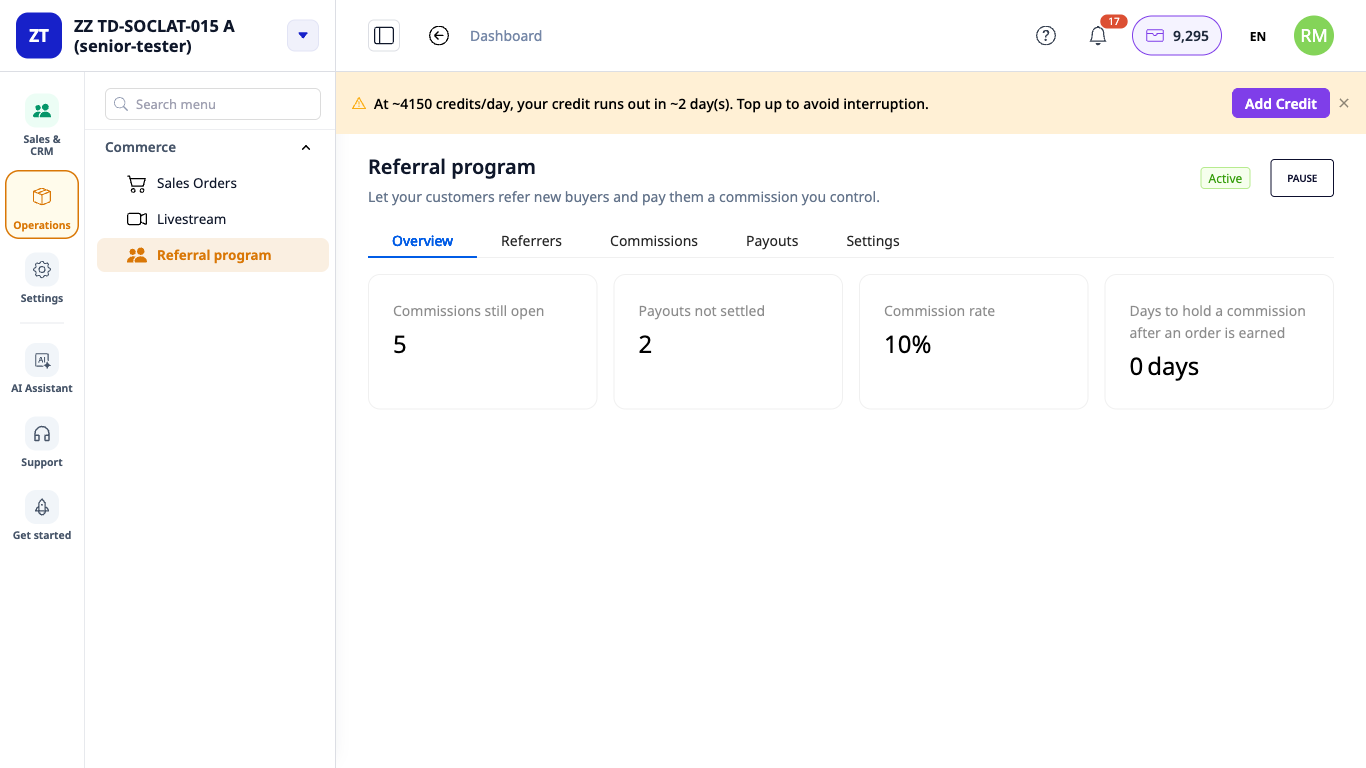
GTG CRM puts referrers, orders, commissions, and payout batches on a single Referral Program screen, right alongside your sales orders and accounting ledger.
Key Highlights
1. You decide every number and every line of wording
Go to Commerce ▸ Referral Program. The Overview tab has a Before you start panel listing the items still open: the commission rate, when a commission is considered earned (after the order is delivered and paid, or as soon as the order is paid), the ledger accounts that record the commission as an expense and as a liability, the terms for referrers, a notice about their data (you write it yourself; the system doesn't provide content), and the number of days a payout is held after the recipient changes their details. No item is pre-filled, and the Activate button stays grayed out until you answer all of them.
Number fields never auto-correct what you type. Enter 110 in the rate field and the field keeps 110, a red line reads "Enter a rate from 0 to 100," and the Save button stays grayed out, so no rate is saved by accident.
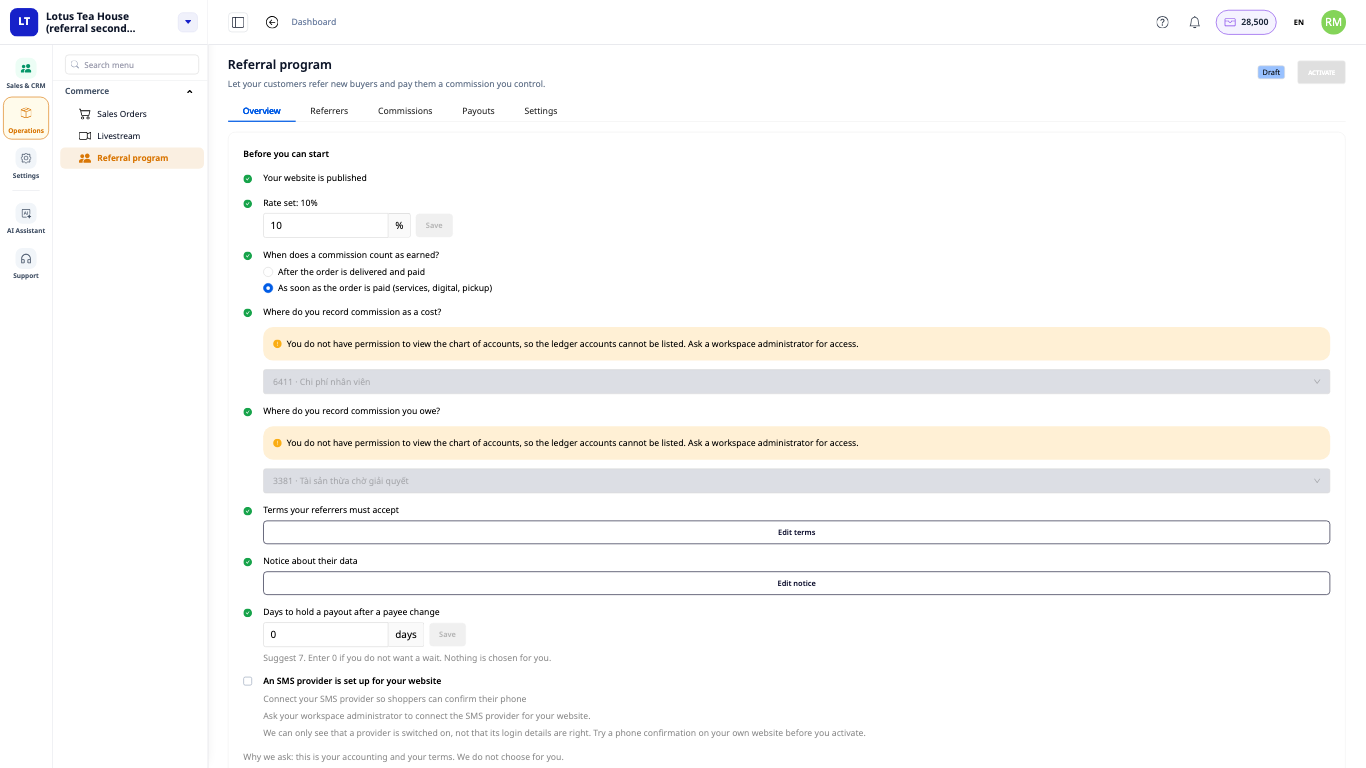
- Benefit: you open the program knowing every rule is your decision, not the software's default.
2. Referrers and buyers use your own website
Referrers go to Account ▸ Referral program on your shop's website. They verify their email and phone number (with a text message code), read your terms, and click Join. Once you approve them, they see their code and a Share any page box to create a link to a page of your shop. Buyers can click that link or enter the code in the Have a referral code? field at checkout. A buyer who has declined advertising choices is only credited to a referrer if they enter the code themselves.
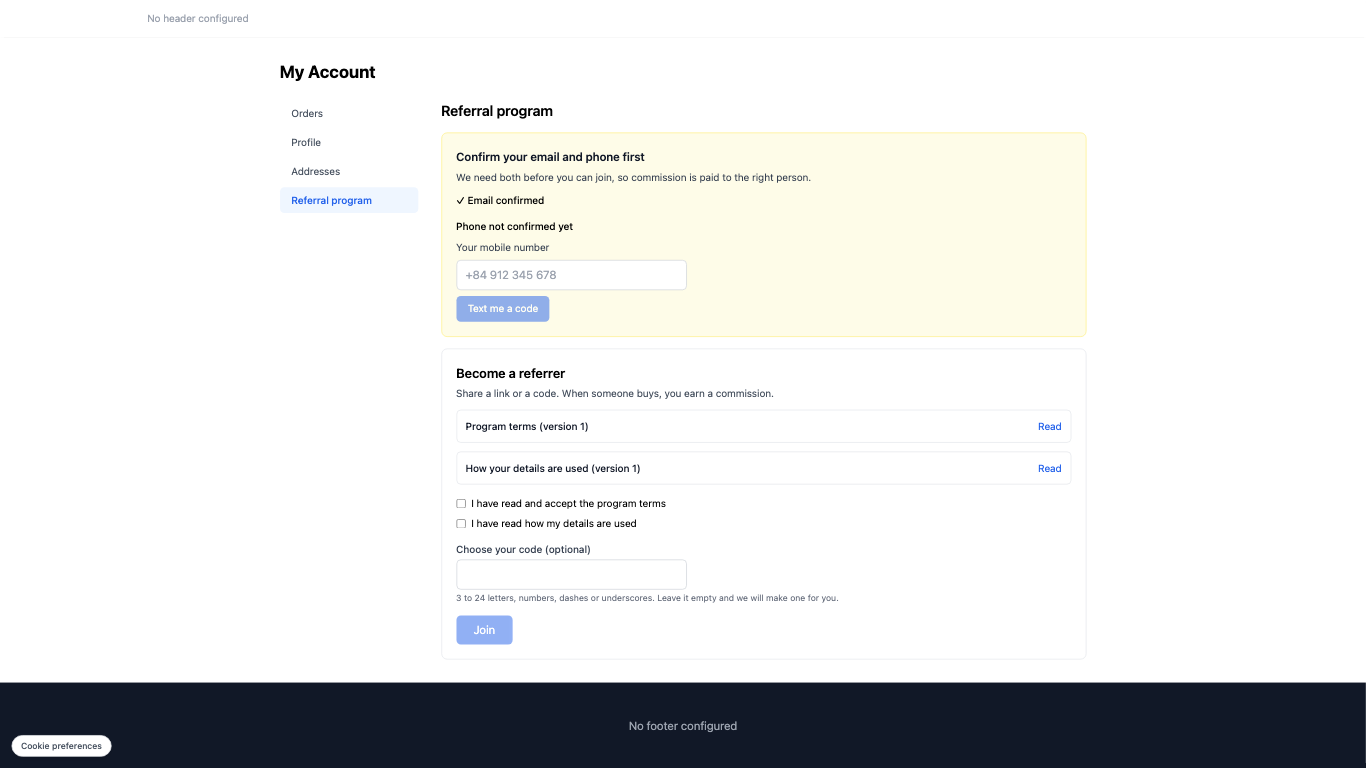
- Benefit: your customers encounter the program on a page under your shop's name, not another brand's, and no one needs an account in your workspace.
ℹ️ For referrers to verify their phone number, your website needs a messaging provider that is connected and enabled. You connect the provider you choose; this article does not name or compare any providers.
3. One general rate, and separate rates for each product
Some products earn more margin than others. In the program's Settings, the Rates by product or category tab lets you set a specific rate for a product in place of the default rate. You select the product by name, type the rate (the field is blank, not prefilled), and confirm a dialog that lists exactly what will change. The new rate only applies to orders placed from that point on: orders already placed keep their original rate.
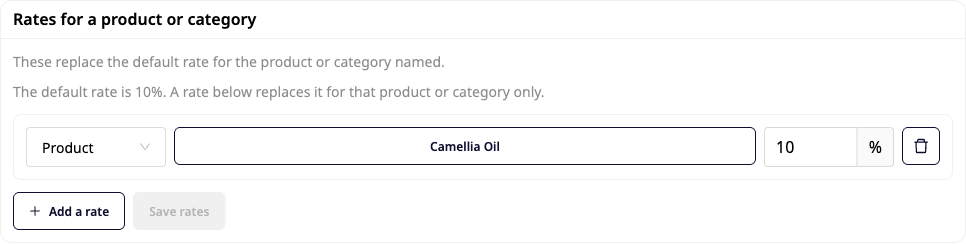
- Benefit: you pay the rate you chose for each product, and no past order changes its amount because you adjusted a rate today.
4. Refunded orders reverse commissions automatically, and payouts require two people
Each commission waits for the number of days you set to hold orders. If the order is refunded during that time, the commission reverses automatically. Once the hold period ends, the commission moves to Pending approval: someone with commission approval permission approves it under Tasks ▸ Pending approval, and only then does it become Ready. Next, the person preparing the payout (accounting) selects the recipients and makes the two decisions that only your business can make: who the recipient is for tax purposes, and how much tax you withhold (or not withholding, and why). GTG CRM does not calculate tax on your behalf. A different person with payout approval permission then clicks Approve, selects the account the money is paid from, and records the payment.
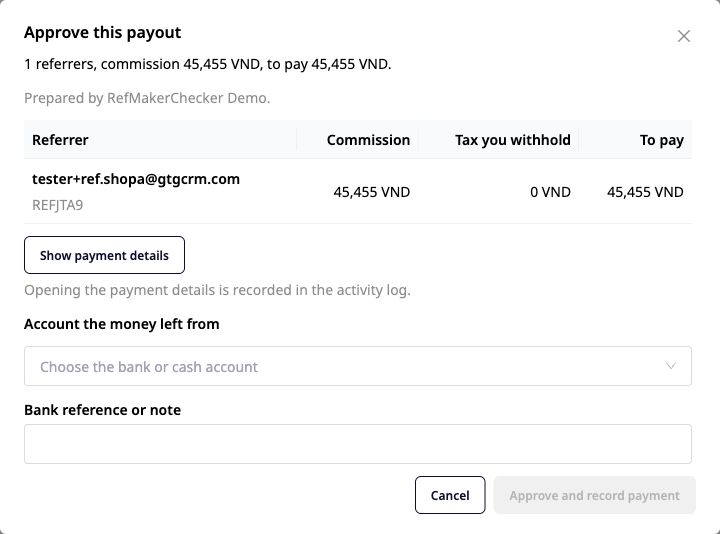
- Benefit: money leaves your account only after two decisions by two different people, and the ledger has one entry when the commission is generated and another when it is paid out.
5. Every change leaves a trail
At the bottom of the Settings tab, the Setup History card answers "who changed what, and when" with one line per change, for example: Anna changed the default commission rate from 10% to 12%. Terms and notice texts only record the new version number, not the content. The referrer list, commissions, and payouts can all be exported to CSV, and the payee report (CSV) is for users who are allowed to see full bank account numbers and documents.
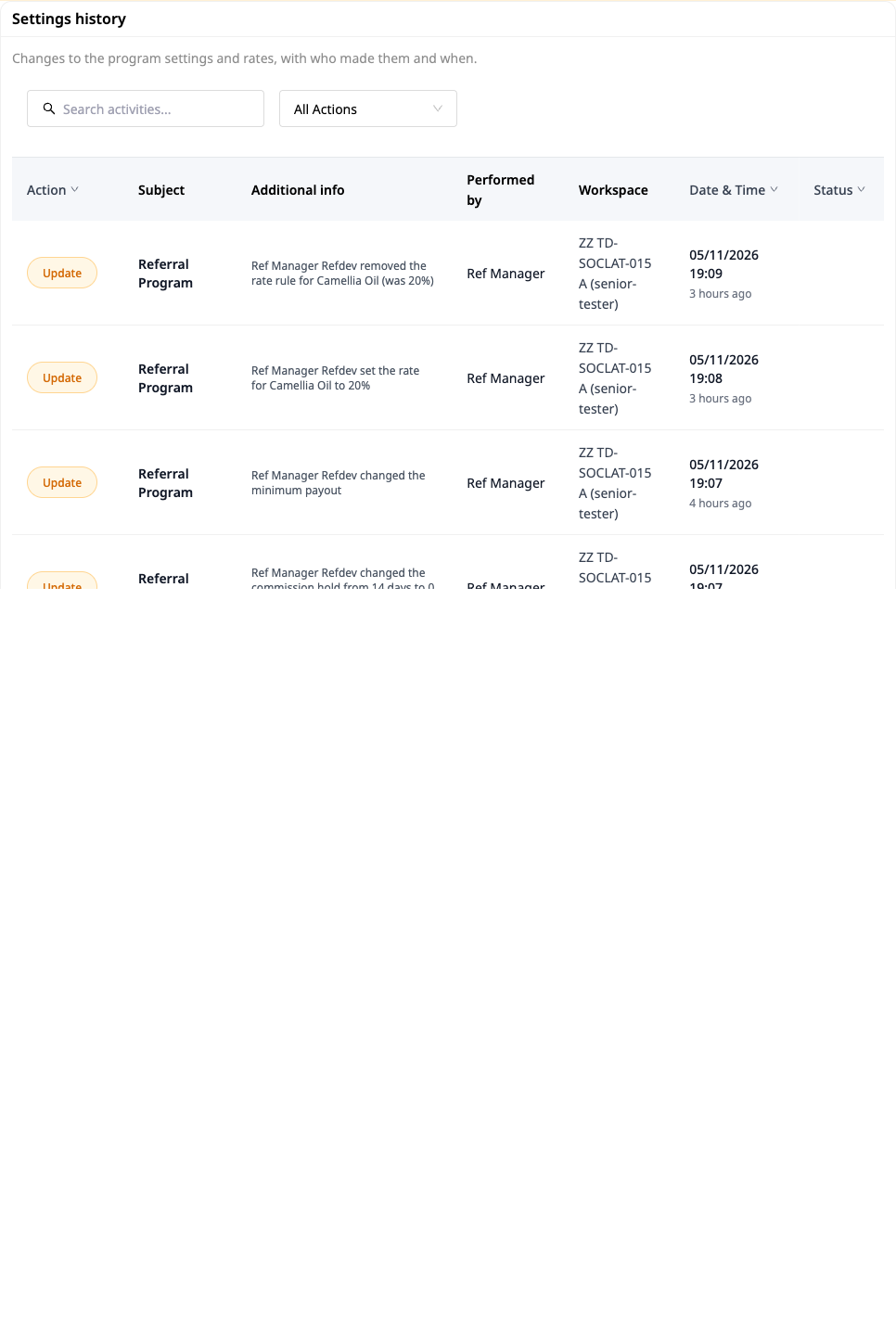
- Benefit: when a referrer asks "why is this month's rate different?", you open the history and get an answer with the name of the person who made the change.
Current Scope
- You review referrers and review commissions manually: a person decides each item. This article does not cover automatic approval.
- Commissions are calculated as a percentage. You choose whether to calculate on the price before or after discount, excluding shipping fees.
- Payouts are recorded through the "I will pay by another method" option: you transfer the money through your own method, then record the paying account and the reference code. Payment by bank file is not yet covered in this article.
- Withholding tax is your decision for each payee. GTG CRM does not calculate it and does not provide tax advice.
Benefits for Your Business
| Feature | Practical benefit for you |
|---|---|
| A list of decisions to make before launch | Every rate, term, and account is your choice; the Activate button only lights up when everything is complete |
| Codes and links on your shop's website | Referrers and buyers never leave your page, and no workspace account is needed |
| Per-product rates | Pay more for high-margin products; old orders keep their old rate |
| Hold period and reversal on refunds | Refunds can cancel the commission before the money goes out |
| Two decisions before payment | One person approves commissions, and a different person approves the payout batch |
| Commissions go into the accounting ledger | Expenses and amounts payable show up under the account you selected |
| Setup history and CSV export | Know who changed what and when; pull the data out whenever you need it |
Who Is It For?
- Shop owners selling on their own website who want loyal customers to refer more customers without keeping a paper notebook.
- E-commerce managers who need to set rates per product and review each commission on each order.
- Accountants who prepare monthly payout batches and need to make and record withholding tax decisions for each payee.
- Payment approvers who want to see the number of payees and the total amount before clicking approve, and know they were not the one who prepared the batch.
How to Get Started?
Go to Settings ▸ E-commerce features and turn on Referral Program; the Commerce ▸ Referral Program item will appear in the menu. You need a published website and a connected messaging provider for that website. For step-by-step instructions with screenshots, see User Guide: Customer Referral Program on GTG CRM. Want to reward customers with points and tiers instead of cash commissions? See Loyalty Program; orders placed by buyers remain regular sales orders, just like any other order in Order Hub.
Free trial — no credit card required.