
Introduction to Features
You produce goods for sale — baking cakes, sewing clothes, formulating cosmetics, assembling components — but at the end of each month, you still can't answer the simplest question: how much does it cost me to make one of my products? Ingredients are tracked in one place, labor is estimated mentally, and machinery costs are "guessed." And right now, in the middle of a production shift, you also don't know where the line is in progress, which station is bottlenecked, or which batch is nearing completion.
Starting today, you no longer have to guess.
GTG CRM has a Production Management module integrated directly with the Inventory, Purchasing, and Accounting you're already using. You define your product formulas (Bill of Materials - BOM), production orders automatically calculate the exact raw materials needed, deduct from inventory upon start, and automatically calculate the cost of finished goods = materials + labor + overhead upon completion. Finished goods are inventoried at that exact cost, and the cost of goods sold entry is posted directly to the accounting ledger — no more finished goods with a "zero cost."
The latest update brings production directly to the shop floor: schedule based on real capacity with a Gantt chart, and a real-time shop floor screen (MES) — touch terminals for operators at each station, along with an andon board mounted on the wall to view the entire line at a glance.
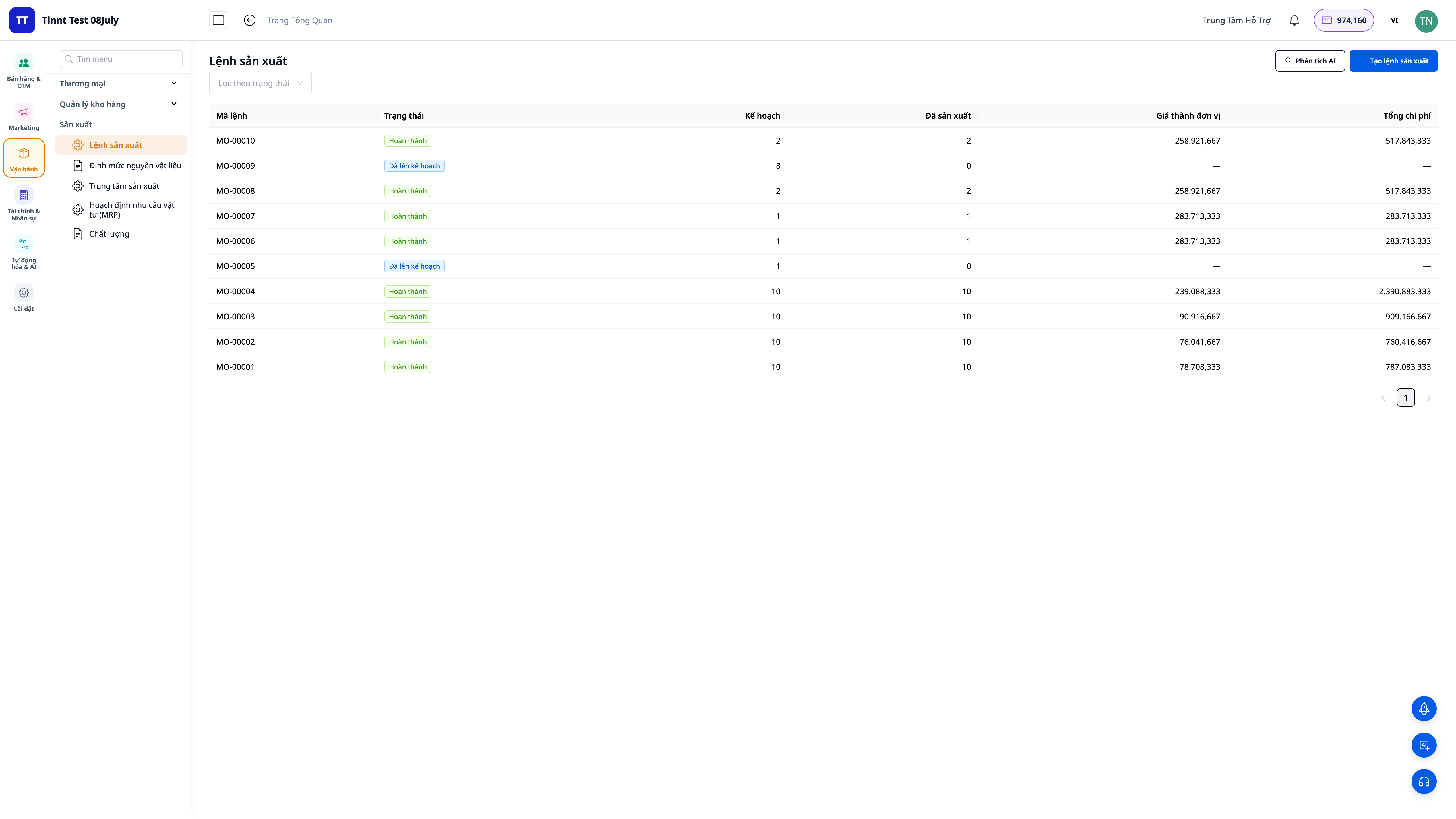
Problems Businesses Face
Recording raw materials in notebooks, calculating labor costs mentally — Unaware of true costs, mispricing products, thinking you're profitable when you're actually losing money.
Uncertainty about sufficient raw materials for upcoming orders — Running out of stock mid-production, or holding onto dead inventory of raw materials.
Finished goods inventoried at "zero cost" because the software can't calculate it — Incorrect profit and loss reports, inaccurate Cost of Goods Sold (COGS).
Not knowing the progress of the line or which station is bottlenecked mid-shift — Discovering delays only when orders are late, idle workers, managers having to go down to the shop floor to ask around.
Manually recording produced quantities and scrap, running times on paper and then re-entering them at the end of the day — Delayed and inaccurate data, incorrect costs, inability to trace responsibility.
Inventory, purchasing, accounting, and production are in separate software — Multiple data entries, inconsistent data.
GTG CRM consolidates everything into a single workflow: define formula → schedule → issue orders to stations → workers clock in/out directly on the shop floor → deduct raw materials → calculate cost of goods sold → inventory finished goods → post to accounting ledger — seamlessly within the same system you use for sales and invoicing.
Key Features
1. Multi-level Bill of Materials (BOM) — the "recipe" for your product
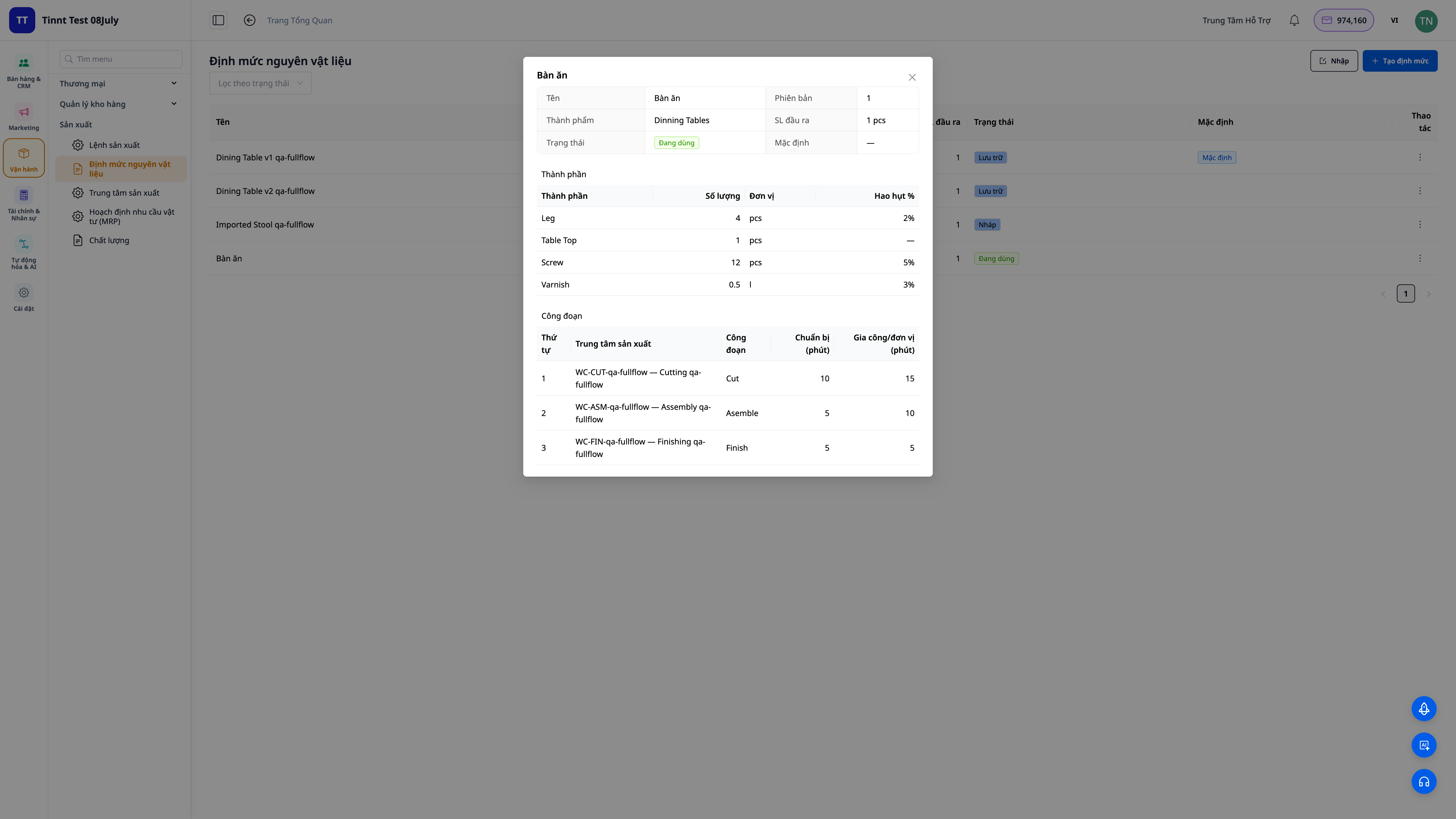
- Define once, use forever: list each raw material (quantity, unit, scrap percentage) and work stages (which department, setup time + run time).
- Multi-level: a component in the formula can itself be a sub-assembly with its own formula — the system expands all levels.
- Activate when ready: maintain multiple formula versions, only use the activated version.
2. Production orders automatically calculate materials and cost of goods sold
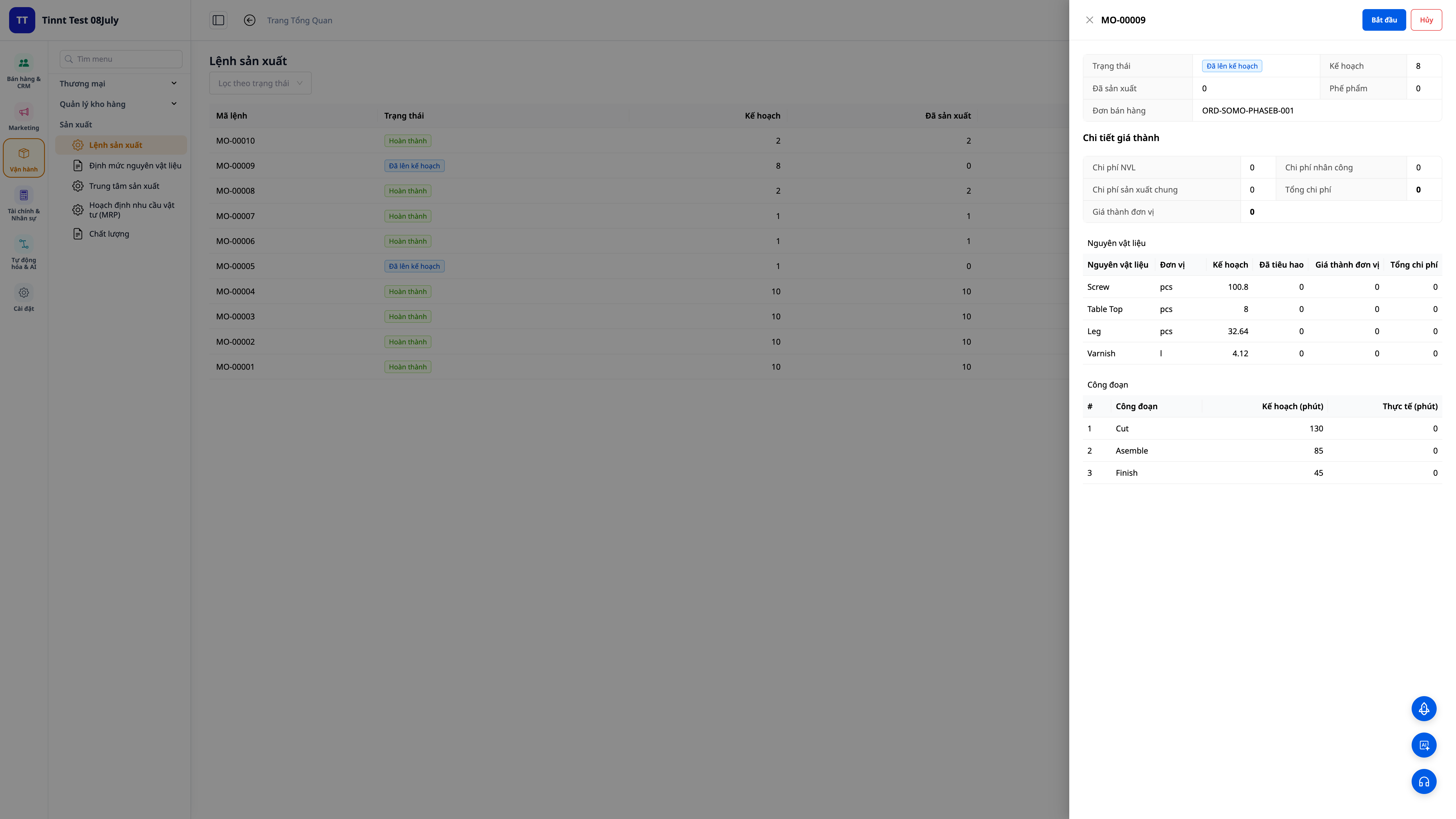
- Automatic formula explosion: select product, formula, quantity — the system calculates the exact materials and work stages needed (including scrap).
- Deduct from inventory upon start: raw materials are deducted from inventory when you click Start; shortages are immediately flagged.
- Automatic cost calculation upon completion: enter the quantity produced and actual time taken — the system calculates unit cost = (materials + labor + overhead) ÷ quantity produced, and finished goods are inventoried at that cost.
3. Cost of Goods Sold (COGM) directly posted to accounting — calculated accurately based on actual production
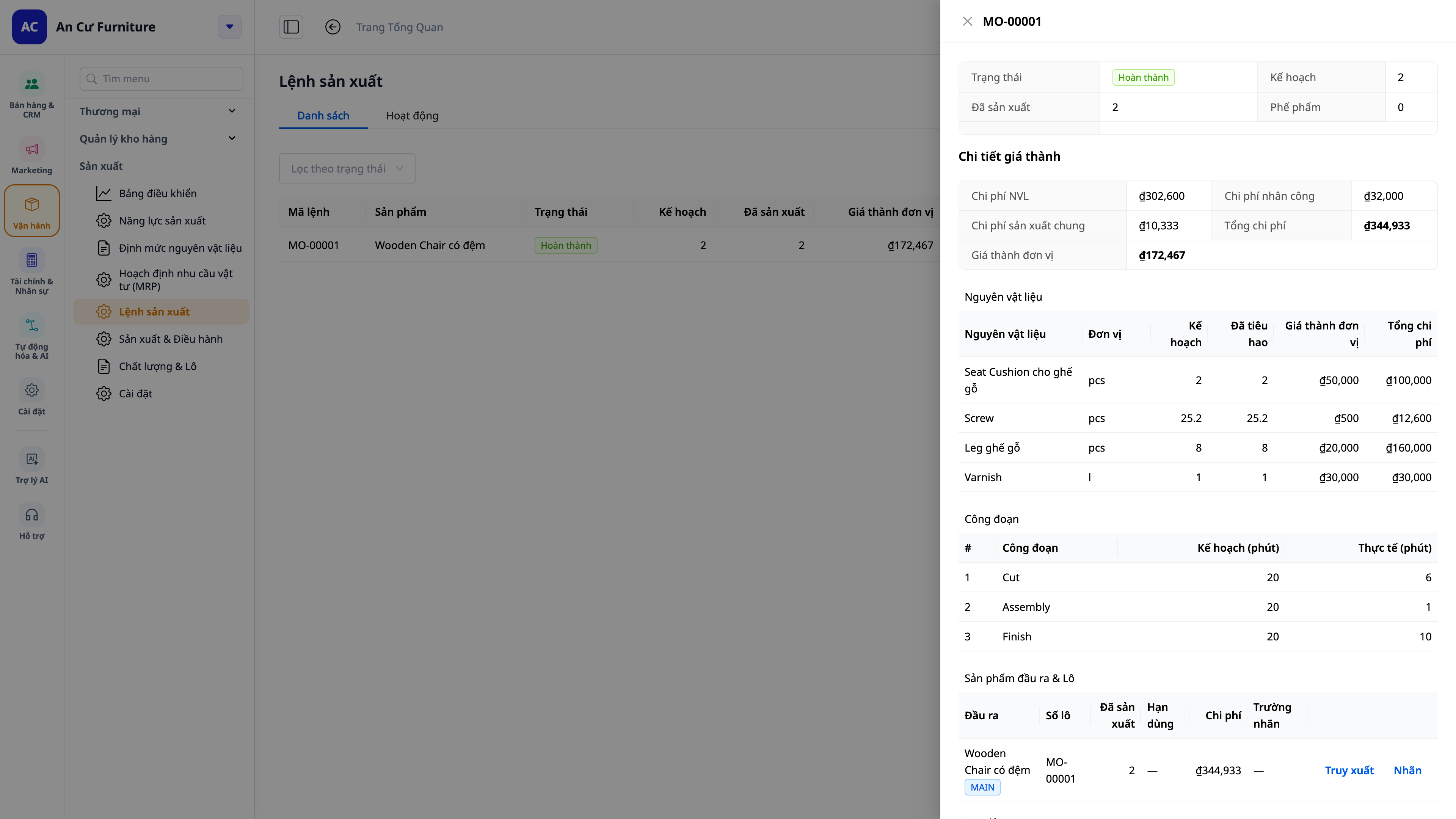
- No more zero-cost finished goods: internally produced items always have a cost basis, ensuring accurate Cost of Goods Sold (COGS) and profit & loss reports.
- Accurate roll-up from the shop floor: the quantities produced, scrap, and run times recorded by operators at each stage are rolled up accurately to the batch cost — no more end-of-day re-entries from paper leading to discrepancies.
- Automatic journal entries: Cost of Goods Manufactured (COGM) is automatically posted to the general ledger, matching your chart of accounts.
- Accounting and production are unified: no manual reconciliation between two separate systems.
4. Material Requirements Planning (MRP) — including based on customer orders
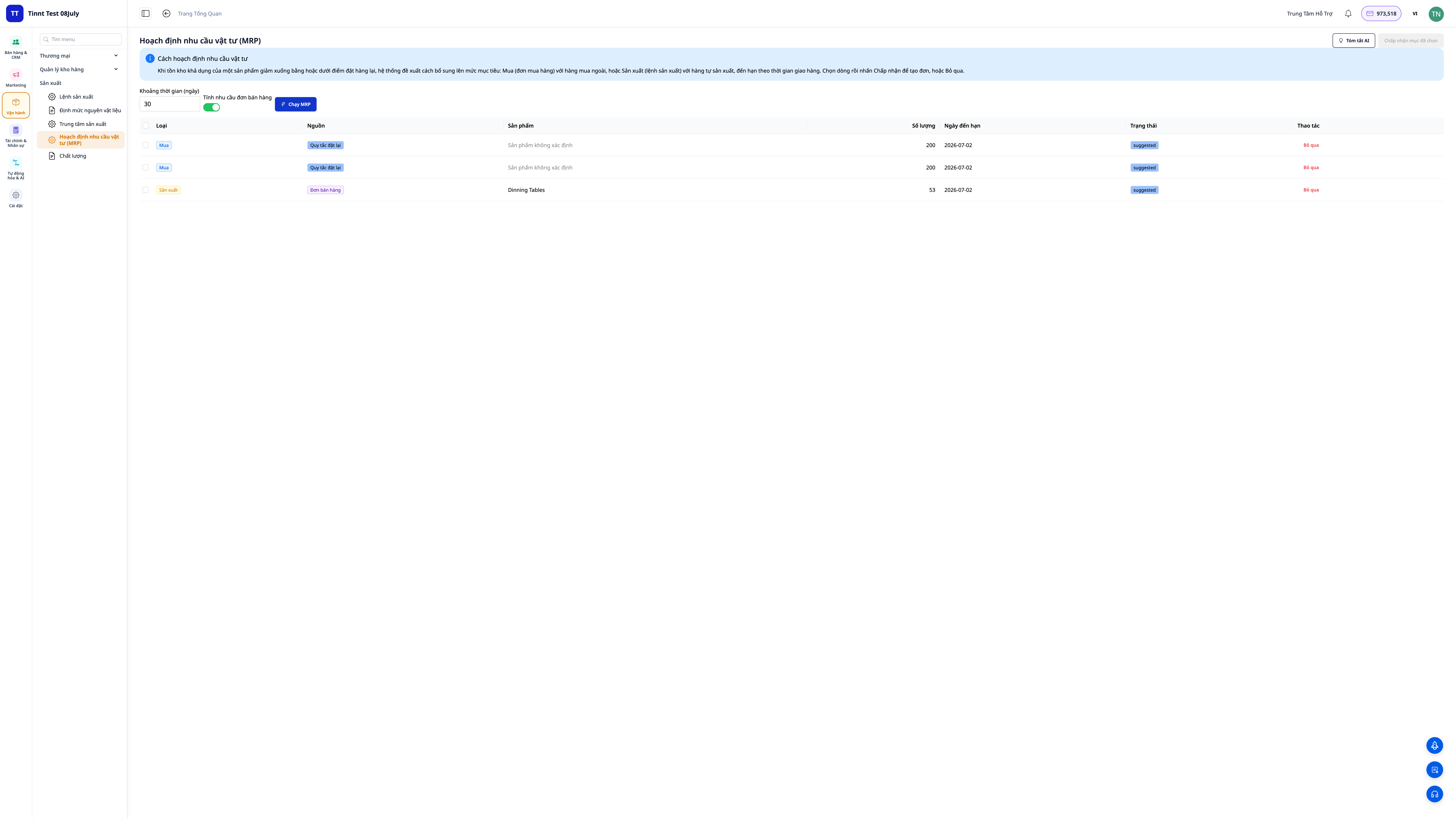
- Set inventory levels (minimum / reorder point / target) for each product, then run Planning (MRP): the system compares demand with inventory and suggests purchase orders (what to buy) and production orders (what to make).
- Based on open sales orders: enable "include demand from sales orders" to plan based on customer orders — the system deducts ordered quantities from inventory and in-progress production, suggesting to produce exactly what's missing.
- Know why a suggestion is made: each suggestion clearly states the source (inventory levels, sales order, or both).
5. Make-to-Order Production — directly linked from sales orders
- From sales order: open the order, view the Production Plan tab — it shows how much has been ordered, how much is in stock, how much is in production, and how much is still needed. Click "Create Production Order" for the shortage, and the order is directly linked to that sales order.
- Track progress: the plan line on the sales order shows "In Production" and then "Ready" when completed; it provides a reminder for delivery if not yet produced (it won't block your delivery).
6. Quality Control and Cost Variance
- Quality Checks: record inspections upon receiving raw materials, during production, or on finished goods (passed/failed, disposition: accept / rework / reject / quarantine). Open a Non-Conformance Report (NCR) with corrective actions and close it upon completion.
- Variance from Standard: if a standard cost is set for a product, each completed order will show the variance (actual vs. standard for materials, labor, overhead) — immediately understand why a batch exceeded or fell under budget.
💡 AI Assistant Support: explains cost variances, drafts corrective actions (CAPA), and interprets MRP results in easy-to-understand language.
7. Scheduling based on real capacity — Gantt chart for coordination
Not only do you know what needs to be done, but also when to do it: define machines/production departments with their work schedules (calendar), and the system schedules work stages based on finite capacity and draws a Gantt chart — each work stage is a bar on the timeline of the assigned machine/department.
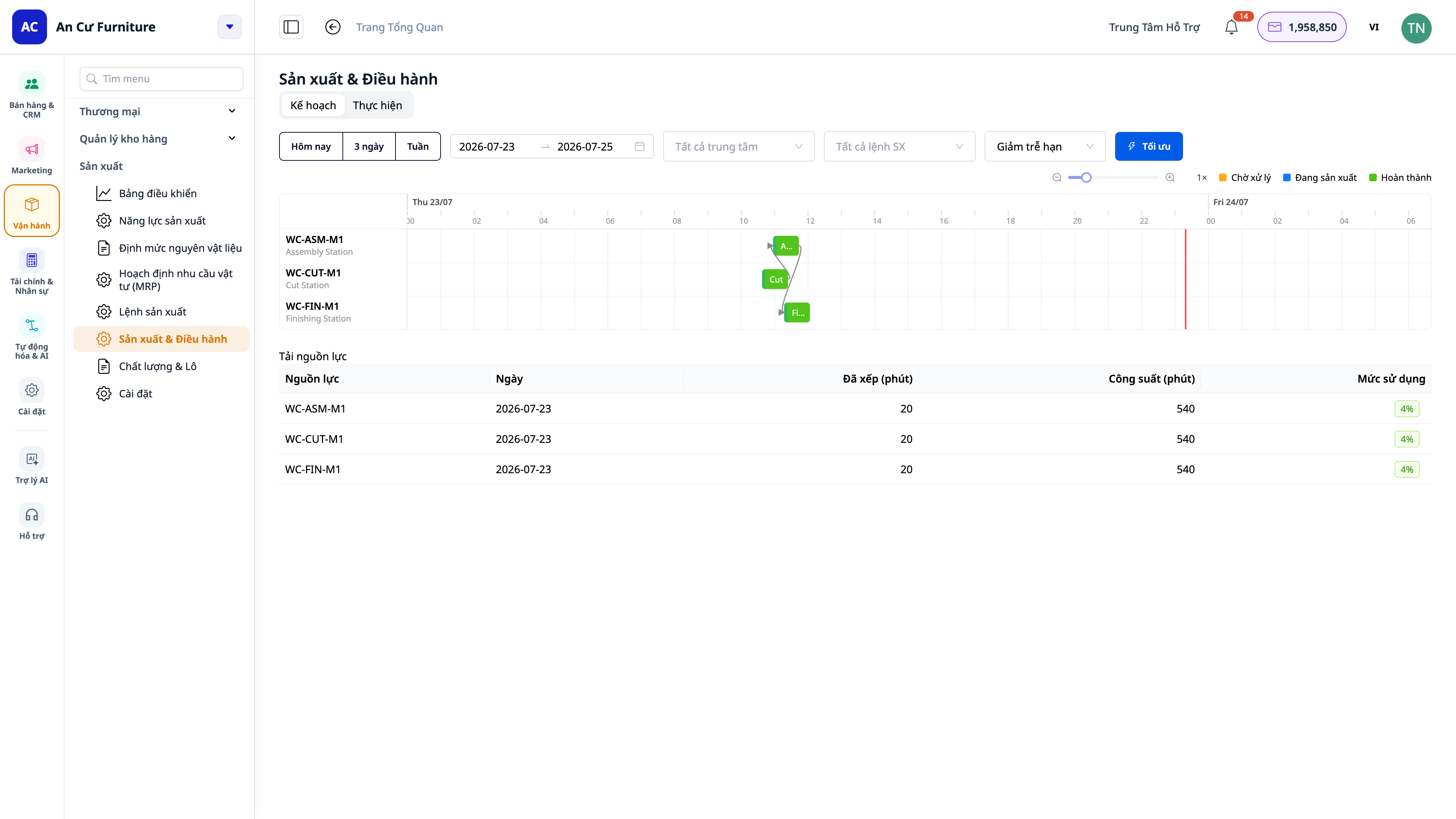
- View by time frame: click Today / 3 Days / Week (or select a date range) to frame the specific period you want to see.
- Visual coordination: anticipate bottlenecks, see which department is overloaded, and the estimated completion date for each order.
- Includes changeover time: when a machine/department switches from one product to another, requiring cleaning/setup time — that time is factored into the schedule to make estimated delivery dates more realistic.
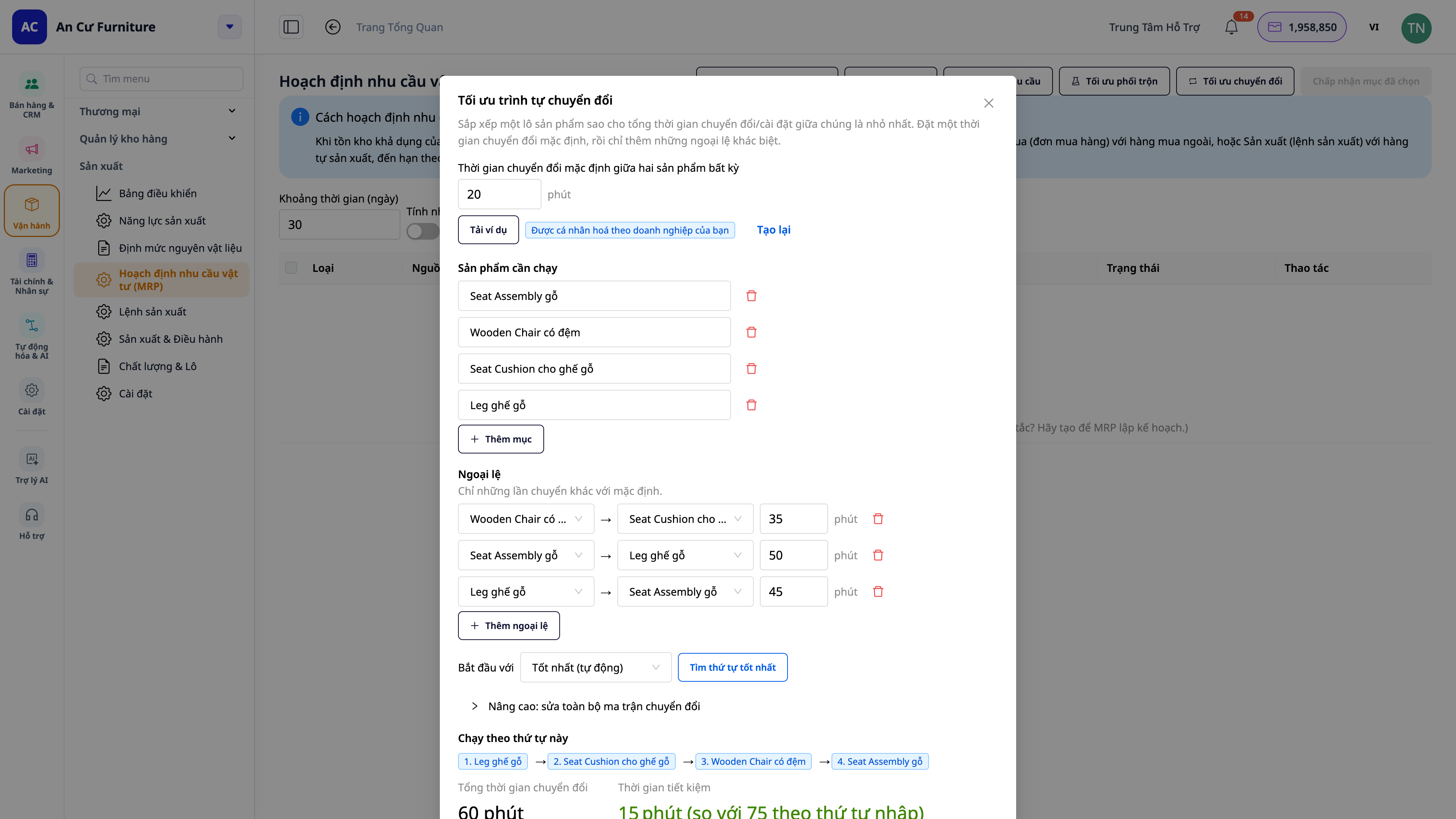
- Benefits: promise realistic delivery dates, avoid overloading a department, reduce downtime due to changeovers.
8. Real-time Shop Floor Screen (MES) — operator terminals and andon boards
This is the step that brings production directly to the shop floor. Enable "Real-time Shop Floor Screen" in Production Settings with just one switch, then open the Shop Floor Screen application on tablets placed at each station (and a large screen mounted on the wall for the entire line).
Operator Terminals — a touch screen, tap to operate, no need to navigate the entire CRM software:
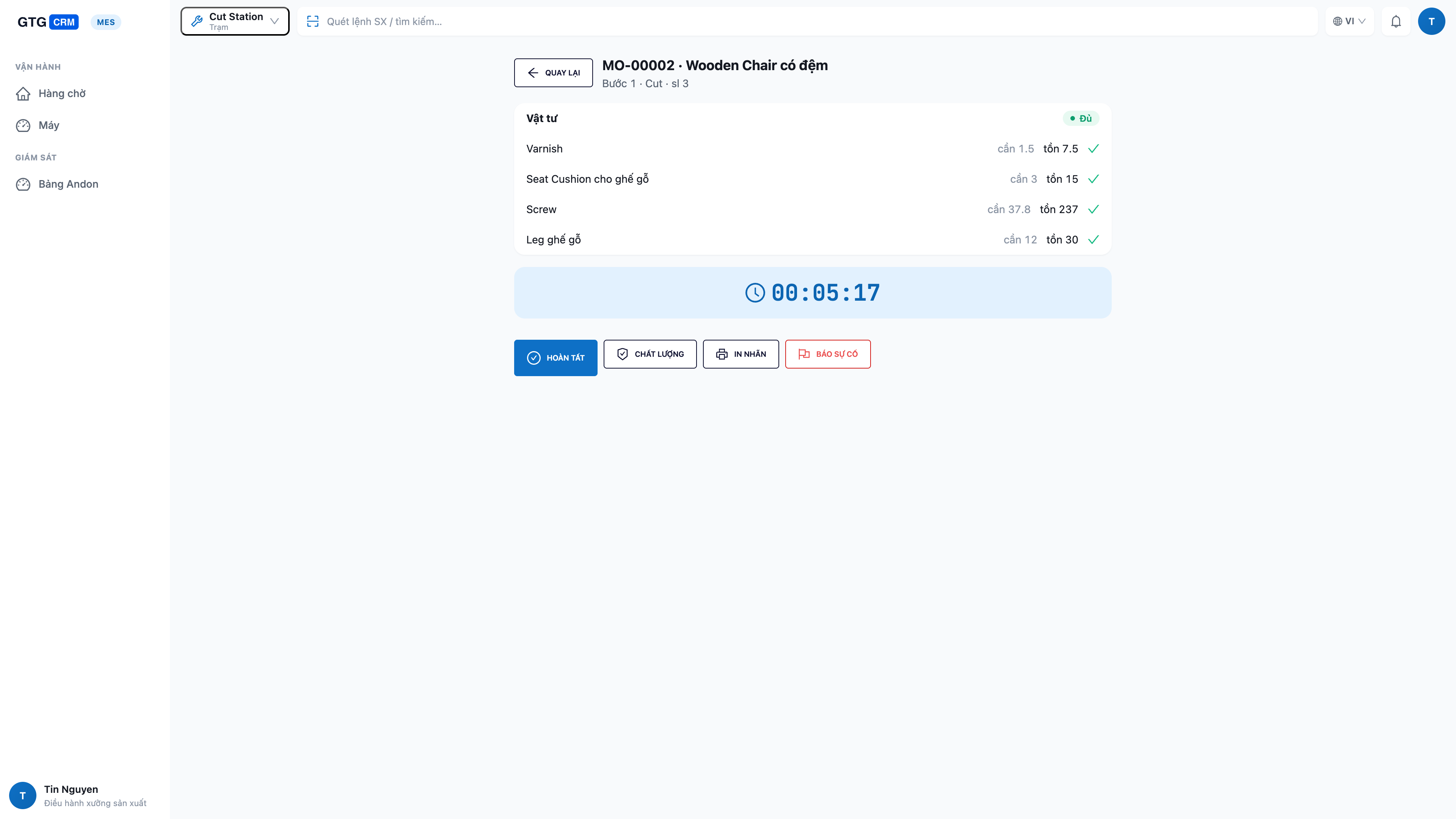
- Only see your station's work: queue of work stages for that specific station, with ready tasks at the top.
- Check materials before starting: open a task and immediately see if there are enough materials to produce (required quantity / available quantity / shortage) — no starting and then discovering a shortage.
- Start → Complete on the spot: tap Start, and upon completion, tap Complete and enter the quantity produced, scrap quantity, downtime — data enters the system instantly, rolling up directly into the cost of goods sold.
- Machine status at your fingertips: switch machine status between running / idle / changeover / stopped directly on the screen.
- One-tap issue reporting (andon): machine breakdown or material shortage — tap a button to alert management immediately, no need to run around looking for someone.
- Quality checks & lot printing at the station: when required by the work stage, perform quality checks and print lot labels right there.
Shop Floor Andon Board — a large screen for the entire line:
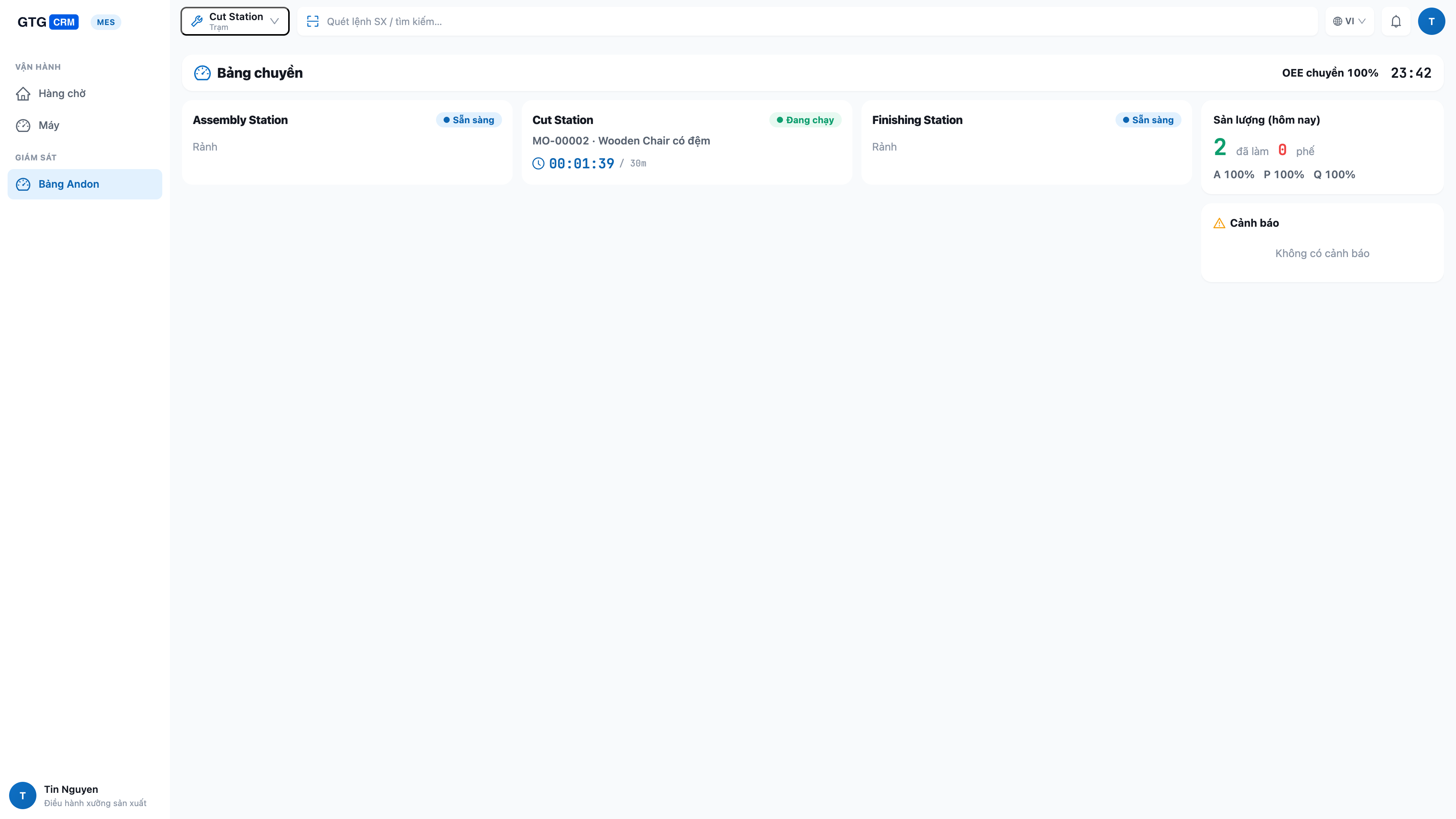
- The entire line at a glance: all stations with their current status (running / idle / changeover / stopped), the job being worked on, and its progress.
- See issues immediately: stations that are stopped, or areas with material shortages are highlighted for timely resolution.
- Overall line productivity & OEE: produced quantity, scrap, and Overall Equipment Effectiveness (OEE) for the line, updated continuously.
- Automated machines and manual operators share the same board: whether a stage is reported by an automated machine or manually by an operator, everything appears consistently on the same board — suitable for both highly automated factories and those where "machines are people at workstations."
ℹ️ Clear Role-Based Permissions: operators can only run their assigned stages at their station; scheduling and issuing orders are for production managers — everyone does their job, ensuring safety and accountability.
9. Co/By-products, Fractional Units & Lot Traceability
- Co/By-products: a single batch can yield multiple finished products or by-products — define them directly in the formula.
- Fractional Units: entering fractional quantities (e.g., 1.25 kg) no longer corrupts product lists.
- Lot Traceability + Genealogy + Expiration Dates: each batch has a unique lot number, allowing you to trace which raw material lots were used (genealogy) and alerting you before finished goods/raw materials expire.
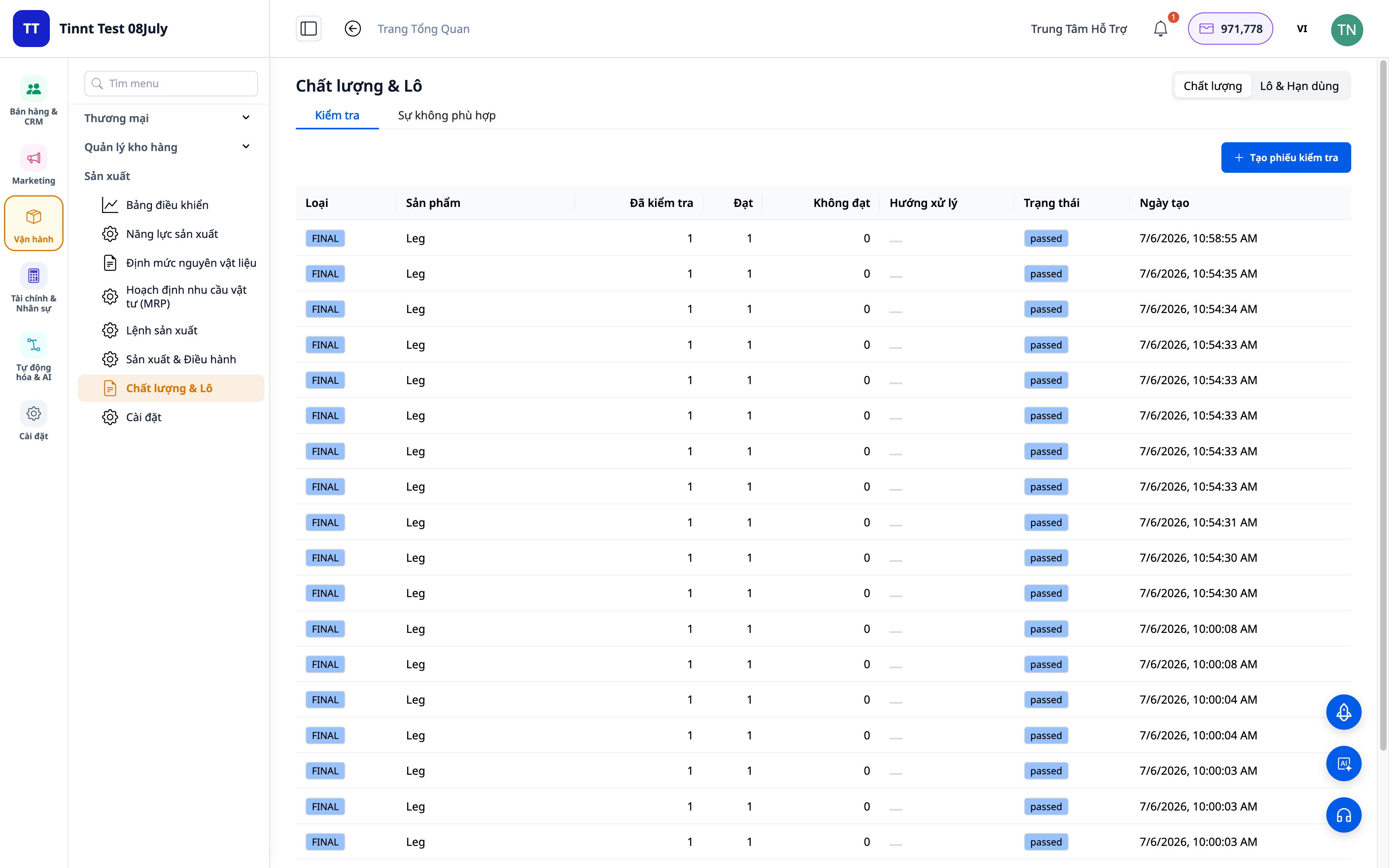
- Benefits: quickly trace back to the root cause in case of quality issues; prevent expired products from being used.
10. Smart MRP Advisor, OEE/SPC, and Lot Label Printing
- MRP Advisor: suggests safety stock, lot sizes, material blending, changeover optimization, and demand forecasting — presented in easy-to-understand language, using actual product names, not cryptic codes.
- OEE/SPC: monitor equipment efficiency and quality variations for continuous improvement.
- Lot Label Printing (PDF): print lot labels for finished goods for application and traceability.
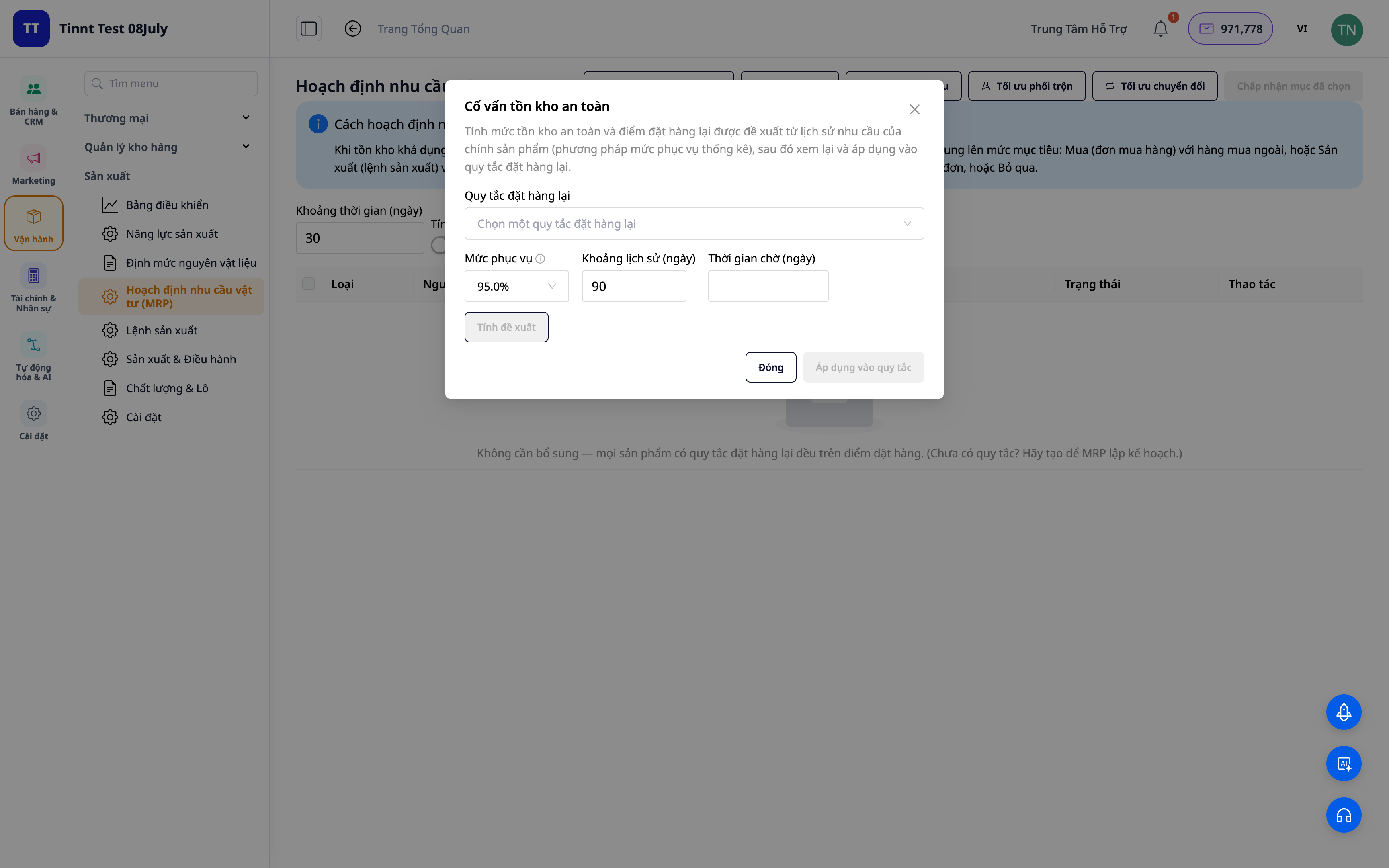
- Benefits: make informed decisions about purchasing/manufacturing/stocking based on clear suggestions, reducing waste and machine downtime.
Benefits for Your Business
Multi-level BOM definition — Standardize formulas, ensuring everyone produces according to the correct bill of materials and costs.
Production orders automatically calculate cost of goods sold — Know exactly how much it costs to make a product — enabling correct pricing.
Cost of Goods Sold directly posted to accounting (COGM) — Accurate profit and loss reports, eliminating zero-cost finished goods.
Produced/scrap quantities recorded at each stage — Accurate cost of goods sold rolled up based on actuals, no discrepancies from end-of-day re-entry.
MRP considering customer orders — Avoid running out of raw materials mid-production, and avoid holding dead inventory.
Production directly linked to sales orders — Produce what customers need, when they need it, ensuring on-time delivery.
Quality Control + Variance Analysis — Control scrap, and immediately identify which batches are unprofitable and why.
Gantt scheduling based on capacity + changeover — Promise realistic delivery dates, prevent overloading departments, reduce downtime.
Real-time Shop Floor Screen (MES) — See the line's progress in real-time; workers report and complete tasks on the spot.
Andon board for the entire line — Issues are immediately visible, allowing managers to resolve them promptly without having to go down to the shop floor.
Lot traceability + expiration dates — Trace issues back to the root cause, prevent expired products from being used.
MRP Advisor + OEE/SPC — Reduce waste, reduce machine downtime, optimize inventory levels.
Who Is It For?
- Small and medium-sized factories: food, beverages, cosmetics, apparel, furniture, metalworking, printing, household goods.
- Factories with multiple stations/lines that need real-time progress visibility and capacity coordination, and don't want to constantly check with each station on the shop floor.
- Shop owners who also produce (cakes, handmade items, custom manufacturing) and want to know their true cost of goods sold for pricing.
- Medium-sized businesses looking to move away from Excel/standalone production software and integrate it with their sales, inventory, and accounting systems.
How to Get Started?
Navigate to Manufacturing in the system, define Units of Measure and Production Departments, build the Bill of Materials (BOM) for a product, and then create your first production order. Want to manage operations directly on the shop floor? Enable "Real-time Shop Floor Screen" in Production Settings, then open the Shop Floor Screen application on a tablet at each station and a large screen for the andon board. Have your raw material list/BOM in Excel? Drag and drop the file, and let AI automatically match the columns. See the step-by-step Production Management user guide, or read the real-world story From Raw Materials to Finished Goods — Know the Exact Cost, No More Guesswork in Pricing.
Free Trial — No credit card required.


