
Funktsioonide tutvustus
Kuu lõpus avate pangaväljavõtte ja hakkate ridu läbi vaatama: see summa on, mille eest klient arve eest maksis? See teine on tasu, sisemine ülekanne või platvormi poolt tagastatud COD-maksed? Siis avate Exceli ja sisestate käsitsi, et raamatupidamine vastaks pangaga. See võtab terve hommiku, on kergesti vigane ja iga kord, kui teilt küsitakse "kust see raha tuli?", hakkate higistama.
See lõppes täna. GTG CRM muudab pangaväljavõtte teie kasutatavas raamatupidamissüsteemis vastavusse viimise keskkonnaks: liigitab iga tehingu õigele kontole, määrab korduvkasutatavad reeglid, et automaatselt pakkuda sarnaseid ridu, vaadata üle vastavuskaardid ja aruanded ning lülitada sisse automaatse tasakaalustava kirjenduse loomise valik. Raha ⇄ arve ⇄ pearaamat on suletud ringina.
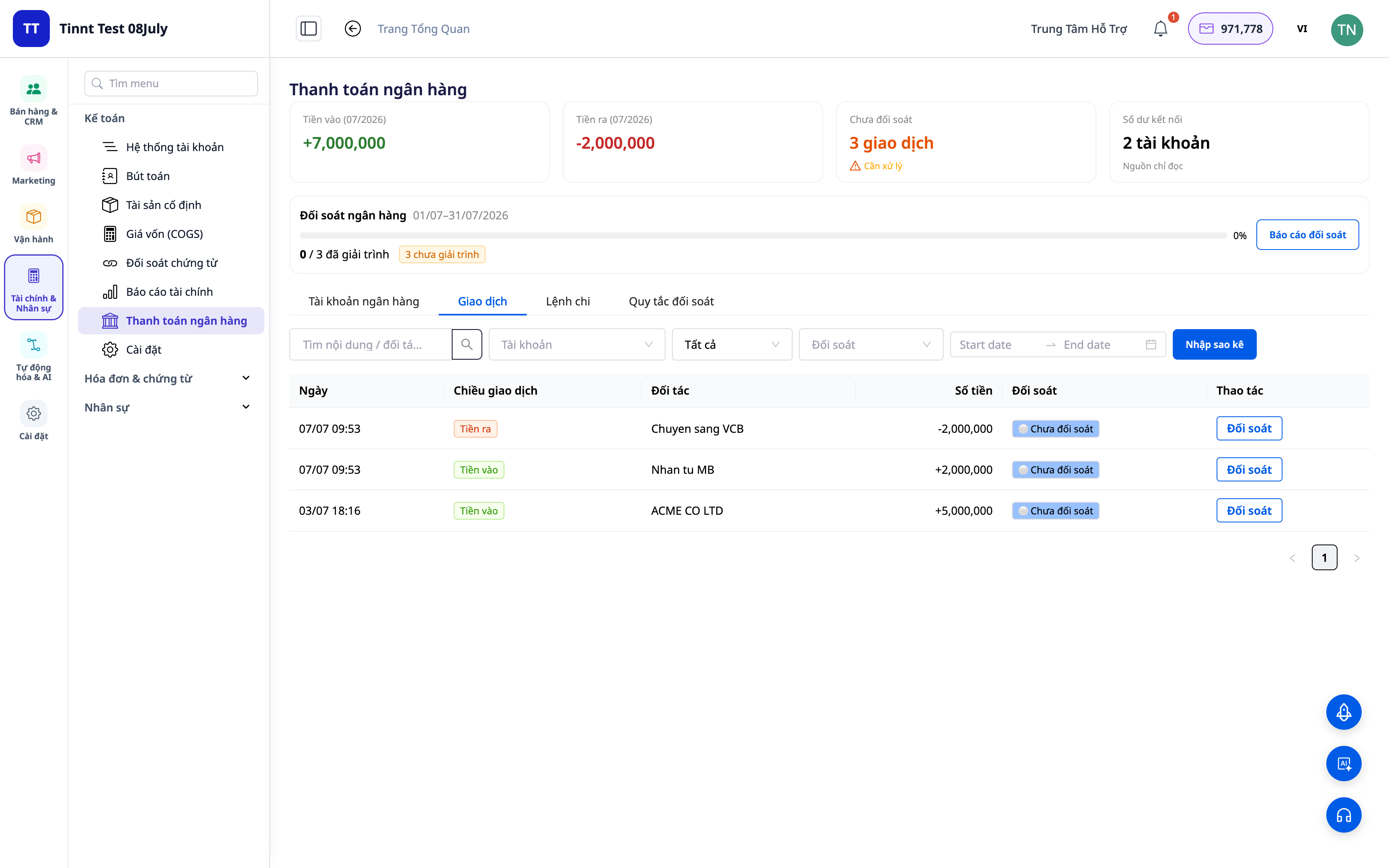
Probleemid, millega ettevõtted silmitsi seisavad
| Vana meetod | Tagajärjed |
|---|---|
| Pangaväljavõtte käsitsi läbivaatamine, sisestamine Excelisse | Tunnid kuus, lihtne sisestada vigu, ei saa tagasi jälgida |
| Ei tea, milline rahavoog vastab millelegi arvele | Määratlemata võlgnevused, puudulikud/korduvad sissetulekud, mida ei tuvastata |
| Raamatupidamise kirjendamine eraldi pangast | Numbrid ei ühti, raske selgitada maksukontrolli käigus |
| Platvormi/vedaja poolt tagastatud COD-maksete eraldamine on keeruline | Pole selge, kas on piisavalt saadud, COD-vastavuse korraldus on keeruline |
GTG CRM koondab kõik üheksainsaks andmeallikaks: iga pangatehing on otse seotud raamatupidamise kontoga ja (kui see on kohaldatav) arvega, luues automaatselt tasakaalustava kirjendi.
Peamised omadused
1. Tehingute liigutamine õigele kontole
Iga väljavõtte rea kohta valige, mis see on: müük, tasu, sisemine ülekanne, sularaha-pangaülekanne, COD... Süsteem seob tehingu õige raamatupidamise kontoga (GL account).
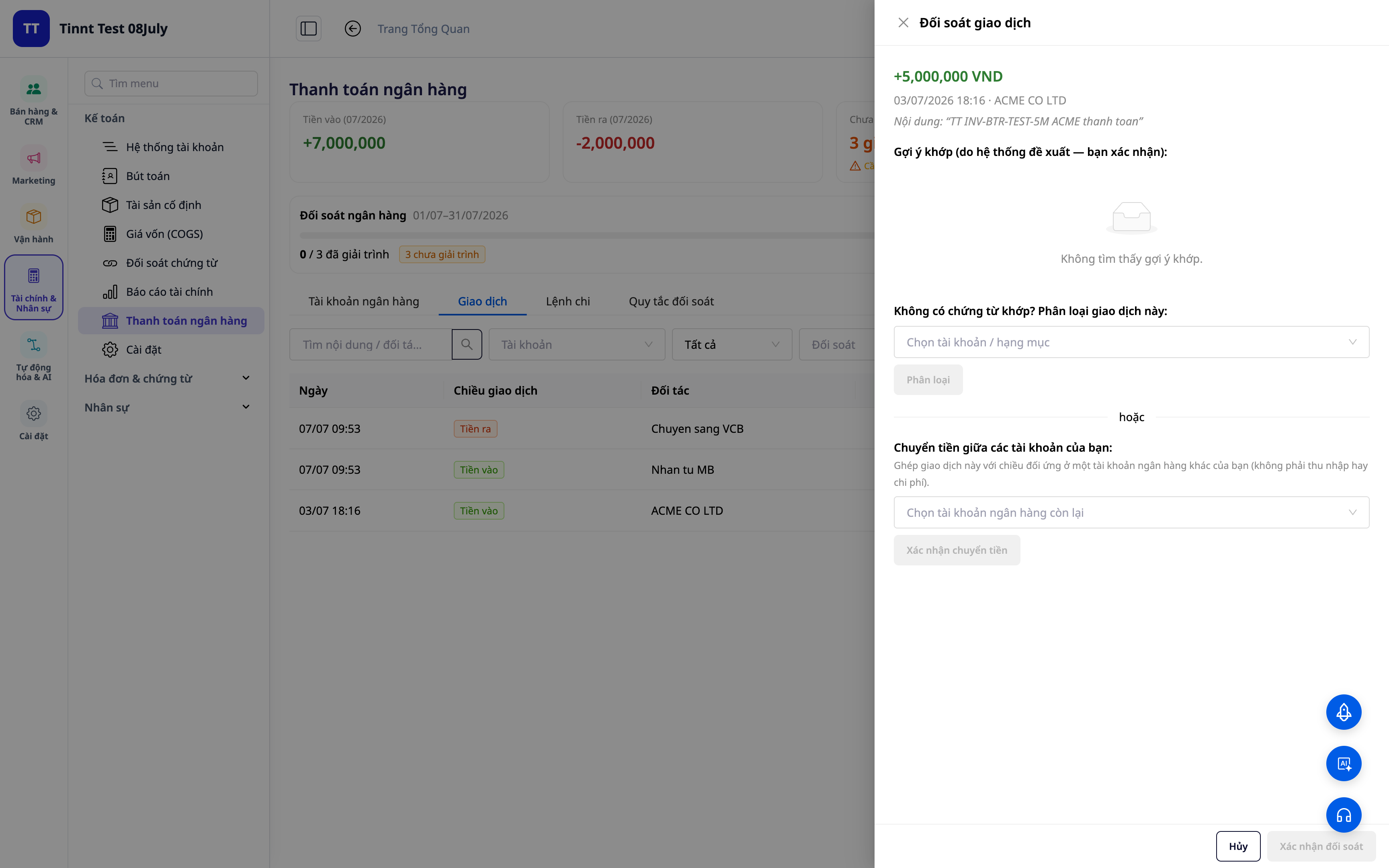
- Funktsioon: tehingu liigutamine → vastav raamatupidamise konto.
- Kasulikkus: igal siseneval/väljuval rahal on raamatupidamises selge "aadress".
2. Korduvkasutatavad vastavusreeglid — määrake üks kord, vastake automaatselt
Looge reeglid sisu/partneri/summa järgi: hilisemad sarnased tehingud määratakse automaatselt õiget tüüpi. Uued reeglid aktiveeruvad koheselt, et neid kohe rakendada.
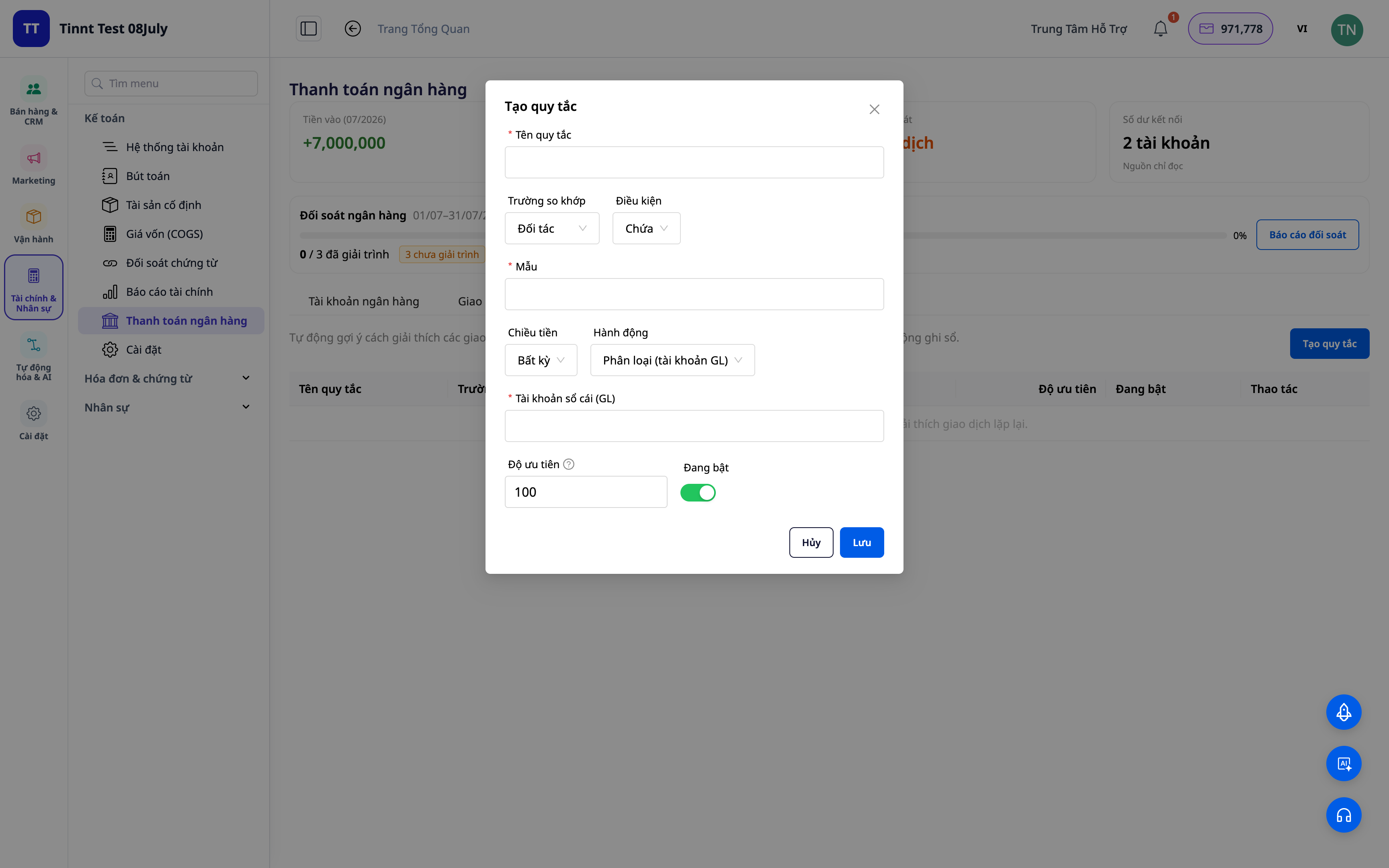
- Funktsioon: korduvkasutatavate vastavusreeglite kogum.
- Kasulikkus: järgmine kuu on rahulikum kui eelmine — korduv töö on automatiseeritud.
3. Reeglipõhised vastavussoovitused — teie ainult kinnitate
Teie määratud reeglid soovitavad automaatselt klassifitseerimisviisi sarnaste tehingute jaoks — teie peate ainult vaatama ja kinnitama. Mida rohkem te kasutate, seda rohkem olukordi teie reeglid katavad ja seda kiiremaks vastavus muutub. Teie olete alati lõplik otsustaja.
- Funktsioon: reeglite alusel tehinguvastavuse soovitused (teie kinnitate).
- Kasulikkus: kiire töötlemine korduvatele ridadele, säilitades samal ajal täieliku kontrolli.
ℹ️ Reeglite alusel vastavus ja soovitused on tasuta. Varsti saadaval: AI assistent, kes pakub selgitusi ka täiesti uute tehingute jaoks.
4. Vastavuskaart + aruanded
Vaadake ülevaadet: kui palju on vastendatud, kui palju on jäänud, kus on erinevused. Eksportige vastavusaruanded toimikute säilitamiseks ja selgitamiseks.
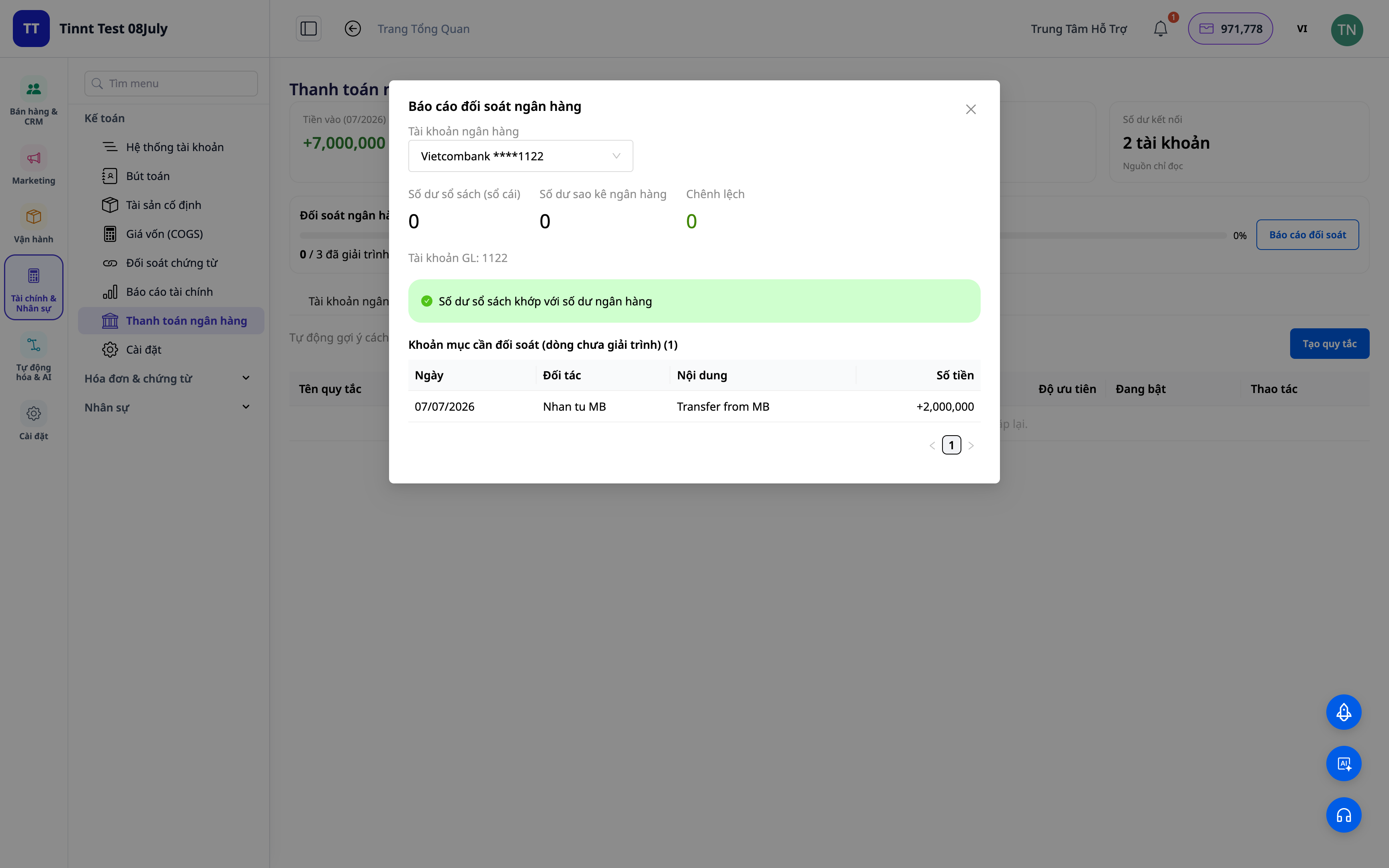
- Funktsioonid: võrdlusaruanded + aruanded.
- Eelised: ühe ekraanivaatega saate kohe teada, kas raamat on pangaga ühendatud.
5. Automaatne tasakaalustuspostituste loomine (valikuline)
Lülitage sisse valik „Salvesta raamatusse“: klassifitseerimisoperatsioonid / ülekanded / sularaha-panga / COD loovad automaatselt tasakaalustuspostituse vastavalt raamatupidamisstandarditele. Kui siduda tehing lahti, siis postitus tühistatakse.
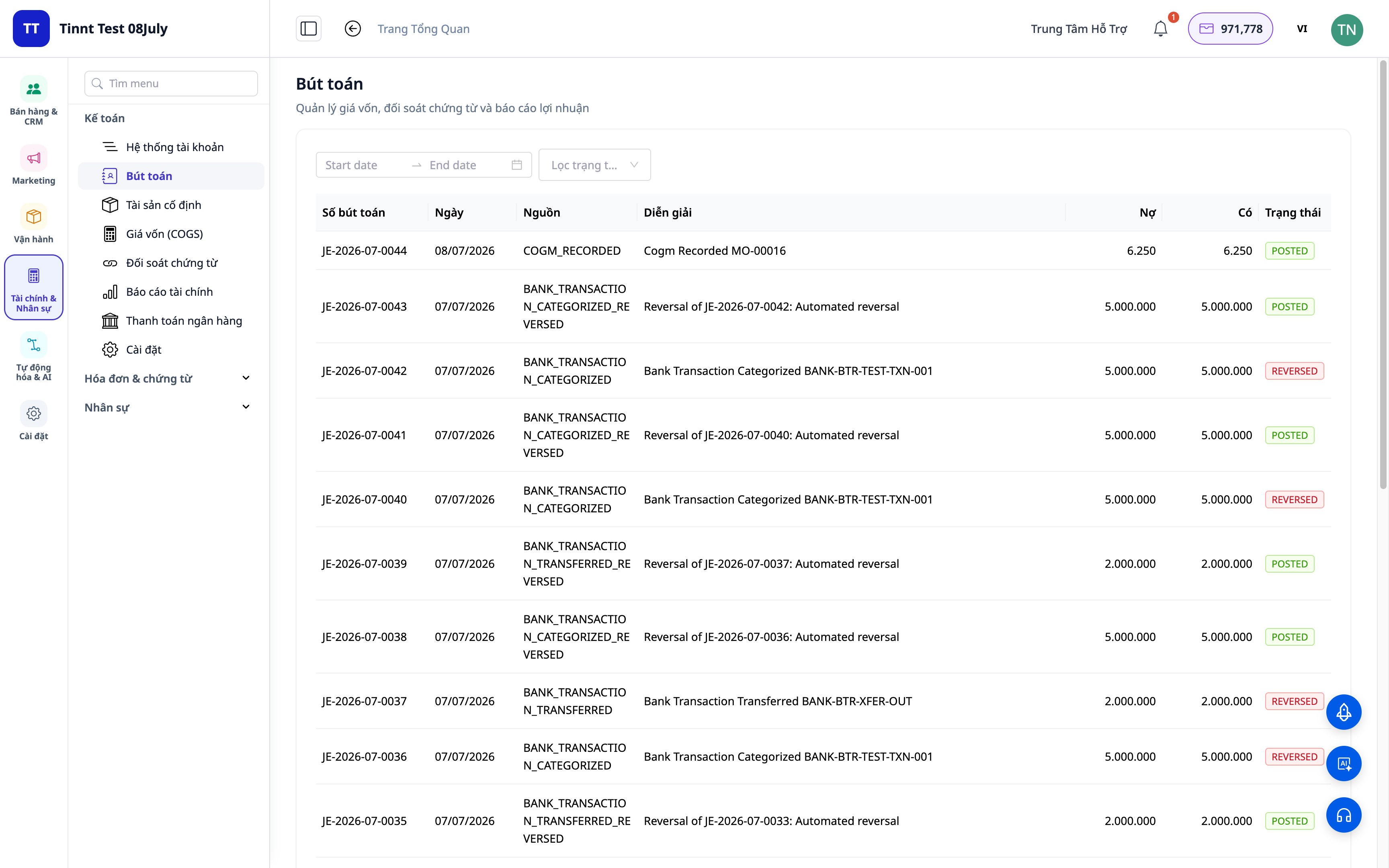
- Funktsioonid: automaatne postituste loomine sobitatud tehingutest.
- Eelised: võrdlemine ja raamatupidamine on üks ja sama, mitte kaks tegevust – andmed on alati ühtsed.
Ettevõtte eelised
| Funktsioon | Praktiline kasu teile |
|---|---|
| Klassifitseerimine + sobitamisreeglid | Säästab iga kuu tunde käsitsi väljavõtete kontrollimist |
| Sobitussoovitus reeglite järgi | Kiire töötlemine korduvate ridade puhul, vigade vähendamine |
| Võrdlustabel + aruanded | Kiire raamatute sulgemine, dokumendid valmis maksuinspektsiooniks |
| Automaatne postituste loomine | Pearaamat on alati pangaga kooskõlas, ei mingeid lahknevusi |
| COD võrdlus | Täpne teadmine, kas kaubamakse on täielikult saadud |
Kellele sobib?
- Raamatupidajad / pearaamatupidajad, kes vajavad kiiret raamatute sulgemist ja pangaga kooskõlas olevaid andmeid.
- Ettevõtete / füüsilisest isikust ettevõtjate juhid, kes kasutavad GTG CRM-i raamatupidamiskomplekti ja soovivad kontrollida raha liikumist.
- COD müüjad, kes vajavad platvormi/vedaja poolt tagastatud maksete võrdlemist.
- Keskmised ettevõtted, kes soovivad vähendada sõltuvust eraldiseisvast raamatupidamistarkvarast.
Kuidas alustada?
Minge jaotisse Raamatupidamine ▸ Pangakonto võrdlus, laadige üles väljavõte või ühendage pangakonto ja alustage klassifitseerimist. Vajate üksikasjalikumaid samme? Vaadake artiklit Kasutusjuhend: Pangakonto võrdlus GTG CRM-is ja tutvuge artikliga Topeltraamatupidamine otse CRM-is, et mõista terviklikku raamatupidamisstruktuuri.
Tasuta prooviversioon – krediitkaarti pole vaja.


