
Funktsioonide tutvustus
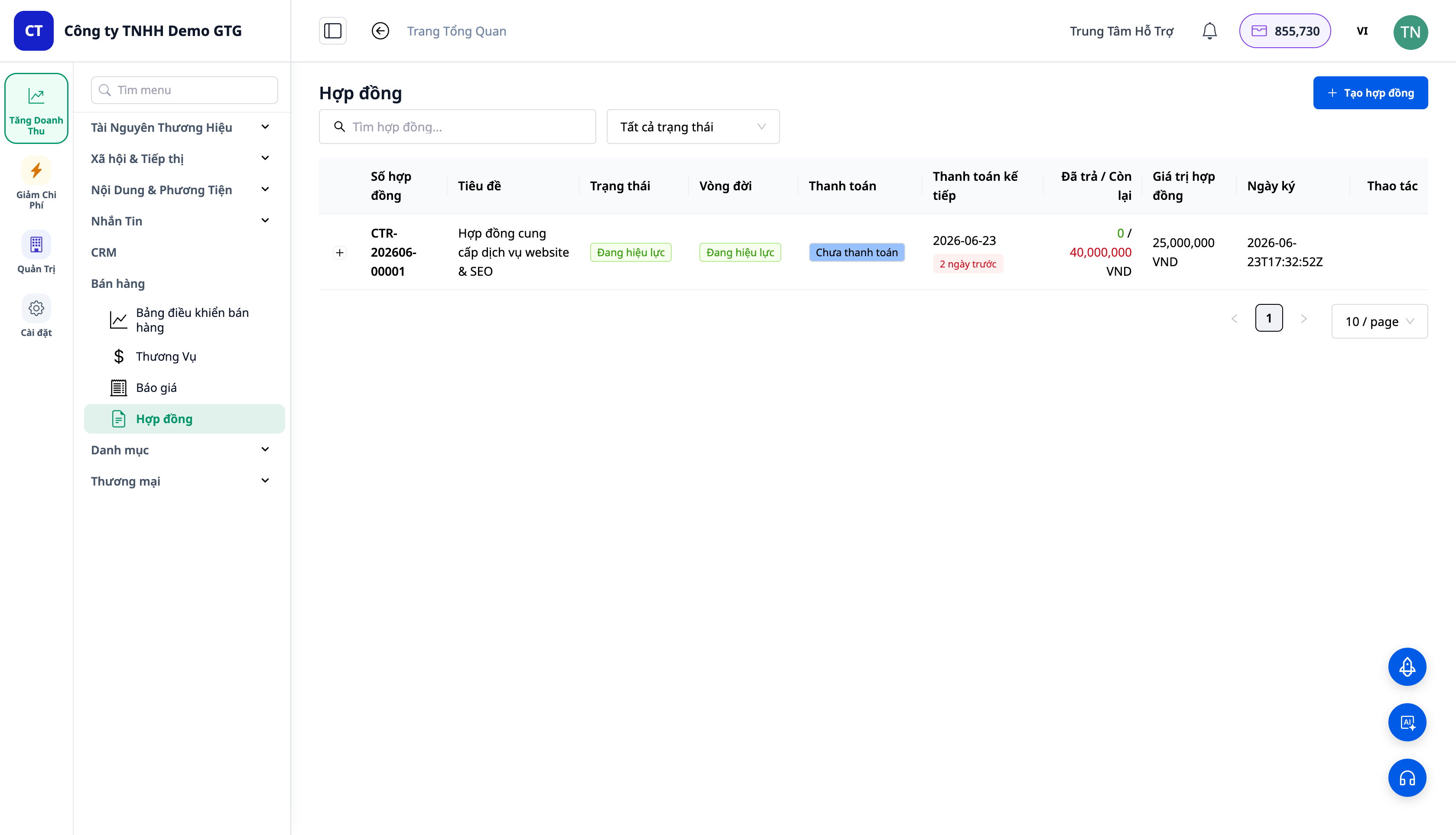
GTG CRM on pikka aega olnud tugev toodete müügil: kaupade kataloog, laoseis, tellimused, arved. Aga kui te müüte teenuseid — agentuur, konsultatsioon, spa/kliinik, vabakutseline, B2B-pakkuja — siis varem pidite seda "trikitama": looma teenuse fiktiivseks laos mitteoleva tooteks ja mitte omama tõelist lepingut (ainult hinnapakkumine, ilma allkirjata, ilma osapoolte, ilma maksetähtajata).
Alates tänasest toetab GTG CRM teenuste müüki esmaklassilise kodanikuna: üks kataloog, mis sisaldab nii tooteid kui ka teenuseid, segaportfelli pakkumine (pakkumine, mis sisaldab nii tooteid kui ka teenuseid) ja tegelikud lepingud — koos osapoole B, vastuvõtu etappide, kahes keeles, saatmise ja allkirjastamisega, seejärel osamaksetena arve väljastamine → automaatne sissekanne raamatupidamisse.
Probleemid, millega ettevõtted silmitsi seisavad
| Vana meetod | Tagajärjed |
|---|---|
| Teenused tuleb luua kui "fiktiivsed laos mitteolevad tooted" | Segadus kataloogis, lao loogika rikkumine |
| Üks hinnapakkumine tootele, eraldi leping teenusele | Kaks dokumenti, kaks korda koostamine |
| Puuduvad lepingud osapoole B / vastuvõtu etappidega | Raske siduda, raske etappide kaupa vastu võtta |
| Wordi leping + maksete jälgimine Excelis | Maksetähtajaliste maksete unustamine, võla suuruse teadmatus |
| Pärast allkirjastamist käsitsi tulude sissekandmine | Arvete väljastamise unustamine, raamatupidamiskanne unustamine |
GTG CRM ühendab ühtse töövoo: teenused → segaportfelli pakkumine → leping → saatmine ja allkirjastamine → osamaksetena arve → tulude ja raha sissekannete koostamine — trikitamine, topeltandmesisestus puudub.
Esiletõstetud funktsioonid
1. Üks Kataloog Nii Toodetele Kui Ka Teenustele
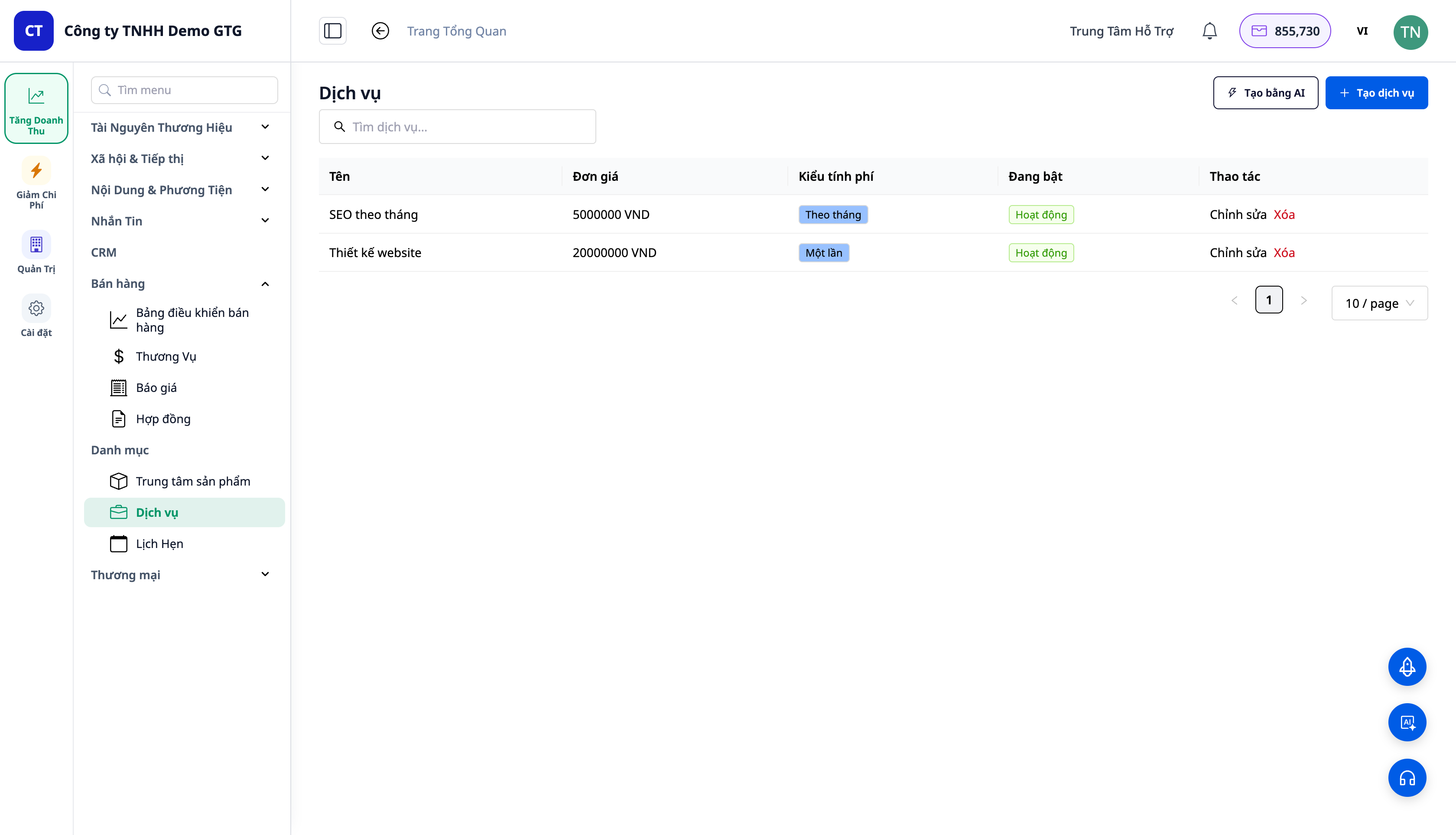
- Menüüs CRM → Kataloog: Tooted, Teenused, Kohtumised — koht, kus defineerida "mida te müüte", koondatud ühe pealkirja alla.
- Teenustel on hind ja arveldusperiood: ühekordne või korduv (─ igakuine...). Toodete puhul võib olla ka korduv tellimus.
- Sama ühendatud loend on see, mida pakkumise/lepingu rea valija kasutab — valib mõlemad, tooted ja teenused, ühest kohast.
2. Segaportfelli Pakkumine — Üks Pakkumine, Nii Toodetele Kui Ka Teenustele
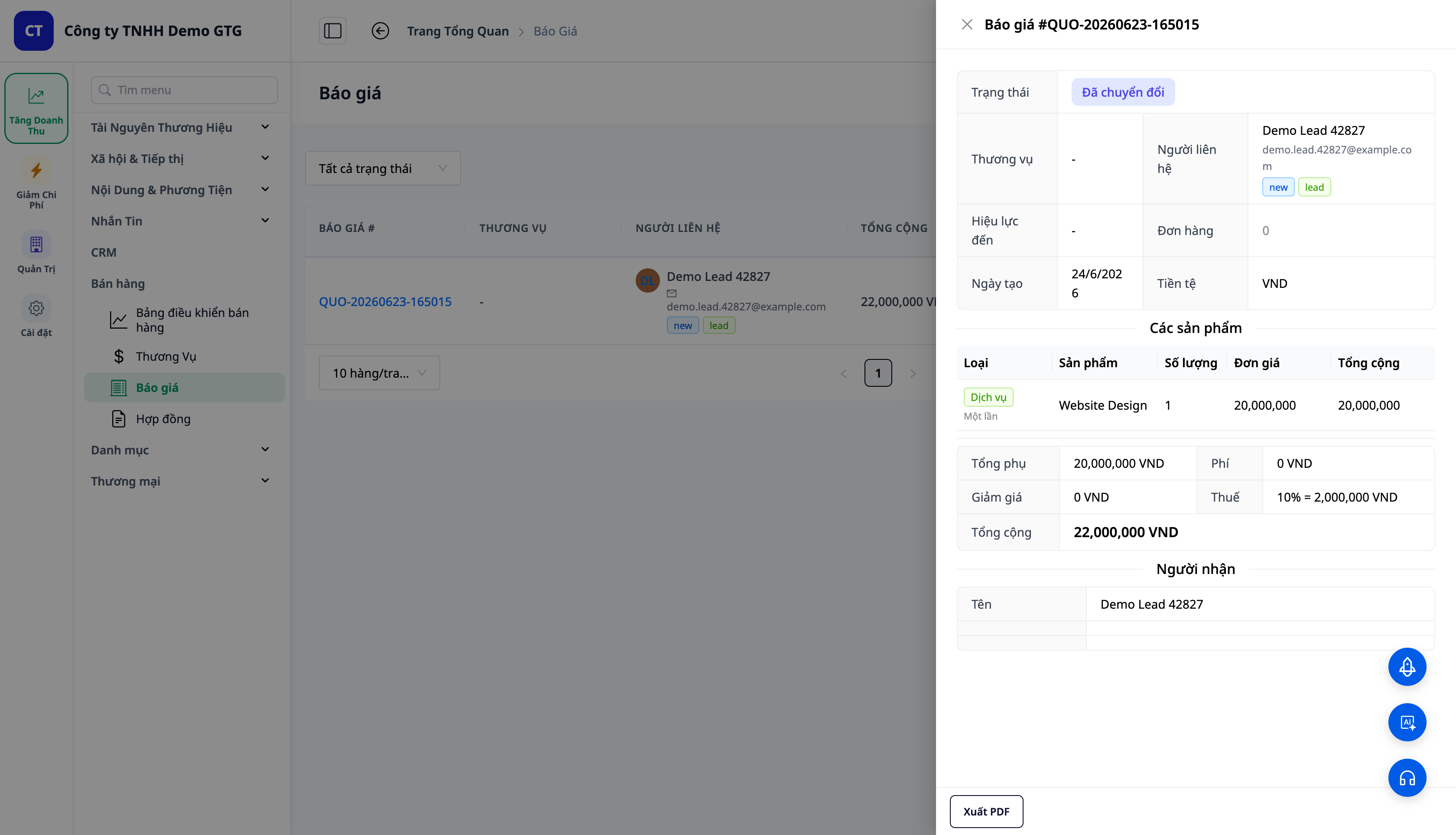
- Lisage Teenuse tüüpi read (nt "Veebisaidi disain", "SEO kuus") ja Toote tüüpi read (nt "Hostingulitsents" × 3) samasse pakkumisse.
- Igal real on Tüübi silt (Teenus = roheline, Toode = sinine); teenuse rida kuvab arveldusperioodi.
- Pakkumine on DRAFT → SENT → ACCEPTED; kui see on Vastuvõetud, kuvatakse nupp Convert to Contract (teisenda lepinguks).
3. Tõelised Lepingud — Osapool B, Vastuvõtt, Kahes Keeles
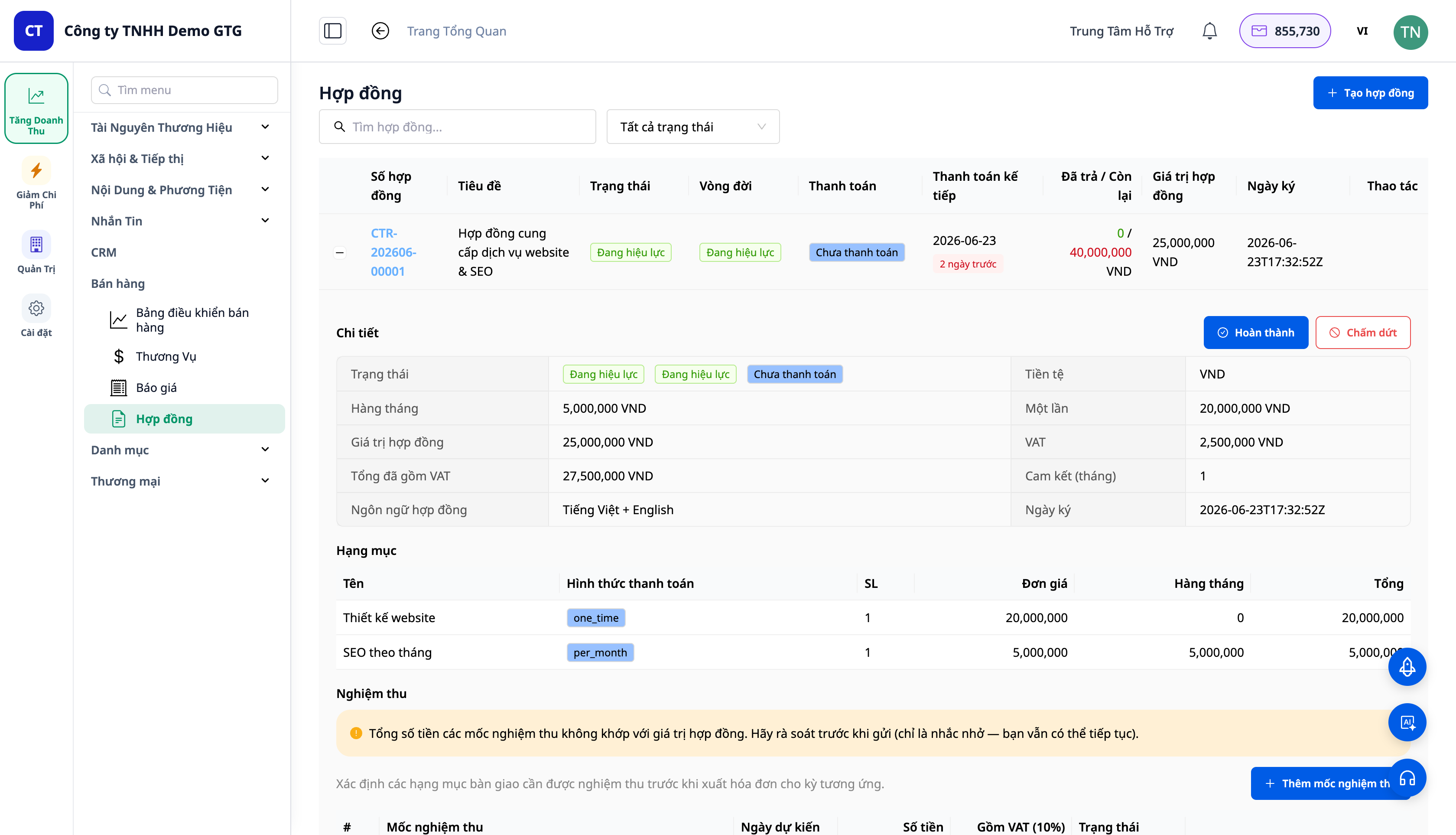
- Convert to Contract säilitab reasises stiili/tsükli; summa jaguneb ühekorraga makseks ja kuuarvesumma + KM.
- Pool B (Pool B) võib olla füüsiline isik või ettevõte; teave (juriidiline nimi, KMKR, aadress, esindaja) saab täita automaatselt, kui ettevõtte andmed on olemas – tänu ettevõtte andmete rikastamise funktsioonile.
- Vastuvõtmise etapp (Vastuvõtmine) määratakse lepingu loomisel, mis juhib maksegraafikut.
- Keeleline leping (kuni 2 keelt) + e-post vastavalt keelele, brändinguga.
- Leping võib säilitada ka otse tooteridvad (ilma pakkumiseta) – üks leping sisaldab nii tooteid kui teenuseid.
4. Saatmine → Allkirjastamine → Osade kaupa arvete väljastamine
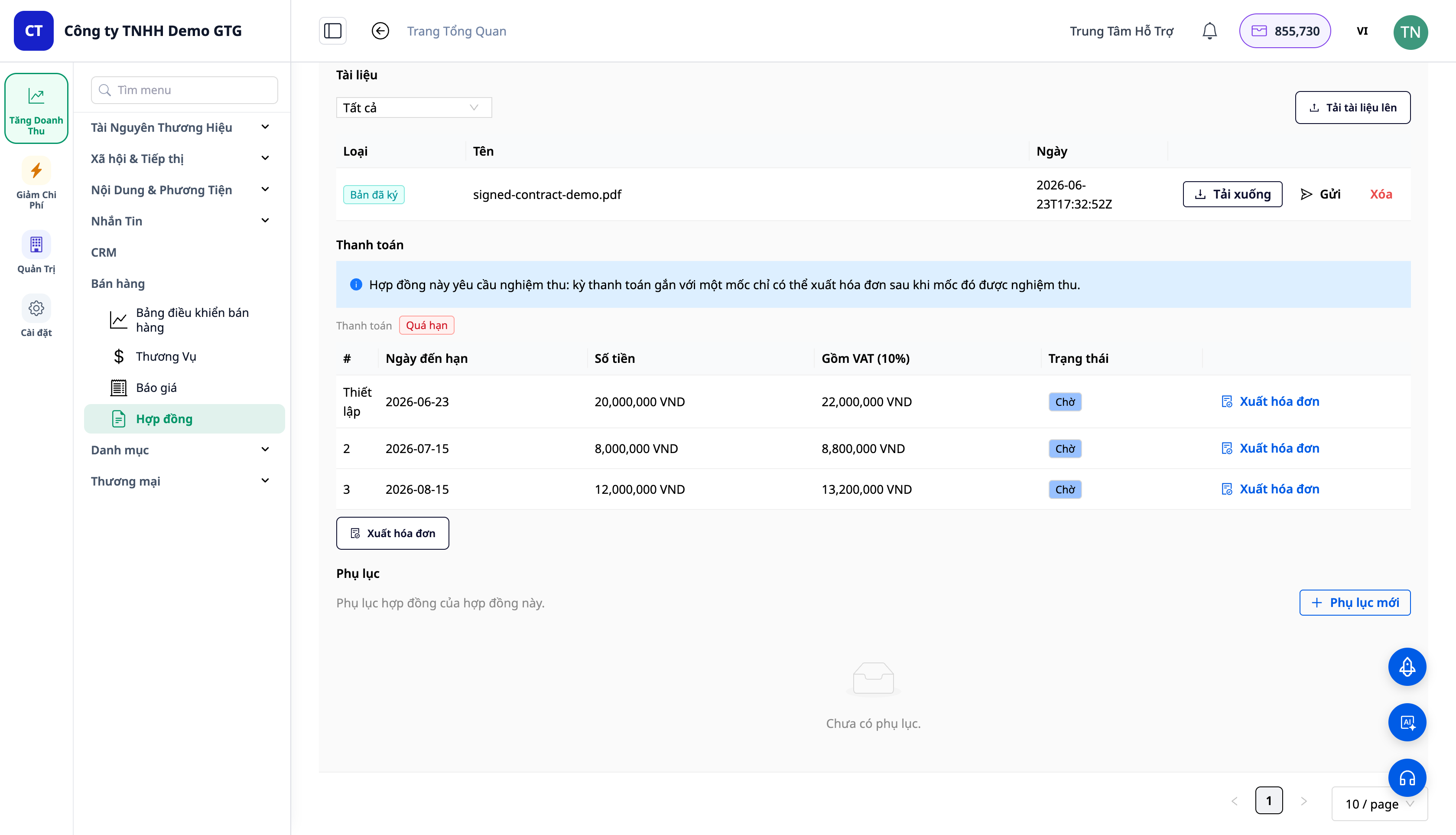
Praktiline, juriidiliselt korrektne allkirjastamisprotsess:
- Saada kliendile: süsteem renderdab lepingu kujul Word (.docx) (saab muuta/läbirääkida) ja saadab kliendile e-postiga. Staatuse DRAFT → SENT.
- Klient allkirjastab süsteemist väljaspool (paberil/soft copy) ja saadab tagasi.
- Laadi allkirjastatud koopia üles: lisa allkirjastatud fail (salvestatud süsteemi) → registreeritakse allakirjutanu, allkirjastamise aeg. SENT → SIGNED → ACTIVE.
- Osade kaupa arvete väljastamine: iga makse kohta vaadake arve eelvaadet → kinnitage → väljastage arve olemasoleva ERP/arveldussüsteemi kaudu.
ℹ️ Märkus: Arvete väljastamine nõuab, et tööruum oleks ühendatud e-arvelduse teenusepakkuja / maksuteenuse pakkujaga. Kogu teenuste loomise, pakkumiste koostamise, lepingute, saatmise ja allkirjastatud koopia allalaadimise protsess töötab endiselt; ainult arvete väljastamise etapp nõuab seda ühendust.
5. Arved → Automaatne kanne raamatupidamises
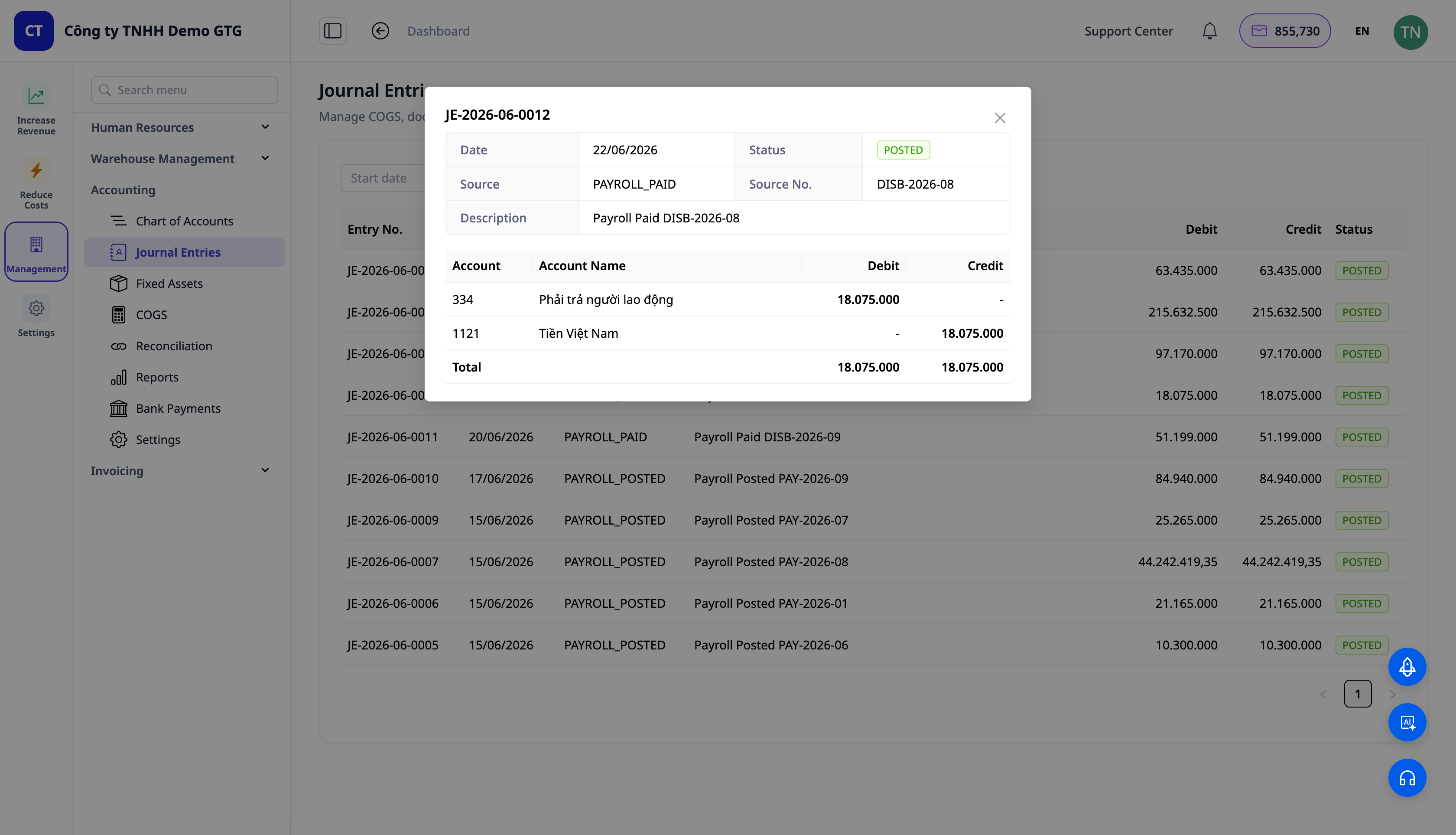
- Allkirjastatud leping = kohustus, mitte veel finantstehing – seega ei teki kirjet allkirjastamisel.
- Arve väljastamisel toimub kanne: Deebet Nõuded (131) / Kreedit Tulud (511) / Kreedit Käibemaks (3331) – kasutades olemasolevat automaatset arveldusmootorit.
- Makse laekumisel: Deebet Raha (111/112) / Kreedit Nõuded (131).
Kogu süsteem kasutab olemasolevat automaatset raamatupidamismootorit – ei ole "omatehtud" GL-koode, töövood on teie omad ja neid saab muuta.
Ettevõtte eelised
| Funktsioon | Teie tegelikud eelised |
|---|---|
| Üks kataloog (tooted + teenused) | "Võltsitud tooteid" enam ei ole, kategooriad on puhtad ja õiged |
| Segapakkumised | Üks dokument kahe asemel; vähem uuesti koostamist |
| Leping Pool B + vastuvõtmisega | Selged sidemed, vastuvõtmine etappide kaupa |
| Osade kaupa arved vastavalt graafikule | Ei unusta kogumist, tead alati, kui palju on võlgu |
| Arved → automaatsed kanded | Tulud on pearaamatus õigesti, ilma käsitsi sisestamiseta |
| Ettevõtte andmed täidetakse automaatselt | Pool B ja KMKR on lepingu/arvete jaoks eelnevalt täidetud |
Kellele sobib?
- Turundus-/reklaamiagentuurid (ICP3), kes müüvad kuupakette.
- Konsultandid, vabakutselised, B2B tarnijad, kes vajavad osade kaupa lepinguid ja arveid.
- Spa’d, kliinikud, koolituskeskused, kes müüvad teenuseid koos toodetega.
- Ettevõtted, kes müüvad nii tooteid kui teenuseid ja soovivad ühte pakkumist / ühte lepingut.
Kuidas alustada?
CRM → Kataloog → Teenused valige esimene teenus, seejärel koostatakse kombineeritud hinnapakkumine ja see teisendatakse lepinguks. Vaadake samm-sammult juhiseid artiklist "Juhend teenuste müük & lepingud".
Tasuta prooviversioon — krediitkaarti pole vaja.


