
Funktsioonide tutvustus
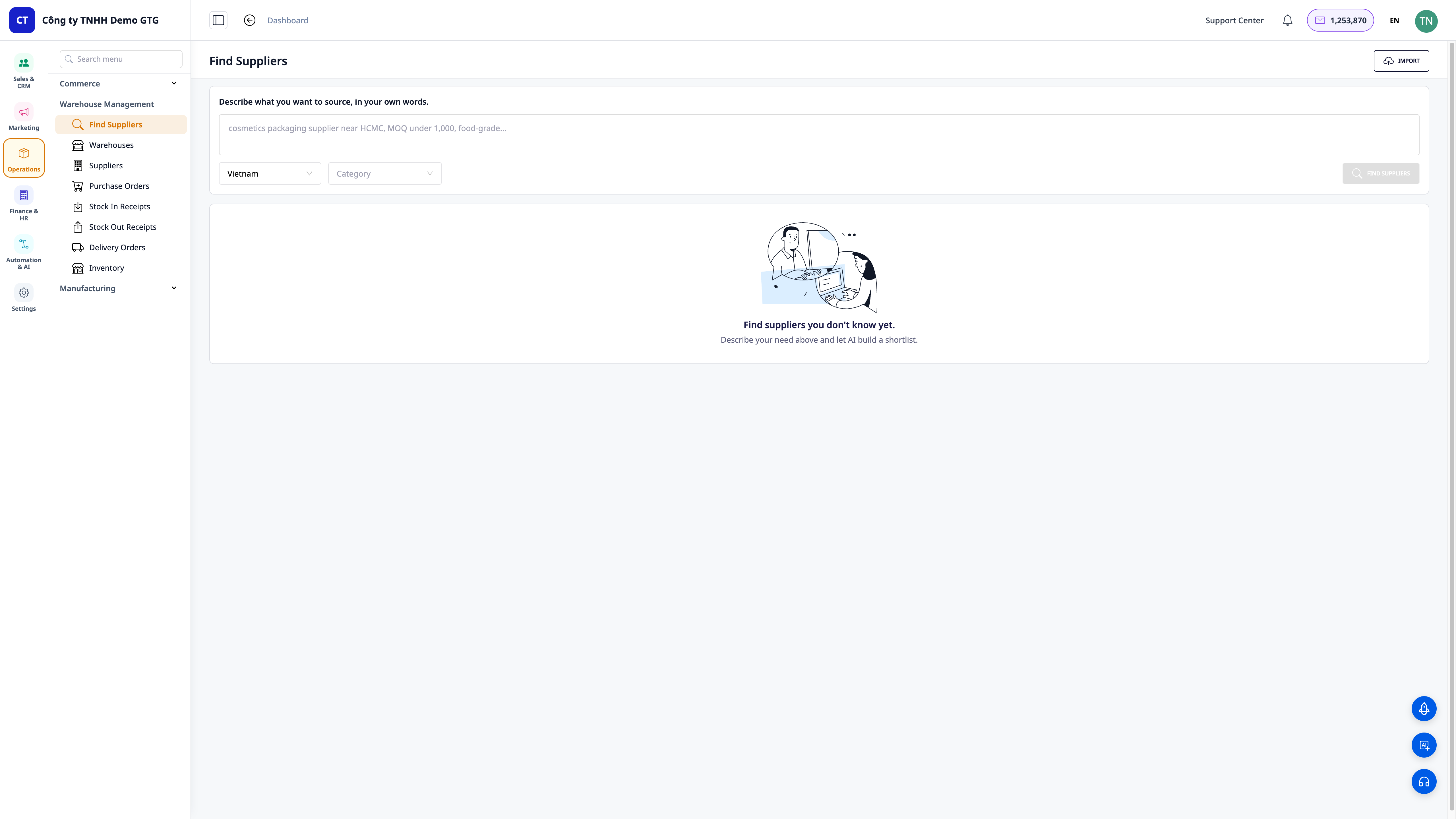
Olete just alustanud ettevõtlust või avanud uue tootesarja ja olete kohe esimeses etapis hädas: ei tea, kust kaupa hankida. Otsite tundide kaupa Google'ist, sirvite kümneid gruppe, küsite Zalo gruppides numbreid, kopeerite kõik segasesse Exceli faili — enamik neist on surnud kontaktid, keegi ei vasta. Leida paar nime võtab aega terve hommikupooliku ja te pole ikka kindel, kas nad teevad seda, mida te vajate.
See lõppes täna.
GTG CRM aitab teil nüüd tarnijaid leida, mitte ainult neid salvestada. Minge jaotisesse Warehouse Management → Find Suppliers, kirjeldage vajalikku toodet oma igapäevase keelega ("kosmeetikatoodete pakenditarnija, toidustandarditele vastav Ho Chi Minh Citys, MOQ alla 1000"), tehisintellekt otsib veebist ja tagastab loendi reaalsetest kandidaatidest, kes on paremusjärjestuses sobivuse järgi — koos veebisaidi, piirkonna, kontaktandmete, sobivuse põhjuste ja allikalingiga, et saaksite ise kontrollida. Ühe klõpsuga saate sobivad tarnijad salvestada CRM-i tarnijate kontaktandmete hulka ja saata kohe hinnapakkumise päringu (RFQ) — kõik ühes süsteemis.
Ettevõtete probleemid
| Vana meetod | Tulemus |
|---|---|
| Otsimine Google'ist, rühmade sirvimine, tuttavate käest küsimine, et kontakte leida | Võtab terve hommikupooliku, enamik on surnud kontaktid, keegi ei vasta |
| Nime — numbri — lingi käsitsi kopeerimine erinevatesse Exceli failidesse | Andmed on hajutatud, dubleeritud, keegi ei tea, kellega on ühendust võetud |
| Puudub võimalus kontrollida, kas tarnija on reaalne ja kas ta teeb seda, mida vaja | Valesti valitud, deposiitkaotus, tarnimisplaanide hilinemine |
| Pärast otsimist tuleb ikka avada teine programm hinnapakkumise e-kirjade koostamiseks | Katkenud protsess, lihtne unustada, aeglane tehingute lõpetamine |
GTG CRM koondab kõik ühtseks andmeallikaks: vajaduste kirjeldus → tehisintellekt otsib ja järjestab reaalsete kandidaatide → salvestamine tarnijate kontaktandmetesse (automaatne duplikaatide filtreerimine maksu-ID järgi) → hinnapäringu saatmine — järjest, ilma ekraanilt lahkumata.
Esiletõstetud omadused
1. Kirjeldage sõnadega — tehisintellekt tagastab reaalsete kandidaatide loendi, mis on järjestatud
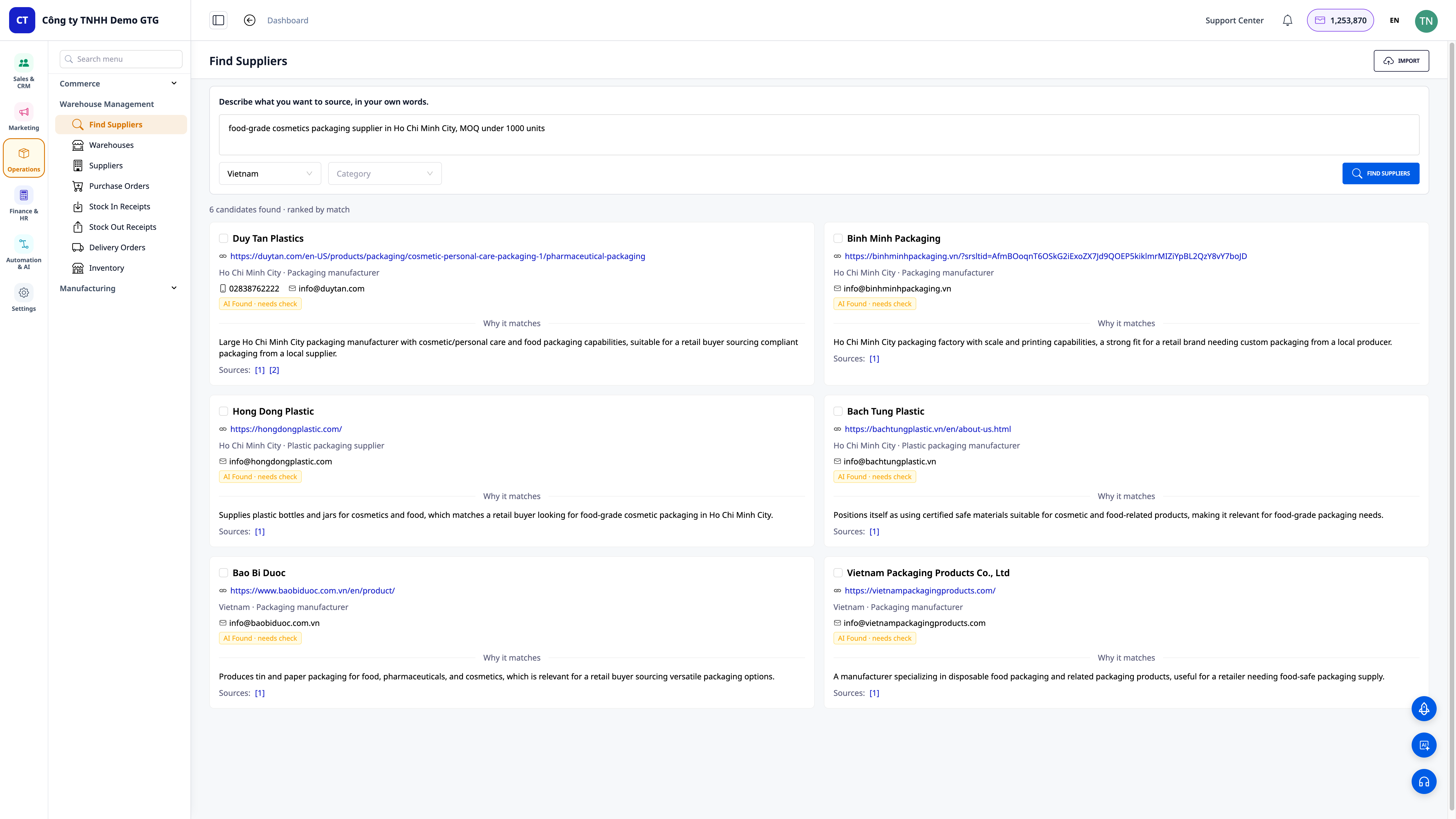
- Otsing loomulikus keeles: te ei pea teadma "õigeid märksõnu" — lihtsalt kirjeldage nii, nagu räägiksite sõbraga, tehisintellekt mõistab ja otsib teie eest.
- Sobivuse järgi järjestatud loend: tulemused näitavad selgelt "leitud kandidaatide arv · sobivuse järgi järjestatud", nii et vaadates ülalt alla näete kohe kõige rohkem ühendust väärivaid kandidaate.
- Filtreerimine õige piirkonna ja õige tööstusharu järgi: valige riik (vaikimisi Vietnam) ja tööstusharu, et kitsendada otsingut vajalike tarnijateni.
ℹ️ Funktsioon on disainitud rahvusvaheliselt, esialgu keskendudes Vietnami turule — saate otsida tarnijaid riigisiseselt või laiendada otsingut välismaale.
2. Iga kandidaat on kontrollitav profiil
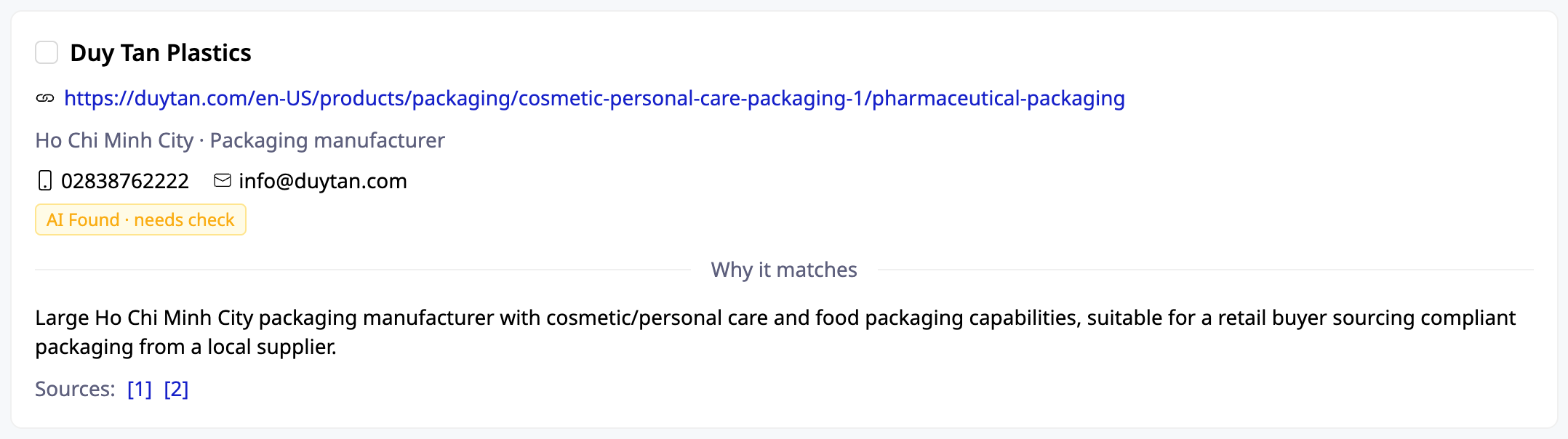
- Piisavalt teavet otsuse tegemiseks: ettevõtte nimi, veebisait, piirkond (nt Ho Chi Minh City), telefoninumber/e-post, kui need on saadaval.
- "Sobivuse põhjus" (Why it matches): tehisintellekt selgitab, miks see kandidaat teie kirjeldusega vajadustele vastab — te ei pea arvama.
- Allikad (Sources): iga kaart sisaldab allikat, millele saate ise klõpsata ja kontrollida, et vältida võltskontakte. Otsuse teete teie, mitte tehisintellekt teie eest.
3. Üks klõps CRM-i salvestamiseks — automaatne duplikaatide filtreerimine maksu-ID järgi
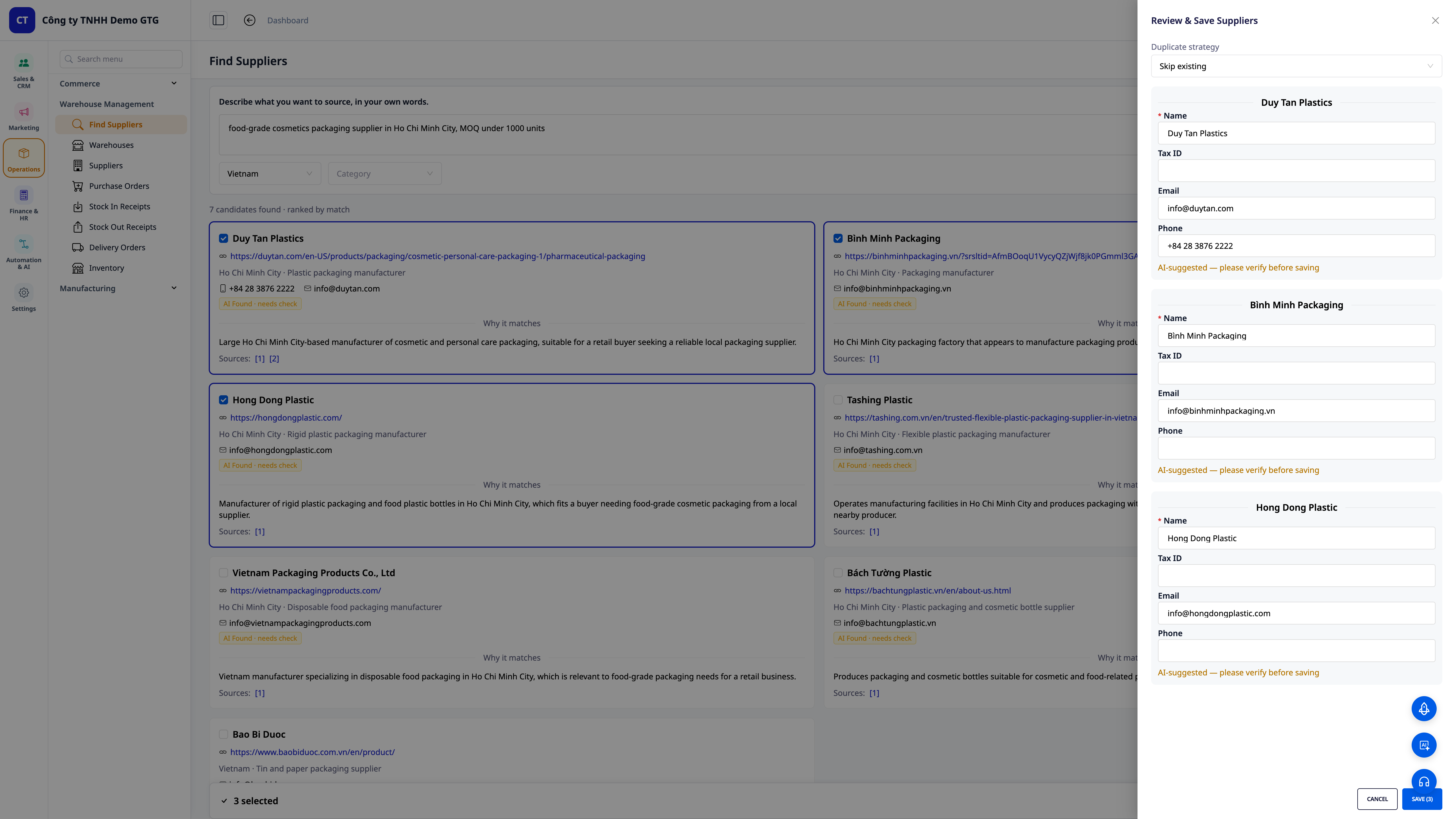
- Vali — redigeeri — salvesta: märkige tarnijad, mis teile meeldivad, muutke kiiresti Nimi/Maksu-ID/E-post/Telefon otse sahtlis ja salvestage need ühtlasi tarnijate kontaktandmetesse.
- Nutikas duplikaatide vältimine: valige, kuidas duplikaate käsitleda (jätke vahele, kui on juba olemas / uuendage vana) — süsteem filtreerib duplikaadid maksu-ID järgi, nii et kontaktandmed on alati puhtad, mitte ei paisu duplikaatide tõttu.
- Sujuv üleminek hinnapäringule: tarnija on juba CRM-is, saate kohe saata hinnapäringu (RFQ) e-posti teel, ilma et peaksite uuesti sisestama.
4. Kas teil on juba loend? Hulgimüük — AI sobitab veerud
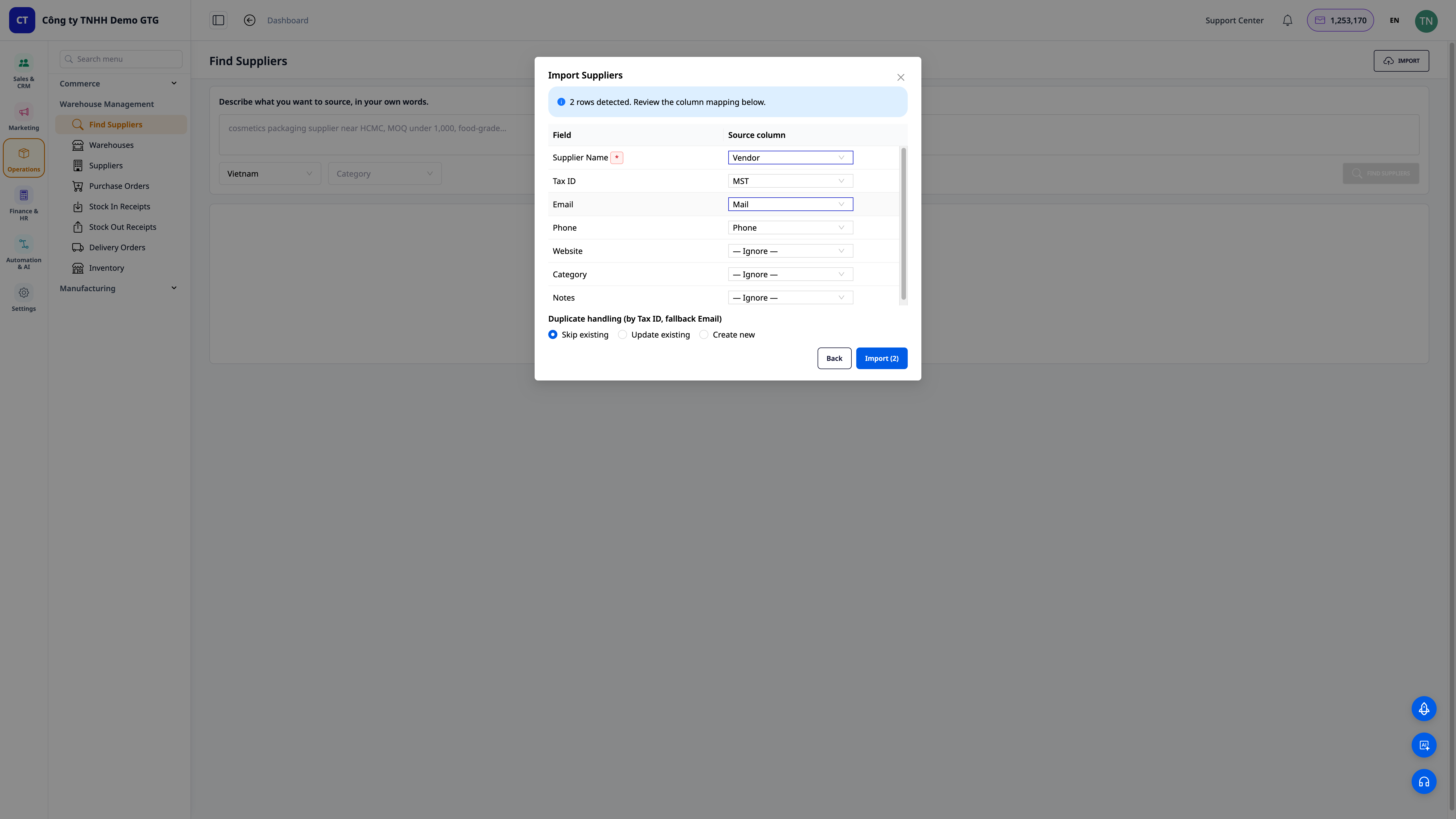
- Importige mis tahes vormingus fail: lohistage oma olemasolev CSV/Excel-fail — pole vaja seda meie malli järgi parandada.
- AI sobitab veerud automaatselt: süsteem tuvastab automaatselt "Müüja → Tarnija nimi", "Maksu-ID → Maksu-ID", "Meil → E-post" ... Teie peate enne importimist vaid üle vaatama ja muutma.
- Duplikaatide töötlemine importimisel: valige vahelejätmine / uuendamine / uue loomine, duplikaatide filtreerimine maksu-ID järgi (varundus e-posti teel) — viige kogu vana loend mõne minutiga CRM-i.
💡 Näpunäide: Võite ka küsida CRM-i AI assistendilt — lihtsalt sisestage "otsi mulle 5 tarnijat [toode]" — ja saate kohe lühendatud loendi, mille saate salvestada.
Ettevõtetele kasu
| Funktsioon | Reaalne kasu teile |
|---|---|
| Leidke tarnijaid tehisintellekti abil sõnalise kirjelduse järgi | Nullist mõne minutiga potentsiaalsete kontaktide loendini, mitte terve hommik Google'is surfamist |
| Edetabel + sobivuse põhjused + allikalingid | Valige kohe alguses õige, vähendage valesti valimise ja deposiidi kaotamise riski |
| Üks klõps salvestamiseks, duplikaatide filtreerimine maksu-ID järgi | Tarnijate kontaktandmed on alati puhtad, duplikaatideta, pikaajaliseks kasutamiseks |
| Importige mis tahes faili hulgimüük, AI sobitab veerud | Viige vanad andmed kiiresti süsteemi, ilma et peaksite käsitsi uuesti sisestama |
| Saada hinnapäringuid otse CRM-ist | Leidmise — valimise — hinnapäringu protsess sujuvalt üksteise järel, kiiremini otsustamine |
Kellele sobib?
- Uued ettevõtte omanikud / startupid, kellel pole veel tarneahelat ja kes on hädas sammuga "ei tea, kust kaupa saada".
- Online-kaupluste omanikud (Shopee/Lazada/TikTok), kes soovivad oma tootevalikut laiendada ja vajavad kiiresti uusi tarnijaid.
- Tootmis-, toidu- ja joogi-, kosmeetika- ja jaekaubanduse SMB-ettevõtted, kes soovivad leida täiendavaid varutarnijaid, et mitte sõltuda ühestainsast allikast.
- Ostuhaldus / operatiivosakonnad, kes soovivad tarnijate kontaktandmete keskset haldamist ja hinnapäringute saatmist otse CRM-is.
Kuidas alustada?
Minge Warehouse Management → Find Suppliers, kirjeldage seda, mida soovite osta, valige riik/sektor ja klõpsake Find Suppliers. Valige sobivad kandidaadid, et need CRM-i salvestada, või klõpsake Import, et olemasolev loend importida. Vaadake samm-sammult juhiseid artiklis "Kasutusjuhend: Tarnijate leidmine tehisintellekti abil GTG CRM-is".
Tasuta prooviversioon — krediitkaarti pole vaja.


