
Inngangur að eiginleikum
Í lok mánaðarins opnarðu bankayfirlitið þitt og byrjar að athuga hverja línu: hvaða reikning greiddi viðskiptavinurinn? Er það gjald, innri millifærsla eða greiðsla í póstkröfu frá kauphöllinni? Síðan opnarðu Excel og slærð allt inn handvirkt til að passa við færslur bankans. Það tekur heilan síðdegi og það er samt auðvelt að gera mistök. Í hvert skipti sem þú ert spurður „hvaðan komu þessir peningar?“ svitnarðu.
Því lýkur í dag. GTG CRM breytir bankayfirlitum í afstemmingarsvæði beint innan núverandi bókhaldskerfis þíns: flokkaðu hverja færslu í réttan reikning, stilltu einskiptis samsvörunarreglur til að sjálfkrafa leggja til svipaðar færslur, skoðaðu afstemmingaryfirlit og skýrslur og virkjaðu sjálfvirka afstemmingu dagbókarfærslna. Reiðufé ⇄ reikningar ⇄ bókhald er allt lokað í einni lykkju.
Vandamálin sem fyrirtæki standa frammi fyrir
| Gamla leiðin | Afleiðingar |
|---|---|
| Athugaðu bankayfirlitið þitt sjónrænt og skráðu það í Excel. | Það tekur klukkustundir í hverjum mánuði, er viðkvæmt fyrir villum í gagnaskráningu og ekki er hægt að rekja það til baka. |
| Það er óljóst hvaða sjóðstreymi samsvarar hvaða reikningi. | Óskýrar viðskiptakröfur, vangreiðslur/tvöfaldar greiðslur verða ekki uppgötvaðar. |
| Bókhaldsgögn eru geymd aðskilin frá bankagögnum. | Tölurnar stemma ekki, sem gerir það erfitt að útskýra þær við skattendurskoðun. |
| Erfitt er að aðgreina greiðslur við afhendingu (COD) sem sendar eru til baka frá kerfinu/flutningsfyrirtækinu. | Það er óljóst hvort öll upphæðin hefur borist; afstemmingin af greiðslum eftir skattframtali er flókin. |
GTG CRM sameinar öll gögn í eina uppsprettu : hver bankafærsla er tengd beint við bókhaldsreikninginn og (þar sem við á) við reikninginn, sem býr sjálfkrafa til jafnvægisfærslu.
Hápunktar
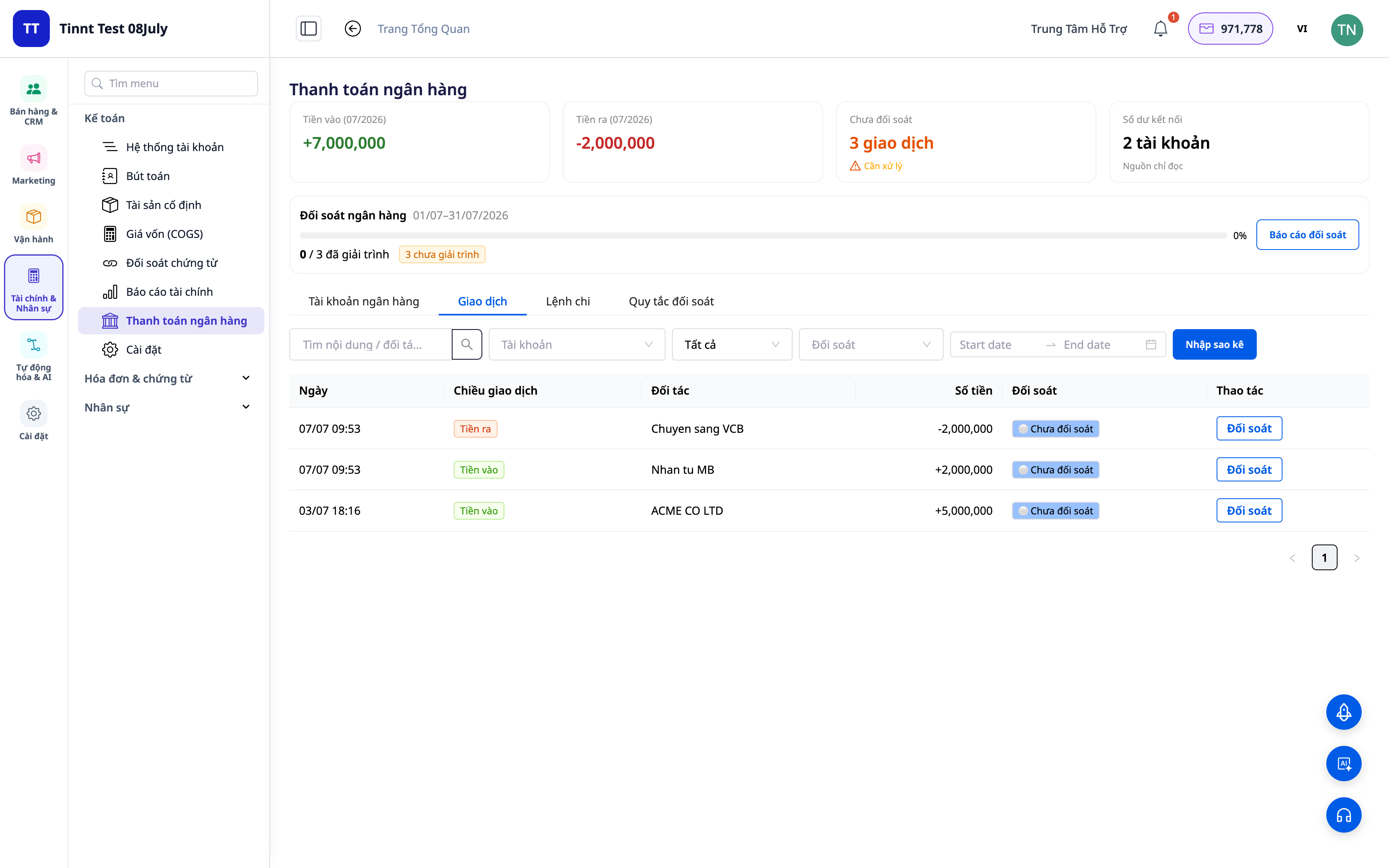
1. Flokkaðu færslur í rétta reikninga.
Fyrir hvern lið á yfirlitinu skal velja hvað hann er: tekjur, gjöld, innri millifærslur, reiðufé-bankafærslur, eftirstöðvagreiðslur o.s.frv. Kerfið mun þá tengja færsluna við réttan bókhaldsreikning (fjárhagsreikning).
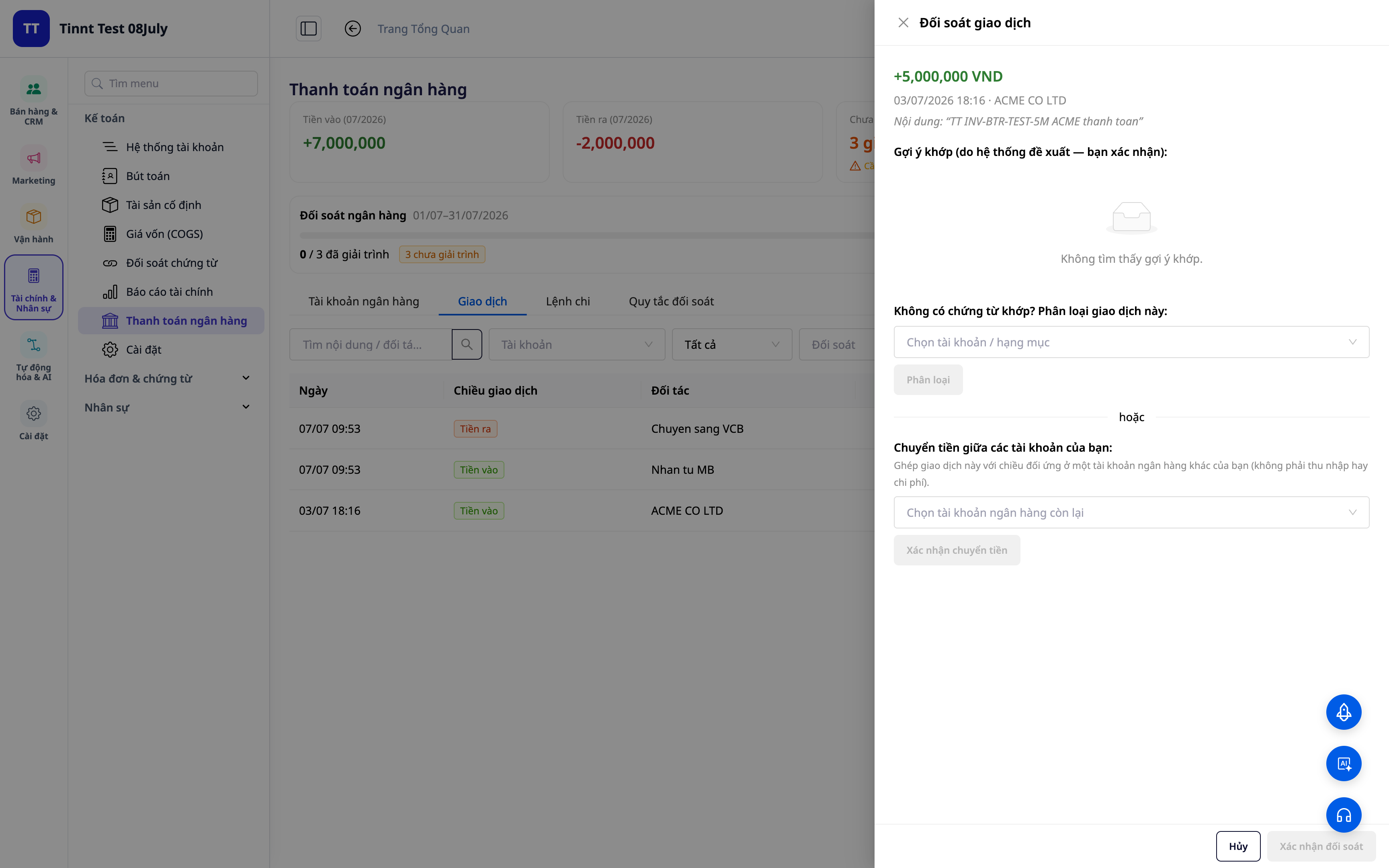
- Virkni : Flokkun færslna → samsvarandi bókhaldsreikningur.
- Kostur : Sérhver mynt sem kemur inn eða fer út hefur skýrt „heimilisfang“ í bókunum.
2. Endurnýtanleg samskeytaregla — sett upp einu sinni, samskeyti sjálfkrafa
Búið til reglur byggðar á efni/samstarfsaðila/upphæð: svipaðar færslur í framtíðinni verða sjálfkrafa úthlutaðar réttri gerð. Nýjar reglur eru virkjaðar strax til notkunar strax.
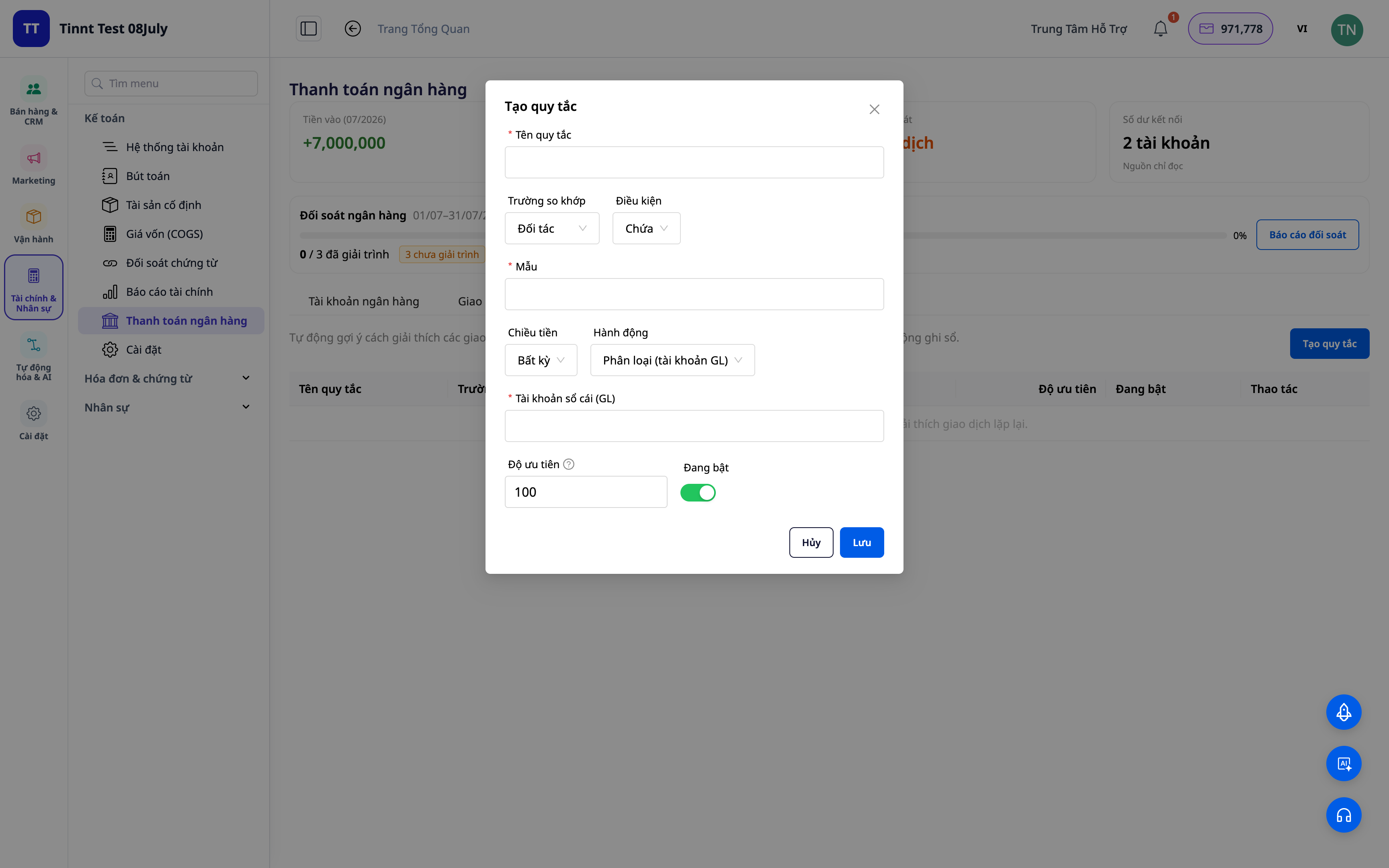
- Eiginleikar : Endurnýtanlegt safn samsvörunarreglna.
- Kostir : Næsti mánuður verður auðveldari en sá fyrri — endurtekin verkefni eru sjálfvirk.
3. Tillögur að leikjum byggðar á reglum — þú þarft bara að skoða.
Reglurnar sem þú setur munu sjálfkrafa leggja til flokkanir fyrir svipaðar færslur — þú þarft bara að skoða þær og fara yfir þær. Því meira sem þú notar þær, því fleiri aðstæður ná reglurnar yfir og því hraðari verður afstemmingarferlið. Þú hefur alltaf síðasta orðið.
- Eiginleiki : Leggur til að viðskipti séu pöruð út frá reglum (sem þú skoðar).
- Kostir : Vinnur fljótt úr endurteknum línum og viðheldur fullri stjórn.
ℹ️ Pörun og reglubundnar tillögur eru ókeypis. Væntanlegt : Gervigreindaraðstoðarmenn leggja til túlkanir fyrir jafnvel alveg ný viðskipti.
4. Afstemmingaryfirlit + skýrsla
Farið yfir yfirlitið: hversu mikið hefur verið parað saman, hversu mikið er eftir á lager og hvar frávikin eru. Búið til afstemmingarskýrslu til skráningar og útskýringar.
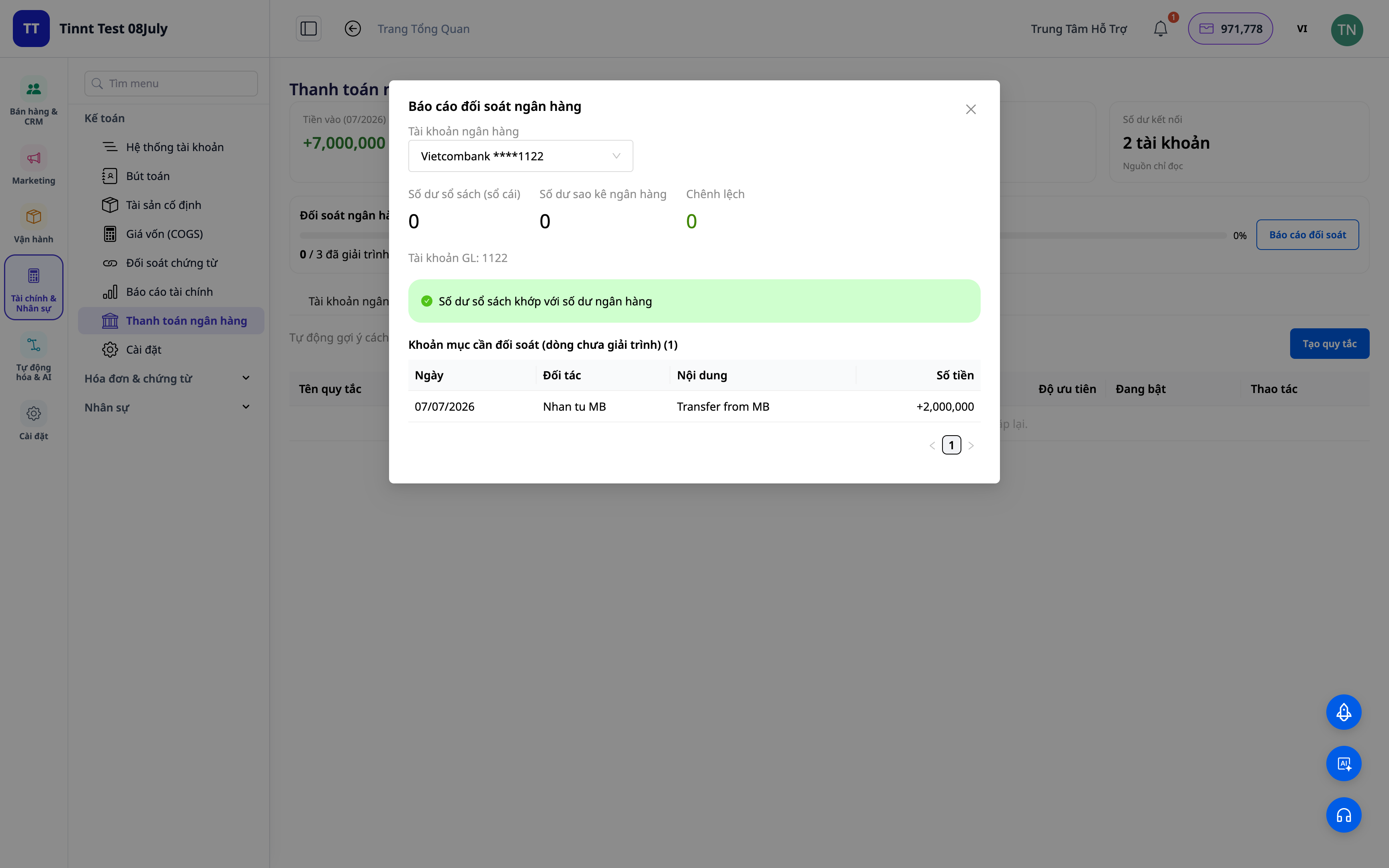
- Eiginleikar : samsvörunarmælaborð + skýrslugerð.
- Kostur : Þú getur séð á einum skjá hvort færslan þín hefur verið pöruð við bankann.
5. Skrá jafnvægisfærsluna handvirkt (valfrjálst)
Virkjun á valkostinum „skrá í höfuðbók“: flokkun/flutningur/reiðufé-banki/eftirkröfufærslur mynda sjálfkrafa jafnaðar færslur samkvæmt bókhaldsstöðlum. Að aftengja færslu snýr færslunni við.
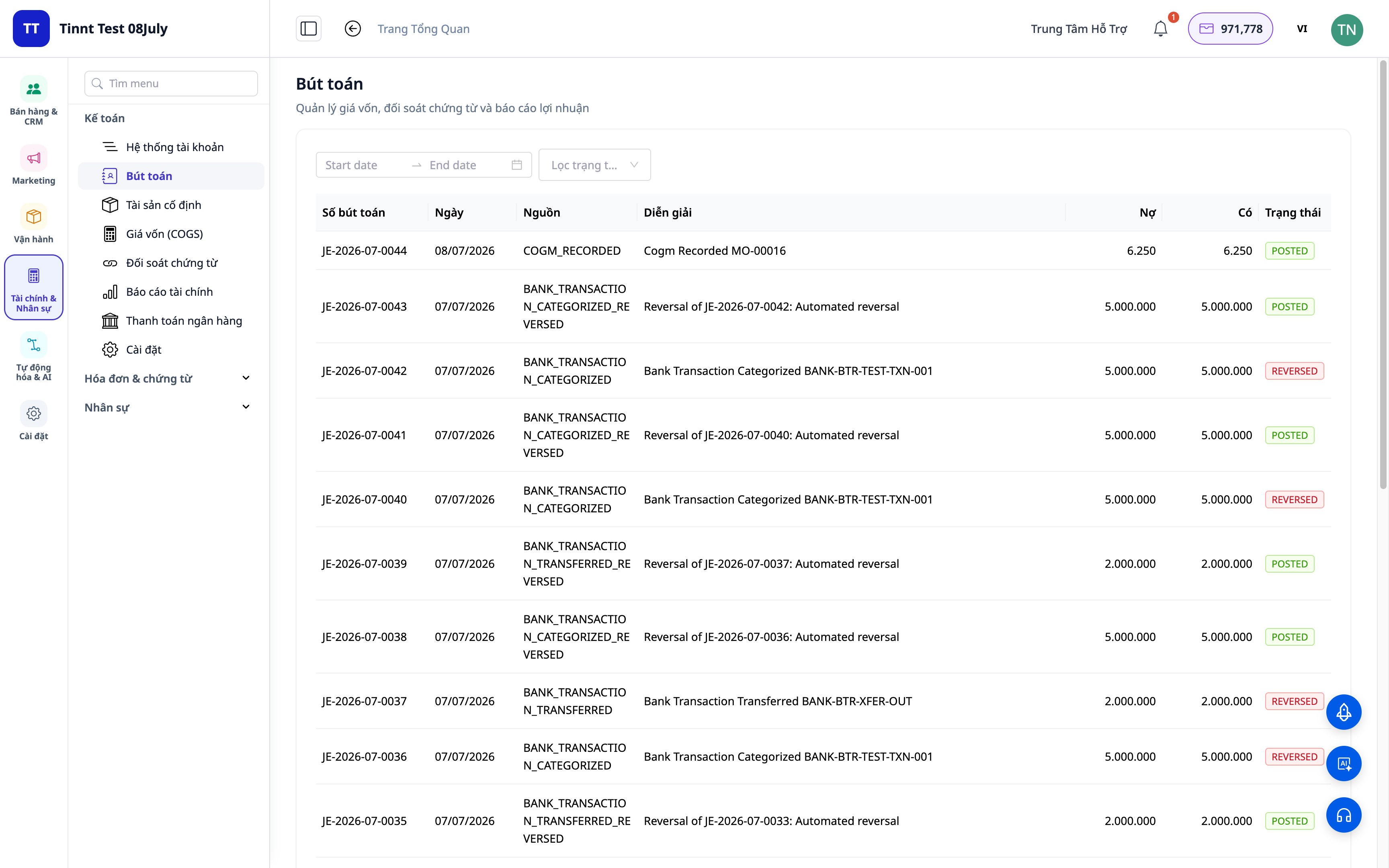
- Eiginleiki : Skráir sjálfkrafa bókhaldsfærslur úr afstemmdum færslum.
- Kostur : Afstemming og bókhald eru eitt og hið sama, ekki tvö aðskilin verkefni — tölurnar eru alltaf samræmdar.
Ávinningur fyrir fyrirtæki
| Eiginleikar | Hagnýtur ávinningur fyrir þig |
|---|---|
| Flokkun + samsvörunarreglur | Skerið niður þann tíma sem fer í að athuga bankayfirlit handvirkt í hverjum mánuði. |
| Ráðlagður samsvörun samkvæmt reglum | Vinnið úr endurteknum línum hratt og fækkið villum. |
| Afstemmingaryfirlit + skýrsla | Hrað lokun reikninga, tilbúin fyrir skattaendurskoðun. |
| Sjálfsskráning dagbókarfærslna | Aðalbókin passar alltaf við færslur bankans, án nokkurra frávika. |
| Afstemming reiðufjár við afhendingu (COD) | Veistu með vissu hvort þú hafir fengið fulla greiðslu fyrir vöruna? |
Fyrir hverja hentar þetta?
- Bókhaldarinn/aðalbókhaldarinn þarf að loka bókhaldinu fljótt og tryggja að tölurnar passi við bókhald bankans.
- Fyrirtækjaeigendur/heimilisfyrirtæki sem nota bókhaldssvítuna í GTG CRM vilja hafa stjórn á sjóðstreymi sínu.
- Seljendur sem selja með greiðslu í gegnum póstkröfu þurfa að stemma af peningana sem kerfið/flutningsfyrirtækið hefur endurgreitt.
- Fyrirtæki vilja draga úr þörf sinni fyrir sjálfstæðan bókhaldshugbúnað.
Hvernig byrja ég?
Farðu í Bókhald ▸ Bankaafstemming , hladdu inn yfirlit eða tengdu bankareikninga og byrjaðu síðan að flokka. Þarftu ítarleg skref? Sjáðu notendahandbókina: Bankaafstemming í GTG CRM og vísaðu einnig til greinarinnar um tvífærslu bókhalds beint í CRM til að fá ítarlega yfirsýn yfir heildarmynd bókhaldsins.
Prófaðu það frítt — engin þörf á kreditkorti.


