
Inngangur að eiginleikum
Þú framleiðir vörur til sölu — bakar, saumar, blandar snyrtivörum, setur saman íhluti — en í lok hvers mánaðar geturðu samt ekki svarað einföldustu spurningunni: hvað kostar það að framleiða eina af vörunum mínum? Efniviður er skráður, launakostnaður reiknaður út í huganum og vélakostnaður „áætlaður“. Og akkúrat núna, mitt í framleiðsluvakt, veistu ekki einu sinni hvar samsetningarlínan er, hvaða stöð er stífluð eða hvaða framleiðslulota er næstum búin .
Frá og með deginum í dag þarftu ekki lengur að giska.
GTG CRM býður upp á framleiðslustjórnunareiningu sem er samþætt beint í núverandi birgða-, innkaupa- og bókhaldskerfi þín. Þú skilgreinir vöruformúluna þína (efnisheiti - BOM), framleiðslupöntunin reiknar sjálfkrafa út rétt magn af efni sem þarf, dregur frá birgðir í upphafi og reiknar sjálfkrafa út kostnað fullunninna vara = efni + vinnuafl + almennur framleiðslukostnaður við lok. Fullunnar vörur eru færðar í birgðir á nákvæmlega því verði og færsla kostnaðar við seldar vörur er skráð beint í bókhaldsbækur - ekki lengur „núllkostnaður við seldar vörur“ fullunnar vörur.
Nýja uppfærslan færir framleiðslu beint á verksmiðjugólfið : áætlanagerð byggð á raunverulegri afkastagetu með Gantt-töflum og rauntíma verksmiðjuskjár (MES) — snertiskjár fyrir rekstraraðila á hverri stöð, ásamt veggfestu stjórnborði (Andon) til að sjá alla línuna í fljótu bragði.
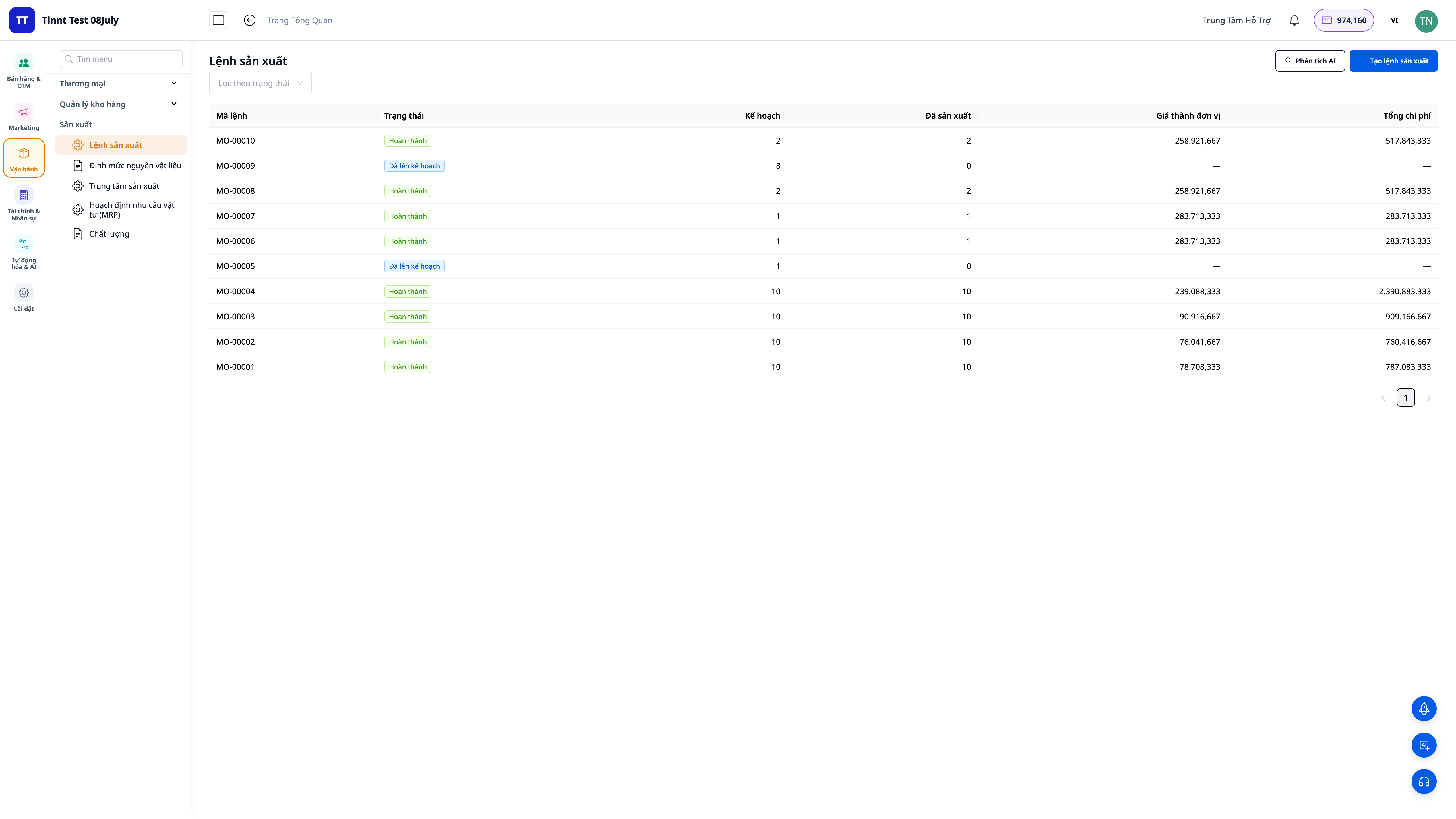
Vandamálin sem fyrirtæki standa frammi fyrir
Skrifaðu efnin niður í minnisbók, reiknaðu launakostnað í huganum — Án þess að vita raunverulegan kostnað við seldar vörur seturðu rangt söluverð og það sem þú heldur að sé hagnaður er í raun tap.
Óviss um hvort nægilegt efni verði til fyrir komandi pöntun — birgðir klárast á meðan framleiðslu stendur eða eru fastir með stórar birgðir sem binda fjármagn.
Fullunnar vörur eru skráðar í birgðir með „kostnaði seldra vara upp á 0“ vegna þess að hugbúnaðurinn getur ekki reiknað hann út — Hagnaðar- og tapskýrslan er röng, kostnaður seldra vara (COGS) er ónákvæmur.
Það er ómögulegt að vita hvar færibandið er staðsett á meðan vakt stendur, eða hvaða stöð er stífluð — pantanir seinka ekki fyrr en pöntunin hefur verið lögð inn, starfsmenn eru látnir bíða og stjórnendur þurfa að hlaupa niður í verksmiðjuna til að spyrjast fyrir.
Skráið niður tölur um lokið og ekki lokið verkefni, keyrslutíma á pappír og færið gögnin aftur inn í lok dags — Seint skilaðar og rangar upplýsingar, misræmi í kostnaði við seldar vörur og vanhæfni til að úthluta ábyrgð.
Vöruhús, innkaup, bókhald og framleiðsla eru öll meðhöndluð af aðskildum hugbúnaðarforritum — sem leiðir til endurtekinnar gagnasláttar og ósamræmis í tölum.
GTG CRM samþættir allt í eitt ferli: gerð formúlna → áætlanagerð → pöntunarútgáfa á stöðina → starfsmaður byrjar/lýkur strax í verksmiðjunni → frádráttur efnis → útreikningur á kostnaði seldra vara → birgðir fullunninna vara → bókhaldsfærsla — allt í einu samfelldu ferli innan sama kerfis og þú notar fyrir sölu og reikningagerð.
Hápunktar
1. Fjölþátta efnislisti (BOM) — „formúla“ vörunnar.
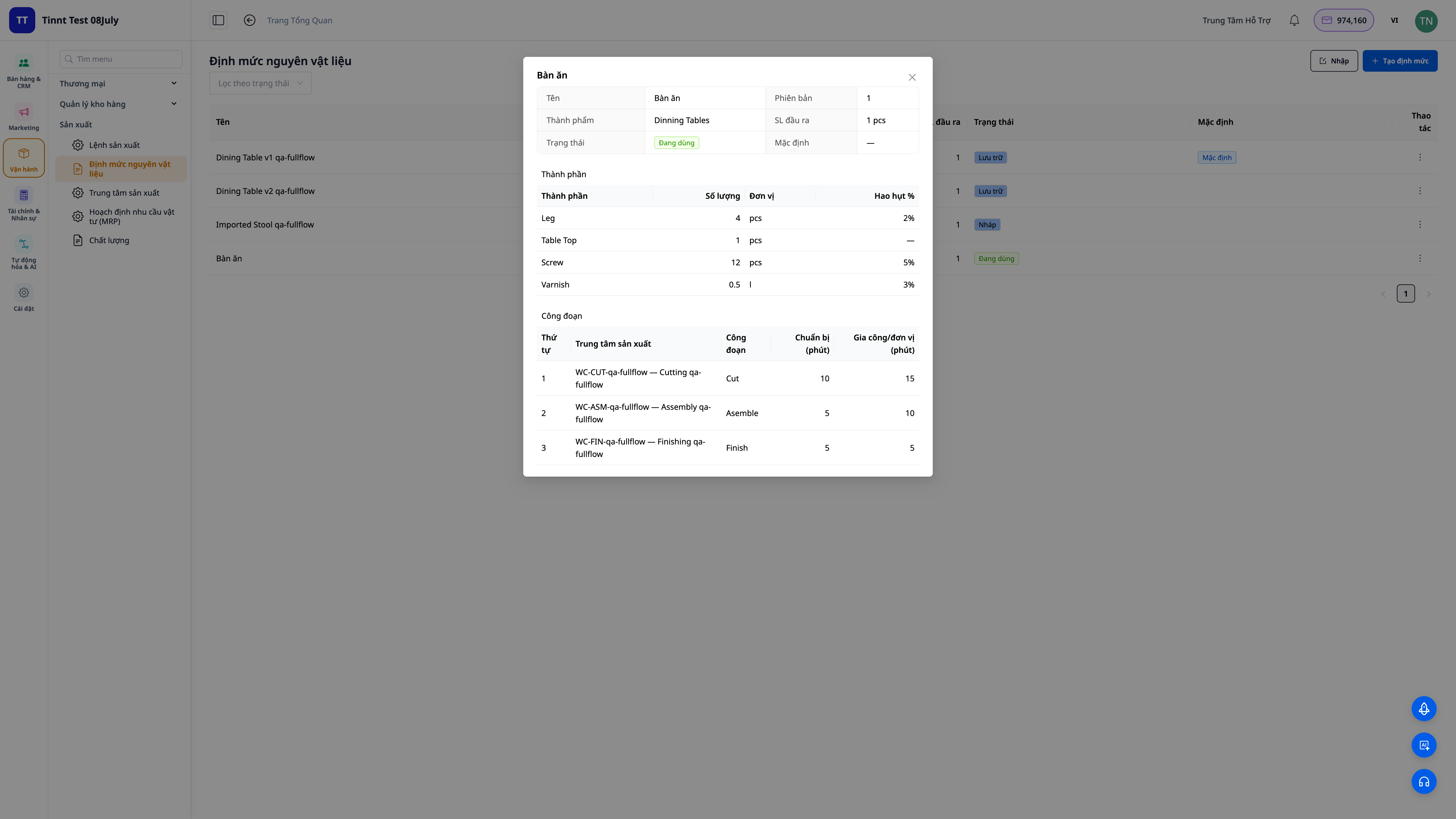
- Þegar verkinu er lokið, til langtímanotkunar : teljið upp hvert efni (magn, eining, % tap) og hvert stig (hvaða teymi vinnur verkið, undirbúningstími + keyrslutími).
- Margþætt stig : íhlutur í formúlunni getur verið hálfunnin vara með sína eigin formúlu — kerfið þróast í gegnum öll stigin.
- Virkja þegar tilbúið : geymdu margar útgáfur af uppskriftinni, notaðu aðeins virku útgáfuna.
2. Framleiðslupantanir reikna sjálfkrafa út efni og kostnað seldra vara.
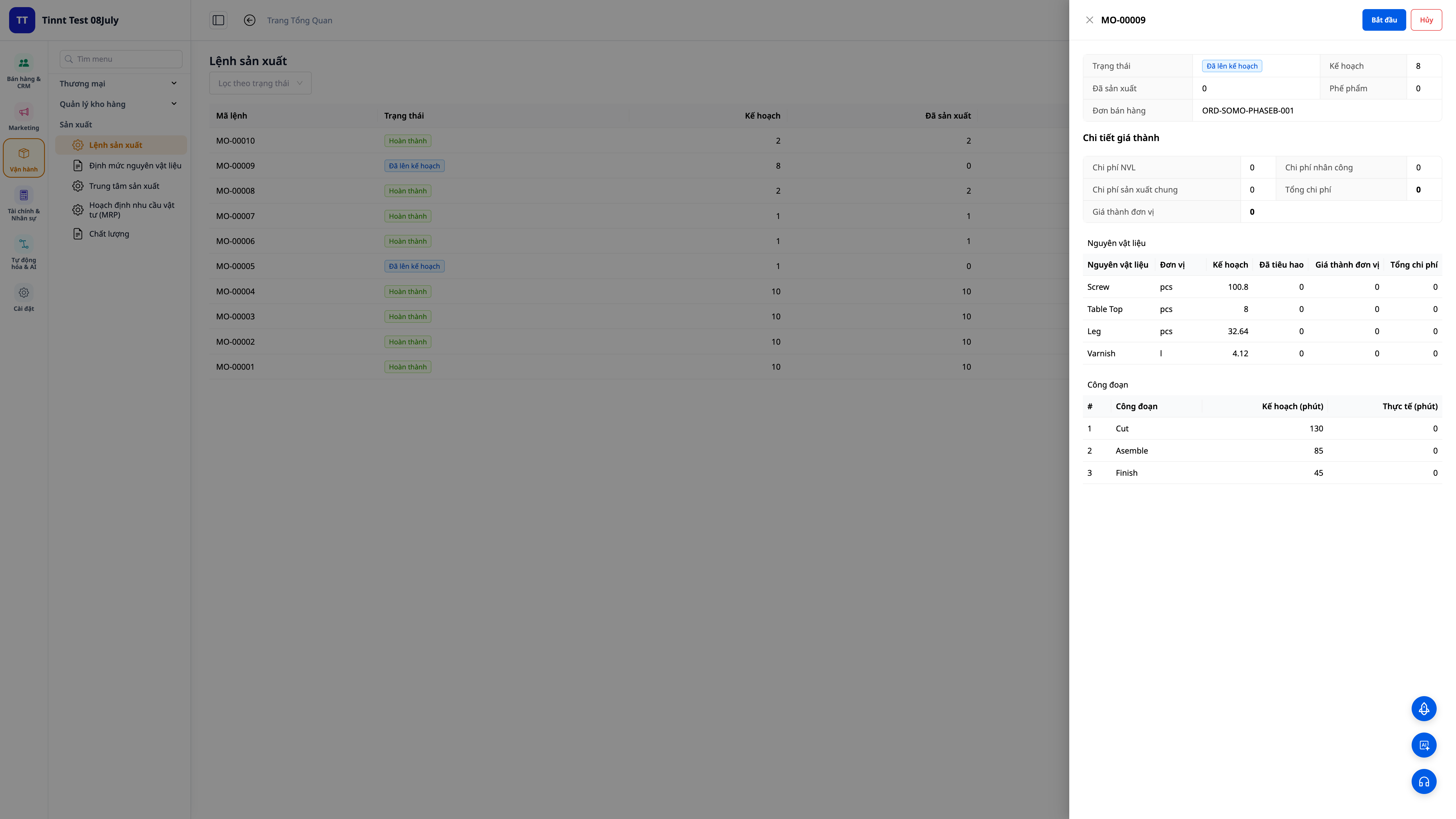
- Sjálfsmynduð formúla : veldu vöru, formúlu, magn — kerfið reiknar út rétt magn innihaldsefna og nauðsynleg skref (þar með talið tap).
- Birgðafrádráttur í upphafi : efni er dregið frá birgðum þegar smellt er á Byrja; skortur á efni veldur tafarlausri viðvörun.
- Reiknaðu kostnað við seldar vörur við lok framleiðslu : sláðu inn framleitt magn og raunverulegan tíma — kerfið reiknar út einingarkostnað við seldar vörur = (efni + vinna + álag) ÷ framleitt magn og fullunnin vara er geymd í vöruhúsinu á nákvæmlega því verði.
3. Kostnaður við seldar vörur (COGM) er skráður beint í bókhaldsbækur — reiknaður nákvæmlega út frá raunverulegri framleiðslu.
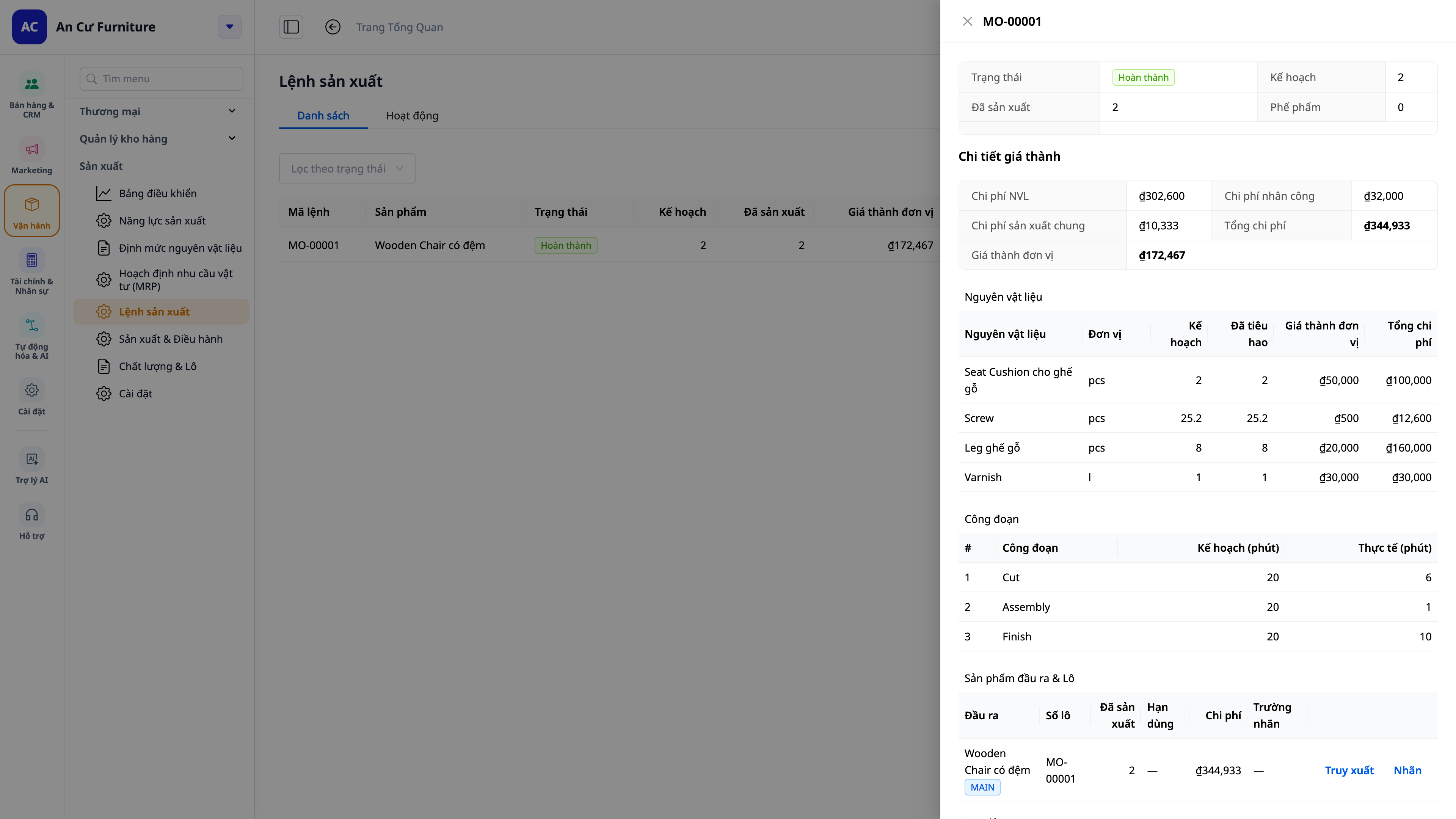
- Engar fleiri fullunnar vörur með núllkostnaði : sjálfframleiddar vörur hafa alltaf kostnaðargrundvöll, þannig að kostnaður seldra vara (COGS) og hagnaðar-/tapskýrslur eru nákvæmar.
- Reiknaðu nákvæmlega út kostnað við seldar vörur frá verksmiðjunni : fjöldi framleiddra hluta, fjöldi gallaðra hluta og vinnustundir sem starfsmenn skráðu á hverju stigi eru allir rétt reiknaðir inn í kostnað við seldar vörur fyrir lotuna — engin þörf á að endurskrifa af pappír í lok dags, sem myndi valda frávikum.
- Sjálfvirk dagbókarfærsla : Kostnaður við seldar vörur (COGM) er sjálfkrafa skráður í höfuðbókina, í samræmi við bókhaldskerfið þitt.
- Bókhald og framleiðsla eru samþætt : engin handvirk afstemming milli hugbúnaðarforritanna tveggja er nauðsynleg.
4. Innkaupa- og framleiðsluáætlun (MRP) — þar með taldar sérpantanir.
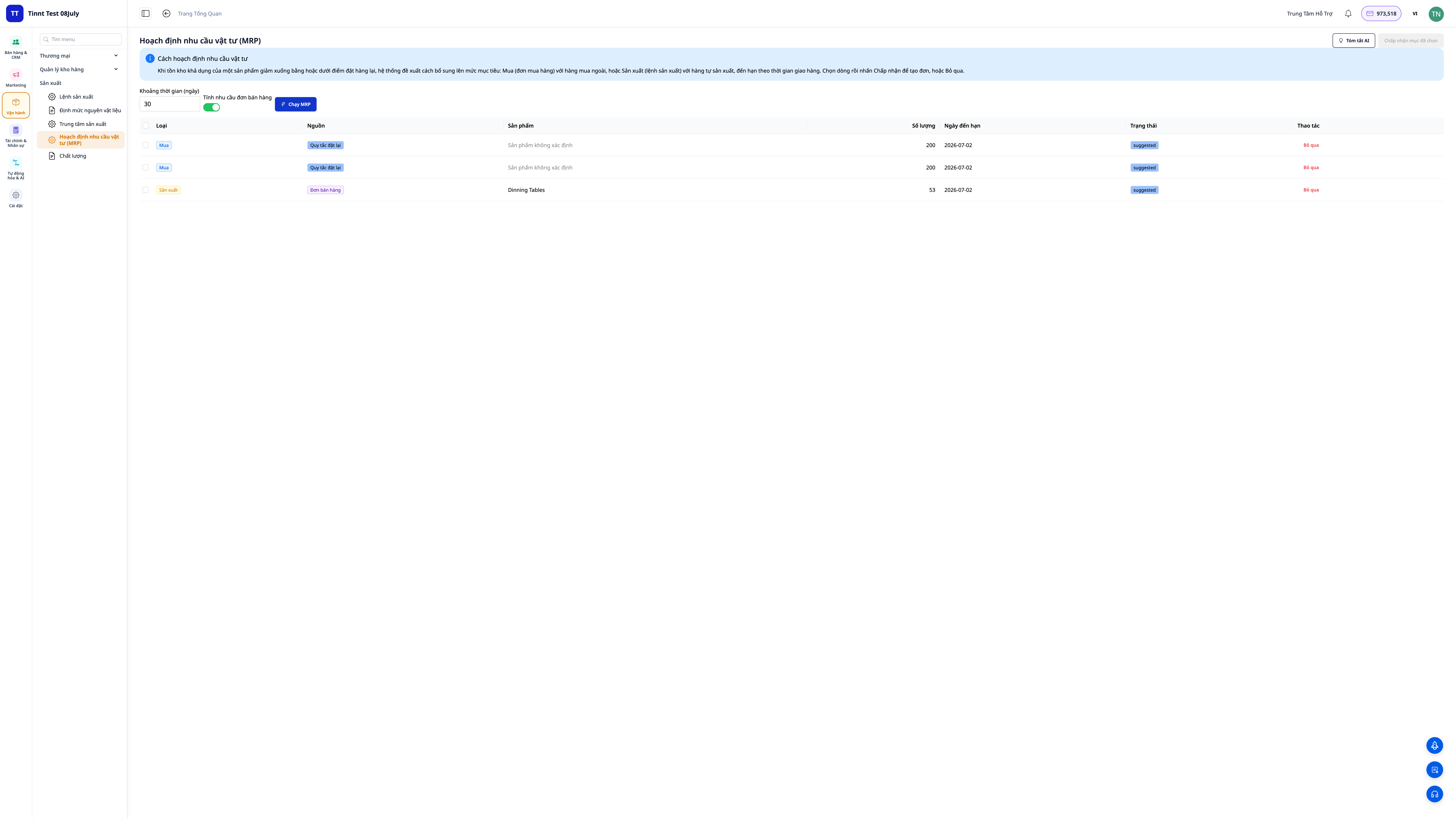
- Stillið birgðastig (lágmark/endurstillingarpunkt/markmið) fyrir hverja vöru og keyrið síðan vöruáætlun (MRP): kerfið ber saman eftirspurn við birgðir og leggur til innkaupapantanir (til að kaupa) og framleiðslupantanir (til að framleiða).
- Fyrir opnar sölupantanir : virkjaðu „takið með eftirspurn úr sölupöntunum“ til að áætla út frá pöntunum viðskiptavina — kerfið dregur pantað magn frá birgðum og framleiðslumagni og leggur til að vantar magn sé unnið rétt.
- Vitaðu hvers vegna þú færð tillögu : í hverri tillögu ætti að koma skýrt fram upprunann (birgðastig, sölupöntun eða hvort tveggja).
5. Framleiðsla eftir pöntun — tengd beint við sölupantanir.
- Frá sölupöntuninni : opnaðu pöntunina, skoðaðu flipann Framleiðsluáætlun — þar sést hversu mikið hefur verið pantað, hversu mikið er til á lager, hversu mikið er verið að framleiða og hversu mikið er enn eftir. Smelltu á „Stofna framleiðslupöntun“ fyrir þær vörur sem vantar; pöntunin er tengd beint við þá sölupöntun.
- Fylgstu með framvindu : framvindulínan á sölupöntuninni mun sýna „Í framleiðslu“ og síðan „Tilbúið“ þegar því er lokið; vingjarnleg áminning verður gefin við afhendingu ef framleiðsla er ekki enn lokið (án þess að koma í veg fyrir að þú getir afhent).
6. Gæðaeftirlit og kostnaðarfrávik
- Gæðaeftirlit : Skráið skoðanir við móttöku hráefnis, meðan á framleiðslu stendur eða á fullunnum vörum (staðist/fallið, aðgerðir gerðar: samþykkja/endurvinna/farga/setja í sóttkví). Opnið fráviksskýrslu (NCR) með leiðréttingaraðgerðum og lokið henni þegar henni er lokið.
- Mismunur frá staðlinum : Ef staðlaður kostnaður er settur fyrir vöruna sýnir hver lokið pöntun greinilega mismuninn (raunverulegur kostnaður samanborið við staðalinn fyrir efni, vinnu og rekstrarkostnað) — sem leiðir strax í ljós hvers vegna lota fer yfir eða undir fjárhagsáætlun.
💡 Aðstoðarmaður gervigreindar hjálpar til við að : útskýra kostnaðarfrávik, setja fram leiðréttingaráætlanir (CAPA) og túlka niðurstöður MRP á auðskiljanlegu máli.
7. Áætlanagerð byggð á raunverulegri afkastagetu — Gantt-rit áætlanagerð
Þetta snýst ekki bara um að vita hvað á að gera, heldur líka hvenær á að gera það : að koma á fót vélum/framleiðslueiningum ásamt vinnuáætlunum, skipuleggja ferla samkvæmt endanlegri afkastagetu og teikna Gantt-rit — hvert ferli er eins og súla á tímalínunni sem er úthlutað réttri vél/einingu.
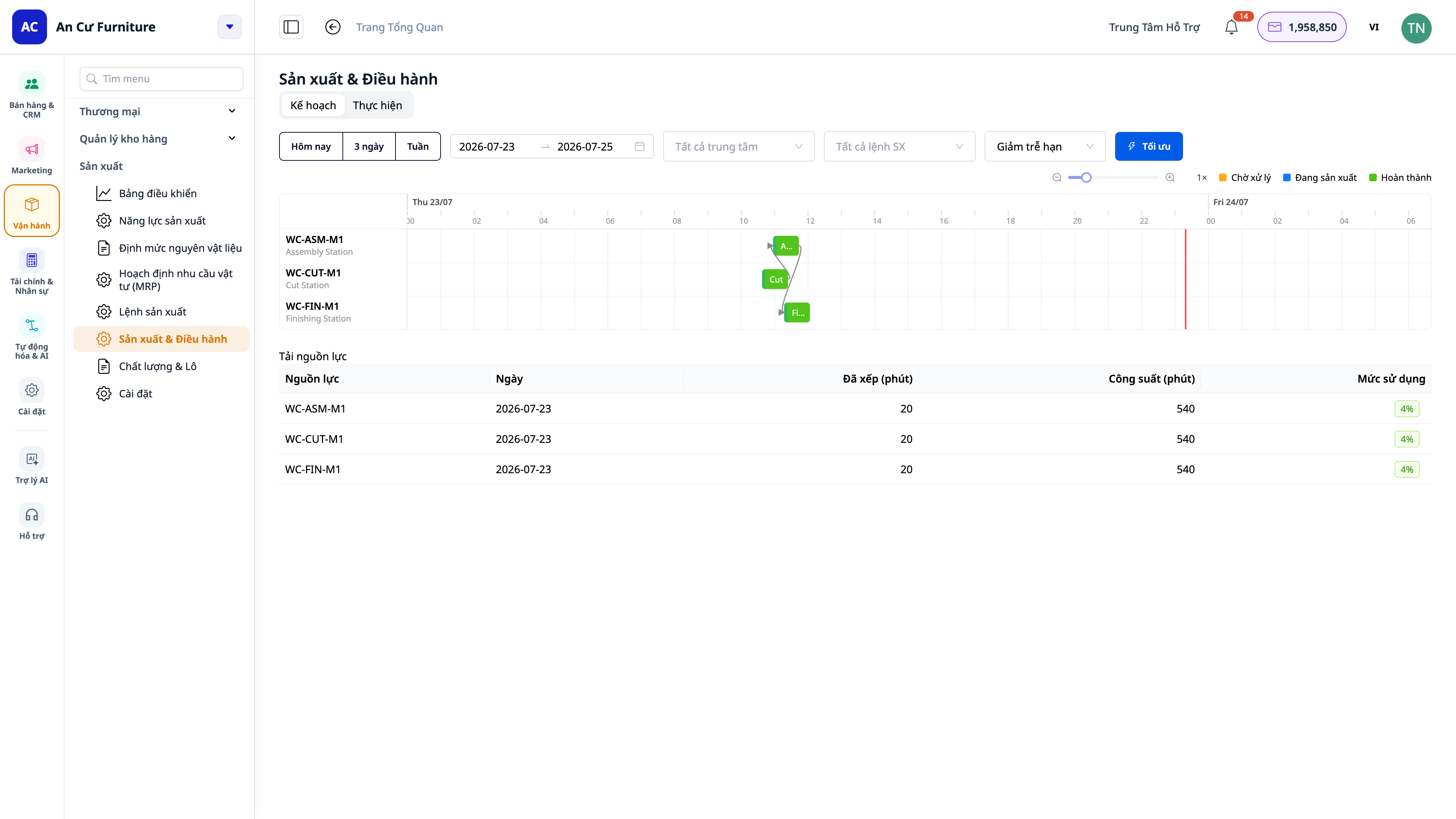
- Skoða eftir tímaramma : Smelltu á Í dag / 3 dagar / vika (eða veldu dagabil) til að ramma inn það tímabil sem þú vilt sjá.
- Sjónræn áætlanagerð : sjáðu fyrir flöskuhálsa, greindu hvaða teymi eru ofhlaðin af vinnu og sjáðu áætlaðan lokadag fyrir hvert verkefni.
- Takið með skiptitíma : þegar vél/sett skiptir úr einni vöru yfir í aðra og þarfnast þrifa-/stillingartíma — þessum tíma er tekið með í reikninginn til að gera áætlaðan afhendingardag raunhæfari.
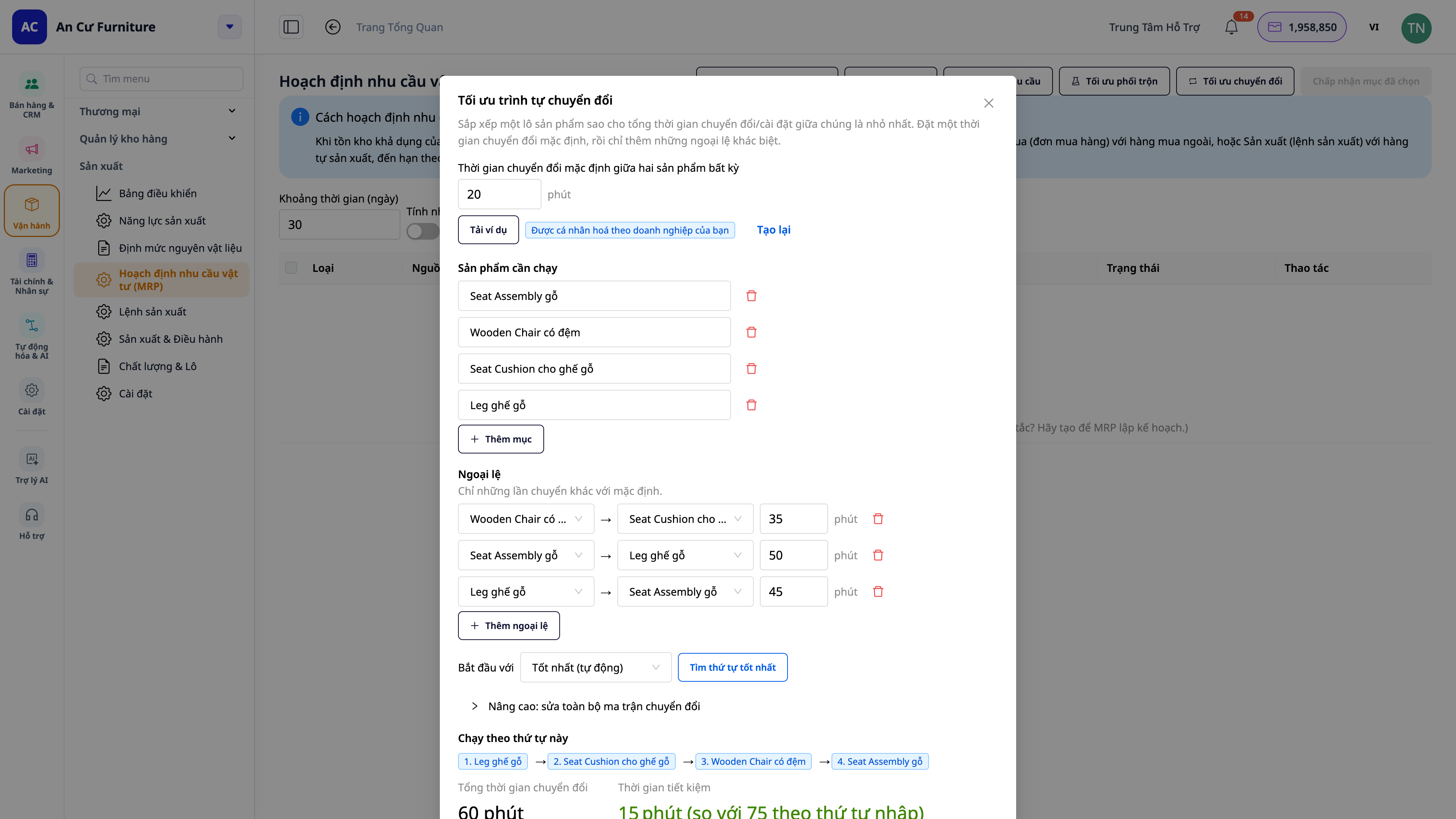
- Kostir : Lofar raunhæfum afhendingardegi, kemur í veg fyrir að eitt teymi sé ofhlaðið með vinnu og dregur úr niðurtíma vegna skipta um starf.
8. Rauntíma verkstæðisskjár (MES) — vinnustöð fyrir iðnaðarmenn og innleiðingarnefnd
Þetta er skrefið til að færa framleiðslu beint á verksmiðjugólfið . Kveiktu á „Rauntíma verksmiðjuvöktun“ í framleiðslustillingum með einum rofa og opnaðu síðan verksmiðjuvöktunarforritið á spjaldtölvunni á hverri stöð (og stórum veggfestum skjá fyrir alla línuna).
Vinnustöð fyrir rekstraraðila — snertiskjár, forrit sem hægt er að keyra með því að smella á „snerta til að keyra“, engin þörf á að fletta í gegnum CRM hugbúnað:
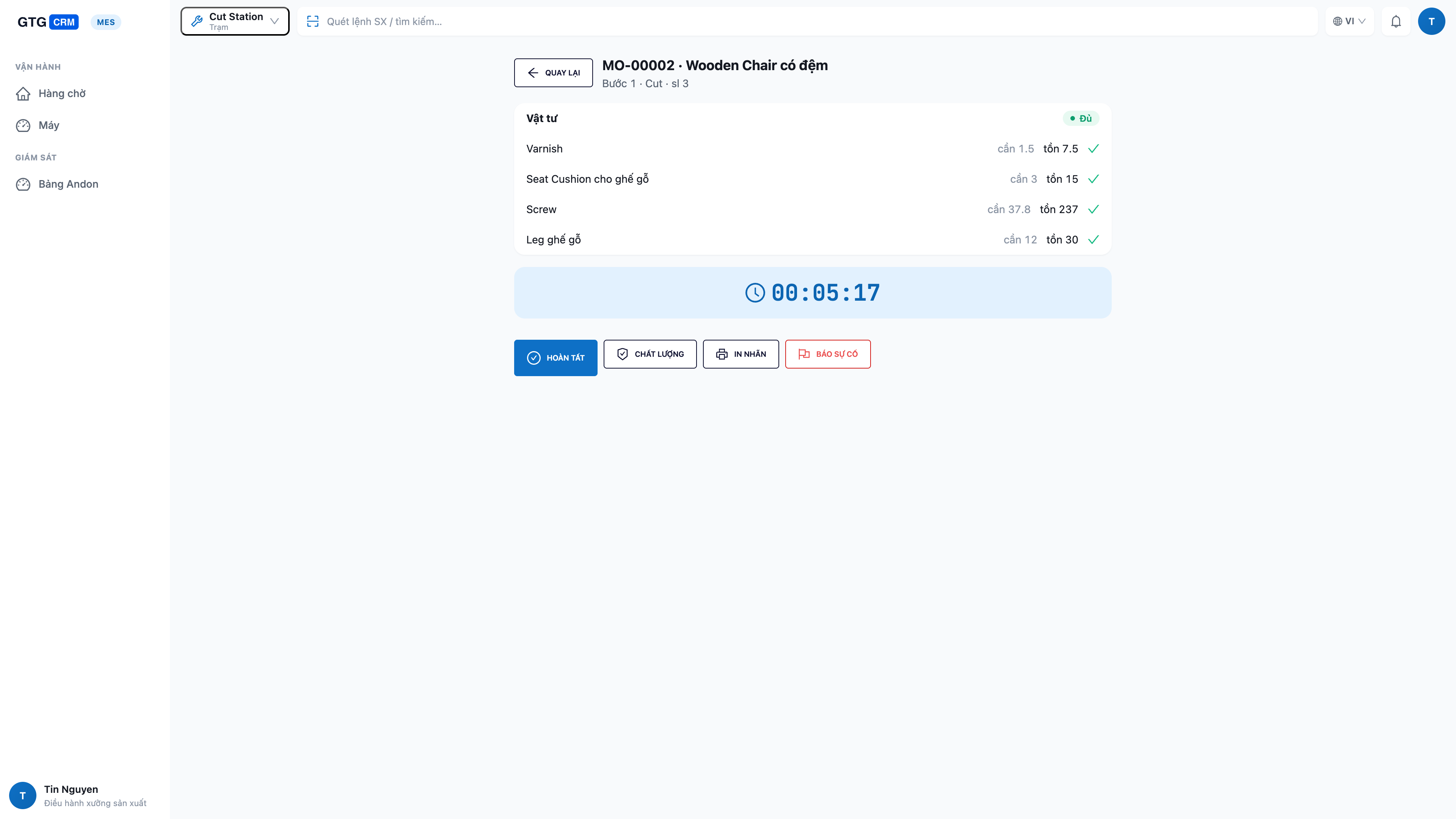
- Ég sé aðeins vinnu stöðvarinnar minnar : biðraðir fyrir tiltekin verkefni þeirrar stöðvar og stöðuna „tilbúinn“ sem birtist fyrir ofan höfuðið á mér.
- Athugaðu efnið áður en þú byrjar á verkefni: athugaðu strax hvort þú hafir nægilegt efni (hversu mikið vantar / hversu mikið er eftir / hversu mikið vantar) — ekki byrja á verkefni og uppgötva svo að þú ert að skortir.
- Byrja → Ljúka á staðnum : ýttu á Byrja , þegar því er lokið ýttu á Ljúka og sláðu inn fjölda lokiðra verkefna, fjölda misheppnaðra verkefna og niðurtíma — gögnin eru þegar í stað færð inn í kerfið og beint bætt við kostnað seldra vara.
- Staða vélarinnar innan seilingar : skiptu á milli keyrslu/óvirkrar/rofa/biðstöðu beint á skjánum.
- Bilanatilkynning með einni snertingu (andon) : bilun í vél eða efnisskortur — ein snerting á hnapp sendir tafarlausa viðvörun til stjórnenda og útrýmir þörfinni á að leita að einhverjum.
- Gæðaeftirlit og prentun lotumerkja á stöðinni : þegar þörf krefur, framkvæma gæðaeftirlit og prenta lotumerkja á staðnum.
Stjórnborð verksmiðjunnar (Andon) — stór skjár fyrir alla framleiðslulínuna:
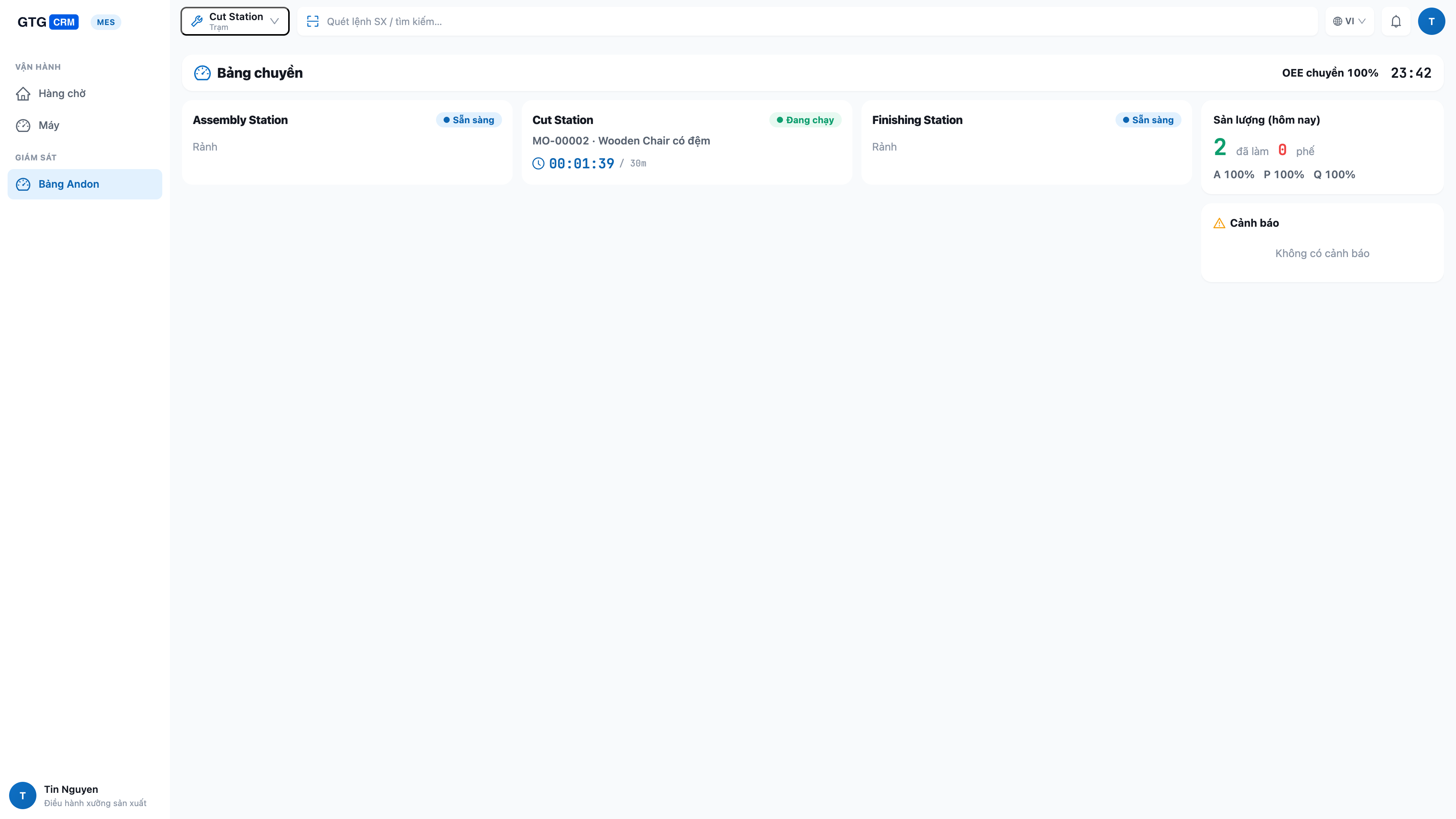
- Allt flutningsferlið í hnotskurn : hver stöð með rauntíma stöðu (í gangi/óvirk/skipt/stöðvuð), núverandi verkefni og framvindu.
- Vandamál eru strax greind : hvaða stöðvar eru niðri og hvar eldsneytisskortur er, eru auðkennd svo hægt sé að bregðast við þeim tafarlaust.
- Framleiðni og afköst búnaðar (OEE) fyrir alla framleiðslulínuna : fjöldi fullunninna hluta, fjöldi gallaðra hluta og afköstavísitala búnaðar (OEE) fyrir alla línuna, stöðugt uppfærð.
- Sjálfvirkar vélar og handavinna deila einni mælaborði : hvort sem ferlið er sjálfkrafa ræst af vélinni eða framkvæmt handvirkt af starfsmanninum, birtist allt á sama mælaborðinu — hentar bæði fyrir verkstæði tengd vélum og „vélknúin“ verkstæði.
ℹ️ Skýr úthlutun valds : rekstraraðilar keyra aðeins ferlana á úthlutaðri stöð; skipulagning og útgáfa fyrirmæla er í höndum framleiðslustjóra — allir vinna sitt starf, á öruggan og ábyrgan hátt.
9. Kopar/aukaafurðir, brotaeiningar og loturakning
- Aukaafurðir : Lotuframleiðsla getur framleitt margar gerðir af fullunnum vörum eða aukaafurðum — tilgreinið þær beint í uppskriftinni.
- Broteiningar : að slá inn oddatölu (t.d. 1,25 kg) mun ekki lengur brjóta vörulistann.
- Rakning lotna + ættbók + gildistími : Hver lota hefur sína eigin lotu, sem gerir þér kleift að rekja hvaða lota af hráefni var notuð (ættbók) og fá viðvaranir áður en fullunnin vara/hráefni renna út fyrir gildistíma.
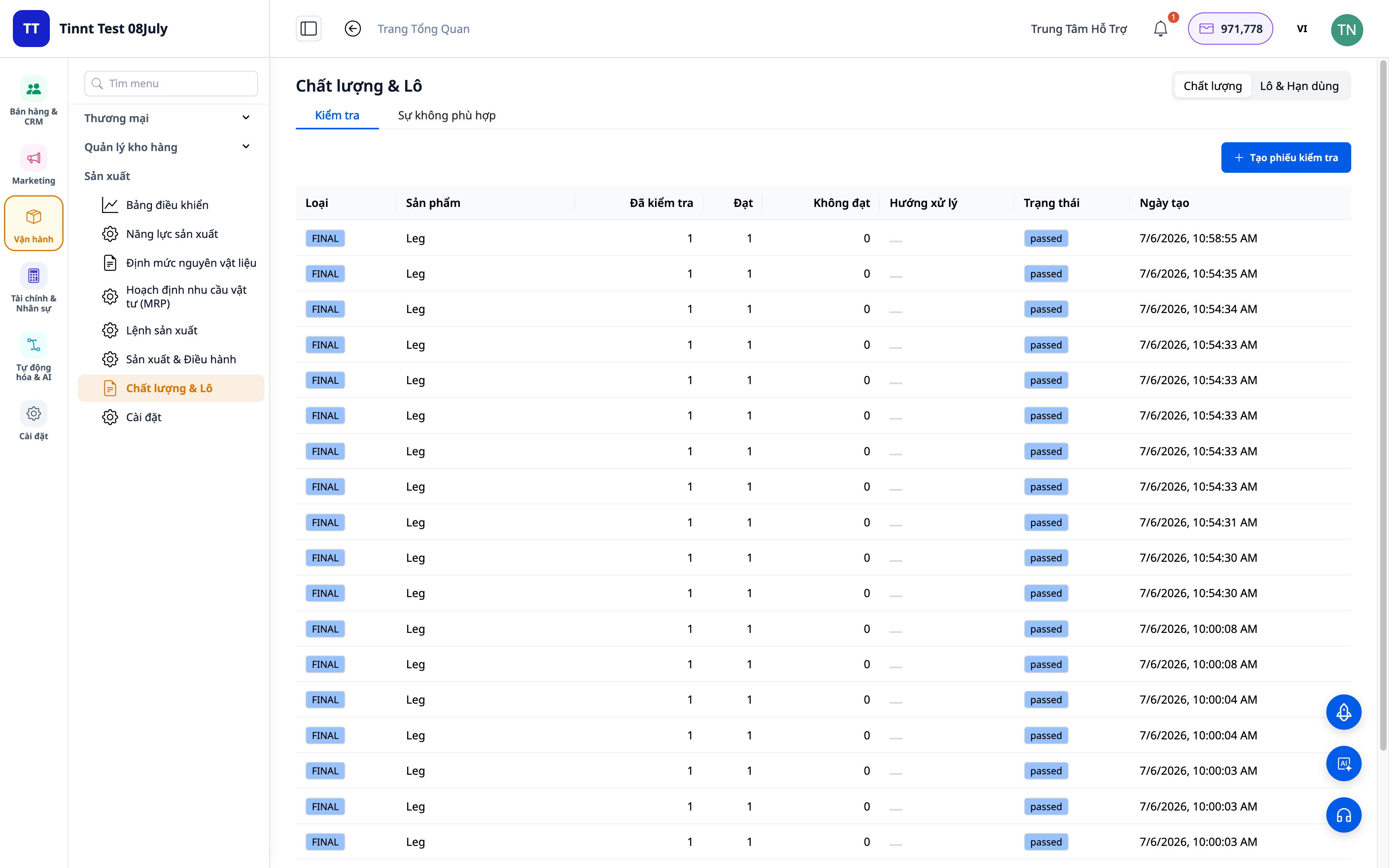
- Kostir : Ef upp koma gæðavandamál er hægt að rekja vandamálið til upptöksins innan nokkurra mínútna; koma í veg fyrir að vörur renni út.
10. Snjöll MRP ráðgjöf, OEE/SPC og lotuprentun.
- Ráðgjafi í MRP : leggur til öruggar birgðastöður, framleiðslulotustærðir, blöndun efnis, bestun á vélaskiptum og eftirspurnarspá — kynnt á skýru máli, með réttum vöruheitum , ekki erfiðum kóðum.
- OEE/SPC : Eftirlit með afköstum búnaðar og breytileika í gæðum til úrbóta.
- Prentun á lotumiðum (PDF) : prentun á lotumiðum fyrir fullunnar vörur til álímingar og rakningar.
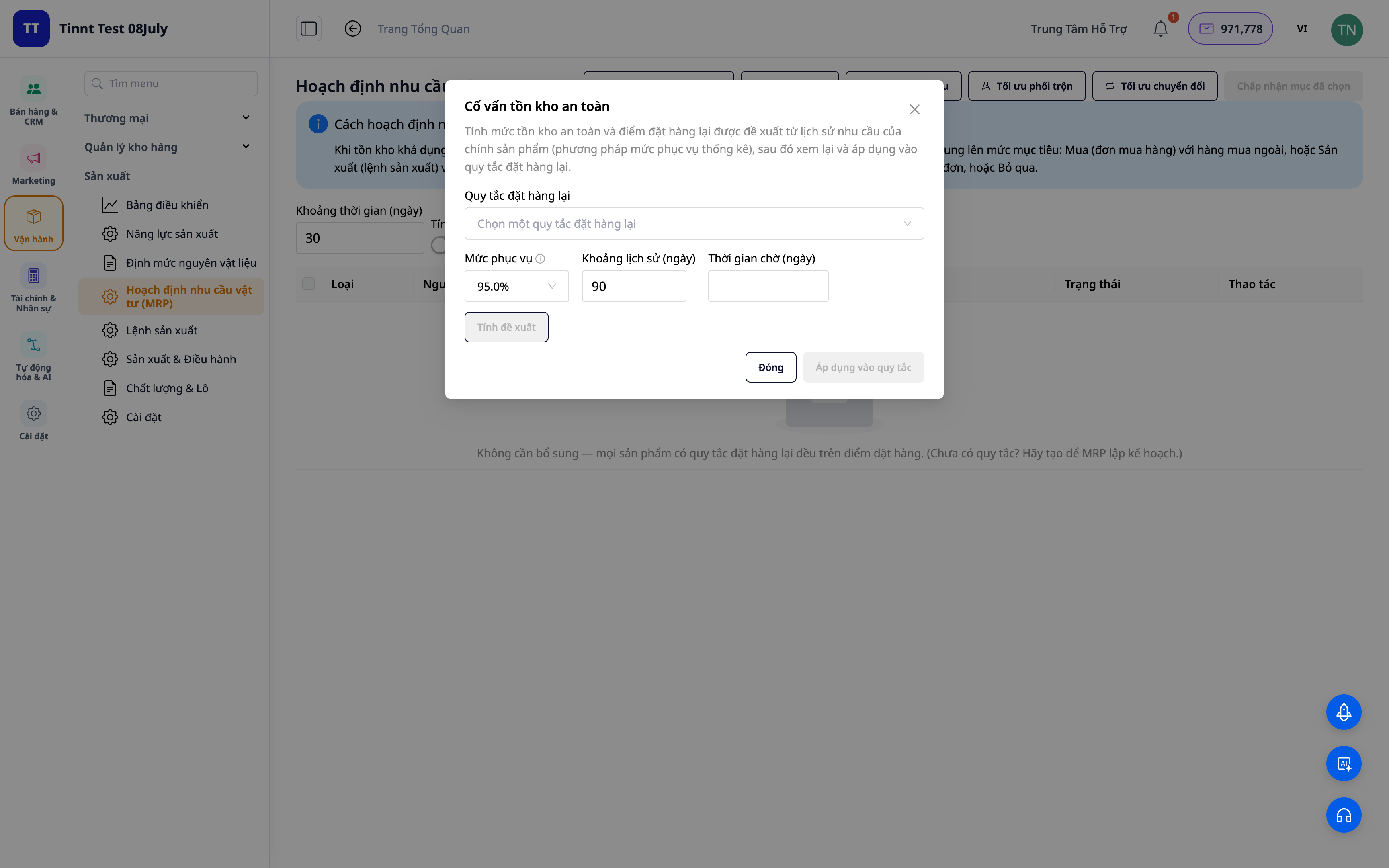
- Kostir : Ákvarðanir um kaup/framleiðslu/birgðahald byggðar á skýrum tillögum, minni sóun og minni niðurtími.
Ávinningur fyrir fyrirtæki
Fjölþátta efnislisti (BOM) — Staðlaðar formúlur, sem tryggja að allir fái réttar forskriftir og kostnað.
Sjálfvirk kostnaðarútreikningur fyrir framleiðslupantanir — Að vita nákvæmlega hvað kostar að framleiða vöru — að ákvarða rétt söluverð.
Beinn kostnaður við seldar vörur (COGM) — Nákvæm skýrslugerð um hagnað og tap, engar fleiri fullunnar vörur með „núllvirði“.
Fjöldi fullunninna vara/fjöldi gallaðra vara er skráður á hverju stigi — Kostnaður við seldar vörur er reiknaður nákvæmlega samkvæmt raunverulegum tölum, án frávika þar sem hann er færður aftur inn í lok dags.
MRP (stjórnunarferli) byggt á pöntunum viðskiptavina — Engin efnisþurrð í framleiðslu, engin birgðabinding.
Bein-til-beinnar framleiðsla fyrir einstakar sölur — Að gera nákvæmlega það sem viðskiptavinurinn þarfnast, þegar hann þarfnast þess, og afhenda án mistaka.
Gæðaeftirlit + frávik — Stjórna tapi, vita strax hvaða framleiðslulota er óarðbær og hvers vegna.
Gantt-áætlanagerð byggð á afkastagetu + breytingum — Lofar raunhæfum afhendingardögum, kemur í veg fyrir ofhleðslu á einingum og dregur úr niðurtíma.
Rauntíma verkstæðiseftirlit (MES) — Sjáðu hvar færibandið er staðsett núna; starfsmenn tilkynna/klára verkefni á staðnum.
Stjórnborð allrar framleiðslulínunnar — Vandamál greinast strax, stjórnendur taka á þeim tafarlaust, engin þörf á að flýta sér niður í verksmiðjuna til að biðja um hjálp.
Rakning lotna + mæling á gildistíma — Rakning að rót vandans og kom í veg fyrir útrunnar vörur.
Ráðgjafi í MRP + OEE/SPC — Minnkaðu sóun, lágmarkaðu niðurtíma, viðhalddu nægilegu birgðum.
Fyrir hverja hentar þetta?
- Lítil og meðalstór framleiðsluverksmiðjur : matvæli, drykkjarvörur, snyrtivörur, fatnaður, húsgögn, vélar, prentun, heimilisvörur.
- Verksmiðjan er með margar stöðvar/framleiðslulínur sem krefjast rauntímaeftirlits með framvindu og úthlutunar afkastagetu, og löngunin til að forðast að þurfa að fara niður í verksmiðjuna til að spyrja hverja stöð fyrir sig.
- Verslunareigendur sem framleiða sínar eigin vörur (kökur, handgerðar vörur, unnar vörur) vilja vita raunverulegan kostnað við seldar vörur til að ákvarða verð.
- Fyrirtækið vill hætta að nota aðskilda Excel/framleiðsluhugbúnaðinn sinn og samþætta hann í eitt kerfi fyrir sölu, birgðir og bókhald.
Hvernig byrja ég?
Farðu í Framleiðslu í kerfinu, tilgreindu mælieininguna og framleiðsluteymið, búðu til efnislista (BOM) fyrir vöru og búðu síðan til fyrstu framleiðslupöntunina þína. Viltu stjórna rekstri beint í verksmiðjunni? Virkjaðu "Rauntíma verksmiðjueftirlit" í framleiðslustillingunum og opnaðu síðan forritið Factory Monitor á spjaldtölvu á hverri stöð og stóran skjá fyrir borðið. Ertu með lista yfir efni/efnislista í Excel? Dragðu skrána inn og láttu gervigreindina sjálfkrafa para dálkana saman. Sjáðu skref-fyrir-skref notendahandbókina um framleiðslustjórnun eða lestu raunveruleikasöguna " Frá hráefnum til fullunninna vara - Vitaðu nákvæmlega kostnað seldra vara, verðlagning er ekki lengur ágiskun ."
Prófaðu það frítt — engin þörf á kreditkorti.


