
기능 소개
제품을 만들어 판매하지만 — 빵, 옷, 화장품, 부품 조립 — 매월 말일에도 가장 간단한 질문에 답하지 못합니다: 내 제품 하나를 만드는 데 얼마가 드나요? 원재료는 한 곳에 기록하고, 노무비는 어림잡아 계산하고, 기계 설비 비용은 '추정'합니다. 그리고 지금 바로, 생산 중에 컨베이어 벨트가 어디까지 왔는지, 어느 스테이션이 막혔는지, 어떤 배치가 곧 완료되는지 모릅니다.
오늘부터 더 이상 추측할 필요 없습니다.
GTG CRM에는 사용 중인 재고, 구매, 회계 위에 바로 배치된 생산 관리 모듈이 있습니다. 제품 레시피(자재 명세서 - BOM)를 등록하면 생산 명령이 자동으로 필요한 원자재 수량을 계산하고, 시작 시 재고에서 차감하며, 완료 시 완제품의 원가를 자동으로 계산합니다 = 원자재 + 노무비 + 제조 간접비. 완제품은 해당 가격으로 재고에 입고되며, 원가 전표는 회계 장부에 직접 기록됩니다 — 더 이상 '원가 0'인 완제품은 없습니다.
새로운 업데이트는 생산을 현장까지 확장합니다: 간트 차트로 실제 생산 능력에 따라 일정을 계획하고, 실시간 현장 모니터링 화면(MES) — 각 스테이션의 작업자를 위한 터치스크린 단말기와, 한눈에 전체 라인을 볼 수 있는 벽걸이 대시보드(andon).
기업이 직면한 문제
수첩에 원자재 기록, 머릿속으로 노무비 계산 — 실제 원가를 모르고, 판매 가격을 잘못 책정하며, 이익이라 생각하지만 실제로는 손실
다음 주문에 필요한 원자재가 충분한지 모름 — 생산 중에 재고가 떨어지거나, 묶여있는 원자재 재고로 자본이 묶임
소프트웨어가 계산할 수 없어 '원가 0'으로 완제품 입고 — 손익 보고서 오류, 매출 원가(COGS) 불일치
생산 중에 컨베이어 벨트가 어디까지 왔는지, 어느 스테이션이 막혔는지 모름 — 주문 지연을 알고 나서야 파악, 작업자는 기다리고, 관리자는 현장에 나가 직접 확인해야 함
생산량, 불량 수량, 가동 시간 등을 종이에 기록했다가 하루가 지나서 다시 입력 — 데이터 지연 및 오류, 원가 불일치, 책임 추적 불가
재고, 구매, 회계, 생산이 별도의 소프트웨어에 분산됨 — 여러 번 데이터 입력, 데이터 불일치
GTG CRM은 이 모든 것을 하나의 프로세스로 통합합니다: 레시피 등록 → 일정 계획 → 스테이션별 발주 → 작업자가 현장에서 바로 시작/완료 버튼 클릭 → 원자재 차감 → 원가 계산 → 완제품 입고 → 회계 장부 기록 — 판매 및 청구서 발행을 위해 현재 사용 중인 시스템 내에서 끊김 없이 처리됩니다.
주요 기능
1. 다단계 자재 명세서(BOM) — 제품의 '레시피'
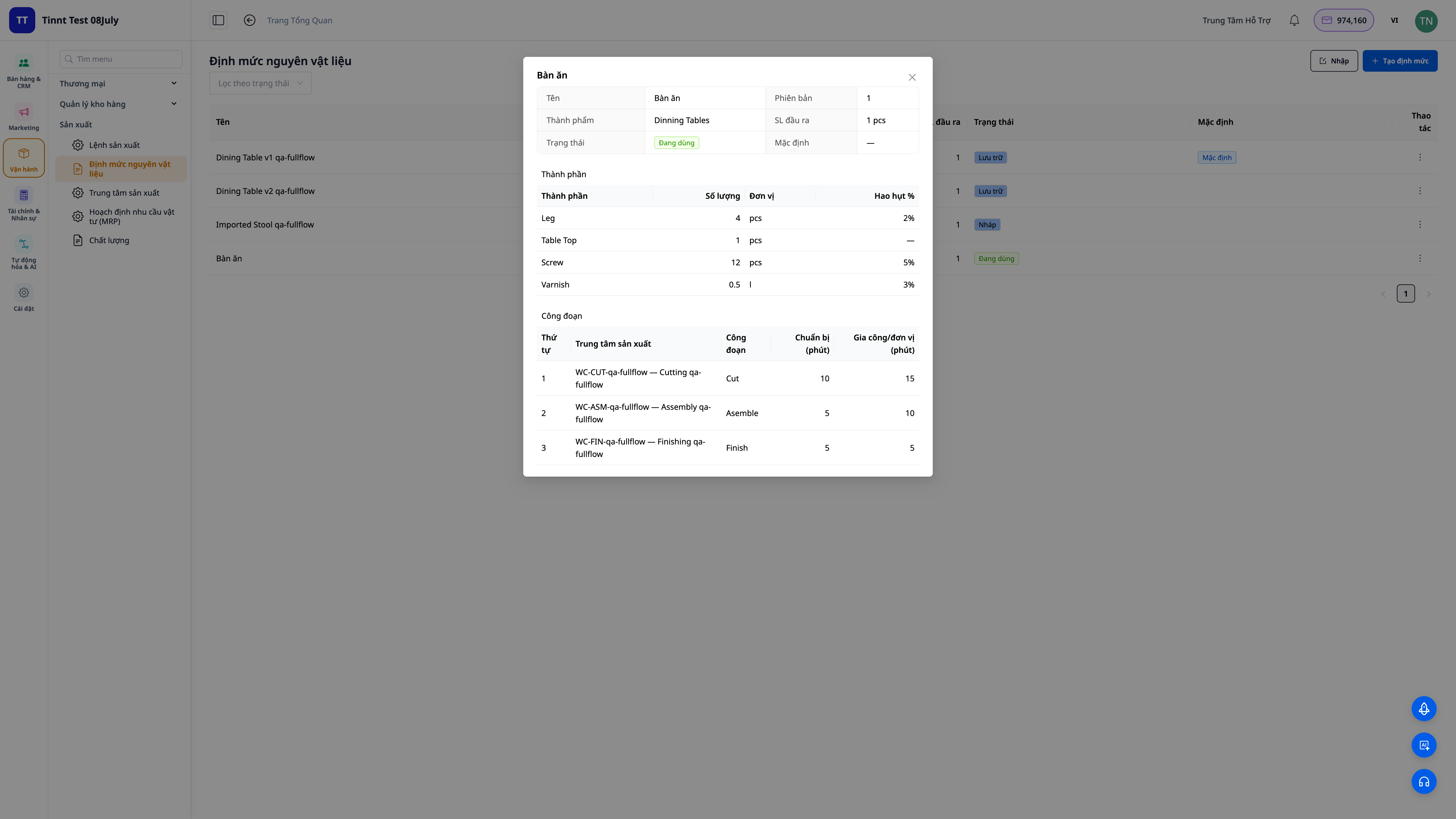
- 한 번 등록, 영원히 사용: 각 원자재(수량, 단위, 손실률)와 공정(어느 팀에서 작업하는지, 준비 시간 + 실행 시간)을 나열합니다.
- 다단계: 레시피 내의 하나의 부품이 자체적으로 별도의 레시피를 가진 반제품이 될 수 있습니다 — 시스템이 모든 단계를 자동으로 펼쳐줍니다.
- 준비 완료 시 활성화: 여러 버전의 레시피를 유지하고, 활성화된 버전만 사용합니다.
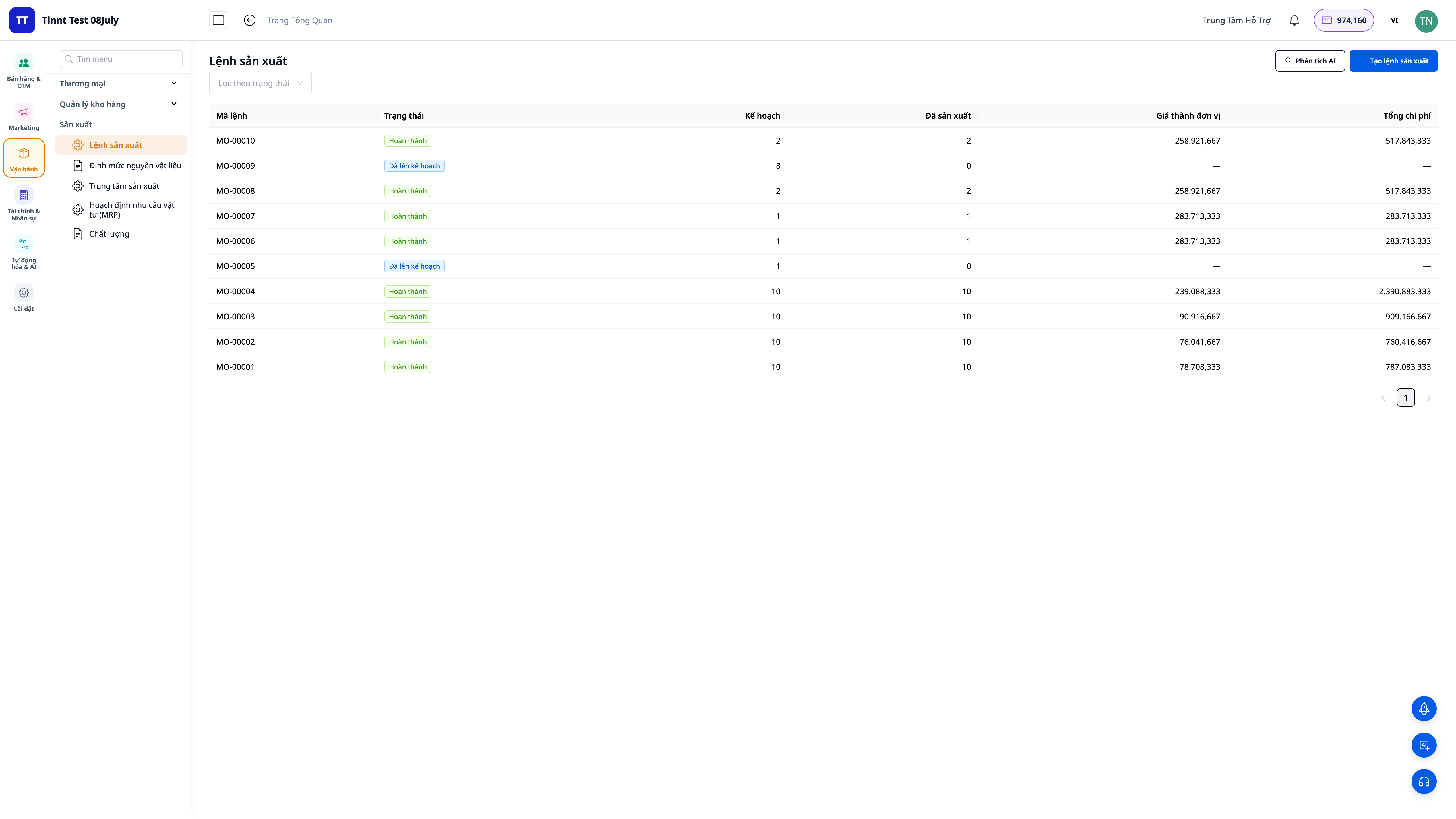
2. 원자재 및 원가를 자동으로 계산하는 생산 명령
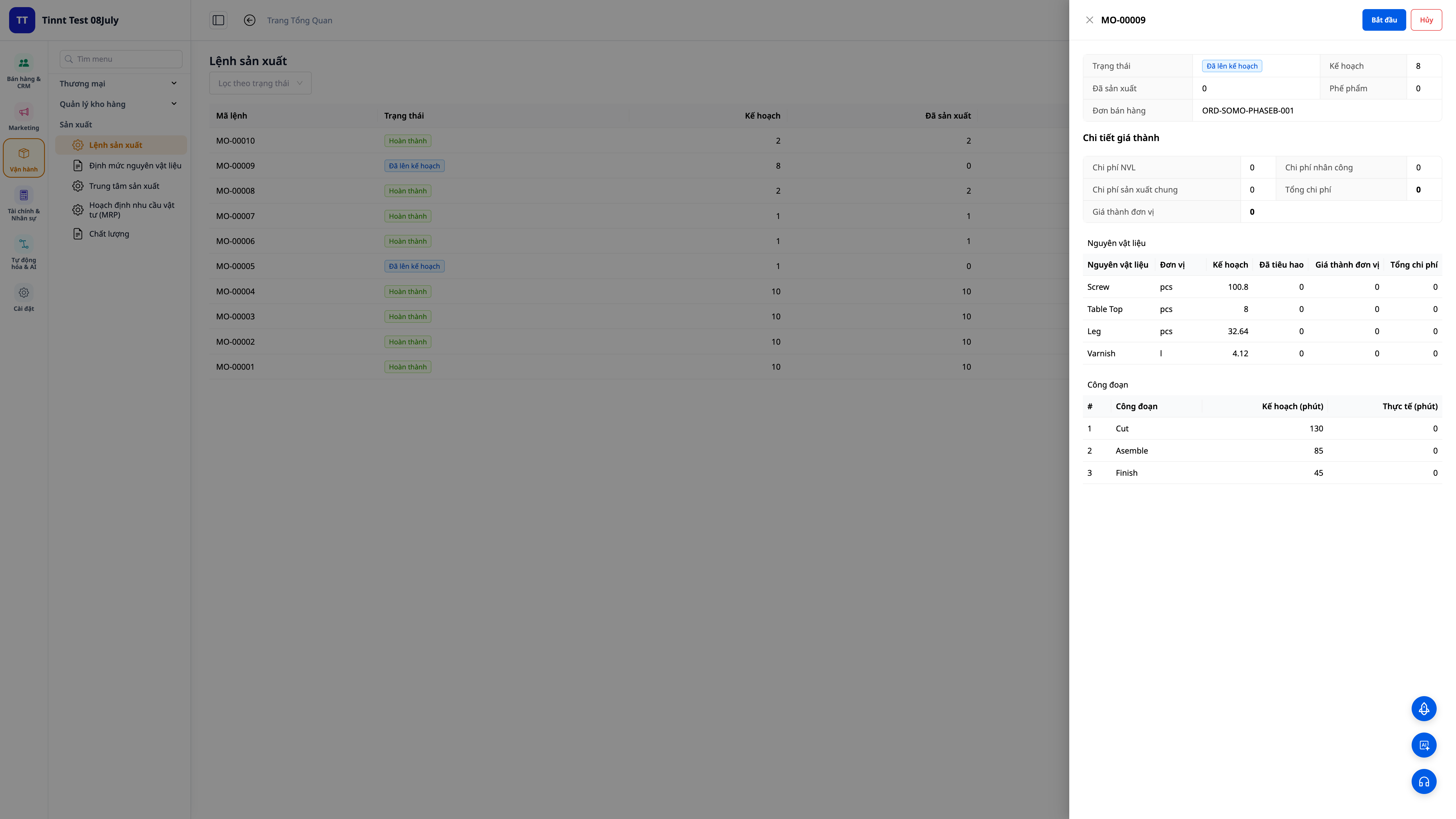
- 자동 레시피 생성: 제품, 레시피, 수량을 선택하면 시스템이 필요한 재료와 공정(손실 포함)의 정확한 양을 계산합니다.
- 시작 시 재고 차감: '시작'을 누르면 재료가 재고에서 차감됩니다. 재료가 부족하면 즉시 경고가 표시됩니다.
- 완료 시 원가 자동 계산: 생산된 수량과 실제 시간을 입력하면 시스템이 단위당 원가 = (재료 + 인건비 + 일반 비용) ÷ 생산 수량을 계산하고, 완성된 제품은 해당 가격으로 재고에 입고됩니다.
3. 원가는 회계 장부에 직접 기록 (COGM) — 실제 생산량에 따라 정확하게 계산
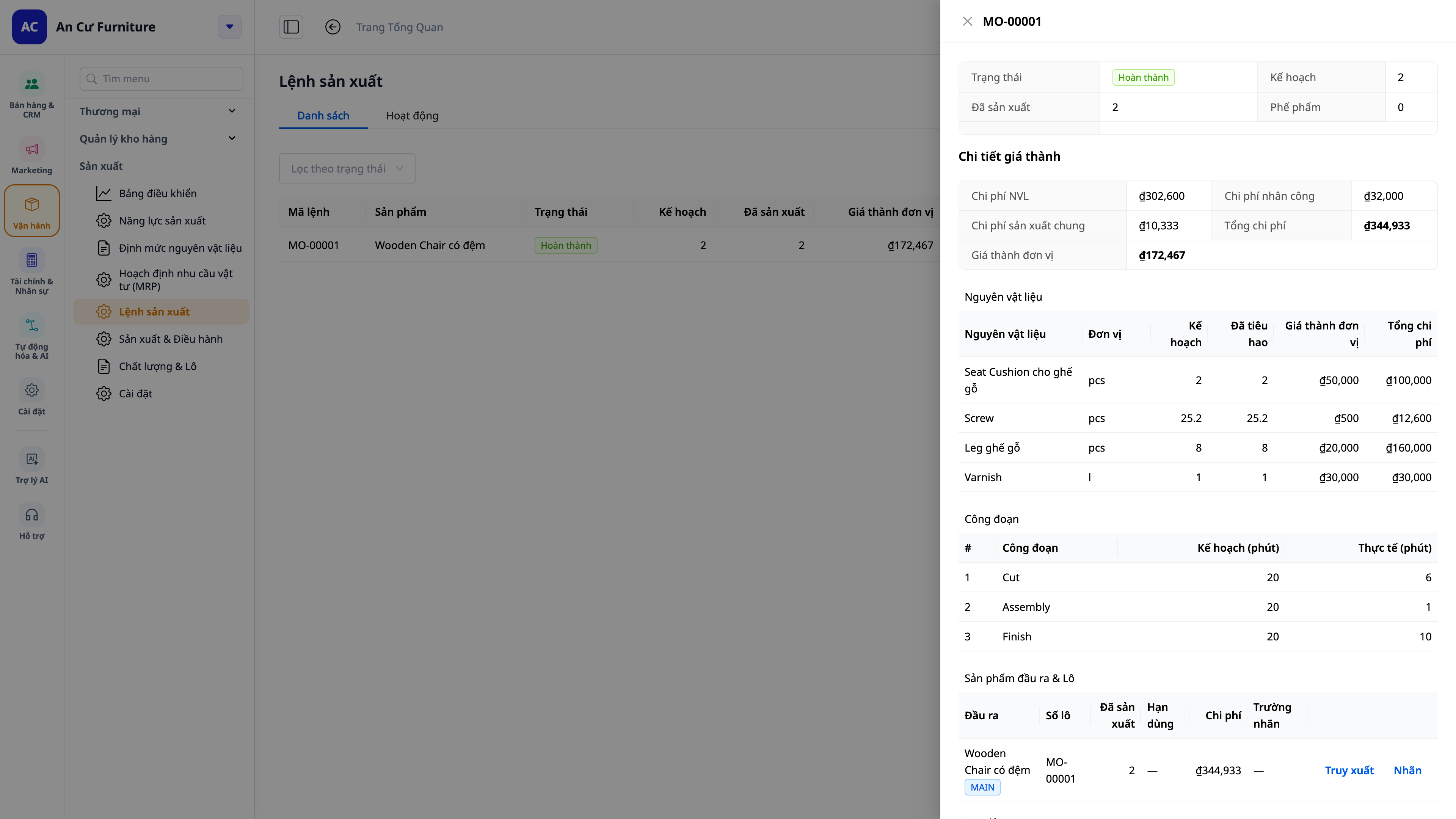
- 0원 완제품 없음: 자체 생산 제품은 항상 원가 기준이 있어 매출 원가(COGS) 및 손익 보고서가 정확합니다.
- 현장에서 직접 누적: 작업자가 각 공정별로 기록한 생산 수량, 불량 수량, 작업 시간은 배치 원가로 정확하게 누적됩니다. 일일 마감 시 종이 기록을 다시 입력하여 수치가 틀리는 일이 없습니다.
- 자동 전표: 완성 생산 원가(COGM)는 자동으로 총계정원장에 기록되어 계정 시스템과 일치합니다.
- 회계와 생산의 통합: 두 소프트웨어 간의 수동 대사 작업을 할 필요가 없습니다.
4. 구매 및 생산 계획 (MRP) — 고객 주문까지 포함
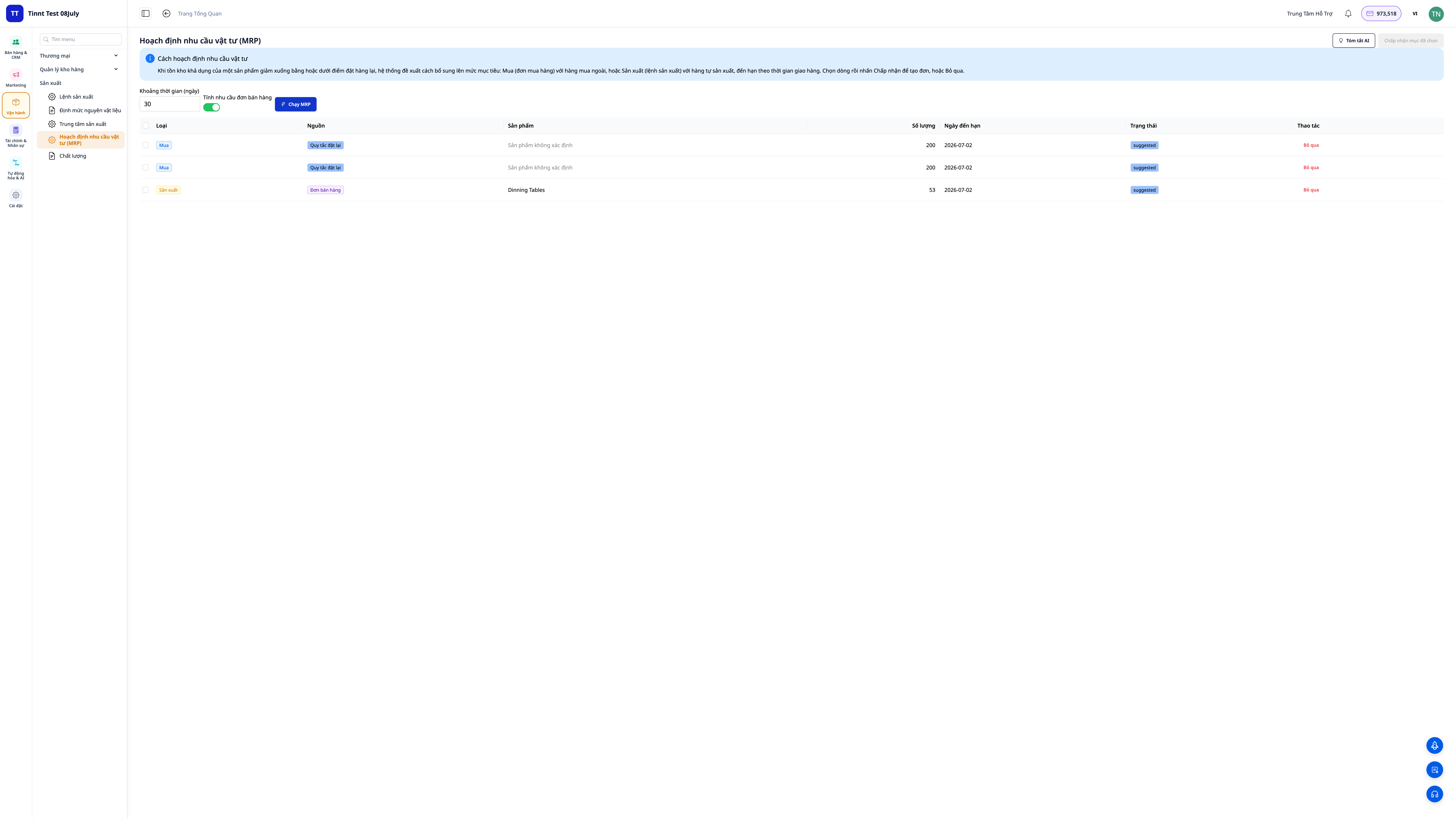
- 각 제품별 **재고 수준(최소/재주문점/목표)**을 설정하고 계획(MRP)을 실행하면, 시스템이 수요와 재고를 비교하여 **구매 오더(구매 필요)** 및 **생산 오더(생산 필요)**를 제안합니다.
- 진행 중인 판매 오더 기준: '판매 오더 수요 포함'을 활성화하여 고객이 주문한 내역에 따라 계획을 수립합니다. 시스템이 주문된 수량, 재고, 생산 중인 수량을 차감하고 부족한 부분만 생산하도록 제안합니다.
- 제안 근거 파악: 각 제안은 출처(재고 수준, 판매 오더 또는 둘 다)를 명확하게 기록합니다.
5. 주문 기반 생산 — 판매 오더에서 직접 연결
- 판매 오더 기준: 오더를 열고 '생산 계획' 탭을 확인하면, 주문 수량, 재고, 생산 중인 수량, 부족한 수량을 알 수 있습니다. 부족한 부분에 대해 '생산 오더 생성'을 클릭하면 해당 판매 오더에 직접 연결됩니다.
- 진행 상황 추적: 판매 오더의 계획 라인에 '생산 중'으로 표시되었다가 완료되면 '준비 완료'로 변경됩니다. 납품 시 생산이 완료되지 않았으면(납품 차단하지 않음) 가볍게 알림을 표시합니다.
6. 품질 관리 및 원가 차이 분석
- 품질 검사: 원료 입고, 생산 중, 또는 완제품에 대한 검사를 기록합니다(합격/불합격, 처리: 수령/재작업/폐기/격리). 부적합 보고서(NCR)를 열고 시정 조치를 취한 후 완료 시 종료합니다.
- 표준 대비 차이: 제품에 대해 표준 원가를 설정한 경우, 각 완료된 오더는 차이(원료, 인건비, 일반 비용에 대한 실제 대비 표준)를 명확하게 표시하여 특정 배치가 예산을 초과하거나 미달한 이유를 즉시 파악할 수 있습니다.
💡 AI 보조 기능: 원가 차이 설명, 시정 조치(CAPA) 초안 작성, MRP 결과 쉬운 언어로 해석.
7. 실제 생산 능력 기반 일정 계획 — Gantt 차트로 조정
무엇을 해야 할지 아는 것뿐만 아니라 언제 해야 할지도 압니다: 기계/생산 팀을 작업 일정(캘린더)과 함께 시작하고, 시스템이 유한한 생산 능력에 따라 단계를 배열하며, 간트 차트를 그립니다 — 각 단계는 담당하는 기계/팀의 타임라인에 있는 막대입니다.
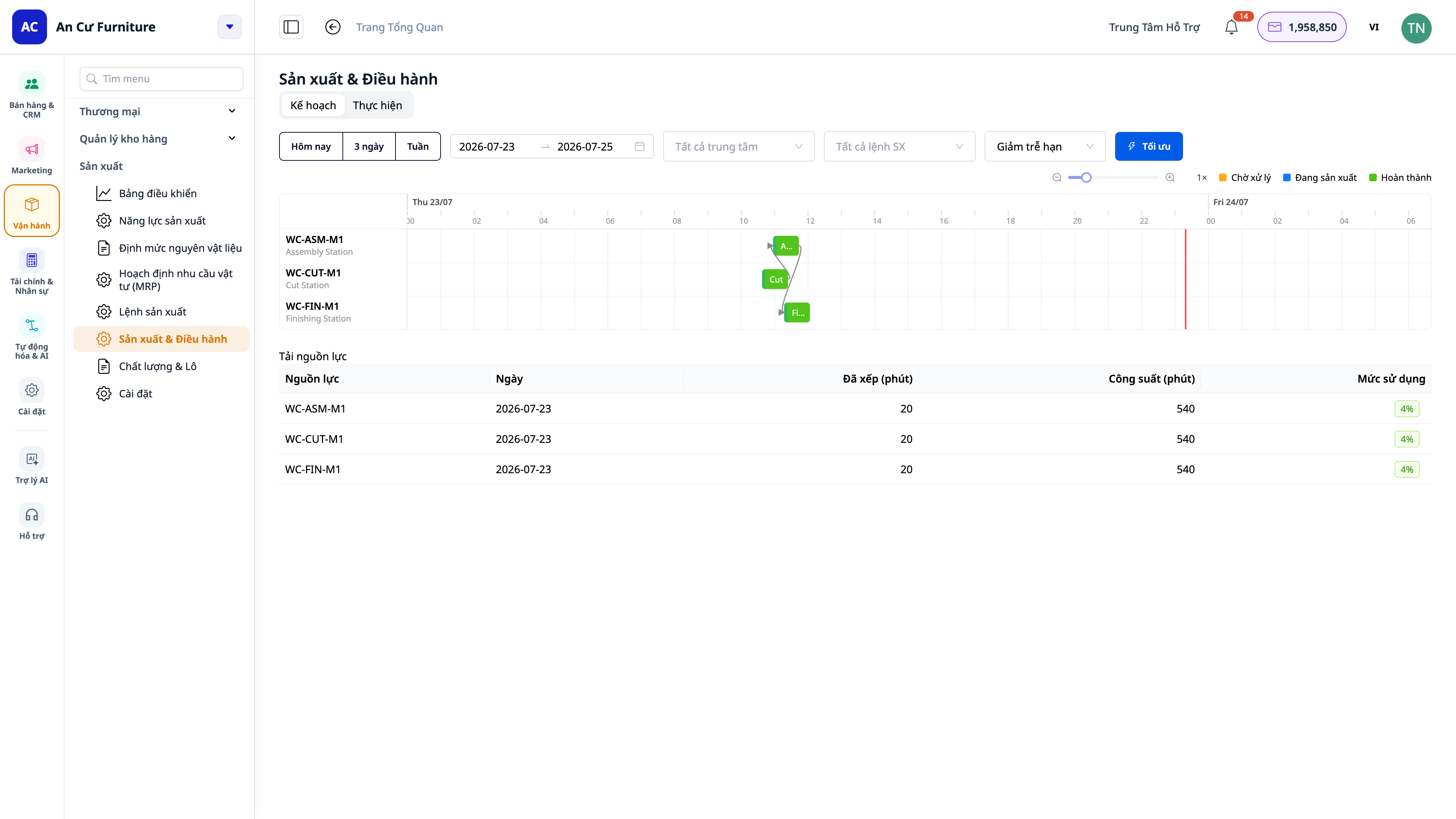
- 시간 프레임별 보기: 오늘 / 3일 / 주(또는 날짜 범위 선택)를 클릭하여 보고 싶은 정확한 기간을 맞춥니다.
- 직관적인 조정: 병목 현상을 미리 보고, 어떤 팀이 과부하 상태인지, 각 주문의 예상 완료일을 확인합니다.
- 전환 시간(changeover) 포함: 기계/팀이 한 제품에서 다른 제품으로 전환할 때 청소/조정하는 데 걸리는 시간 — 이 시간은 예상 납품일을 현실에 가깝게 만들기 위해 일정에 포함됩니다.
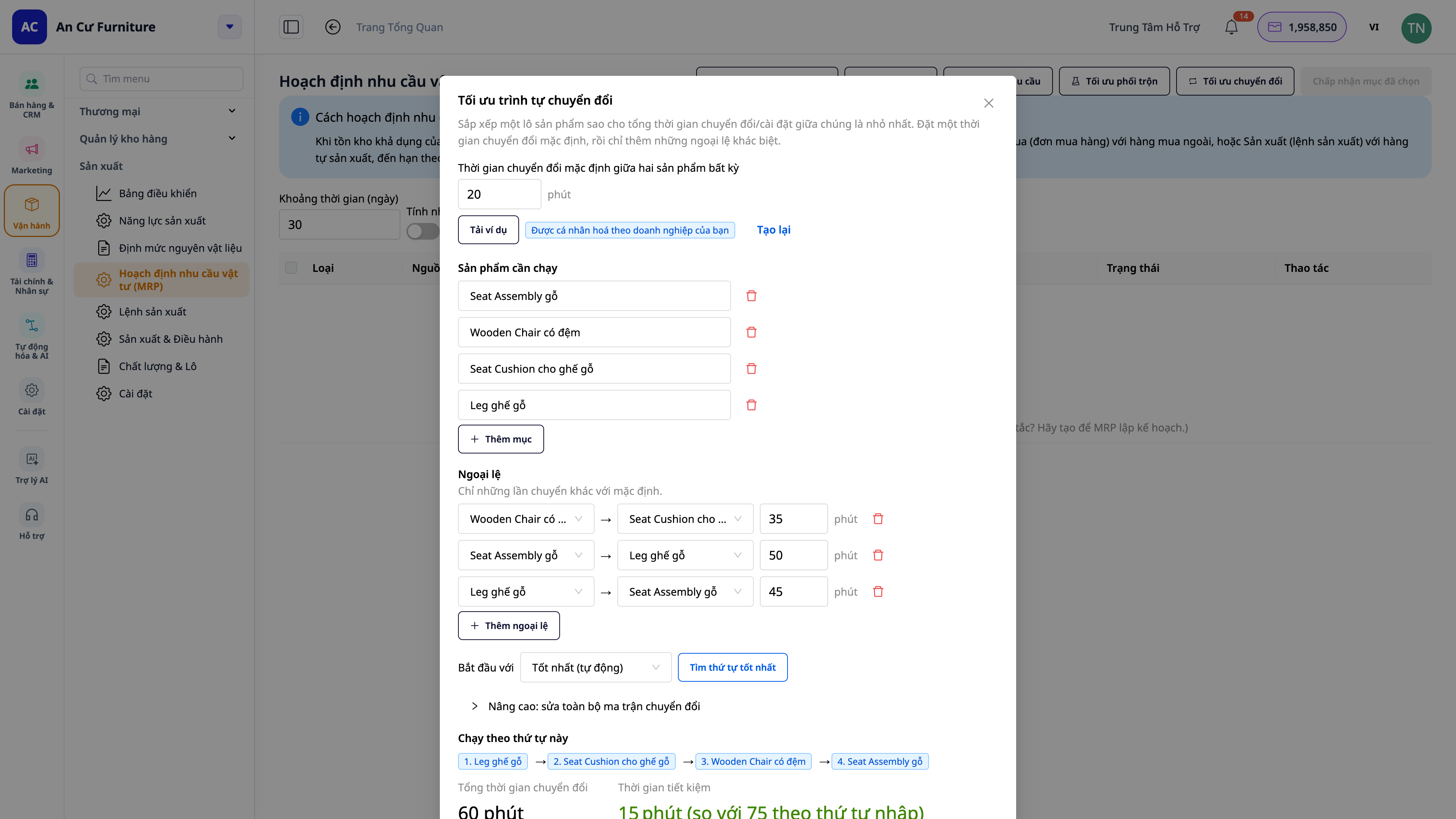
- 이점: 현실적인 납품일을 약속하고, 한 팀의 과부하를 피하며, 전환으로 인한 유휴 시간을 줄입니다.
8. 실시간 작업장 화면 (MES) — 작업자 스테이션 및 Andon 보드
이것은 생산을 작업장 현장으로 가져가는 단계입니다. 생산 설정에서 "실시간 작업장 화면"을 단 하나의 스위치로 켜고, 각 스테이션에 배치된 태블릿(그리고 전체 라인을 위한 벽걸이 대형 화면)에서 작업장 화면 애플리케이션을 엽니다.
운영 작업자 스테이션 — 터치하면 실행되는 터치스크린, CRM 소프트웨어를 전체 탐색할 필요가 없습니다:
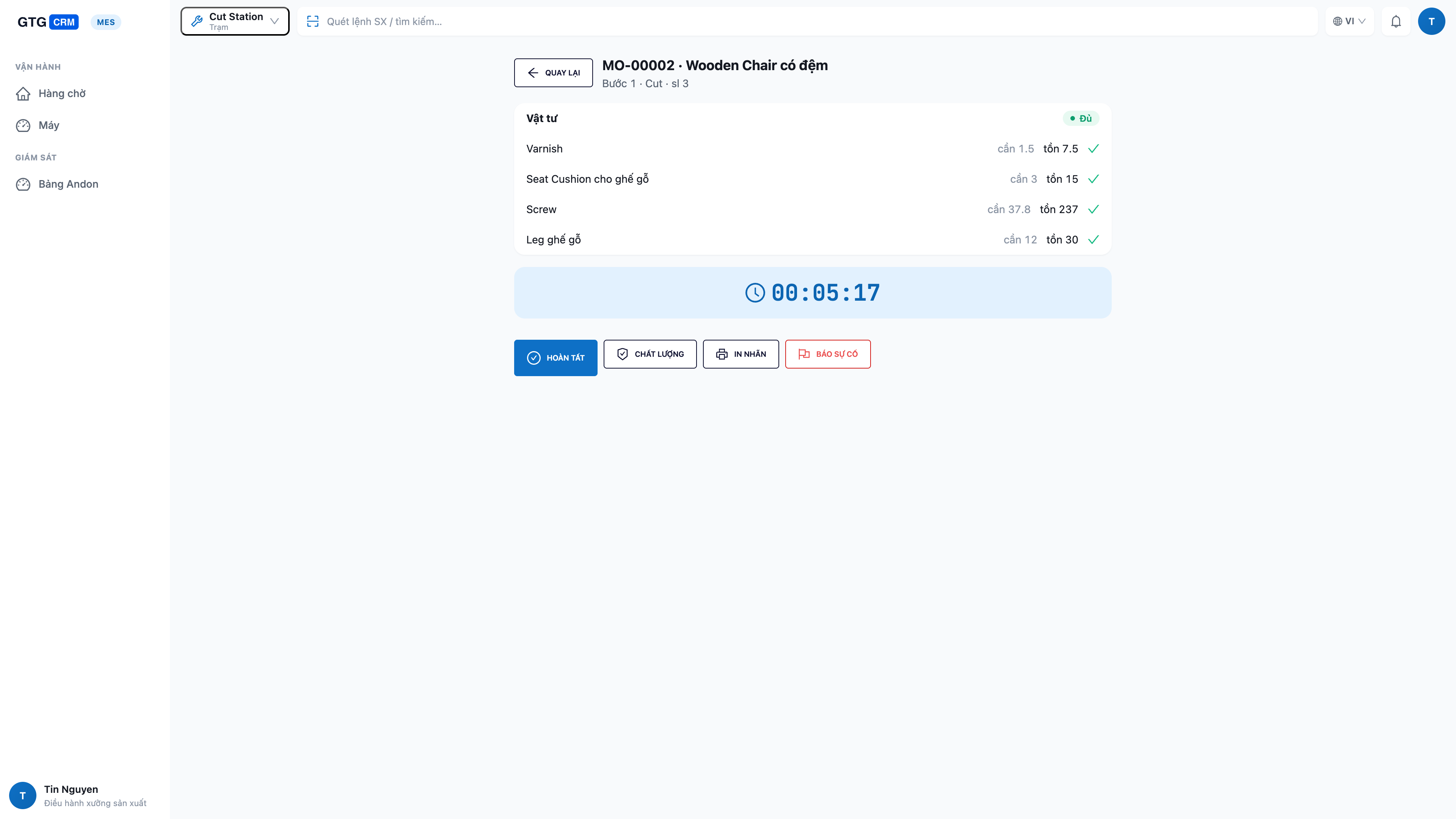
- 자신의 스테이션 작업만 보기: 해당 스테이션의 단계 대기열, 준비 완료된 작업이 상단에 표시됩니다.
- 작업 시작 전 원자재 확인: 작업을 열면 작업할 원자재가 충분한지(얼마나 필요한지 / 얼마나 남았는지 / 얼마나 부족한지) 즉시 확인합니다 — 부족한 것을 발견하기 위해 시작할 필요가 없습니다.
- 현장에서 바로 시작 → 완료: 시작을 터치하고, 완료 후 완료를 터치한 다음 생산량, 불량품 수, 중지 시간을 입력합니다 — 데이터가 즉시 시스템에 입력되어 원가로 직결됩니다.
- 손안의 기계 상태: 화면에서 바로 기계 상태를 가동 중 / 유휴 / 전환 / 중지로 변경합니다.
- 원터치 문제 보고 (andon): 기계 고장 또는 원자재 부족 — 버튼을 터치하면 즉시 관리자에게 경보가 울립니다. 사람을 찾아다닐 필요가 없습니다.
- 스테이션에서 품질 검사 및 로트 스티커 인쇄: 단계에서 요구할 때, 품질 검사 및 로트 스티커 인쇄를 현장에서 바로 수행합니다.
작업장 운영 보드 (andon) — 전체 라인을 위한 대형 화면:
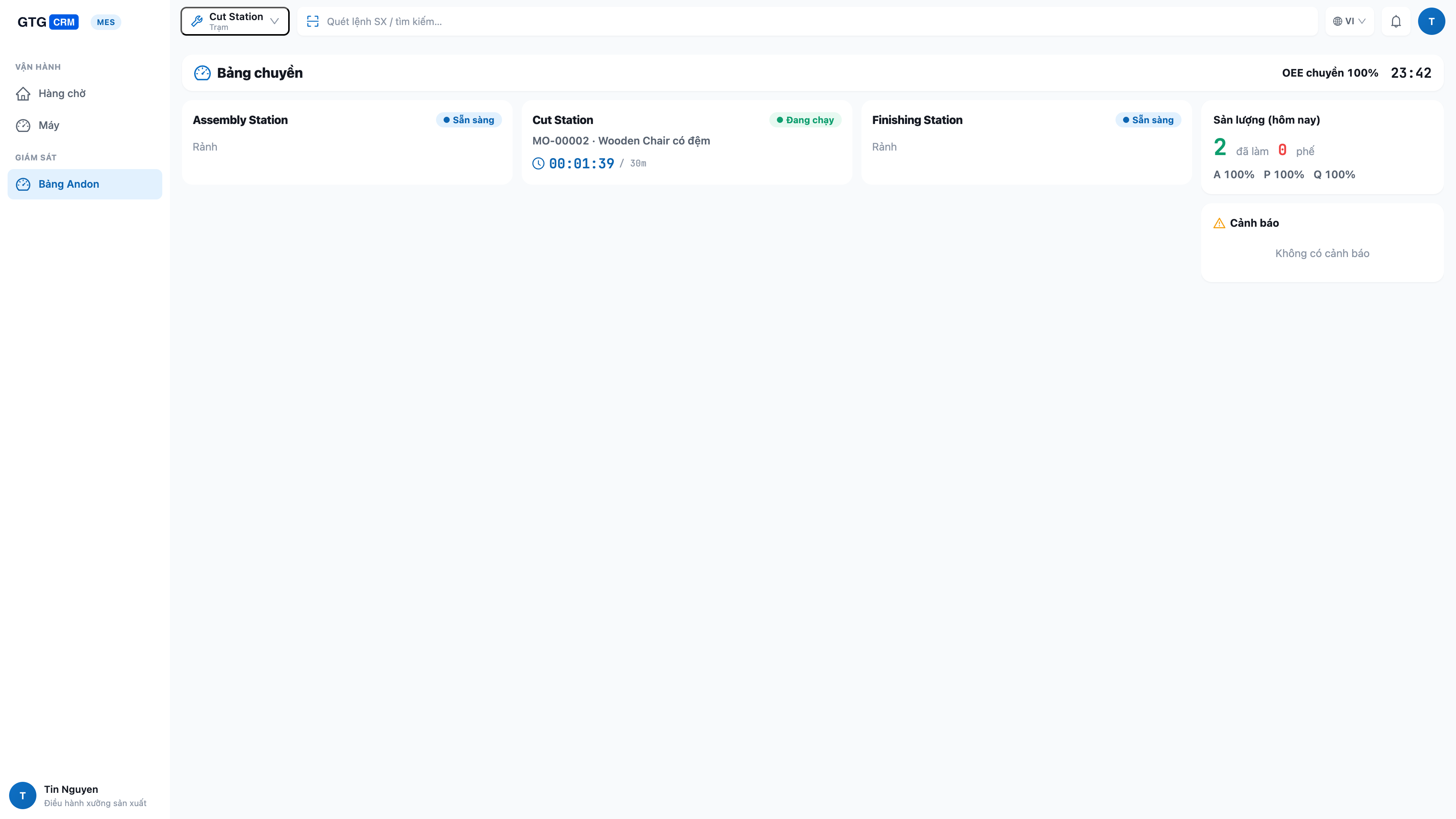
- 모든 라인을 한 눈에: 실행/유휴/전환/중지 등 모든 스테이션의 실시간 상태, 작업 내용 및 진행 상황 표시.
- 문제 즉시 파악: 중지된 스테이션, 부족한 원자재 등을 즉시 강조 표시하여 신속하게 처리.
- 라인별 생산성 & OEE: 생산량, 불량품 수, 장비 종합 효율(OEE) 지표를 실시간으로 업데이트.
- 자동 설비와 수동 작업 통합 관리: 설비 자동 보고 또는 수동 입력 작업 모두 동일한 화면에 일관되게 표시. 설비 연동 공장 및 "설비는 책상에 있는 사람" 공장 모두에 적합.
ℹ️ 명확한 권한 분리: 작업자는 자신의 스테이션에서만 작업을 실행. 생산 관리자는 계획 및 작업 지시 담당 — 각자 맡은 업무 수행, 안전하고 책임감 있게.
9. 동/부산물, 분수 단위 & 로트 추적
- 동/부산물: 배치당 여러 종류의 완제품 또는 부산물 생산 가능 — 레시피에서 즉시 지정.
- 분수 단위: 소수점 단위 수량(예: 1.25kg) 입력 시 제품 목록 오류 발생 방지.
- 로트 추적 + 계보 + 유통 기한: 각 배치별 고유 로트 번호 부여. 사용된 원자재 로트 추적(계보) 및 완제품/원자재 유통 기한 만료 전 사전 경고.
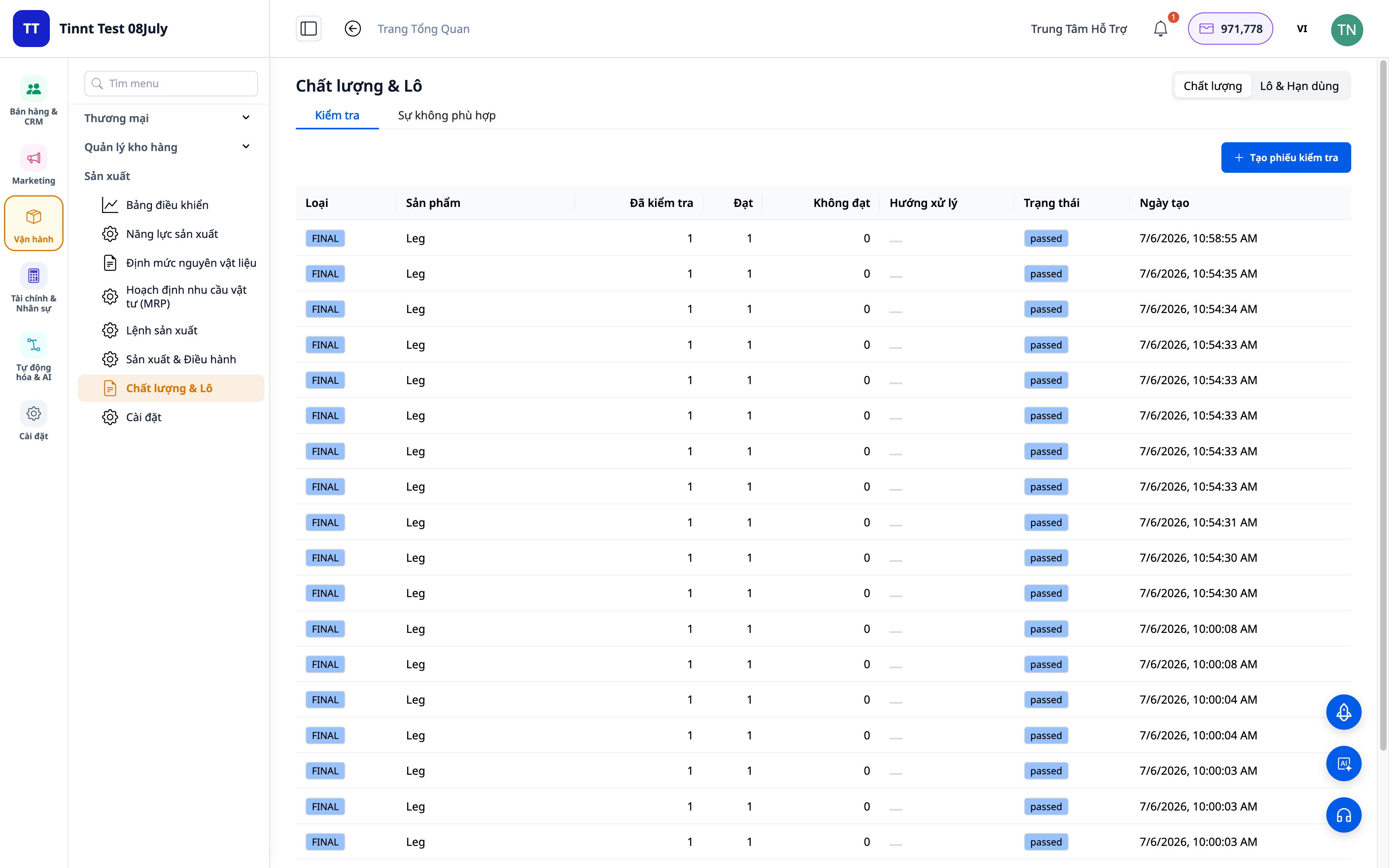
- 이점: 품질 문제 발생 시 몇 분 안에 근본 원인 추적 가능. 유통 기한 지난 재고 방지.
10. 스마트 MRP 상담가, OEE/SPC 및 로트 라벨 인쇄
- MRP 상담가: 안전 재고, 로트 크기, 원자재 혼합, 설비 전환(changeover) 최적화 및 수요 예측 제안 — 이해하기 쉬운 언어로, 제품명을 명확하게 표시.
- OEE/SPC: 장비 효율 및 품질 변동 추적을 통한 개선.
- 로트 라벨 인쇄 (PDF): 완제품 로트 라벨 인쇄 및 부착, 추적 용이.
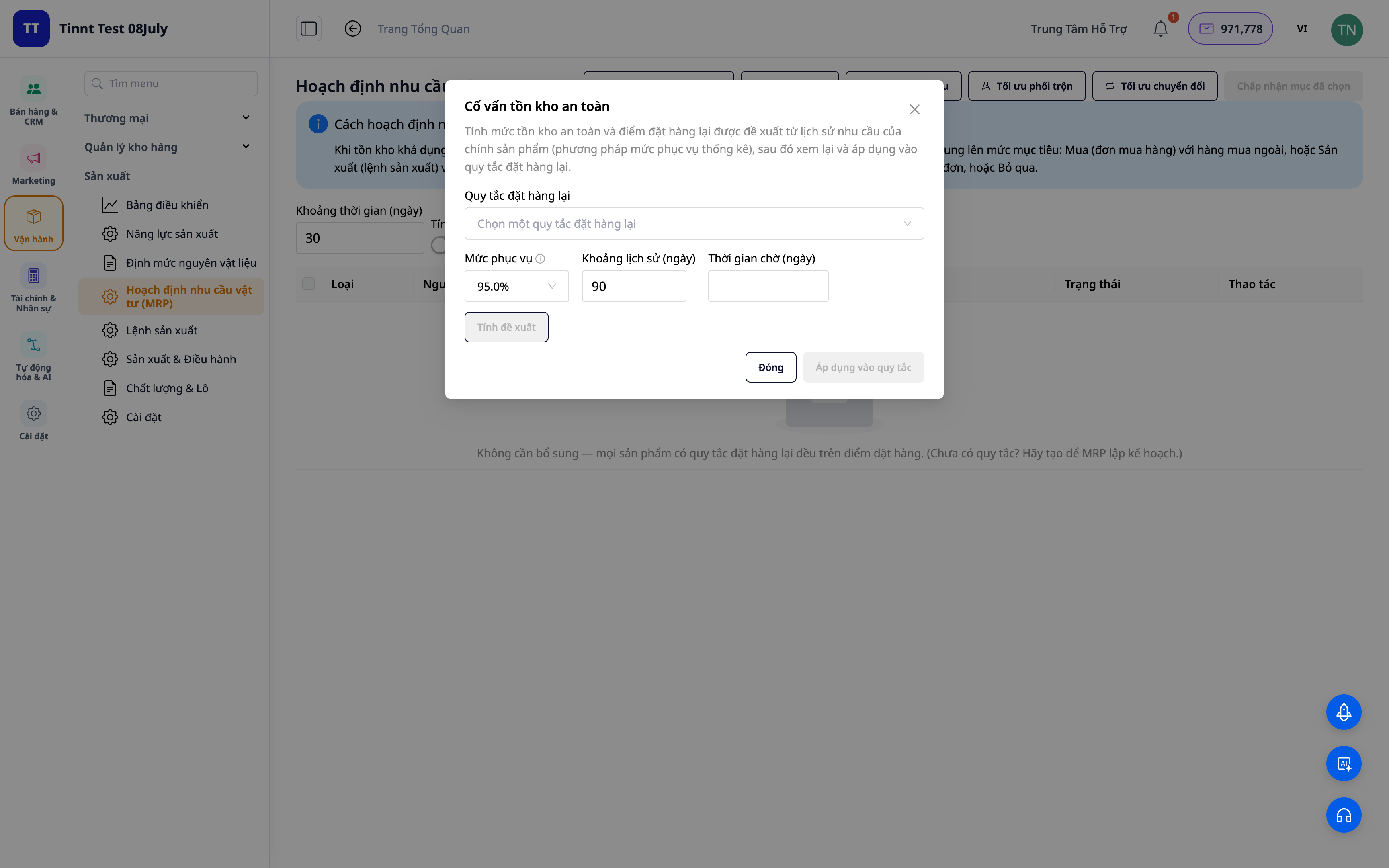
- 이점: 명확한 제안 기반 구매/제조/재고 결정, 낭비 및 설비 중단 시간 감소.
기업 이점
다단계 BOM 표준화 — 레시피 표준화, 누가 작업하든 올바른 재료비 및 원가 계산
생산 오더별 원가 자동 계산 — 제품 생산에 정확히 얼마가 드는지 파악 — 올바른 판매 가격 책정
실시간 원가 장부 기록 (COGM) — 정확한 손익 보고, "0원" 완제품 처리 끝
공정별 생산/불량 기록 — 실제 발생 원가 반영, 일일 정산 시 누락 없음
고객 주문 기반 MRP — 작업 중 원자재 부족 현상 방지, 불용 재고 축소
판매 주문과 직접 연결된 생산 — 고객이 원하는 것을, 원하는 시기에 생산, 납기 지연 없음
품질 관리 + 차이 분석 — 손실률 관리, 어떤 배치에서 왜 손실이 발생했는지 즉시 파악
생산 능력 + 전환 시간 기반 Gantt 차트 — 실제 납기일 약속, 특정 팀 과부하 방지, 작업 중단 시간 감소
실시간 공장 화면 (MES) — 현재 라인 진행 상황 즉시 확인; 작업자 현장 작업 보고/완료
라인별 Andon 보드 — 문제 발생 즉시 파악, 관리자 신속 대응, 공장 내 뛰어다니며 확인 불필요
로트 추적 + 유통 기한 — 문제 근본 원인 추적, 유통 기한 지난 재고 방지
MRP 상담가 + OEE/SPC — 낭비 감소, 설비 중단 시간 감소, 적정 재고 유지
누구에게 적합한가요?
- 소규모 및 중소 규모 생산 공장: 식품, 음료, 화장품, 의류, 가구, 기계, 인쇄, 가전 제품.
- 여러 스테이션/여러 라인이 있는 공장: 실시간 진행 상황을 파악하고 생산 능력을 조정하고 싶으며, 각 스테이션에 직접 방문하여 수작업을 묻는 것을 원치 않습니다.
- 직접 생산하는 상점 주인 (빵, 수제 제품, 가공품): 정확한 원가를 파악하여 가격을 책정하고 싶습니다.
- Excel/자체 생산 소프트웨어를 사용하다가 판매, 재고, 회계와 통합된 시스템으로 전환하려는 중간 규모 기업.
어떻게 시작하나요?
시스템 내의 Manufacturing(생산)으로 들어가서 단위와 생산 팀을 설정하고, 제품에 대한 레시피(BOM)를 작성한 후 첫 생산 명령을 생성합니다. 즉시 공장에서 관리하고 싶으신가요? 생산 설정에서 "실시간 생산 공장 화면"을 활성화하고, 각 스테이션에 태블릿을 배치하여 생산 공장 화면 앱을 열고, 안돈 보드를 위한 대형 화면을 사용하세요. Excel 파일에 재료 목록/BOM이 준비되어 있나요? 파일을 드래그하여 AI가 열을 자동으로 매칭하도록 하세요. 단계별 생산 관리 사용 설명서를 보거나, 원자재부터 완제품까지 — 정확한 원가를 파악하여 판매 가격을 추측 없이 책정하세요와 같은 실제 사례를 읽어보세요.
무료 체험 — 신용카드 불필요.


