
Funkcijų pristatymas
Mėnesio pabaigoje atsidarote banko išrašą ir pradedate tikrinti kiekvieną eilutę: šis mokėjimas yra kliento atsiskaitymas už kokią sąskaitą? O anas – tai mokestis, vidinis pervedimas, ar parduotuvių grąžinami COD mokėjimai? Tada vėl atidarote „Excel“ ir rankiniu būdu įvedate duomenis, kad knygos atitiktų banko duomenis. Tai užima pusę dienos, lengva suklysti, o kiekvieną kartą paklausus „iš kur šie pinigai“ prakaituojate.
Nuo šiandien tai baigėsi. GTG CRM paverčia banko išrašus suderinimo erdve tiesiai jūsų naudojamoje apskaitos sistemoje: kiekvieną operaciją suskirstysite į tinkamą sąskaitą, nustatysite vienkartines taisykles, kurios bus naudojamos visam laikui, kad automatiškai siūlytų panašias eilutes, peržiūrėsite suderinimo lentelę ir ataskaitas, bei įjungsite automatinio įrašų kūrimo parinktį. Pinigai ⇄ sąskaitos ⇄ žurnalas sujungiama į vieną ciklą.
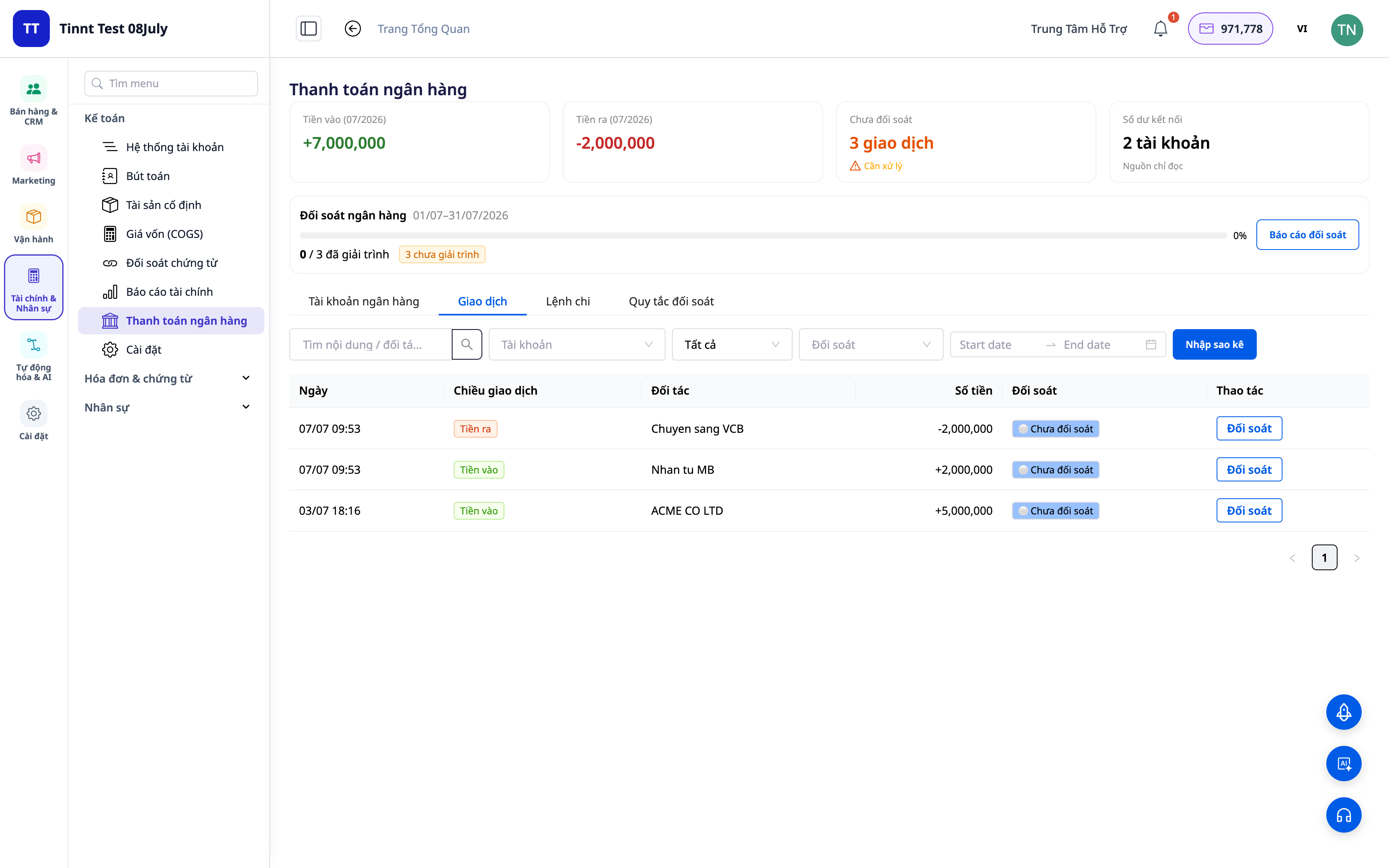
Verslo problemos
| Senas metodas | Rezultatas |
|---|---|
| Banko išrašų tikrinimas akimis, perkėlimas į „Excel“ | Užtrunka valandas kas mėnesį, lengva suklysti įvedant, negalima atsekti |
| Nežinoma, kokia pinigų srauto eilutė atitinka kurią sąskaitą | Mato skolos neaiškios, neaptinkami nepriimti/dvigubai priimti mokėjimai |
| Apskaitos įrašai atskirti nuo banko | Duomenys nesutampa, sunku paaiškinti mokesčių patikrinimo metu |
| Sunku atskirti pinigų grąžinimus iš parduotuvių/vežėjų | Neaišku, ar gauta visa suma, sudėtingas COD suderinimas |
GTG CRM viską sujungia į vieną duomenų šaltinį: kiekviena banko operacija susiejama tiesiogiai su apskaitos sąskaita ir (kai tinkama) su sąskaita, automatiškai sukuriami balansiniai įrašai.
Išskirtiniai bruožai
1. Operacijų paskirstymas į tinkamas sąskaitas
Kiekvienai išrašo eilutei pasirinkite, kas tai yra: pajamos, mokesčiai, vidinis pervedimas, grynieji pinigai – bankas, COD… Sistema susieja operaciją su tinkama apskaitos sąskaita (GL account).
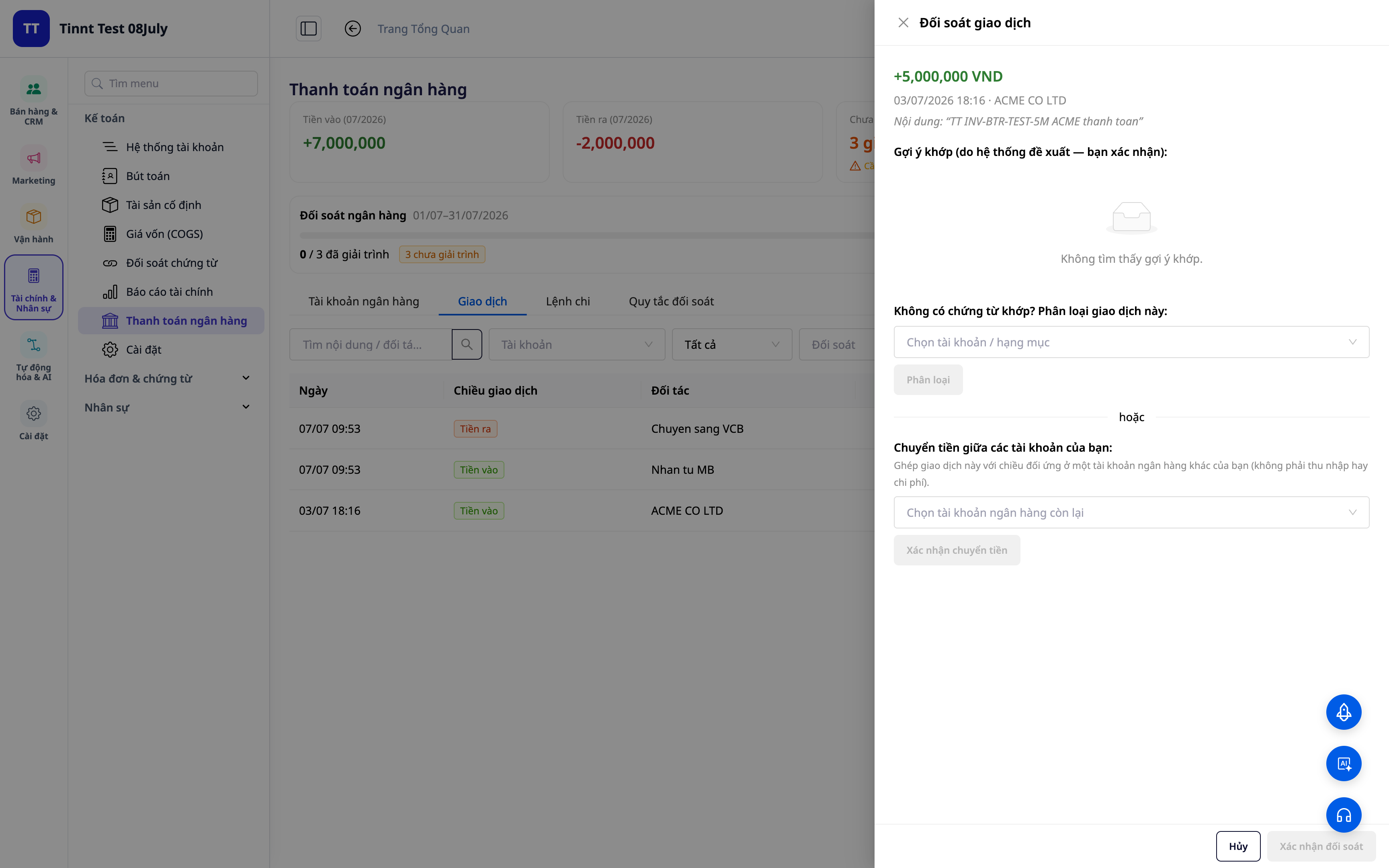
- Funkcija: operacijos paskirstymas → atitinkama apskaitos sąskaita.
- Nauda: kiekvienas įplaukiantis/išplaukiantis pinigas turi aiškų „adresą“ knygose.
2. Pakartotinai naudojamos suderinimo taisyklės – nustatykite vieną kartą, suderinkite automatiškai
Sukurkite taisykles pagal turinį/partnerį/sumą: panašios operacijos vėliau bus automatiškai priskiriamos tinkamam tipui. Naujos taisyklės įsigalioja iškart, kad būtų taikomos nedelsiant.
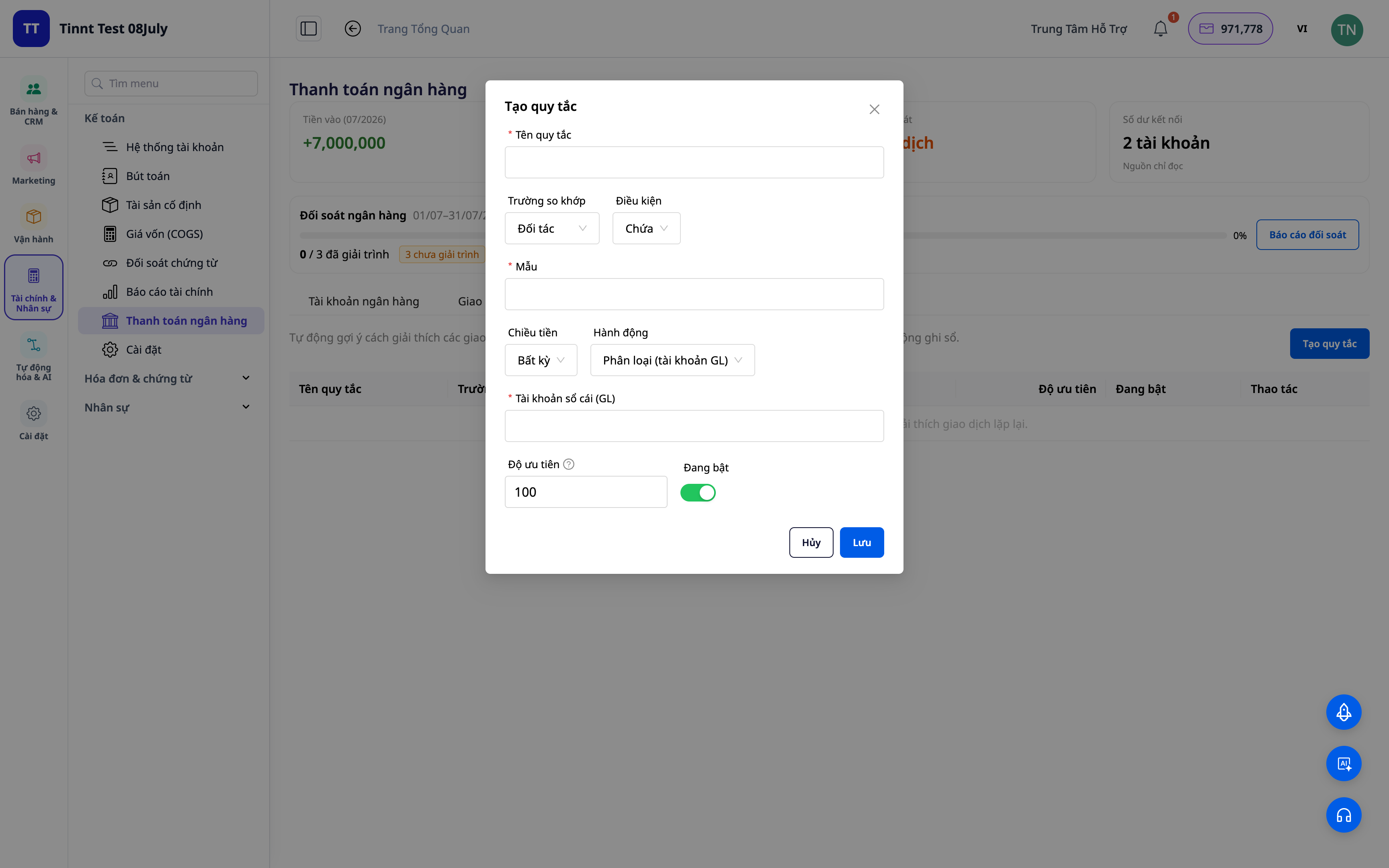
- Funkcija: pakartotinai naudojamų suderinimo taisyklių rinkinys.
- Nauda: kitas mėnuo lengvesnis nei praėjęs – pasikartojantys darbai automatizuojami.
3. Rodyti suderinimą pagal taisykles – jums tereikia patvirtinti
Jūsų nustatytos taisyklės automatiškai siūlys būdą, kaip paskirstyti panašias operacijas – jums tereikia peržiūrėti ir patvirtinti. Kuo daugiau naudosite, tuo daugiau situacijų apims taisyklių rinkinys, ir tuo greičiau vyks suderinimas. Jūs visada priimate galutinį sprendimą.
- Funkcija: siūlyti operacijų suderinimą pagal taisykles (jūs patvirtinate).
- Nauda: greitas pasikartojančių eilučių apdorojimas, išlaikant visišką kontrolę.
ℹ️ Suderinimas ir siūlymas pagal taisykles yra nemokamas. Netrukus bus: DI padėjėjas, siūlantis paaiškinimus net visiškai naujoms operacijoms.
4. Suderinamumo lentelė + ataskaitos
Peržiūrėkite apžvalgą: kiek suderinta, kiek liko, kur yra skirtumai. Eksportuokite suderinimo ataskaitą, kad išsaugotumėte dokumentus ir pateiktumėte paaiškinimus.
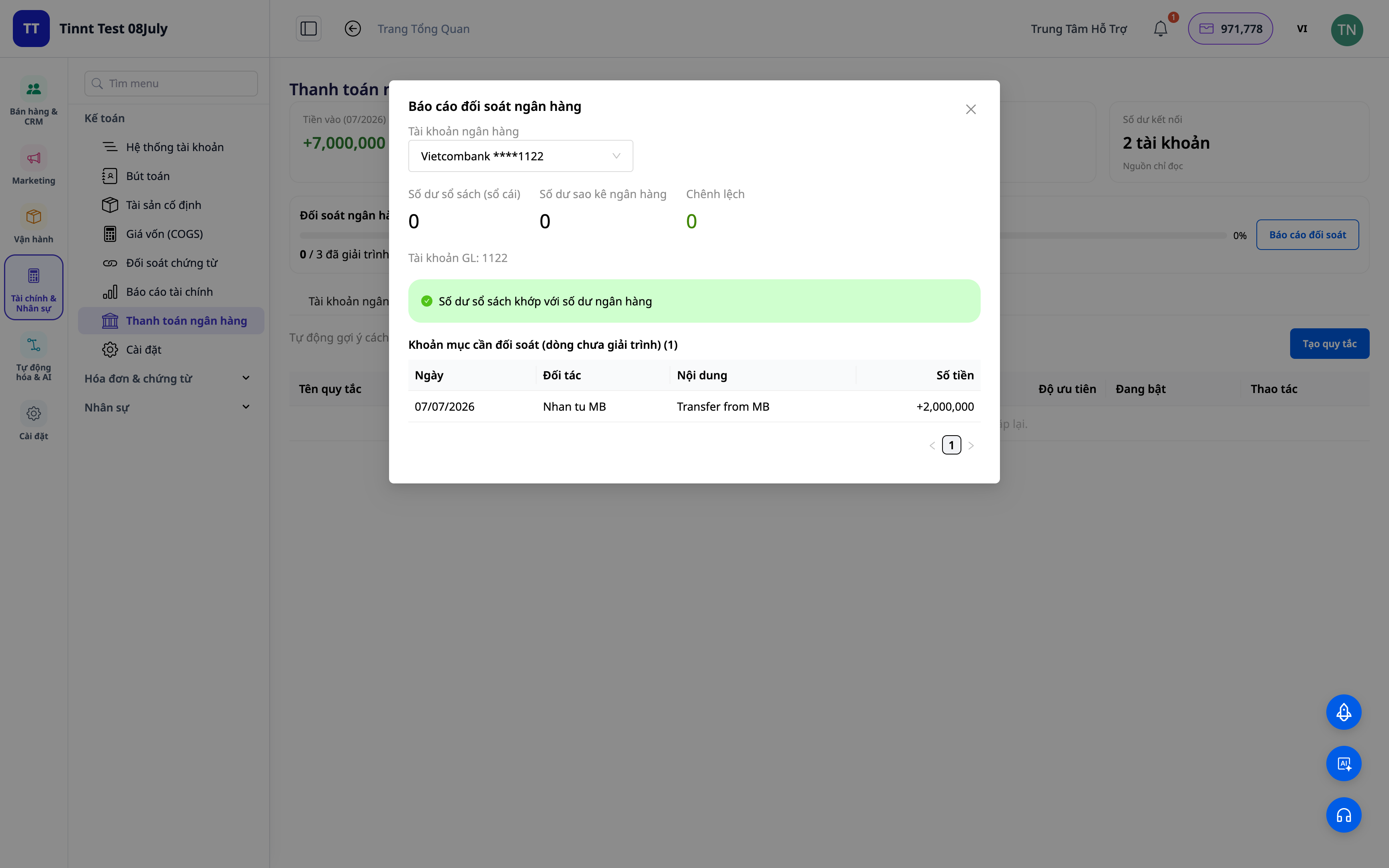
- Savybės: suderinimo su banku lenta + ataskaitos.
- Privalumai: viename ekrane iš karto matyti, ar sąskaita sutampa su banku.
5. Automatinis balansinių įrašų sudarymas (pasirinktinai)
Įjunkite parinktį „įrašyti į knygą“: klasifikuojami / pervedami / grynieji pinigai–banko / COD sandoriai automatiškai sudaro teisingus pagal apskaitos standartus **balansinius įrašus**. Pašalinus ryšį tarp sandorio, įrašas atšaukiamas.
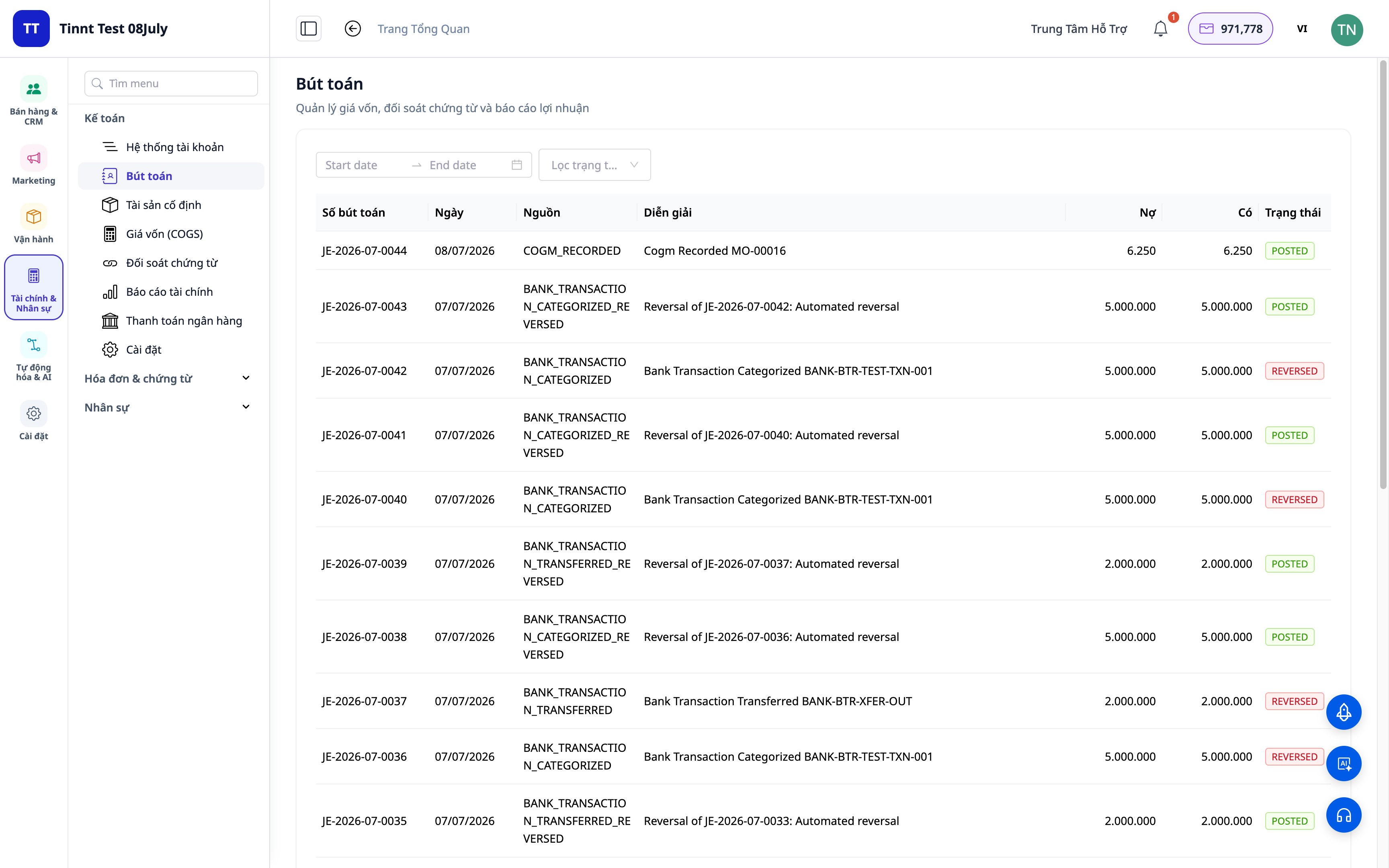
- Savybės: automatinis balansinių įrašų sudarymas iš suderintų sandorių.
- Privalumai: suderinimas ir įrašymas į knygą yra vienas procesas, o ne du — duomenys visada nuoseklūs.
Nauda įmonėms
| Savybės | Faktinė nauda jums |
|---|---|
| Klasifikavimas + derinimo taisyklės | Kiekvieną mėnesį sutaupoma valandų rankinio banko išrašų tikrinimo |
| Pasiūlymai derinti pagal taisykles | Greitas pasikartojančių eilučių apdorojimas, klaidų mažinimas |
| Suderinimo lenta + ataskaitos | Greitas knygų uždarymas, paruošti dokumentai mokesčių patikrinimui |
| Automatinis įrašų sudarymas | Didžioji knyga visada sutampa su banku, nėra nukrypimų |
| COD derinimas | Tiksliai žinoti, ar gauta visa už prekes sumokėta suma |
Kam tinka?
- Buhalteriams / vyriausiems buhaleriams, kuriems reikia greitai uždaryti knygas ir užtikrinti banko sąskaitų sutapimą.
- Įmonių savininkams / individualios veiklos vykdytojams, naudojantiems GTG CRM apskaitos paketą ir norintiems kontroliuoti pinigų srautus.
- Pardavėjams, parduodantiems COD (sumokėta pristatymo metu), kuriems reikia suderinti pinigus iš platformos / grąžintus per pristatymo tarnybas.
- Vidutinėms įmonėms, norinčioms mažiau priklausyti nuo atskirų apskaitos programų.
Kaip pradėti?
Eikite į skiltį Apskaita ▸ Banko derinimas, įkelkite banko išrašą arba prijunkite banko sąskaitą, tada pradėkite klasifikuoti. Reikia detalesnių žingsnių? Peržiūrėkite straipsnį Naudojimo instrukcijos: Banko derinimas GTG CRM, ir papildomai perskaitykite straipsnį Dviguba apskaita tiesiai CRM sistemoje, kad suprastumėte bendrą apskaitos vaizdą.
Nemokamas bandomasis laikotarpis — kredito kortelė nereikalinga.


