
Predstavitev funkcij
Ob koncu meseca odprete bančni izpisek in začnete preverjati vsako vrstico: za kateri račun je to plačilo stranke? je ta znesek strošek, interna nakazila ali vračilo s platforme za plačilo po povzetju? Nato odprete Excel in ročno vnašate podatke, da bi uskladili knjige z bančnim izpiskom. To vam vzame celo jutro, je nagnjeno k napakam, in vsakič, ko vas vprašajo "od kod je ta denar", se potite.
To se danes konča. GTG CRM spremeni vaš bančni izpisek v delovni prostor za usklajevanje neposredno v računovodskem sistemu, ki ga uporabljate: razvrsti vsako transakcijo v pravilen račun, postavi pravila za enkratno ujemanje, ki se uporabljajo vedno znova, da samodejno predlaga podobne vrstice, prikaže pregled in poročila ter vključi možnost samodejnega knjiženja za uravnoteženje. Denar ⇄ Računi ⇄ Knjiga so združeni v en krog.
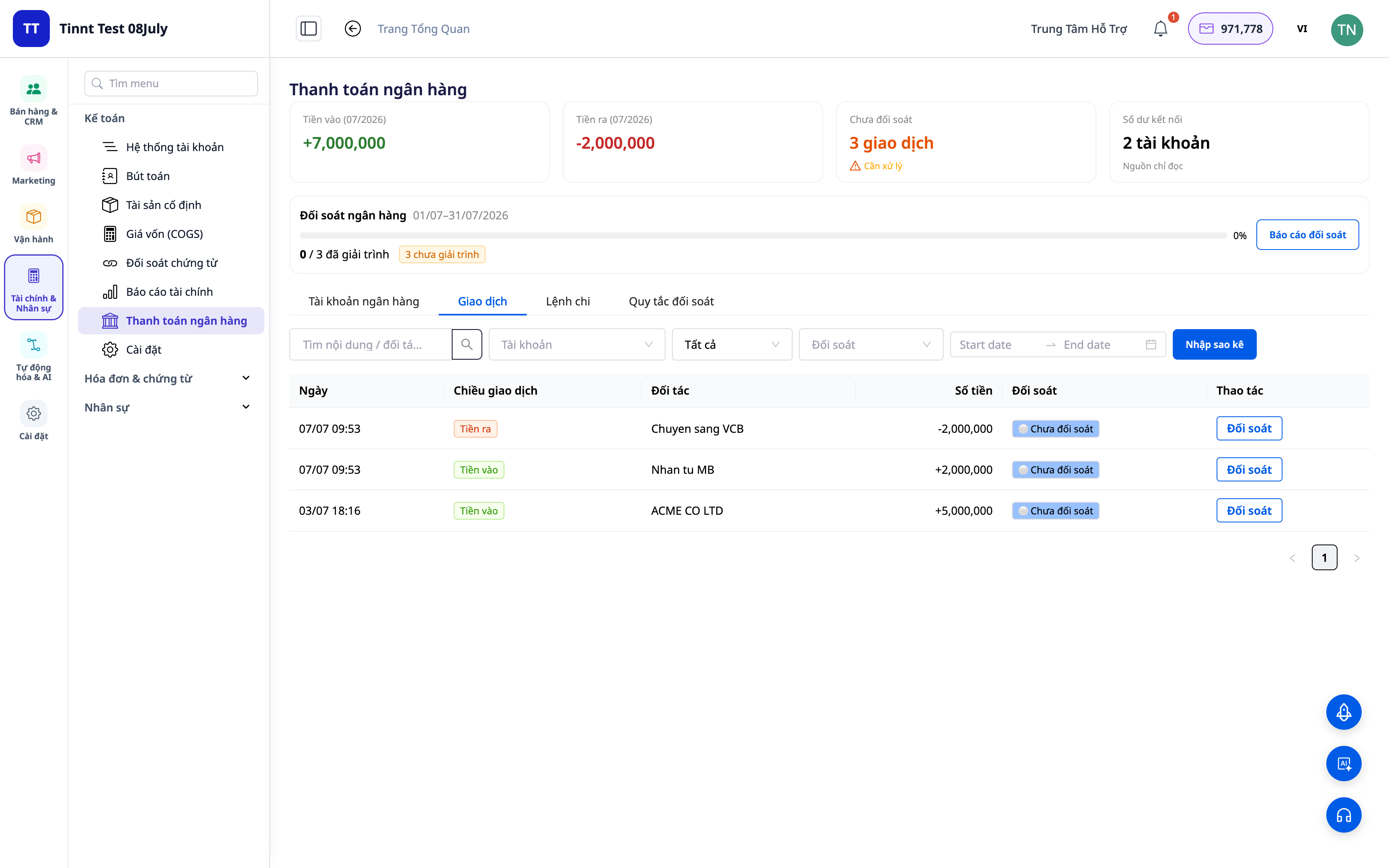
Težave, s katerimi se soočajo podjetja
| Star način dela | Posledice |
|---|---|
| Ročno preverjanje bančnih izpiskov, vnašanje v Excel | Vsak mesec izguba ur, enostaven vnos napačnih podatkov, nezmožnost sledenja |
| Nevednost, katera denarna toka ustreza kateremu računu | Nejasne terjatve, spregledana ali podvojena plačila |
| Računovodsko knjiženje ločeno od bančnih transakcij | Neskladna podatki, težko pojasniti med davčno kontrolo |
| Težko razčlenjevanje vračil denarja s platform in dostavnih služb | Nejasno, ali je bilo vse prejeto, zapleteno usklajevanje vračil |
GTG CRM združuje vse v en sam vir podatkov: vsaka bančna transakcija je neposredno povezana z računovodskim računom in (če je primerno) z računom, samodejno ustvari knjižbo za uravnoteženje.
Ključne značilnosti
1. Razvrstite transakcije v pravilne račune
Za vsako vrstico na bančnem izpisku izberite, kaj je: prihodek, strošek, interna nakazila, gotovina–banka, plačilo po povzetju ... Sistem pripiše transakcijo pravilnemu računovodskemu računu (GL account).
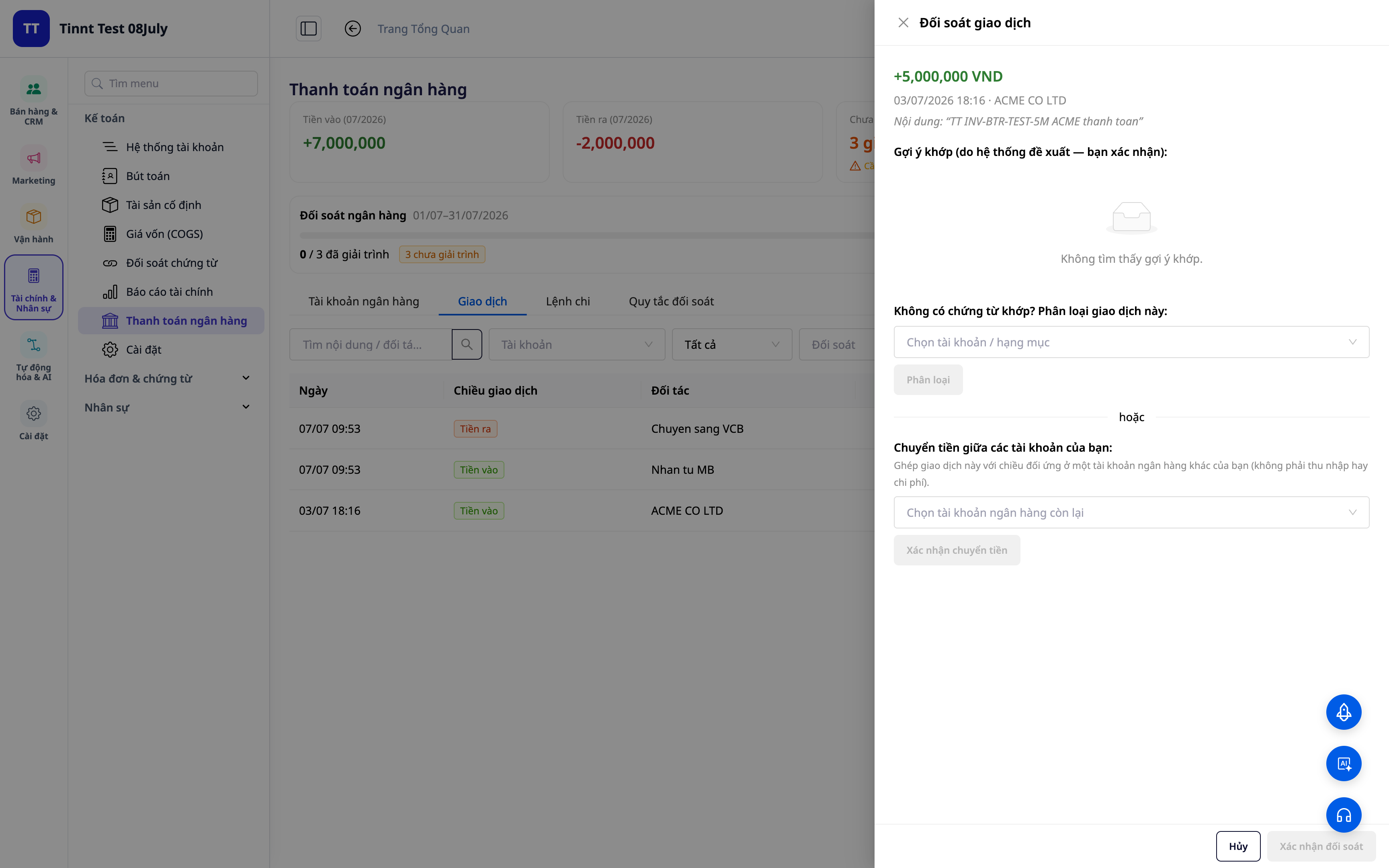
- Funkcija: razvrstitev transakcije → ustrezen računovodski račun.
- Korist: vsak dolar, ki vstopi ali izstopi, ima jasen "naslov" v knjigah.
2. Pravila za ponavljajoče se ujemanje — enkrat nastavite, samodejno se ujema
Ustvarite pravila glede na opis/partnerja/znesek: podobne transakcije v prihodnosti se samodejno uvrstijo pod pravilno kategorijo. Nova pravila se takoj aktivirajo in uporabijo.
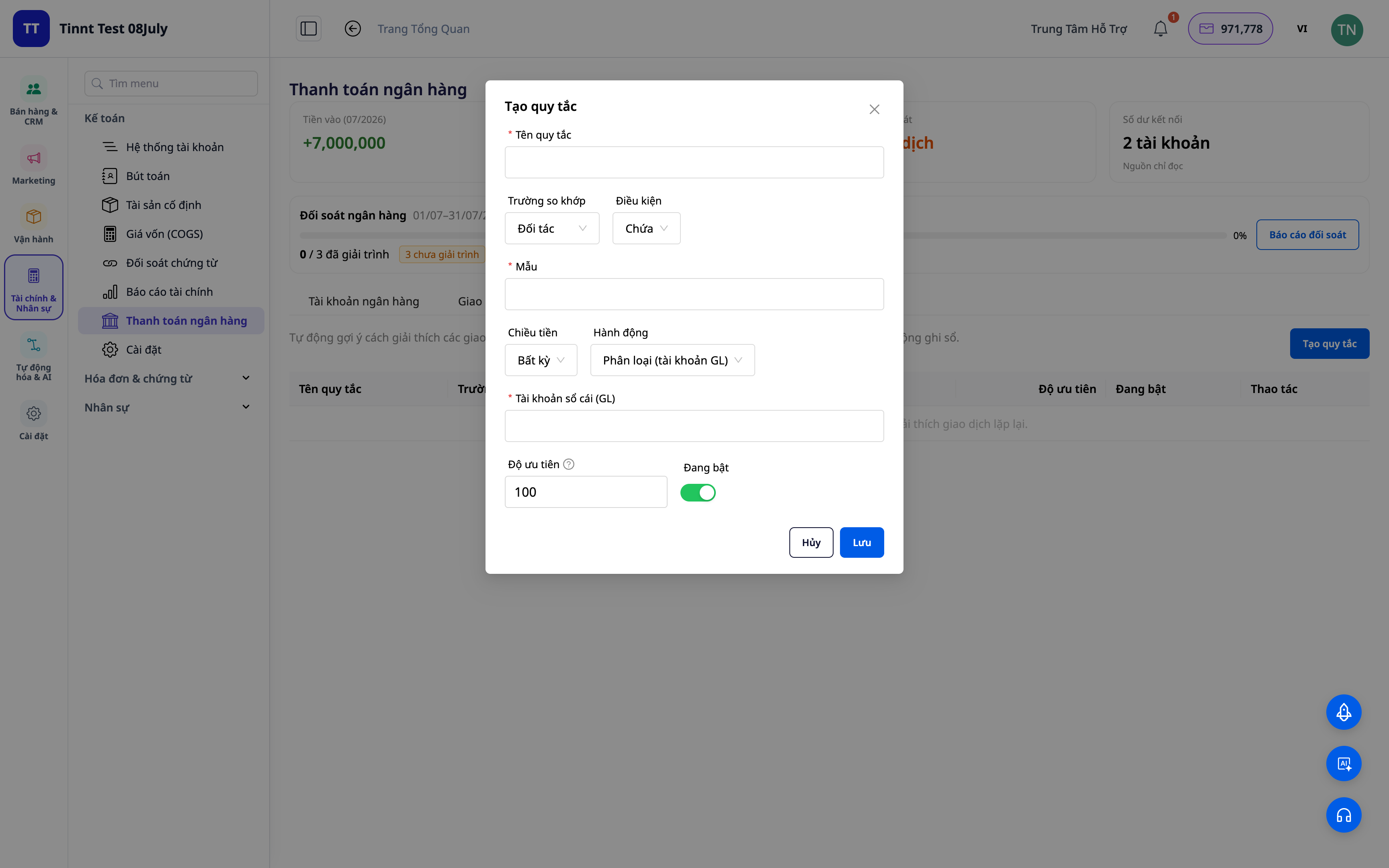
- Funkcija: niz pravil za ponavljajoče se ujemanje.
- Korist: naslednji mesec je lažji kot prejšnji — ponavljajoča se dela se avtomatizirajo.
3. Predlogi za ujemanje po pravilih — vi samo potrdite
Pravila, ki ste jih nastavili, bodo samodejno predlagala razvrstitev za podobne transakcije — vi jih samo pregledate in potrdite. Bolj ko uporabljate sistem, bolj bodo pravila pokrivala različne situacije, hitrejše bo usklajevanje. Vi ste vedno končna odločitev.
- Funkcija: predlogi za ujemanje transakcij na podlagi pravil (vi potrdite).
- Korist: hitro obdelajte ponavljajoče se vrstice, hkrati pa ohranite popoln nadzor.
ℹ️ Ujemanje in predlogi s pravili so brezplačni. Kmalu na voljo: AI pomočnik, ki bo predlagal razlago tudi za povsem nove transakcije.
4. Pregled in poročilo o usklajevanju
Pridobite pregled: koliko je usklajenega, koliko ostaja, kje so razlike. Izvozite poročilo o usklajevanju za arhiviranje in pojasnila.
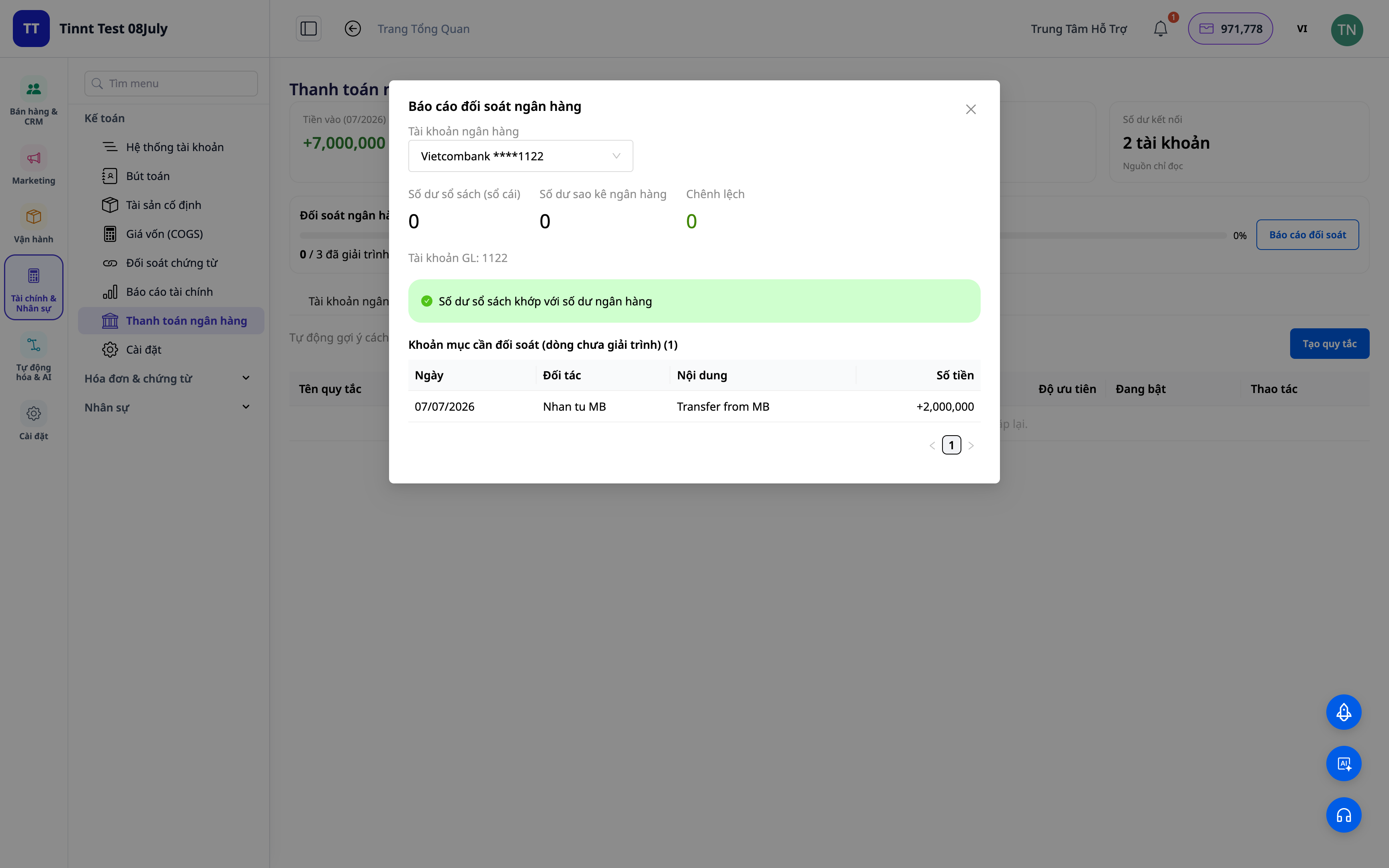
- Funkcija: nadzorna plošča za usklajevanje + poročila.
- Prednost: na enem zaslonu takoj vidite, ali so se transakcije ujemale z banko.
5. Samodejno knjiženje poravnalnih knjižb (neobvezno)
Vklopite možnost »knjiži v glavno knjigo«: transakcije razvrščanja / prenosa / gotovine–banke / COD samodejno ustvarijo pravilne knjižbe za poravnalne knjižbe v skladu s knjigovodskimi standardi. Če prekličete povezavo transakcije, se knjižba razveljavi.
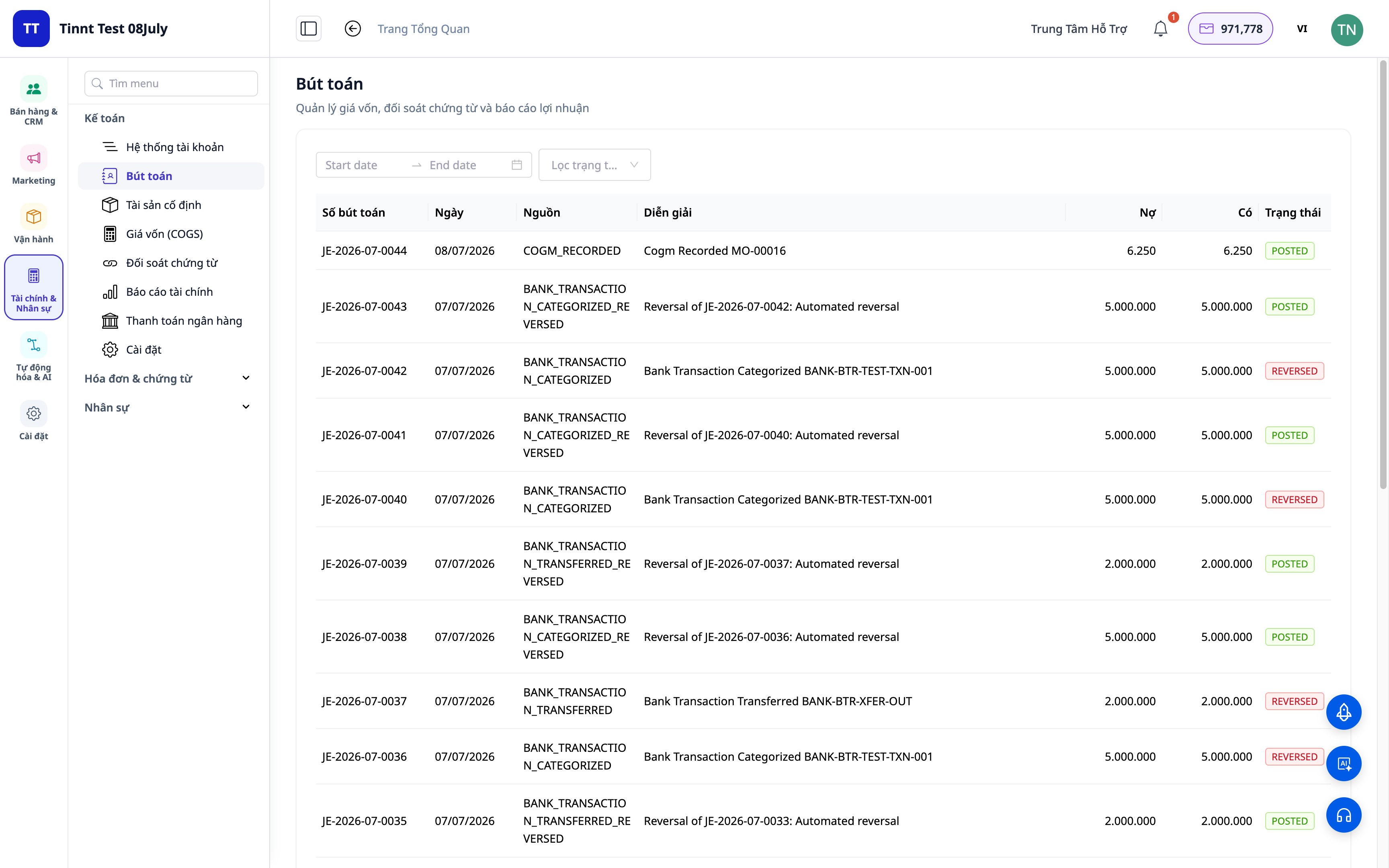
- Funkcija: samodejno knjiženje knjižb iz usklajenih transakcij.
- Prednost: usklajevanje in knjiženje v glavno knjigo sta en postopek, ne dva — podatki so vedno dosledni.
Prednosti za podjetja
| Funkcija | Dejanske prednosti za vas |
|---|---|
| Razvrščanje + pravila ujemanj | Prihranite ure ročnega preverjanja izpiskov vsak mesec |
| Predlaganje ujemanj na podlagi pravil | Hitra obdelava ponavljajočih se vrstic, zmanjšanje napak |
| Pregled usklajevanja + poročila | Hitro zapiranje knjig, pripravljeni dokumenti za davčne preglede |
| Samodejno knjiženje knjižb | Glavna knjiga se vedno ujema z banko, brez odstopanj |
| Usklajevanje COD | Natančno vedite, ali ste prejeli celoten znesek za blago |
Komur je namenjeno?
- Računovodje / glavni računovodje, ki morajo hitro zapreti knjige in imeti usklajene bančne podatke.
- Lastniki podjetij/samostojni podjetniki, ki uporabljajo računovodski paket v GTG CRM in želijo nadzorovati denarni tok.
- Prodajalci, ki prodajajo COD, potrebujejo usklajevanje plačil s platforme/dostavne službe.
- Srednja podjetja, ki želijo zmanjšati odvisnost od ločenih računovodskih programov.
Kako začeti?
Pojdite v razdelek Računovodstvo ▸ Bančno usklajevanje, naložite izpisek ali povežite bančni račun, nato začnite z razvrščanjem. Potrebujete podrobna navodila? Oglejte si vodnik Uporabniški priročnik: Bančno usklajevanje v GTG CRM in si oglejte članek Dvojno knjigovodstvo kar znotraj CRM-ja, da bi razumeli celotno sliko računovodstva.
Brezplačna preizkusna različica — kreditna kartica ni potrebna.


