

I en tid med kraftig e-handel er det at sælge på flere e-handelsplatforme (Shopee, Lazada, TikTok Shop) blevet en uundgåelig trend for sælgere. Dog medfører styring af ordrer fra flere forskellige kanaler ofte mange vanskeligheder: nemt at overse ordrer, svært at kontrollere lagerbeholdning, og det tager meget tid at skifte mellem platforme.
GTG CRM er skabt til at løse dette problem grundigt ved at samle alle ordrer fra e-handelsplatforme på én enkelt platform. Uden at skulle logge ind på hver enkelt platform separat, kan du spore, behandle og ekspedere alle ordrer direkte på GTG CRM, hvilket hjælper med at optimere salgsprocessen og undgå at overse nogen ordrer.
Denne artikel vil guide dig trin for trin igennem, hvordan du effektivt synkroniserer og administrerer multi-kanal ordrer på GTG CRM.
Nøglefunktioner
Automatisk ordre synkronisering fra Shopee, Lazada, TikTok Shop til én samlet platform
Centraliseret ordrehåndtering — Se og behandl alle ordrer fra flere kanaler ét sted
Samlet lagerstyring — Opdater lagerbeholdning synkroniseret på tværs af alle salgskanaler
Automatisk oprettelse af afsendelseskuvert, så snart en ordre er "Bekræftet" - ingen grund til at vente på 'Under levering'
Automatisk udstedelse af elektroniske fakturaer i overensstemmelse med regeringens regler
Samlet omsætningsrapportering fra alle salgskanaler
Hurtig behandling — Ingen grund til at skifte mellem flere platforme
Guide til synkronisering af multi-kanal ordrer
Trin 1: Forbind med e-handelsplatformene
Gå til "Indstillinger" → "Integration af salgskanaler"
Vælg den platform, du vil forbinde med: Shopee / Lazada / TikTok Shop
Klik på "Forbind" og log ind med din butiks konto
Tillad GTG CRM adgang til ordrer og produktdata
Gentag for de resterende platforme
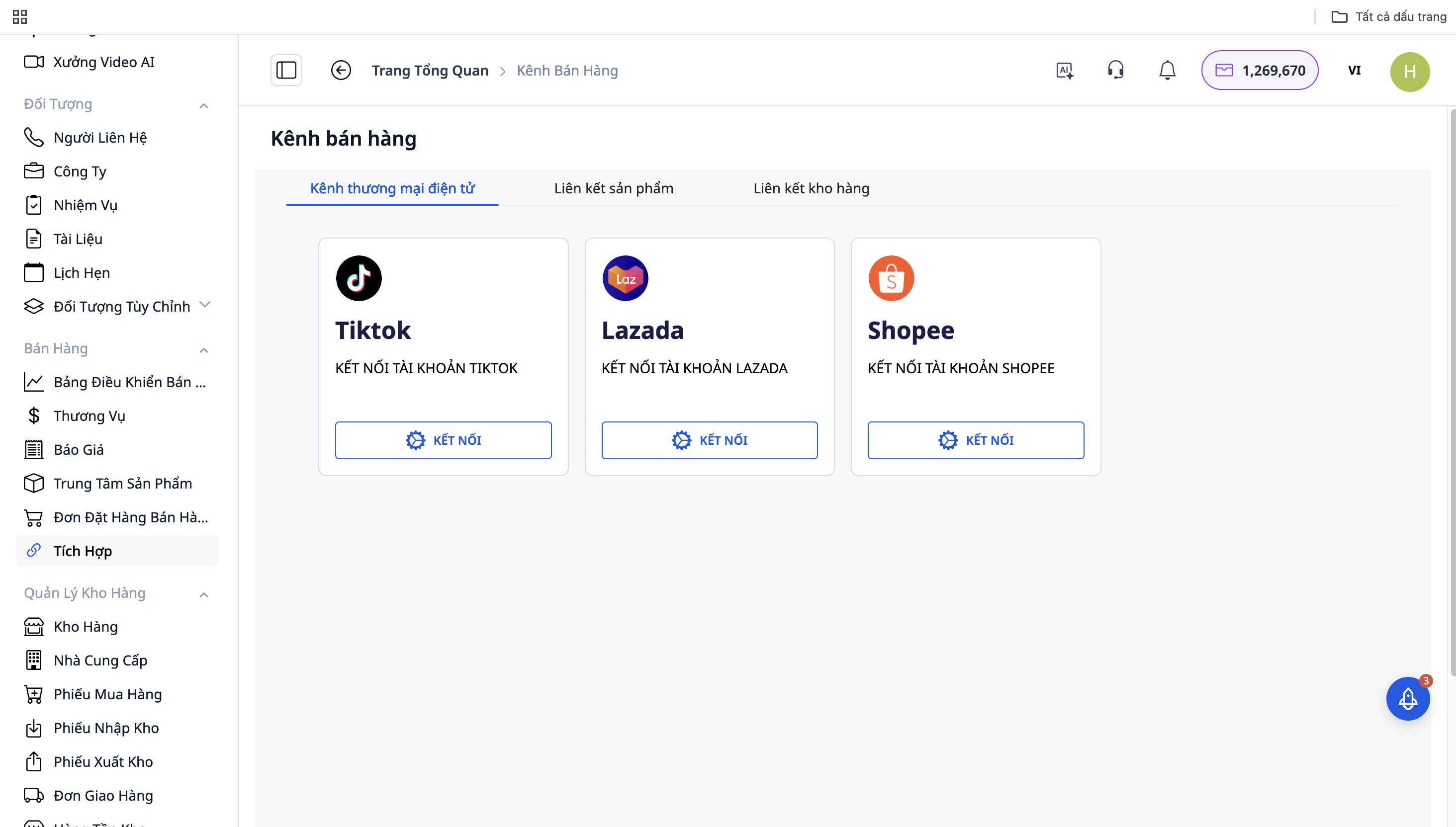
Trin 2: Automatisk ordre synkronisering
Efter succesfuld forbindelse vil GTG CRM automatisk synkronisere ordrer fra platformene til systemet:
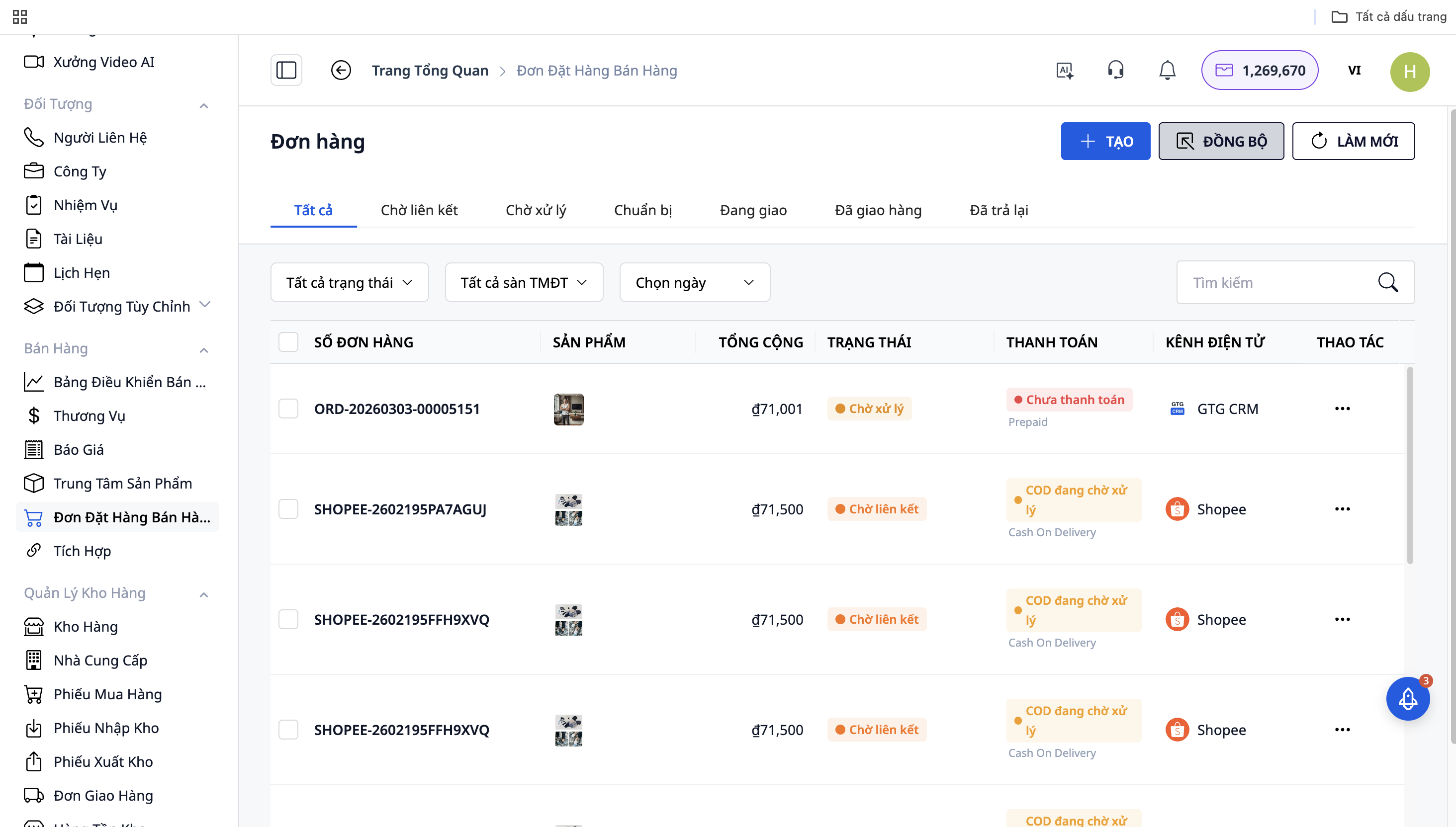
Alle ordrer fra Shopee, Lazada, TikTok Shop vises på "Salgshjemmesiden"
Hver ordre vil have et kildeikon (platformens logo) for nem genkendelse
Ordrer opdateres i realtid
Trin 3: Ordrebehandling
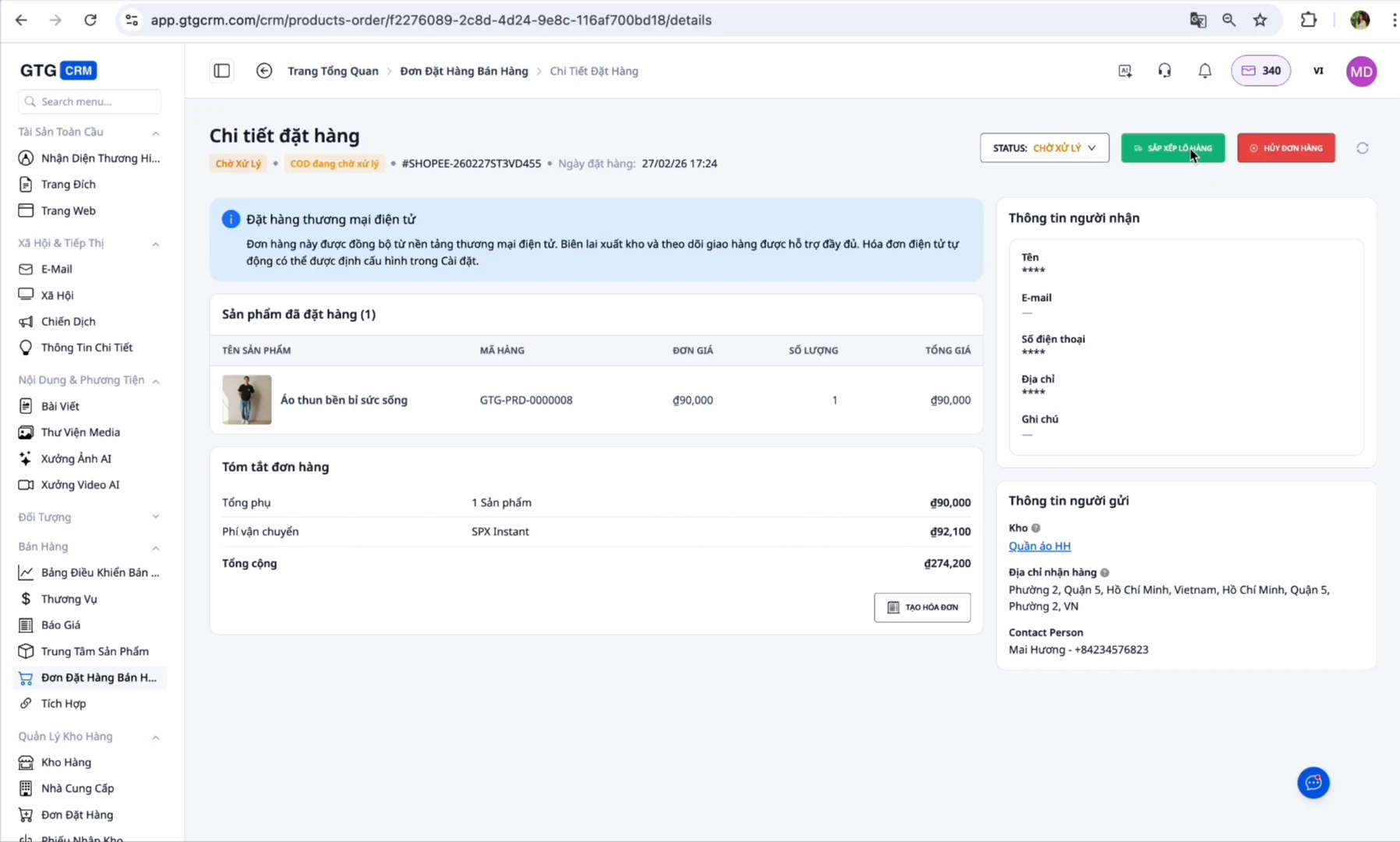
Når der kommer en ny ordre: Ordren vil være i status "On Hold" eller "Afventer behandling"
Bekræft ordre: Skift status til "Under levering"
Forbered varer: Gå til sektionen for leveringsordrer, klik på "print label" for at oprette en forsendelsesetiket
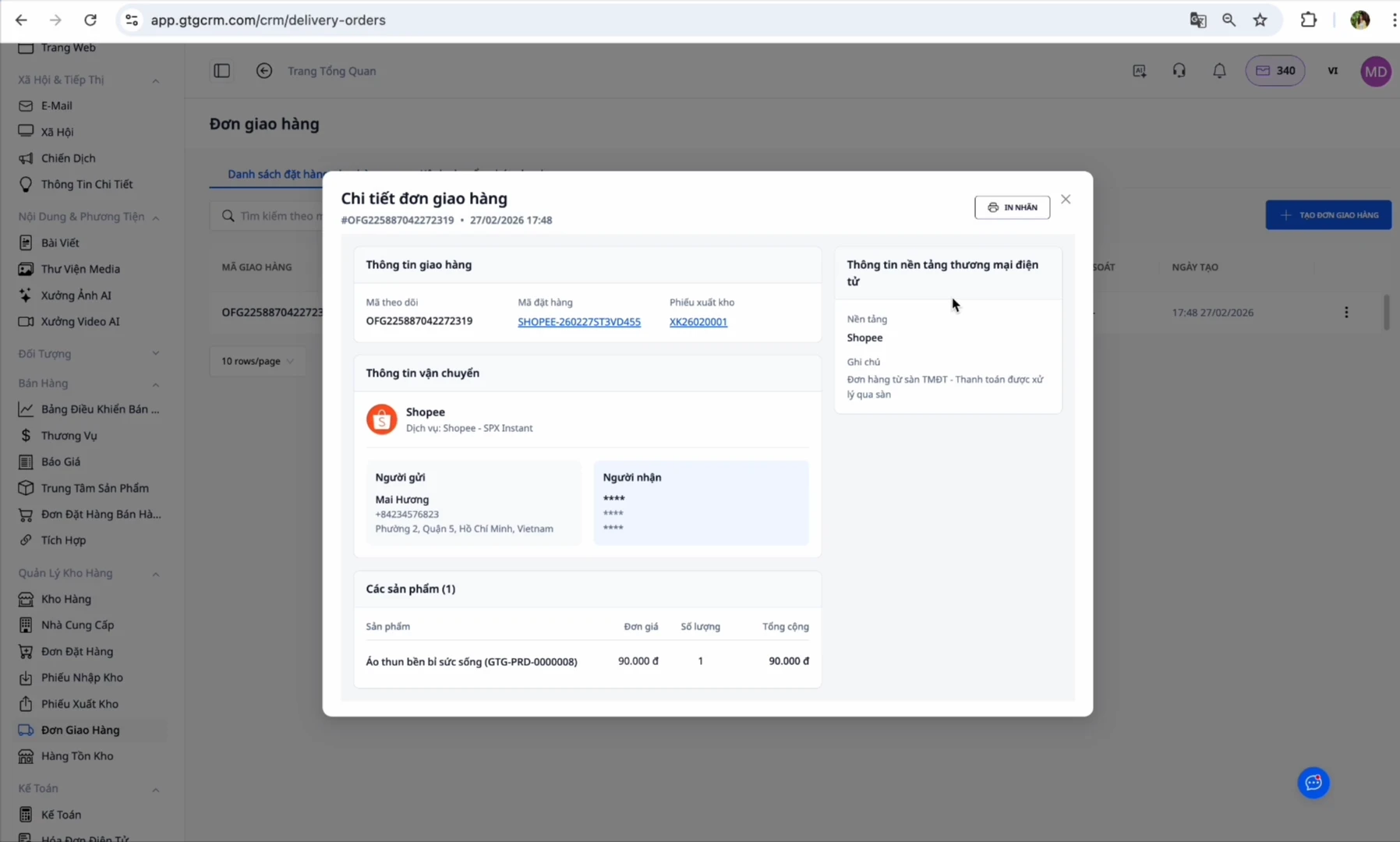
På dette tidspunkt vil GTG CRM automatisk oprette en afsendelseskuvert:
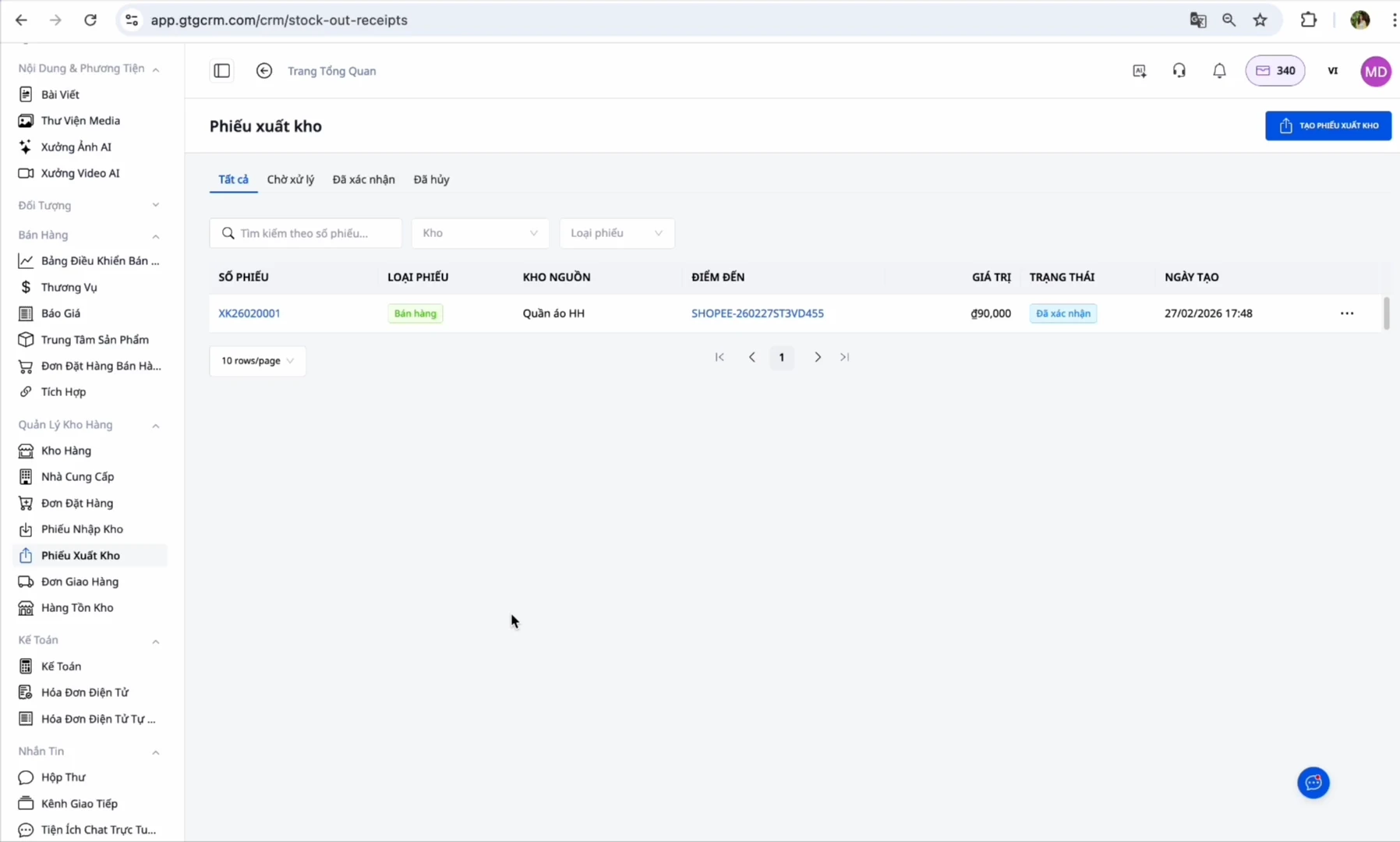
Vareudgang: Gå til den netop oprettede vareudgangsordre → Tryk på "Bekræft vareudgang" (Dette trin udføres af dig, det reducerer lagerbeholdningen og registrerer omkostningsprisen. Efter din bekræftelse udsteder systemet automatisk en elektronisk faktura), hvorefter systemet automatisk udsteder en elektronisk faktura (hvis installeret)
Afsluttet: Når kunden har modtaget varen succesfuldt, skifter ordren til "Afsluttet"
Fordele ved at bruge GTG CRM
Tidsbesparelse: Ingen grund til at logge ind på hver enkelt platform, administrer alle ordrer ét sted
Ingen glemte ordrer: Automatisk synkronisering sikrer, at du aldrig går glip af en ordre
Præcis lagerkontrol: Lagerantal opdateres synkront på alle kanaler
Automatiseret proces: Vareudgangsordrer oprettes for dig, du skal blot trykke på bekræft, og den elektroniske faktura følger automatisk
Nem indberetning: Systemet indsamler indgående og udgående fakturaer automatisk i henhold til regeringens regler
Oversigtsrapportering: Se omsætning og overskud fra alle kanaler på ét samlet dashboard
Vigtige bemærkninger
Om SKU-kode:
Sørg for, at SKU'erne på GTG CRM matcher 100% med SKU'erne på e-handelsplatformene
Hvis SKU'erne er forskellige → Systemet kan ikke synkronisere lagerbeholdningen
Et produkt = En enkelt SKU på alle kanaler
Om automatisk fakturering:
Hvis du har godkendt e-handelsplatformene (Shopee/Lazada/TikTok) til automatisk fakturering → UNDGÅ at aktivere automatisk fakturering i GTG CRM for at forhindre dobbeltfakturering
Aktivér kun denne funktion, hvis du ikke har godkendt platformen (bemærk, at dette kun gælder for ordrer fra e-handelsplatforme)
Om lageradresse:
Indtast lageradressen præcist, da dette er det sted, fragtføreren vil hente varerne
Sørg for, at der altid er en ansvarlig person på lageret i arbejdstiden
Om ordrestatus:
Du skal bekræfte vareudgangen, før du kan udstede en automatisk faktura
Justeringsfakturaer kan kun oprettes, når den oprindelige faktura er udstedt
Konklusion
GTG CRM er en omfattende løsning, der hjælper multikanalsælgere med at administrere ordrer fra Shopee, Lazada og TikTok Shop mest effektivt. I stedet for at skulle logge ind på hver enkelt platform, bruge meget tid på at skifte og nemt overse ordrer, kan du blot åbne GTG CRM og håndtere alle ordrer med det samme.
Især med den automatiserede funktion fra oprettelse af vareudgangsordre til udstedelse af elektronisk faktura, hjælper GTG CRM dig med at overholde lovgivningen om fakturering uden ekstra besvær. Det intelligente lagerstyringssystem sikrer, at du altid har præcis kontrol over lagerbeholdningen og undgår situationer med oversalg.
Med GTG CRM kan du fokusere på at sælge og udvikle din forretning, i stedet for at bruge tid på manuelle driftsprocesser. Dette er et uundværligt værktøj for alle multikanalsælgere i e-handel 4.0-æraen.


