

In der heutigen, stark wachsenden E-Commerce-Ära ist der Verkauf auf mehreren E-Commerce-Plattformen (Shopee, Lazada, TikTok Shop) für Händler zu einer unausweichlichen Tendenz geworden. Die Verwaltung von Bestellungen aus verschiedenen Kanälen birgt jedoch oft viele Schwierigkeiten: leicht verpasste Bestellungen, schwierige Bestandskontrolle, Zeitaufwand für den Wechsel zwischen den Plattformen.
GTG CRM wurde entwickelt, um dieses Problem umfassend zu lösen, indem alle Bestellungen von E-Commerce-Plattformen auf einer einzigen Plattform zusammengeführt werden. Ohne sich auf jeder einzelnen Plattform anmelden zu müssen, können Sie alle Bestellungen direkt auf GTG CRM verfolgen, bearbeiten und ausliefern, was den Verkaufsprozess optimiert und sicherstellt, dass keine Bestellung übersehen wird.
Dieser Artikel führt Sie Schritt für Schritt durch die effektivste Methode zur Synchronisierung und Verwaltung von Multi-Channel-Bestellungen auf GTG CRM.
Hauptfunktionen
Automatische Bestellsynchronisierung von Shopee, Lazada, TikTok Shop auf einer einzigen Plattform
Zentrale Bestellverwaltung – Alle Bestellungen von mehreren Kanälen an einem Ort anzeigen und bearbeiten
Einheitliche Lagerverwaltung – Lagerbestände werden synchron auf allen Verkaufskanälen aktualisiert
Automatisches Erstellen von Lieferscheinen, sobald eine Bestellung "Bestätigt" ist – kein Warten auf "In Zustellung"
Automatisierte Erstellung von E-Rechnungen gemäß den staatlichen Vorschriften
Zusammenfassende Umsatzberichte von allen Verkaufskanälen
Schnelle Bearbeitung – Kein Wechsel zwischen mehreren Plattformen erforderlich
Anleitung zur Multi-Channel-Bestellsynchronisierung
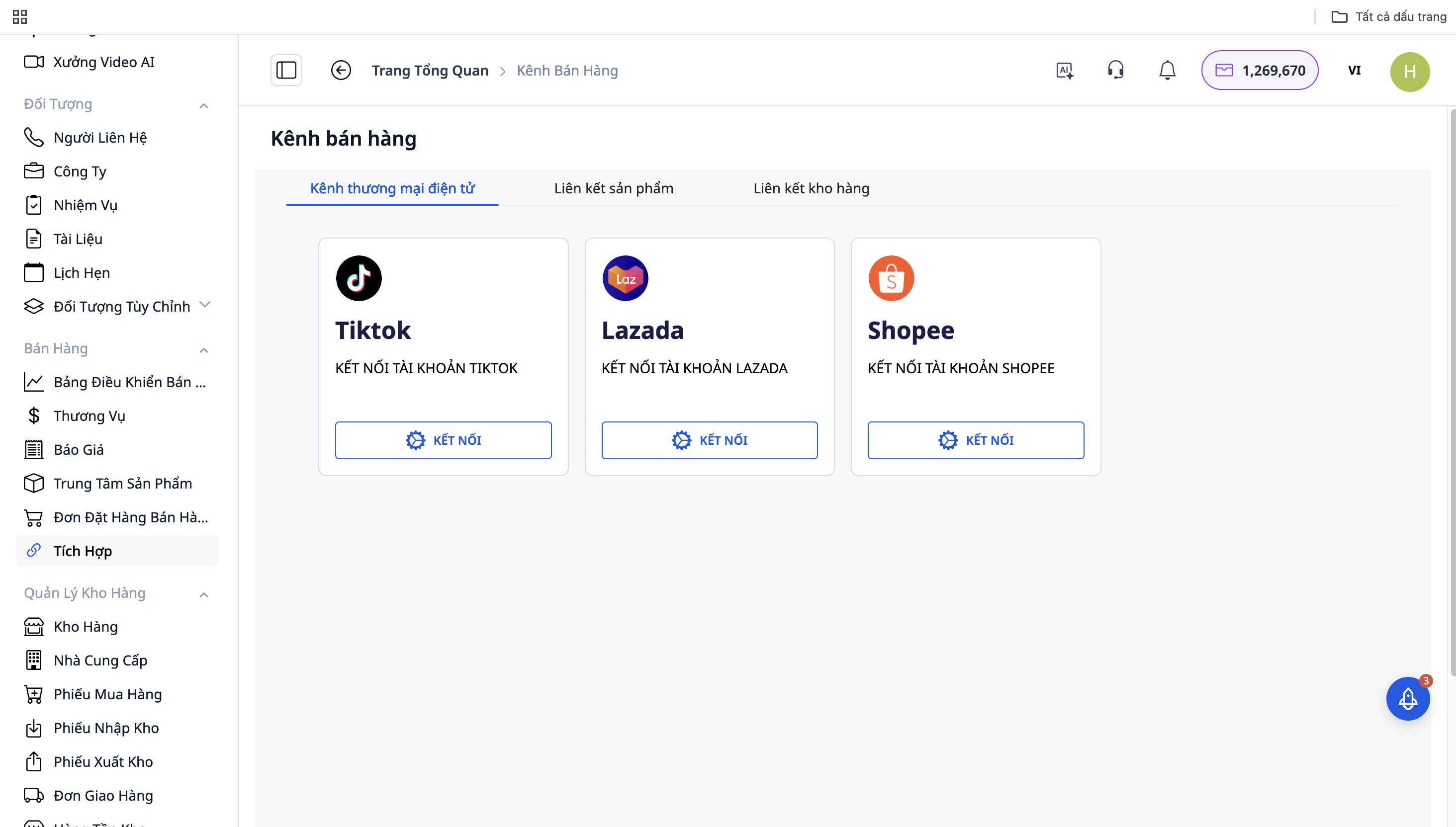
Schritt 1: Verbindung mit E-Commerce-Plattformen
Gehen Sie zu "Einstellungen" → "Integrationen von Verkaufskanälen"
Wählen Sie die zu verbindende Plattform: Shopee / Lazada / TikTok Shop
Klicken Sie auf "Verbinden" und melden Sie sich mit Ihrem Shop-Konto an
Erlauben Sie GTG CRM den Zugriff auf Bestell- und Produktdaten
Wiederholen Sie dies für die restlichen Plattformen
Schritt 2: Automatische Bestellsynchronisierung
Nach erfolgreicher Verbindung synchronisiert GTG CRM automatisch Bestellungen von den Plattformen mit dem System:
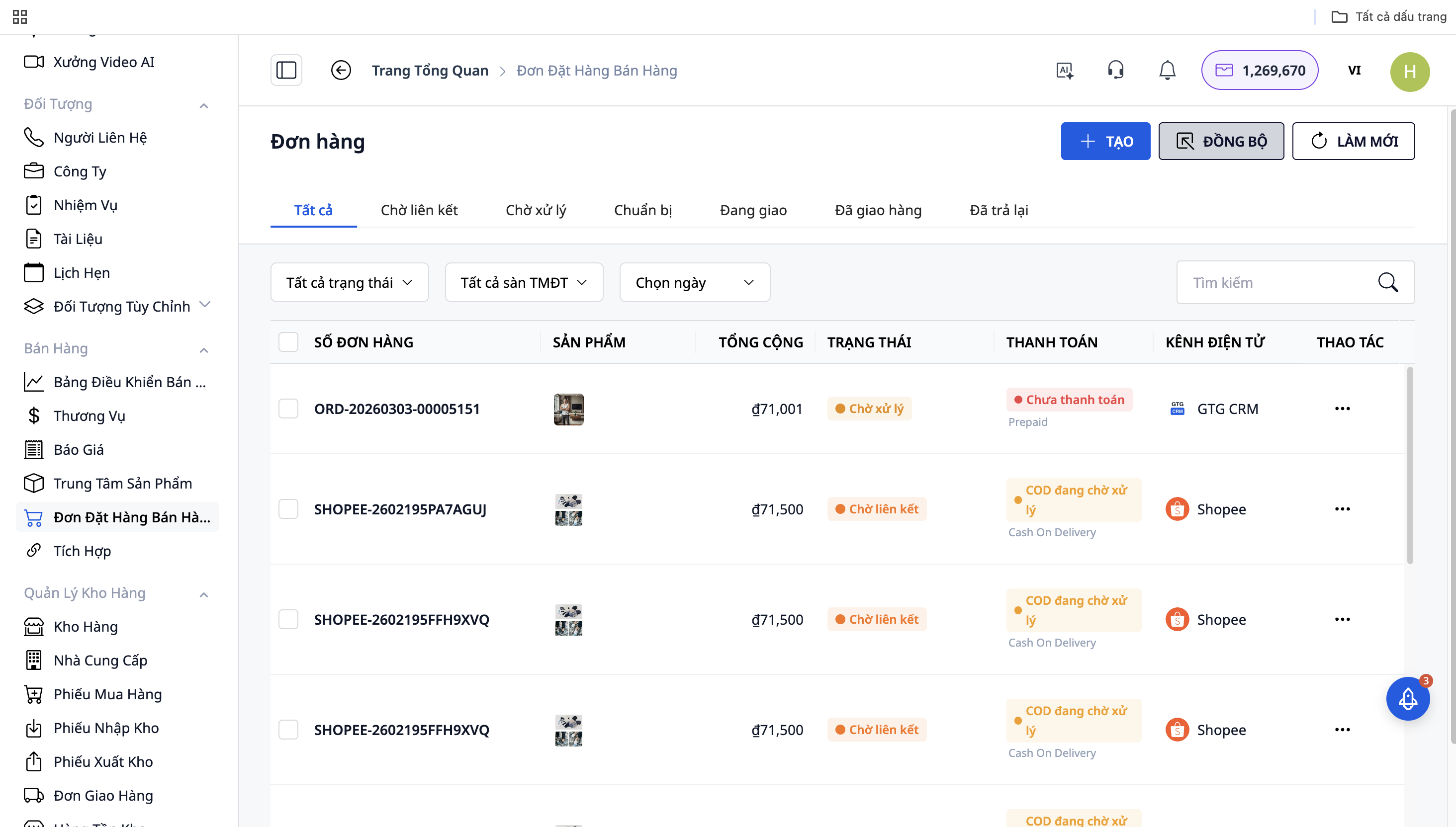
Alle Bestellungen von Shopee, Lazada, TikTok Shop werden in der "Verkaufs-Startseite" angezeigt
Jede Bestellung hat ein Quellensymbol (Plattform-Logo) zur einfachen Unterscheidung
Bestellungen werden in Echtzeit aktualisiert
Schritt 3: Bestellbearbeitung
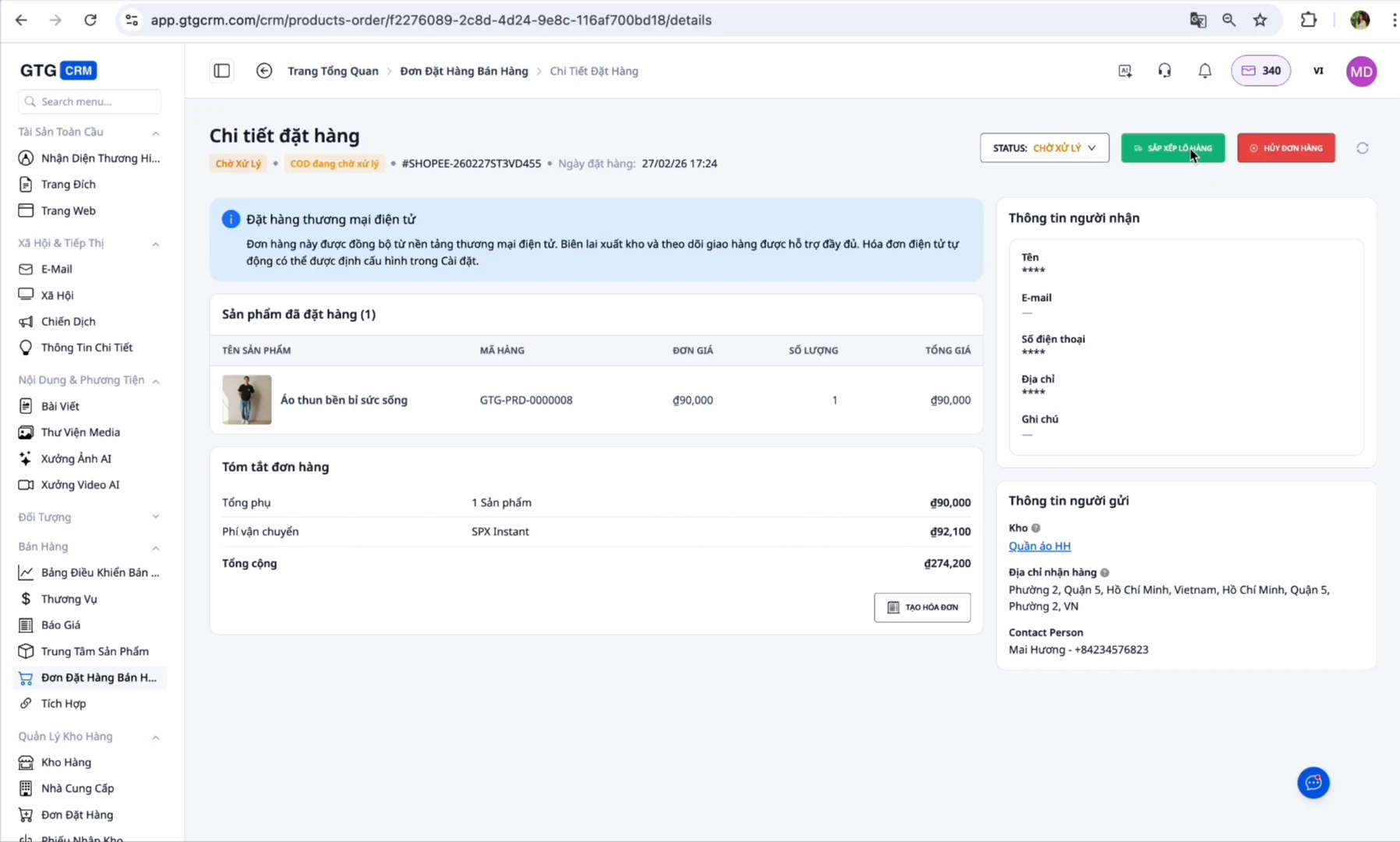
Bei neuen Bestellungen: Die Bestellung hat den Status "On Hold" oder "Wartet auf Bearbeitung"
Bestellung bestätigen: Ändern Sie den Status zu "In Zustellung"
Vorbereitung der Ware: Gehen Sie zum Abschnitt "Lieferungen" und klicken Sie auf "Etikett drucken", um die Versandetiketten zu erstellen
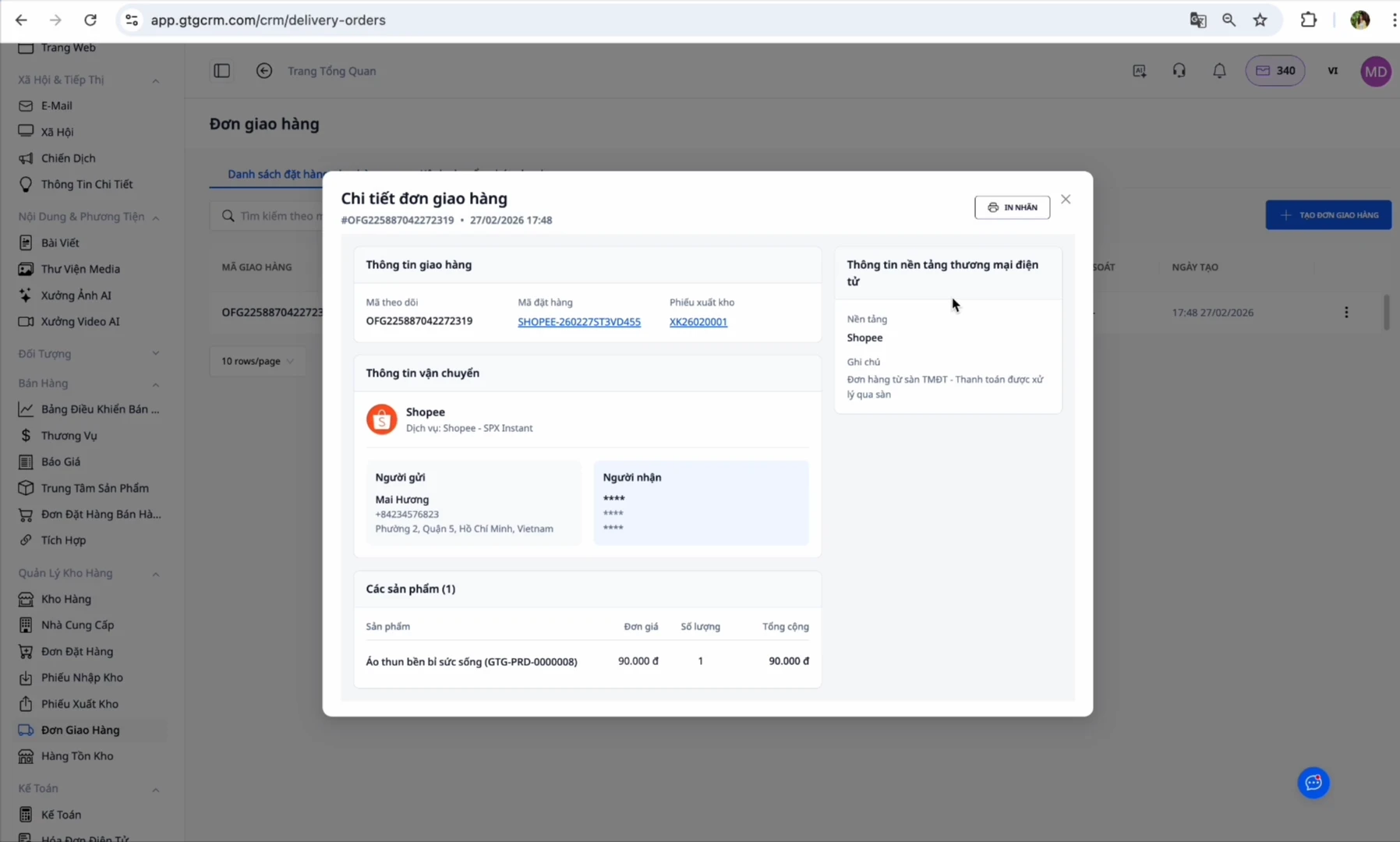
Zu diesem Zeitpunkt erstellt GTG CRM automatisch einen Lieferschein:
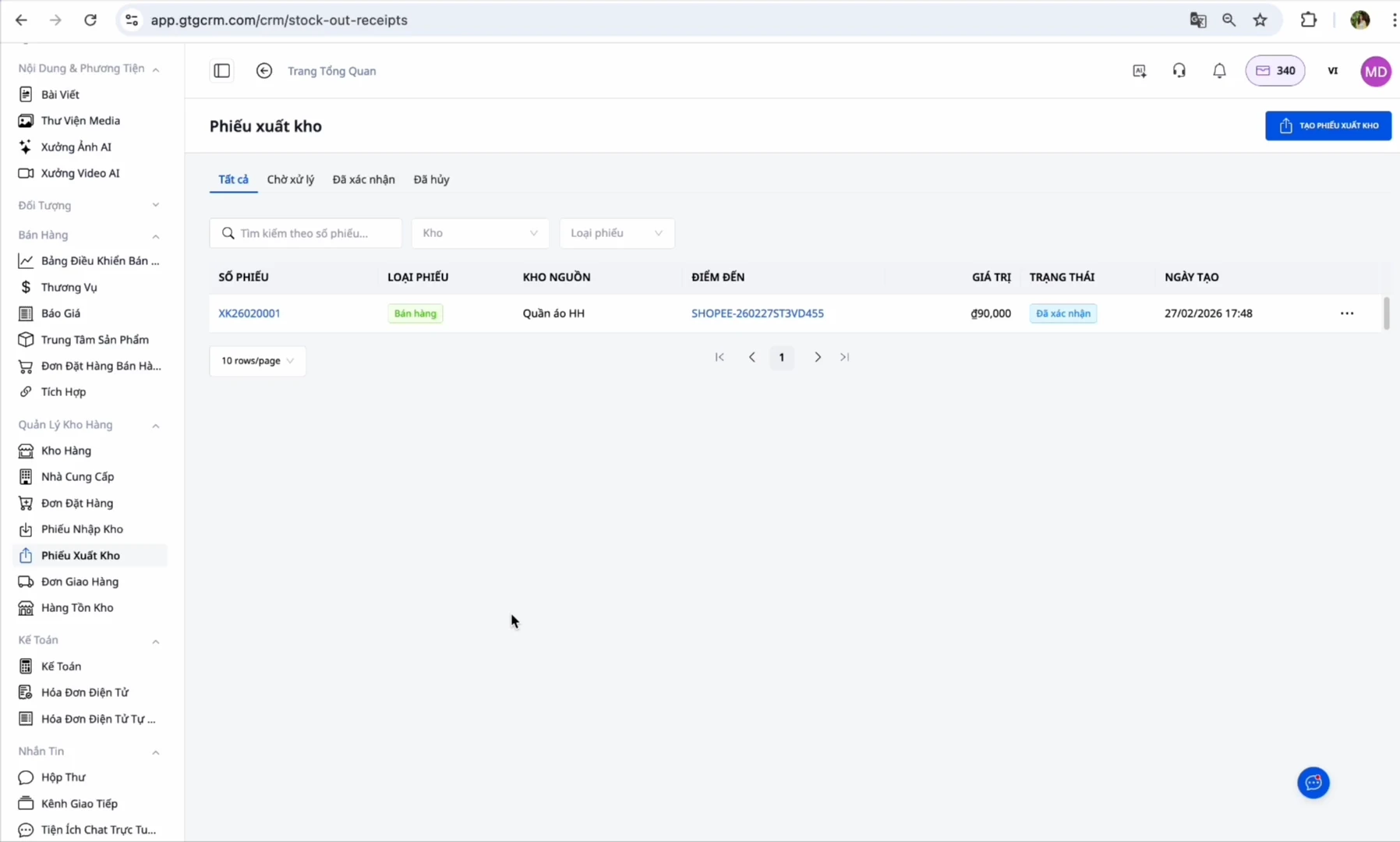
Warenausgang: Gehen Sie zum gerade erstellten Warenausgangsschein → Klicken Sie auf "Warenausgang bestätigen" (Dieser Schritt wird von Ihnen ausgeführt, er zieht den Lagerbestand ab und erfasst die Anschaffungskosten. Nach Ihrer Bestätigung exportiert das System automatisch die elektronische Rechnung), danach exportiert das System automatisch die elektronische Rechnung (falls konfiguriert)
Abschluss: Wenn der Kunde die Ware erfolgreich erhalten hat, wechselt die Bestellung zu "Abgeschlossen"
Vorteile der Nutzung von GTG CRM
Zeitersparnis: Kein separates Einloggen auf jedem Marktplatz erforderlich, verwalten Sie alle Bestellungen an einem Ort
Keine verpassten Bestellungen: Die automatische Synchronisation stellt sicher, dass Sie keine Bestellung verpassen
Genaue Lagerbestandskontrolle: Die Lagerbestandsmenge wird auf allen Kanälen synchron aktualisiert
Automatisierung des Prozesses: Der Warenausgangsschein wird für Sie vorbereitet, Sie müssen nur noch auf Bestätigen klicken, die elektronische Rechnung wird danach automatisch erstellt
Einfache Deklaration: Das System sammelt Eingangsrechnungen und erstellt automatisch Ausgangsrechnungen gemäß den staatlichen Vorschriften
Zusammenfassende Berichte: Sehen Sie Umsatz und Gewinn von allen Kanälen in einem einzigen Dashboard
Wichtige Hinweise
Zu SKU:
Stellen Sie sicher, dass die SKU in GTG CRM zu 100 % mit der SKU auf den E-Commerce-Marktplätzen übereinstimmt
Wenn die SKUs unterschiedlich sind → Das System kann den Lagerbestand nicht synchronisieren
Ein Produkt = Eine einzige SKU auf allen Kanälen
Zur automatischen Rechnungserstellung:
Wenn Sie die Marktplätze (Shopee/Lazada/TikTok) zur automatischen Rechnungserstellung autorisiert haben → Schalten Sie die automatische Rechnungserstellung auf GTG CRM NICHT ein, um Doppelabrechnungen zu vermeiden
Schalten Sie diese Funktion nur ein, wenn Sie den Marktplatz nicht autorisiert haben (beachten Sie, dass dies nur für Bestellungen von E-Commerce-Marktplätzen gilt)
Zum Lageradresse:
Geben Sie die genaue Lageradresse ein, da dies der Ort ist, an dem der Kurier die Ware abholt
Stellen Sie sicher, dass während der Geschäftszeiten immer eine verantwortliche Person im Lager anwesend ist
Zum Bestellstatus:
Der Warenausgang muss bestätigt werden, bevor die automatische Rechnungserstellung erfolgen kann
Eine Korrekturrechnung kann nur erstellt werden, wenn die ursprüngliche Rechnung ausgestellt wurde
Fazit
GTG CRM ist die umfassende Lösung für Multi-Channel-Verkäufer, um Bestellungen von Shopee, Lazada und TikTok Shop am effizientesten zu verwalten. Anstatt sich auf jedem Marktplatz einzeln einzuloggen, was viel Zeit für den Wechsel und das Risiko verpasster Bestellungen mit sich bringt, können Sie mit GTG CRM sofort alle Bestellungen bearbeiten.
Insbesondere mit der Automatisierung von der Erstellung des Warenausgangsscheins bis zur Erstellung der elektronischen Rechnung hilft Ihnen GTG CRM, die gesetzlichen Bestimmungen zu Rechnungen ohne zusätzlichen Aufwand einzuhalten. Das intelligente System zur Lagerbestandssynchronisation stellt sicher, dass Sie stets den genauen Überblick über Ihren Lagerbestand behalten und Überverkäufe vermeiden.
Mit GTG CRM können Sie sich auf den Verkauf und die Geschäftsentwicklung konzentrieren, anstatt Zeit mit manuellen Betriebsabläufen zu verbringen. Dies ist das unverzichtbare Werkzeug für jeden Multi-Channel-Verkäufer im Zeitalter des E-Commerce 4.0.


