
Funktionsübersicht
Möchten Sie Ihren Markt erweitern, wissen aber nicht, wo Sie anfangen sollen? Sie sitzen und tippen bei Google, scrollen durch Fanpages, kopieren jeden Namen in eine Datei – ein paar Zeilen pro Nachmittag, und Sie sind sich nicht einmal sicher, ob sie zur richtigen Zielgruppe passen. Die Suche nach neuen Kunden und Partnern sollte ein Wachstumsschritt sein, wird aber zu einer zeitaufwendigen manuellen Aufgabe.
Das hat heute ein Ende. GTG CRM bietet das Tool Partner- & Lead-Finder: Sie beschreiben einfach, wen Sie suchen (Branche, Region, Art), der KI-Assistent entdeckt reale Unternehmen und Kontakte aus dem Web, speichert die Suchhistorie und lässt Sie die am besten passenden Ergebnisse direkt in Ihre Kontakte & Unternehmen im CRM eingeben. Holen Sie sich in wenigen Minuten eine saubere Liste, weisen Sie Pflege-Skripte zu und beginnen Sie mit der Kontaktaufnahme – alles an einem Ort.
Probleme, mit denen Unternehmen konfrontiert sind
| Alte Methode | Konsequenz |
|---|---|
| Google/Fanpage durchsuchen und manuell kopieren | Ganzer Nachmittag verloren, inkonsistente Daten, leicht zu übersehen |
| Auf schwimmenden Listen kaufen | Falsche Zielgruppe, veraltete Daten, ineffektiv |
| Nach der Suche nicht speichern können | Bei der nächsten Suche von vorne beginnen |
| Listen außerhalb des CRM | Keine Pflege zuweisbar, Verlust von Chancen |
GTG CRM bündelt die Suche – Speicherung – Eingabe – Pflege in einem einzigen Workflow direkt in Ihrem CRM.
Highlights
1. Beschreiben Sie in Worten, KI entdeckt reale Unternehmen & Personen
Geben Sie Ihre Bedürfnisse in natürlicher Sprache ein (z. B. "Kaffeeketten in Ho-Chi-Minh-Stadt suchen Verpackungslieferanten" oder "Innenarchitekturunternehmen in Hanoi"). Die KI liefert eine Liste echter Unternehmen/Kontakte aus dem Web.
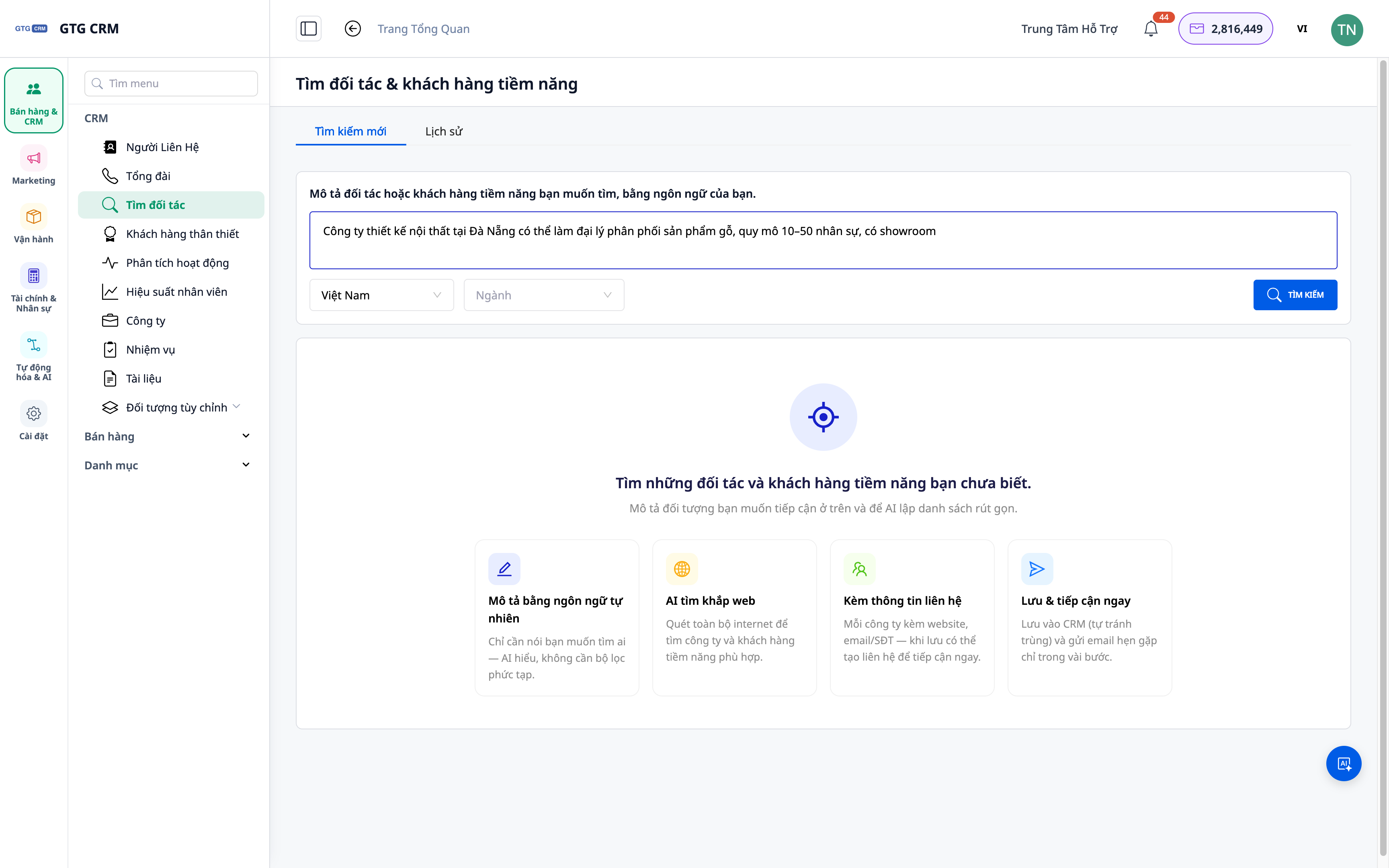
- Funktion: Suche nach natürlicher Beschreibung.
- Nutzen: Kein komplizierter Suchsyntax – sprechen Sie, wie Sie denken.
2. Ergebnisse umfassen sowohl Unternehmen als auch Kontakte
Die zurückgegebene Liste enthält nicht nur Firmennamen, sondern auch relevante Kontakte, die Ihnen helfen, die richtige Person zu erreichen.
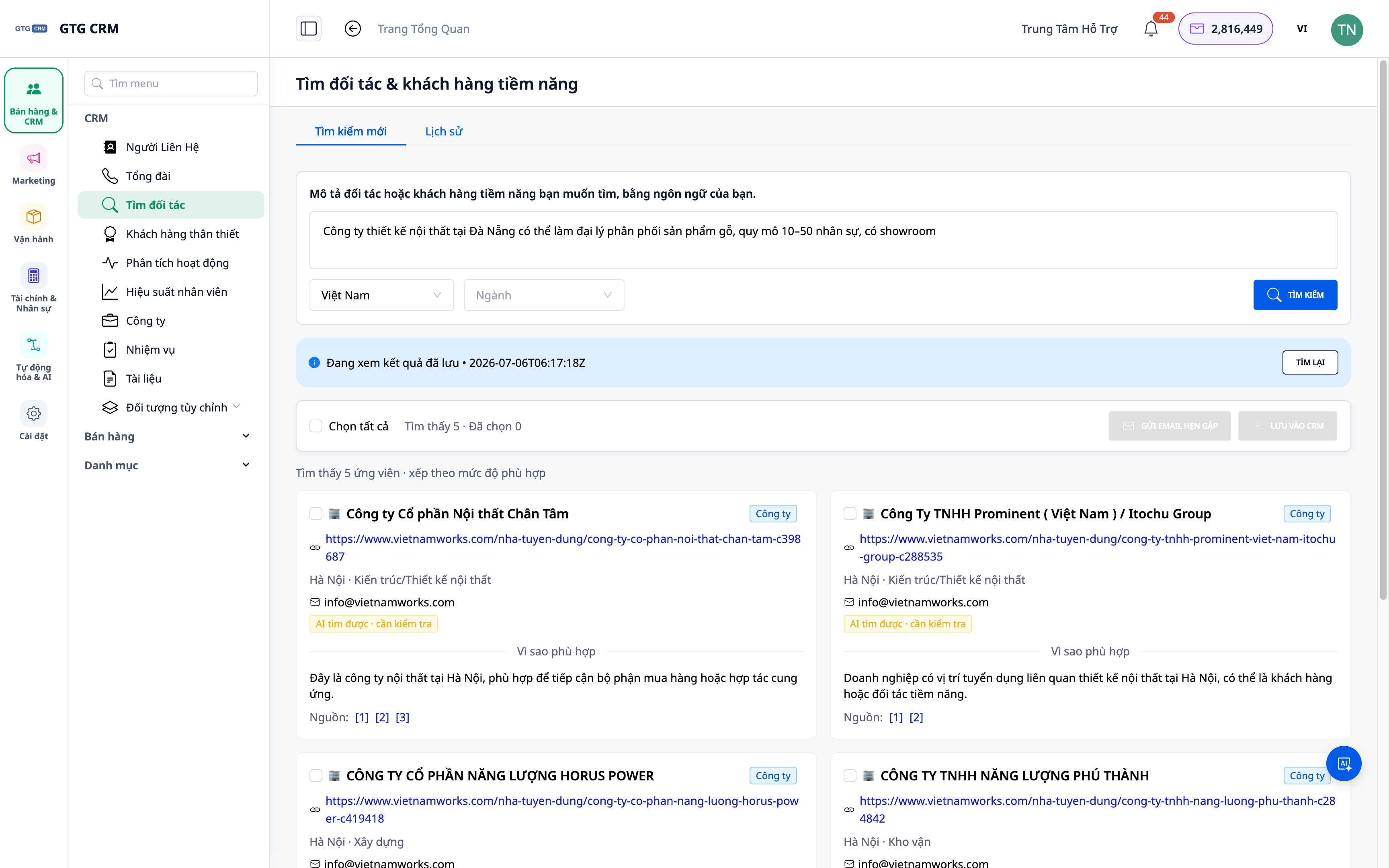
- Funktion: Ergebnisse auf Unternehmens- & Personenebene.
- Nutzen: Verkürzt den Weg zum Entscheidungsträger.
3. Speichern Sie die Suchhistorie – Überprüfen Sie sie, führen Sie sie erneut aus
Jede erfolgreiche Suche wird gespeichert: Sie können alte Ergebnisse erneut aufrufen oder Abfragen jederzeit erneut ausführen.
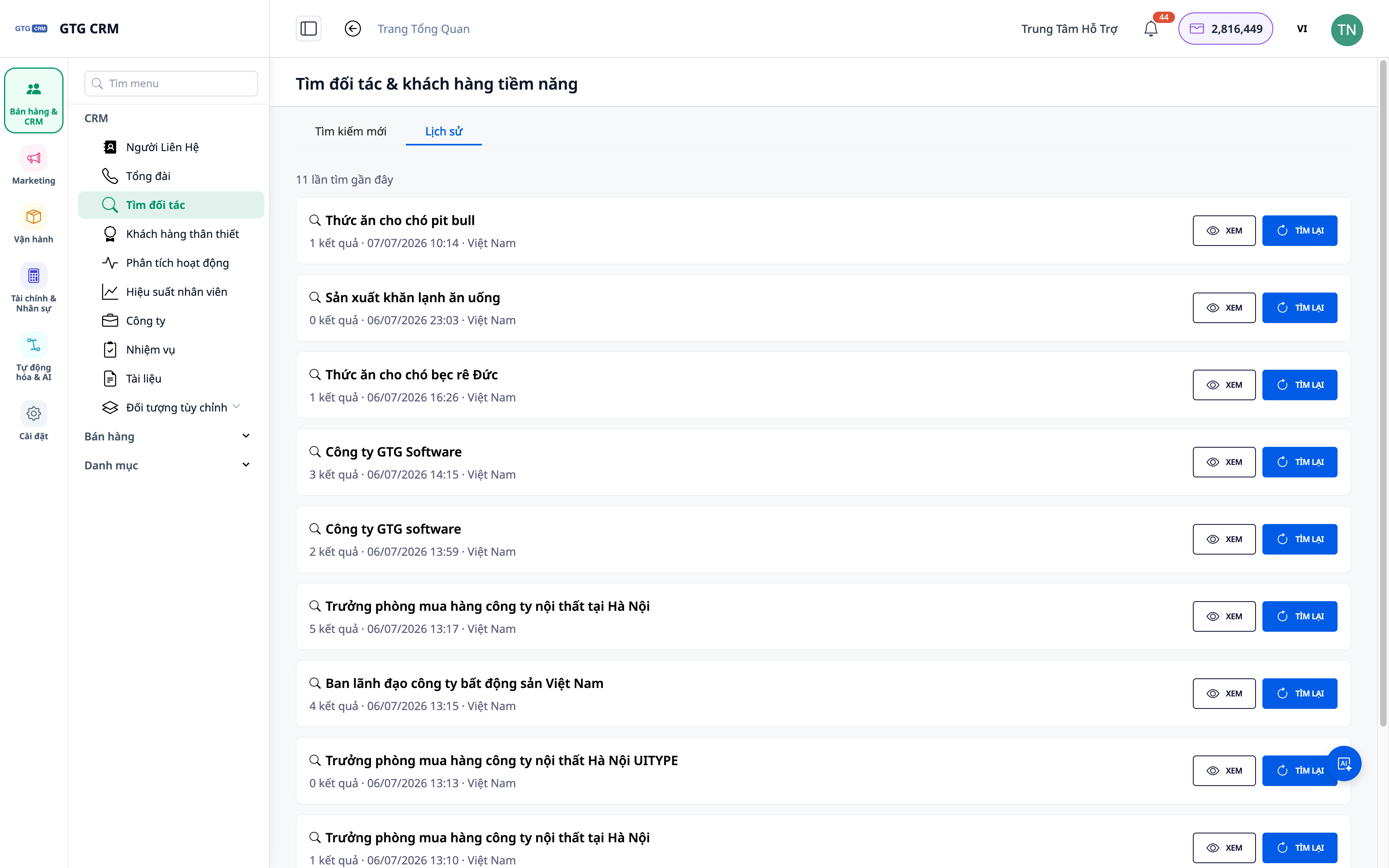
- Funktion: Gespeicherte Suchhistorie.
- Nutzen: Kein erneutes Beginnen; bauen Sie nach und nach ein Potenzial-"Lager" auf.
4. Direkt in Kontakte & Unternehmen eingeben, Pflege zuweisen
Wählen Sie passende Ergebnisse aus und geben Sie sie als Kontakte/Unternehmen in das CRM ein; weisen Sie dann automatische Pflege-Skripte zu, um mit der Kontaktaufnahme zu beginnen.
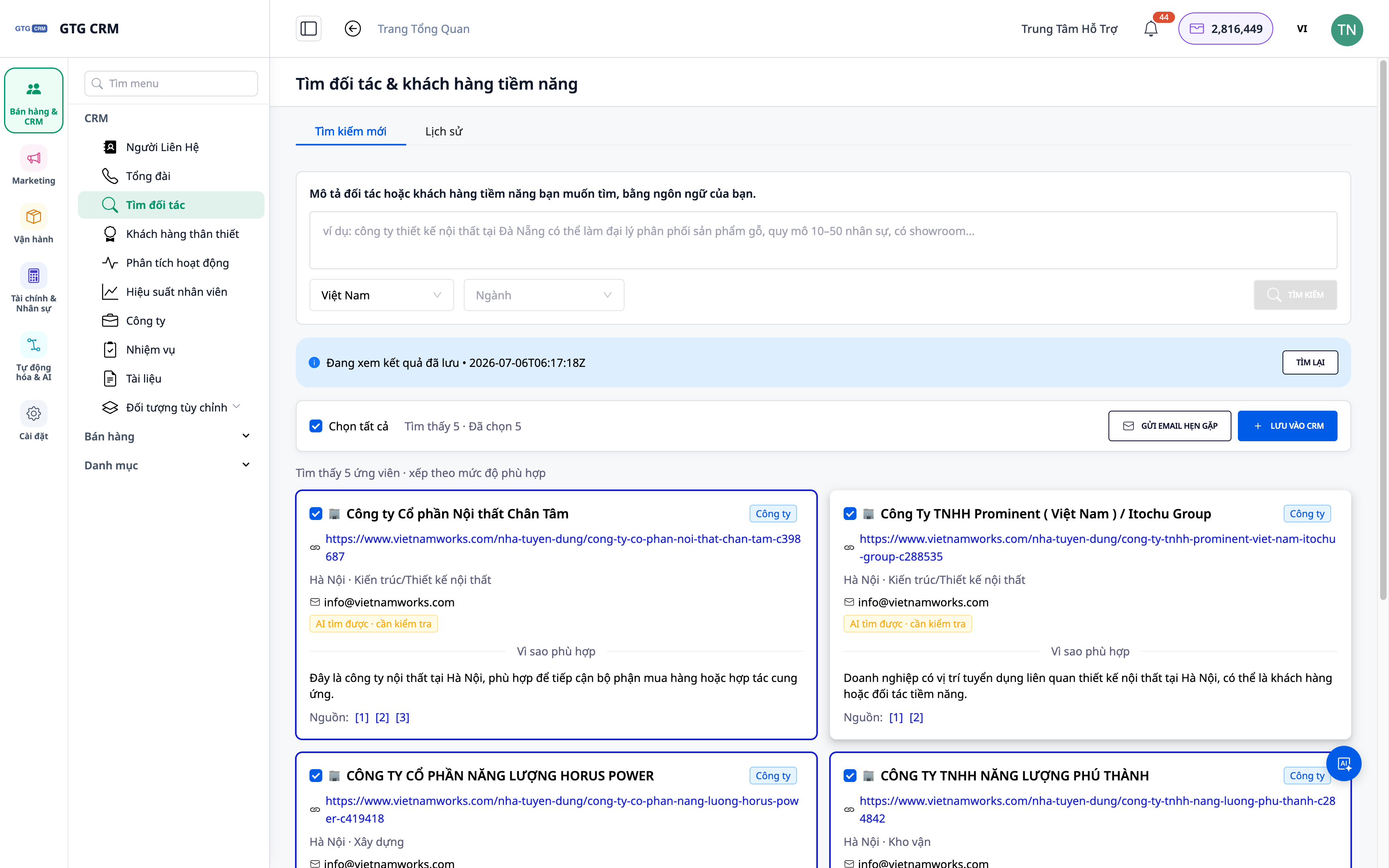
- Funktion: Ergebnisse in Kontakte/Unternehmen eingeben + Playbook zuweisen.
- Nutzen: Von der Liste zur Pflegemaßnahme in nur wenigen Klicks.
ℹ️ Jede Suche verbraucht eine kleine Menge an Credits; die Ergebnisse hängen von öffentlich verfügbaren Daten im Web ab.
Vorteile für Unternehmen
| Funktion | Praktischer Nutzen für Sie |
|---|---|
| Suche mit natürlicher Beschreibung | Potenzielle Kontakte in wenigen Minuten haben |
| Firmen- & Personenergebnisse | Die richtigen Personen, die richtigen Zielgruppen erreichen |
| Suchhistorie | Bauen Sie Ihren Kontaktpool auf, ohne neu beginnen zu müssen |
| Direkter Import in CRM | Keine Leads verpassen; sofort im System betreuen |
Für Wen Geeignet?
- Vertriebs- / Geschäftsentwicklungsteams (BD), die regelmäßig neue Kunden/Partner benötigen.
- Agenturen, die nach potenziellen Kunden nach Branche/Region für Kampagnen suchen.
- Unternehmensleiter, die Märkte erschließen und proaktiv nach Partnern suchen möchten.
💡 Benötigen Sie Lieferanten (Einkaufsseite) anstelle von Kunden? Sehen Sie sich die Schwesterfunktion Lieferanten mit KI finden an.
Wie Beginnen?
Gehen Sie zu Kontakte ▸ Partner & potenzielle Kunden finden, beschreiben Sie, wen Sie suchen, und beginnen Sie. Benötigen Sie detaillierte Schritte? Sehen Sie sich den Artikel Anleitung zum Finden von Partnern & potenziellen Kunden mit KI an.
Kostenlos testen — keine Kreditkarte erforderlich.


