Are you preparing to invest in a Facebook Ads, Google Ads, or SEO campaign? Before clicking "Run," make sure your website is ready to receive and convert traffic. An unoptimized website not only wastes advertising budget but also causes you to miss opportunities to reach potential customers.
This article provides a comprehensive checklist to help you self-audit your website before running ads, ensuring that all technical aspects, content, and user experience are optimized for the highest possible ROI.
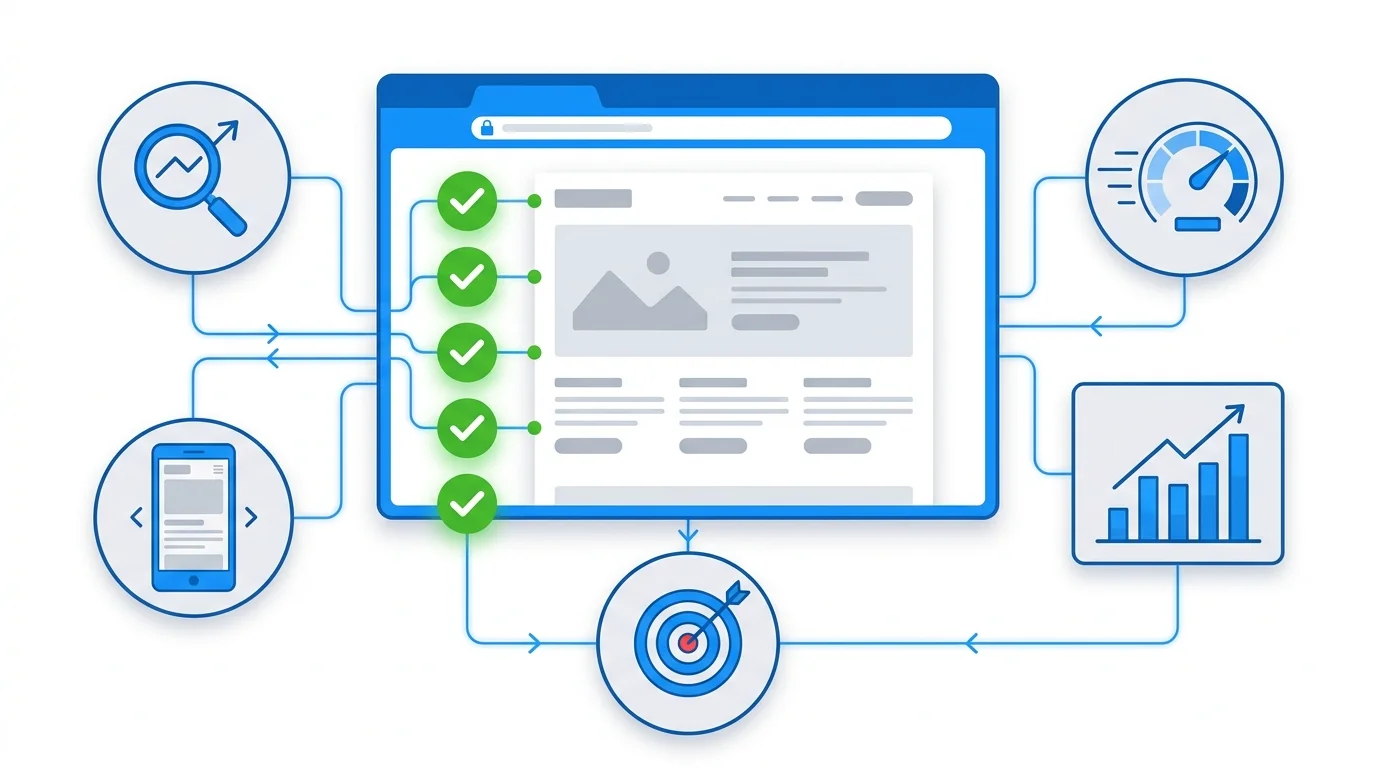
Overview Checklist: 6 Important Check Groups
| Inspection team | Main objective | Priority |
|---|---|---|
| Technical SEO | Ensure the website is stable and loads quickly. | Very high |
| Content & Keywords | Ensure the content matches the search intent. | Very high |
| UX/UI & Landing Page | Optimize user experience and reduce bounce rate. | High |
| Tracking & Attribution | Accurately measure campaign effectiveness and track lead sources. | Very high |
| CTA & Conversion | Optimize conversion rates, increase lead submissions. | Very high |
| On-page SEO | Optimize basic on-page elements. | High |
1. Technical SEO: A Solid Technical Foundation
Technical Checklist
- [ ] Page load speed < 3 seconds (checked on PageSpeed Insights)
- Desktop score > 90
- Mobile score > 80
Core Web Vitals achieved "Good" (LCP, FID, CLS)
[ ] Mobile-friendly 100%
- Responsive design is fully supported on desktop, tablet, and mobile.
- No display errors on mobile devices.
The font size should be large enough, and the buttons should be easy to click (minimum 48x48px).
[ ] HTTPS is properly installed
- Valid SSL certificate
No mixed content warnings
[ ] Sitemap.xml & robots.txt
- The sitemap has been submitted to Google Search Console.
Robots.txt does not block important pages.
[ ] Index the correct page
- Check
site:yourdomain.comon Google - Only valuable pages are indexed.
Use noindex for duplicate or unnecessary pages.
[ ] Crawlability
- There are no 404 or 500 errors on the main pages.
- Proper internal linking
- The URL structure is clear and free of redundant parameters.
Common mistakes to avoid: - Website loads too slowly on mobile (> 5 seconds) — 53% of users will leave - Lack of SSL — Chrome displays "Not Secure," immediately losing trust - Duplicate content but not using canonical tags
Tip from GTG CRM: If you use GTG CRM's Website Builder, responsive design is built-in with the ability to customize each breakpoint (desktop, tablet, mobile). Sitemap.xml and Robots.txt are also automatically generated with a visual editor — you can set priority for each page, add custom URLs, or edit directly using raw XML. SSL and HTTPS are also pre-configured for both the custom domain and the subdomain yourbrand.gtgcrm.com .
Here's a real-world example:
A client was running Google Ads for a landing page selling courses, but the mobile page load speed was 8 seconds. After optimizing images (switching to WebP) and configuring caching, the speed dropped to 2.5 seconds — bounce rate decreased from 78% to 42%, CPA decreased by 35%.
2. Content & Keywords: Speaking the Right Language of Your Customers
Content Checklist
- [ ] Full keyword research
- The primary keyword appears in the title, H1 tag, and URL.
- Secondary keywords are naturally distributed within the content.
LSI keywords to increase context
[ ] Content quality
- Content should be between 800 and 2000 words (depending on the topic).
- Address the customer's pain points effectively.
There is data and evidence to support it.
[ ] Reasonable heading structure
- Only 1 H1
- H2, H3 logical hierarchy
Keywords appear in the main headings.
[ ] Freshness
- Content updated within the last 6 months.
Accurate and up-to-date information.
[ ] Internal linking
- Links to related pages
Anchor text provides clear description.
[ ] Multilingual (if targeting multiple markets)
- Each language has its own URL to support hreflang.
Common mistakes to avoid: - Keyword stuffing — Google will penalize you directly - Thin content that doesn't solve users' problems - Copying verbatim from competitors — will result in a lower EEAT score
Tips from GTG CRM: GTG CRM supports 10 languages (Vietnamese, English, Thai, Chinese, Japanese, Korean, French, Spanish, Indonesian, German) with a unique URL prefix for each language ( /vi/about , /en/about ). You can choose automatic translation using Google Translate or AI Enhanced Translation using GPT-40 — translating according to brand and industry context, resulting in much more natural results than conventional machine translation. Additionally, AI Article Writer helps create high-quality articles with appropriate tone, or improve existing articles (shorten, expand, correct grammar).
Here's a real-world example:
A landing page targeting the keyword "CRM software for medium-sized businesses," but the content talks about "CRM for large businesses"—this mismatch in search intent leads to a low Quality Score and a high CPC. Ensure the content accurately matches the keyword you are bidding on.
3. UX/UI & Landing Page: User Experience Determines Conversion
UX/UI Checklist
- [ ] Clear layout, not cluttered
- Whitespace is sufficient, not too crowded.
Visual hierarchy is logical — the user's eye is guided from the headline to the CTA.
[ ] Above the fold effective
- The value proposition is clearly stated at the top of the page.
- CTA button
Hero image or captivating video
[ ] Simple form, optimized conversion
- Only ask for essential information (3–5 fields maximum)
- Clear label
- Friendly error message
There is a thank-you page or redirect URL after submission.
[ ] Social proof
- Testimonials, case studies
- Partner and client logos
Success data (if available)
[ ] Easy Navigation
- Simple menu, not too many levels.
- Breadcrumbs for complex websites
The search function is working correctly.
[ ] Optimized Mobile UX
- The touch target must be large enough (at least 48x48px).
- No pop-ups obscure the main content.
- Easy-to-fill form on mobile
Common mistakes to avoid: - Pop-ups appearing immediately upon entering the page — 67% of users close them right away - Forms that are too long or ask for too much unnecessary information - CTA buttons that are faded, hard to see, or blend into the background
Tips from GTG CRM: GTG CRM's Website Builder offers over 20 industry-specific templates (Real Estate, Restaurants, Healthcare, Automotive, Education, Spa, Technology, etc.) and over 20 pre-built sections (Hero Banner, Form Section, FAQ, Testimonial, Gallery, etc.) to help you build a professional landing page in minutes. Each template is already optimized for responsiveness with customizations for desktop, tablet, and mobile. The Brand Kit allows you to set up your brand identity (color palette, font, favicon) once — all new elements are automatically inherited, ensuring consistency across the entire website.
If you want to go even faster, AI Website Generation allows you to describe your website in natural language — the AI will create each section with live previews, and you just need to edit and publish.
Here's a real-world example:
An initial software sales landing page had a 12-field form. After reducing it to 4 fields (name, email, phone number, company), the conversion rate increased from 1.8% to 4.2% — more than doubling simply by simplifying the form.
4. Tracking & Attribution: Accurate Measurement for ROI Optimization
This is the most important part that many businesses overlook. Inaccurate tracking = not knowing which ads are effective = wasted budget.
Checklist Tracking
- [ ] Google Analytics 4 (GA4) setup is correct
- Tracking code across all pages
- Event tracking for key actions (form submit, button click, scroll depth)
Conversion goals have been set.
[ ] Google Tag Manager (GTM) configuration
- All tags are working normally.
- Triggers set up correctly
Debugging mode: Test thoroughly before publishing.
[ ] Conversion tracking for each advertising platform
- Google Ads conversion tracking
- Facebook Report
Thank you page or confirmation event
[ ] UTM parameters
- Prepare UTMs for each campaign.
- Consistent naming convention
Do you have a spreadsheet or UTM management system?
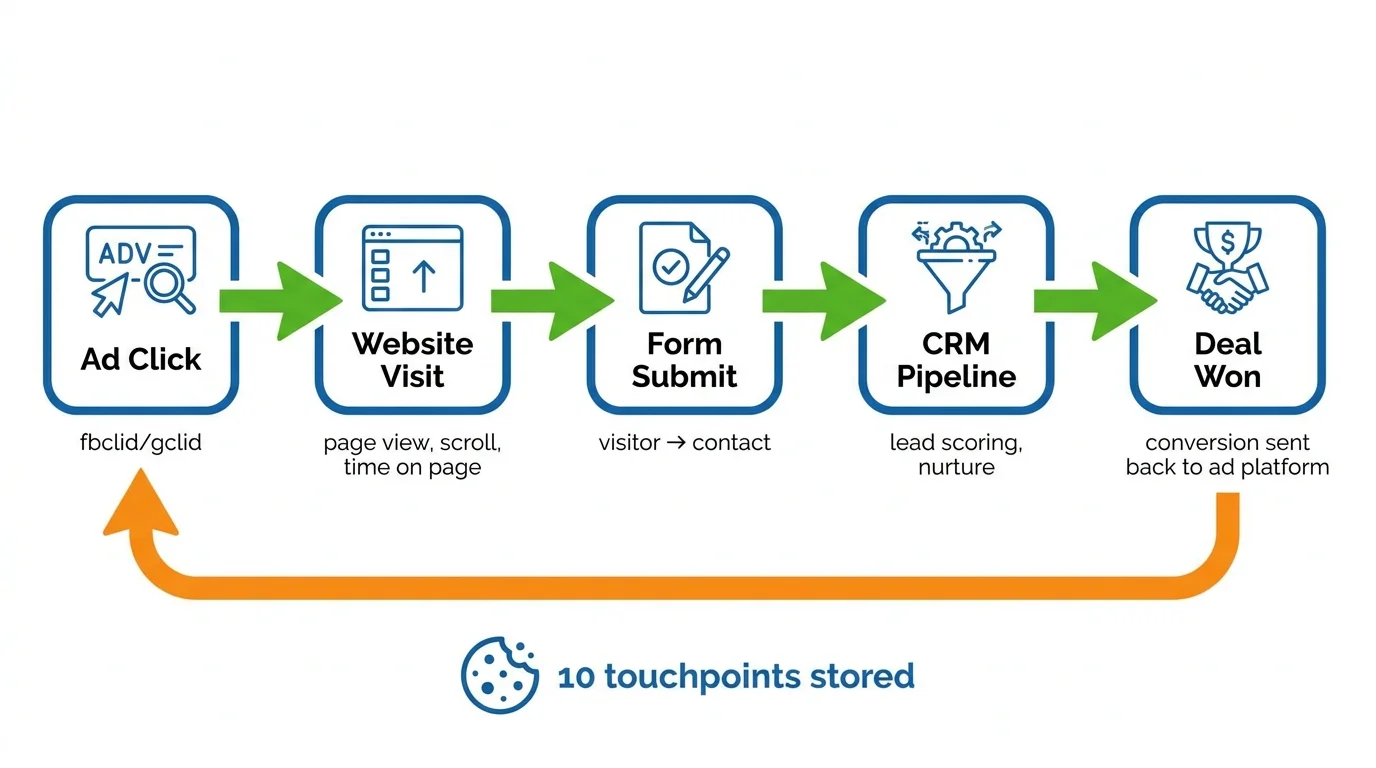
[ ] Attribution — track lead origin from start to finish
- Save the fbclid/gclid file from the ad link.
- Track touchpoint history (First Touch & Last Touch)
When a deal is closed → send the conversion back to the advertising platform (CAPI/Offline Conversion)
[ ] CRM integration — automatically sends leads from website to CRM
- Leads from website forms automatically generate contacts in CRM.
- Tracking leads from the source (source/medium/campaign/fbclid/gclid)
The attribution model is clearly defined (First Touch or Last Touch).
[ ] Server-side tracking (prevents data loss due to ad blockers)
- Client-side pixels are blocked by approximately 26% of desktops and approximately 80% of iOS devices.
- Server-side events are needed to ensure accurate attribution.
Common mistakes to avoid: - Installing GA4 but not setting up event tracking — no knowledge of user activity on the page - Forgetting to install conversion tracking — unable to measure actual ROI - Inconsistent UTM — chaotic data, unanalyzable - Relying solely on client-side pixels — losing 26–80% of conversion data due to ad blockers
Tip from GTG CRM — Automatic tracking, no manual setup required:
GTG CRM has a built-in Attribution SDK on all websites and landing pages built on the platform. If your website isn't built on GTG CRM, you can still embed the SDK using a short script. The SDK automatically tracks:
| Event | Data collected |
|---|---|
| Page View | URL, referrer, UTM params, fbclid, gclid, IP, user agent |
| Page Unload | Time on page (ms), scroll depth (%), number of pages in session |
| Submit Form | Link visitor ID → contact ID in CRM |
| Add to Cart | Product details, quantity |
| Begin Checkout | Shopping cart contents, total value |
| Purchase | Transaction code, revenue, product list |
Additionally, GTG CRM stores up to 10 touchpoints in cookies, supporting both First Touch (the channel that brings the customer to the first time) and Last Touch (the channel that leads to a conversion). When a lead closes a deal or makes a purchase, the system automatically sends the conversion back to Facebook (via CAPI) and Google (via Offline Conversion) — including server-side events to bypass ad blockers, ensuring the advertising platform measures the actual ROI.
Each page in Website Builder also allows for individual configuration: Facebook Pixel ID, GA4 Measurement ID, Google Ads Conversion Labels, GTM Container ID, and custom JS snippets.
Here's a real-world example:
One client was running ads but hadn't integrated CRM. The sales team had to manually enter leads—a delay of 2-3 days—resulting in a 40% loss of closing opportunities. After using GTG CRM with its built-in form, leads were automatically generated in the CRM upon submission, complete with source information (UTM, fbclid), allowing sales to respond within minutes—increasing conversion rates by 28%.
5. CTA & Conversion: Clear Action Guidance
Checklist CTA
- [ ] Featured CTA button
- The color contrasts with the background.
- The size is large enough, and it's easy to click.
Ideal placement (above the fold + at the end of the main content)
[ ] Copy attractive CTA
- Action-oriented: "Get a free consultation", "Try it now", "Get a quote within 24 hours"
- Avoid vague terms: steer clear of "Submit" and "Send".
Create a sense of urgency, if appropriate.
[ ] A reasonable number of CTAs
- 1–2 main CTAs per page
Not so much that it overwhelms the user.
[ ] CTA suitable for funnel stage
- Top funnel: "Learn more", "Download free ebook"
- Mid funnel: "Register for webinar", "View demo"
Bottom funnel: "Buy now", "Contact sales"
[ ] Thank you page optimization
- Clear confirmation message
- Instructions for the next step
There may be additional offers or a next CTA.
[ ] Optimal form for conversion
- Only ask for the necessary information.
- There is a GDPR checkbox if needed.
- Anti-spam: honeypot, render token
- Automatically create contacts in CRM when submitting.
Common mistakes to avoid: - Light gray CTA button that blends into the background - Copying generic CTAs: "Send", "Submit" — doesn't motivate action - Too many different CTAs on one page — users get confused and don't know which one to click
Tips from GTG CRM: GTG CRM's Form Builder supports many field types (text, email, phone, dropdown, checkbox, date...) and can be embedded into any page in 3 ways: widget.js (Shadow DOM, no CSS conflicts), iframe, or direct sharing URL. Each field is mapped to a CRM property — when a customer submits, the contact is automatically created or updated. The form also has built-in spam protection (honeypot + render token with HMAC-SHA256) and automatically counts views/submissions so you can track your conversion rate.
Additionally, each form submission automatically triggers an Automation Workflow — you can set up a welcome email, notifications for the sales team, or any other suitable flow.
Here's a real-world example:
Change the CTA button from "Submit Information" to "Get a Free Quote in 24 Hours" — click-through rate increased by 62%. Combined with GTG CRM Form Builder, it automatically creates contacts and triggers a workflow to send confirmation emails immediately — ensuring no leads are missed.
6. On-page SEO: Optimizing Every Detail
On-page SEO Checklist
- [ ] Optimized Title Tag
- Length: 50–60 characters
- It has a primary keyword.
Attractive, encourages clicking.
[ ] Meta description
- Length: 150–160 characters
- It has a short CTA.
Contains natural keywords
[ ] URL structure
- In short, it contains keywords.
- No special characters
Lowercase, a hyphen (-) instead of an underscore (_)
[ ] Image optimization
- Alt text provides a full description.
- File name contains keyword
Compress images to reduce file size (WebP format)
[ ] Schema markup
- Product schema (if selling products)
- FAQ schema (if there is a Q&A)
Organization schema
[ ] Open Graph & Social metadata
- OG image, OG title for each page
- Twitter Card metadata
The preview is accurate when sharing on social media.
[ ] Internal linking
- Links to related pages
- Diverse and natural anchor text
Common mistakes to avoid: - Duplicate title tags across multiple pages - Blank meta description or auto-generated description from page content - Blank alt text for images or only "image1.jpg" - No original image — links shared on Facebook/Zalo display poorly
Tips from GTG CRM: GTG CRM's Website Builder allows you to configure SEO on each page: Meta Title, Meta Description, URL Slug, Open Graph Image, Open Graph Title. The system also automatically creates dynamic OG images via the /api/og API if you don't upload your own images. With the integrated blogging system, you have a standard RSS 2.0 feed for syndication — and a Headless Content API to push content to WordPress, Ghost, or any platform that supports RSS.
Bonus: Leverage CRM to Optimize Advertising Effectiveness
A website optimized for SEO is just the first step. To truly optimize advertising ROI, you need a system to track leads from click to deal . This is where CRM comes into play:
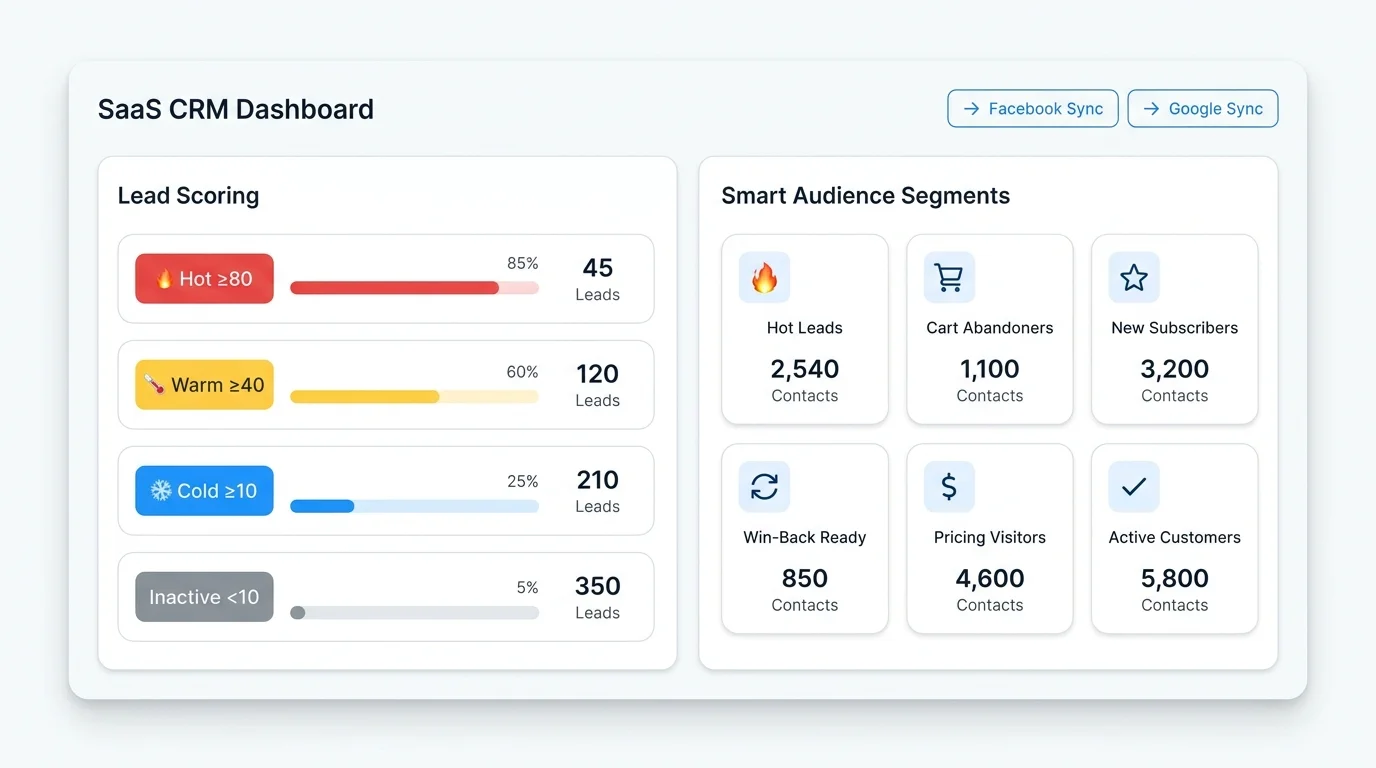
Automatic Lead Scoring — knows which leads are the "hottest"
GTG CRM automatically calculates engagement scores based on 8 channels (email, web, form, deal, social, e-commerce, chat, voice) with a 90-day window and decreasing weighting over time:
| Bag | Score | Proposed action |
|---|---|---|
| Hot | ≥ 80 | Ready to buy — contact us immediately. |
| Warm | ≥ 40 | Nurture with content, email drip |
| Month | ≥ 10 | Need more warming |
| Inactive | < 10 | Inactive recently |
Smart Segments — Synchronizing your audience with your advertising platform
GTG CRM features 10 AI Smart Segments that automatically update (Hot Leads, New Subscribers, Cart Abandoners, Win-Back Ready, Pricing Visitors...). Each segment can be directly synchronized to Facebook Custom Audiences or Google Customer Match — helping you target precisely with data that advertising platforms don't have: email history, deal pipeline, lead scoring, chat history, and calls.
Engagement-Based Audiences — Smart Retargeting
Create an audience based on actual behavior: - Engaged visitors : time on page > 15 seconds - High scroll depth : scroll > 50% of the page - High intent : > 3 minutes on the page AND scroll > 75% - Bounced visitors : < 15 seconds — exclude from the audience to save budget
These audiences operate through both client-side pixels and server-side events (Facebook CAPI), ensuring that data is not lost due to ad blockers.
Conversion Loop — close the deal, know the ad right away.
When a sale successfully closes a deal in the CRM, the system automatically looks up the transaction details on fbclid / gclid from the contact's attribution history and sends a Purchase event to Facebook CAPI or Google Offline Conversion. The advertising platform receives a real conversion signal, optimizes the bidding algorithm, and ROAS increases over time.
Action Plan: What to Do Next?
Step 1: Self-assess your website
Use the checklist above and mark the completed items. Prioritize the following steps in order of completion:
- Critical : Technical SEO, Tracking & Attribution, CTA & Form
- Important : UX/UI, On-page SEO, CRM Integration
- Nice to have : Schema markup, A/B testing, multilingual support.
Step 2: Fix technical issues first.
You shouldn't run ads when your website has serious technical issues (slow speed, missing tracking, non-functioning forms). This is a direct waste of budget.
Step 3: Test thoroughly before scaling.
- Run small campaigns with a low budget (5–10 million VND/month)
- Track metrics: bounce rate, time on page, conversion rate, CPA
- Verify that leads are entering the CRM correctly and that attribution is accurate.
- Adjustments based on actual data.
Step 4: Continuous Optimization
Website audits aren't a one-time thing to do. You should check: - Weekly : Tracking is working correctly, conversion rate, lead quality - Monthly : Technical SEO, content quality, CRM data accuracy - Quarterly : UX/UI, A/B test results, attribution model review
Effective Website Auditing Tools
| Tools | Function |
|---|---|
| Google Page Speed Insights | Speed test and Core Web Vitals |
| Google Search Console | Check index, crawl errors, mobile usability |
| Google Tag Manager + GA4 | Set up and track conversion events. |
| GTG CRM | Website builder with SEO standards, form builder with CRM integration, automatic attribution tracking, server-side conversion, Smart Segments for audience synchronization, lead scoring, automation workflow |
Do you need professional audit support?
If you: - Don't have time to check each item yourself - Are unsure if tracking and attribution are set up correctly - Want detailed reports and specific action plans
Sign up for a free website audit with GTG CRM today!
We will help you: - Conduct a comprehensive website analysis based on the 6 checklist groups above - Verify that tracking and attribution are working correctly - Propose an optimized plan prioritized according to ROI - Integrate form builder, attribution SDK, and CRM to measure effectiveness from click to deal closing - Set up Smart Segments and server-side events to optimize advertising costs
Register for a free website audit →
Turn what you've just read into tangible results — apply it now with GTG CRM, free.
Apply now