Have you ever wondered why your website loads quickly and ranks highly on Google, but your conversion rate remains low? Or conversely, why you invest in Google Ads but have a poor Quality Score, high costs, and unsatisfactory results?
The answer lies in a technical factor that many marketers often overlook: Core Web Vitals and page load speed . These aren't just technical metrics; they directly impact your SEO ranking, advertising effectiveness, and conversion rates.
In this article, we'll delve into the link between website performance and real-world business results — from search engines to user behavior — and how the GTG CRM platform helps you address these issues right from the website building stage.
What are Core Web Vitals and why are they important?
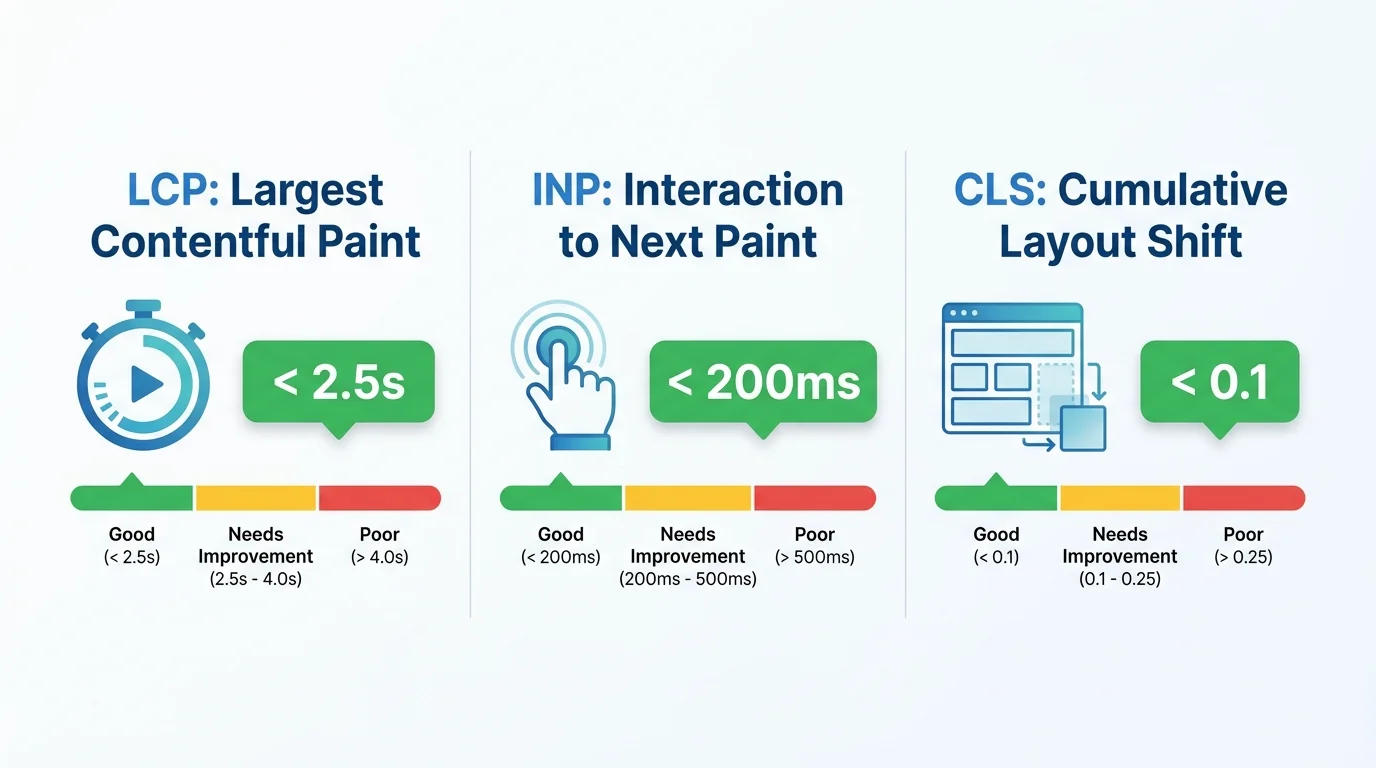
Core Web Vitals are a set of three user experience metrics that Google uses to assess website quality:
1. LCP (Largeest Contentful Paint) — The speed at which main content is loaded.
- What is it? The time it takes for the largest element on a page (usually a hero image or banner) to be fully displayed.
- Good threshold : Under 2.5 seconds
- Impact : If the Low Load Congestion (LCP) exceeds 4 seconds, users will find the page too slow and may leave immediately.
2. INP (Interaction to Next Paint) — Interaction Responsiveness
- What is it ? The time it takes for a website to respond when a user clicks, types in data, or interacts with it.
- Good threshold : Below 200ms
- Impact : High INP makes users feel that the website is laggy and not smooth.
3. CLS (Cumulative Layout Shift) — Layout Stability
- What is it? It measures the "jump" rate of elements while a page is loading.
- Good threshold : Below 0.1
- Impact : You were about to click the "Buy Now" button, but it suddenly jumped to the bottom, and you accidentally clicked on an ad — a terrible experience.
How do page load speed and mobile experience affect SEO?
1. Google uses Core Web Vitals as a ranking signal.
Since 2021, Google has officially incorporated Core Web Vitals into its ranking algorithm under the name "Page Experience Update" . This means:
- Websites with a good CWV (Click-Through Rate) have a higher chance of ranking higher.
- Websites with low CWV (Click-Through Rate) will be ranked lower, especially on mobile devices.
In reality : If two websites have equivalent content, Google will prioritize the one with a better user experience.
2. Mobile-first indexing: Mobile experience dictates everything.
Google now evaluates and ranks websites based on their mobile versions . If the mobile experience is poor:
- The interface is broken and difficult to read on the phone.
- The font is too small, and the buttons are too close together.
- Slower loading speed compared to desktop.
Result: SEO for both desktop and mobile devices was affected.
The solution with GTG CRM : GTG CRM's Website Builder has a responsive 3-breakpoint system (mobile under 768px, tablet 768–1024px, desktop over 1024px) built into every component. Each element allows for individual customization for each breakpoint — for example, the layout changes from horizontal on desktop to vertical on mobile — and you can preview the interface on all three devices directly in the editor.
3. Page load speed affects crawl budget.
If a website loads slowly, Google bots will: - Take longer to crawl each page - Crawl fewer pages per visit - New or updated pages may not be indexed in a timely manner.
This directly impacts visibility on Google .
Impact on Quality Score and Google Ads effectiveness
Many people think Quality Score is only related to keywords, ad copy, and landing page relevance. But in reality, Landing Page Experience (one of the three pillars of Quality Score) is directly affected by page load speed.
Slow speed results in a lower Quality Score and a higher CPC.
| Page load speed | Quality Score | CPC (Cost per Click) | Conversion Rate |
|---|---|---|---|
| Under 2 seconds | 8–10/10 | Lowest | Highest |
| 3–5 seconds | 5–7/10 | Medium | Medium |
| Over 5 seconds | 1–4/10 | 2–3 times higher | Very low |
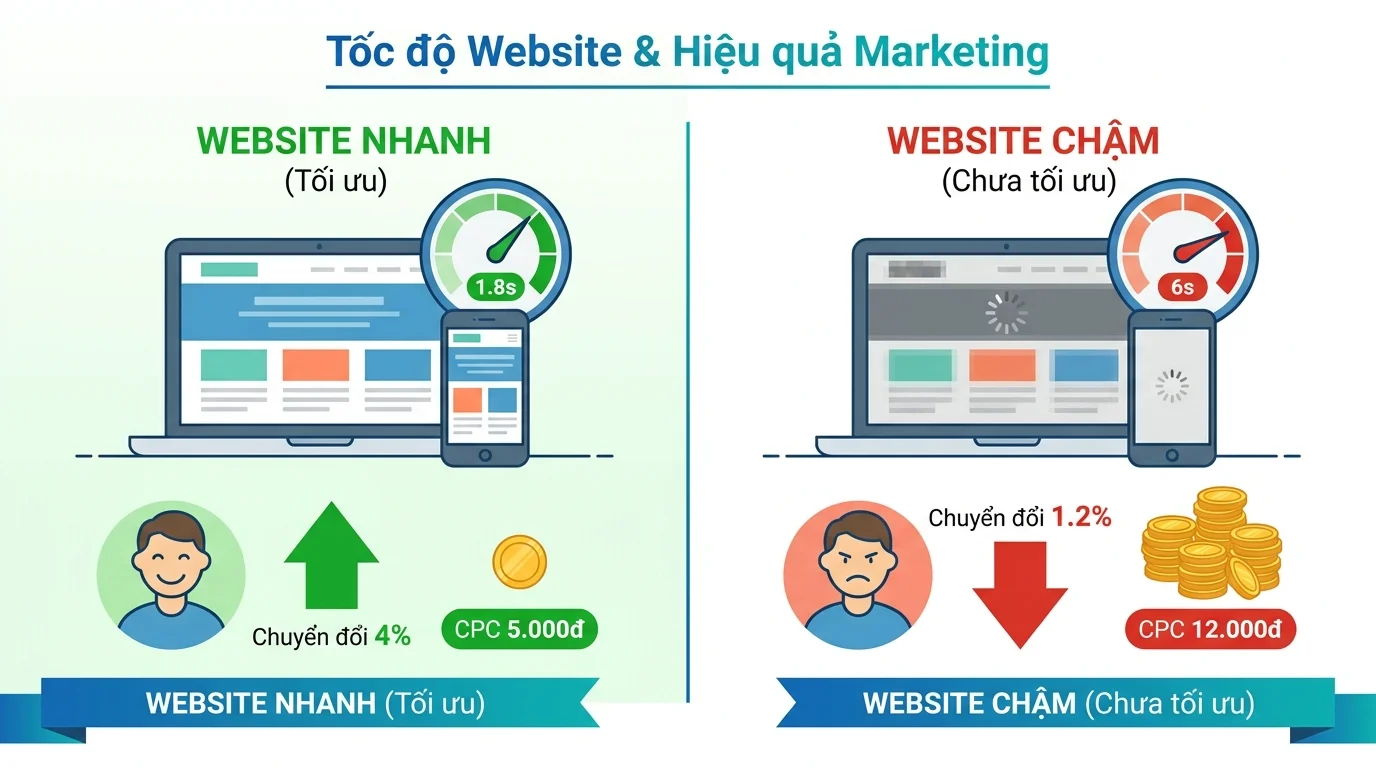
Real-world examples : - Website A: Loads in 1.8 seconds → Quality Score 9/10 → CPC 5,000 VND/click → Conversion rate 4% - Website B: Loads in 6 seconds → Quality Score 4/10 → CPC 12,000 VND/click → Conversion rate 1.2%
Website B had to pay twice the advertising cost and had a conversion rate three times lower.
GTG CRM Solution : GTG CRM integrates multi-platform advertising management (Google Ads, Facebook Ads, LinkedIn Ads) into a single dashboard. The Visitor Engagement Tracking SDK automatically sends conversion events to Google Tags and GTM within 30 seconds of user interaction—ensuring accurate remarketing data. Combined with Facebook CAPI (server-side conversions) and Google Enhanced Conversions , you have all the data you need to optimize your advertising campaigns.
Impact on UX, Bounce Rate, and Conversion Rate
1. Page load speed = User patience threshold
Research from Google and other major organizations shows that:
- 53% of mobile users leave a page if it takes more than 3 seconds to load.
- For every additional second of delay, the bounce rate increases by 20–30%.
- For every 0.1-second improvement in speed, conversion increases by 8–10%.
In the case of a slow-loading website (6 seconds): 1. The user clicks on an ad or search result. 2. Waits 2 seconds — sees a loading spinner. 3. Waits another 2 seconds — some content is displayed but not fully. 4. Waits another 2 seconds — the page finally loads. 5. Result : 70% of users left before the page fully loaded.
In the case of a fast-loading website (1.5 seconds): 1. The user clicks. 2. In less than 1 second, the main content is clearly displayed. 3. In less than 1.5 seconds, the page is ready for interaction. 4. Result : The user stays, reads the content, and is 3 times more likely to take action.
2. Core Web Vitals influence user behavior.
High CLS (Layout Shift) — Poor experience:
- Open a website on your phone.
- I read two lines, then suddenly the image appeared and the content jumped down.
- Scrolling down further, an advertisement appears, causing the layout to jump once more.
- I intended to click the "See more" button, but the button jumped, and I accidentally clicked on an advertising banner.
Result: feeling frustrated, leaving the page immediately.
High INP (Interaction Latency) — Users experience "lag":
- Click the "Add to cart" button and wait 1-2 seconds for a response.
- I entered my email into the form, but the text displayed slower than my typing speed.
- Opening the mobile menu means having to wait for a slow animation.
Users think the website is malfunctioning or don't trust it enough to make a purchase.
3. Poor mobile experience leads to lost conversions.
According to statistics:
- 57% of users would not recommend a poorly designed mobile website to others.
- 40% will switch to a competitor if the mobile experience is not good.
- Mobile conversion rates are on average 2–3 times lower than desktop rates, but with good optimization, this number can be equal to or even higher.
Common mobile issues: - Fonts under 14px, difficult to read, requiring users to zoom in/out - Buttons too close together, easy to accidentally click - Input forms not optimized for mobile keyboards - Popups occupying the entire screen, difficult to close, causing annoyance
Common errors that slow down websites and reduce Core Web Vitals.
1. Suboptimal image quality (The #1 cause of high LCP)
Common mistakes: - Uploading original images from the camera (5–10MB) without compression - Using PNG format for images that don't require transparency - Not using lazy loading for images at the bottom of the first screen
Solutions: - Switch to WebP or AVIF (reduces file size by 30–50%, quality remains the same) - Compress images before uploading (using tools like TinyPNG, Squoosh) - Responsive images: serve images that fit the screen size - Lazy loading: images don't display immediately (below the fold)
Tip when using GTG CRM : Before uploading images to GTG CRM's Media Library , compress them and convert them to WebP format using free tools like Squoosh or TinyPNG. This will significantly speed up your page loading time because image files are 30–50% smaller.
2. JavaScript and CSS are cumbersome.
Common errors: - Loading entire JavaScript libraries even when only using 1-2 functions - Not minifying or bundling code - Render-blocking scripts preventing page rendering
Solution: - Code splitting: only load necessary JavaScript for each page - Defer or async loading for unimportant scripts - Minify and compress (gzip/brotli) CSS and JavaScript - Critical CSS: inline necessary CSS for above-the-fold content
With GTG CRM Website Builder : Pages built using GTG CRM's Craft.js component system are already optimized — only rendering the components that are actually on the page. When you need to add third-party tracking scripts (Facebook Pixel, Google Tag, GTM), use the Custom Scripts feature in the page settings so GTG CRM automatically inserts them in the correct position within
<head>or<body>, avoiding render-blocking.
3. Server response is slow.
Common problems: - Cheap hosting, weak server - No caching - Suboptimal database queries - Not using a CDN
Solutions: - Upgrade your hosting or switch to a better cloud server - Enable caching (browser cache, server cache, CDN cache) - Optimize database queries, add indexes - Use a CDN (Cloudflare, AWS CloudFront, etc.) to serve static files
With GTG CRM : When publishing a website on GTG CRM, the cloud infrastructure (AWS) handles hosting. You can connect your own custom domain or use the subdomains provided by GTG CRM. All image files and resources are stored on AWS S3, ensuring stable access speeds.
4. Not optimized for mobile.
Common errors: - Viewport is not responsive - Touch targets are too small (under 48x48px) - Font size is too small on mobile - Pop-ups obscure main content
Solution: - Responsive design with viewport meta tags - Touch targets at least 48x48px, minimum spacing 8px - Font size at least 16px for body text - Popups that close easily and don't take up the entire screen
With GTG CRM : Every component in the Website Builder supports responsive design with 3 breakpoints (mobile/tablet/desktop). When designing, you can switch between live views on the toolbar to check and customize settings for each screen size. A green dot will appear in the settings when you have overridden a specific breakpoint, making it easy to identify which elements have been optimized for mobile.
5. Layout shift due to advertising and dynamic content.
Common errors: - Ads load late, pushing content to the bottom - Images/videos lack predefined width/height - Fonts load late, changing text size (FOIT/FOUT)
Solutions: - Pre-assign space (placeholder) for ads, images, and videos - Use CSS aspect-ratio - Font-display: swap or preload critical fonts
With GTG CRM : Website Builder, we use a Brand Kit system with CSS variables for fonts and colors, minimizing layout shift caused by font loading. Each image and video component has a predefined size within the layout, preventing layout "jumps".
Practical example: Before and after optimization
Case Study 1: E-commerce Website
Before optimization: - LCP: 5.8 seconds | INP: 420ms | CLS: 0.35 - Mobile bounce rate: 68% - Conversion rate: 1.2% - Organic traffic: 50,000 visits/month
Optimization steps: 1. Optimize product images (WebP + lazy loading) 2. Remove unused JS, code splitting 3. Optimize mobile UI (increase button size, improve forms) 4. Add placeholders for ads
After optimization: - LCP: 1.9 seconds | INP: 180ms | CLS: 0.06 - Mobile bounce rate: 42% (down 26%) - Conversion rate: 2.8% (up 133%) - Organic traffic: 73,000 visits/month (up 46% thanks to SEO boost)
Business results: - Revenue increased by 210% simply from performance optimization - Advertising ROI increased by 60% thanks to a better Quality Score
Case Study 2: Landing page B2B SaaS
Before optimization: - LCP: 4.2 seconds - Mobile traffic: 45% of total traffic - Mobile conversion: 0.8% (compared to desktop 2.5%)
After optimizing the mobile experience: - Mobile LCP: 2.1 seconds - Mobile conversion: 2.2% (an increase of 175%) - Mobile conversion is almost equal to desktop conversion
Checklist: Improve Core Web Vitals and Page Load Speed
Step 1: Measure the current situation
Testing tools: - PageSpeed Insights (Google): Measures CWV on both lab and field data - Google Search Console : View Core Web Vitals reports for the entire website - Lighthouse (Chrome DevTools): Detailed performance audit - GTmetrix : Detailed analysis of each resource load
Key metrics to monitor: - LCP (Latest Contentful Paint): under 2.5 seconds - INP (Interaction to Next Paint): under 200ms - CLS (Cumulative Layout Shift): under 0.1 - First Contentful Paint (FCP): under 1.8 seconds - Time to First Byte (TTFB): under 600ms
With GTG CRM : Every website and landing page published on the platform is automatically integrated with Matomo Analytics , providing live visitor data. Combined with the built-in Visitor Engagement Tracking SDK (tracking scroll depth, time on page, session duration), you get a comprehensive picture of user behavior without needing to install any external tools.
Step 2: Optimize speed
Image optimization: - [ ] Compress images before uploading (TinyPNG, Squoosh) - [ ] Convert to WebP/AVIF whenever possible - [ ] Use responsive images with srcset - [ ] Preload important hero/banner images
Optimize JavaScript: - [ ] Minify and compress JS files - [ ] Code splitting by routes/pages - [ ] Defer non-critical scripts - [ ] Remove unused JavaScript
Optimize CSS: - [ ] Minify CSS - [ ] Inline critical CSS - [ ] Remove unused CSS - [ ] Defer non-critical CSS
Server optimization: - [ ] Enable caching (browser + server) - [ ] Use CDN for static assets - [ ] Optimize database queries
Step 3: Optimize Mobile Experience
Mobile UI/UX: - [ ] Standard responsive design - [ ] Minimum font size 16px - [ ] Minimum touch targets 48x48px - [ ] Minimum spacing between buttons 8px - [ ] Form optimized for mobile keyboard - [ ] Popups do not occupy the entire screen
With GTG CRM Website Builder : Switch to mobile view in the editor, then customize each element individually. The
ResponsiveValuesystem automatically applies the appropriate value for each breakpoint — for example,padding,fontSize,flexDirectioncan be completely different between mobile and desktop.
Step 4: Reduce Layout Shift (CLS)
Layout stability: - [ ] Set width/height for images and videos - [ ] Placeholder for ads - [ ] Font-display: swap for web fonts - [ ] Avoid inserting content above existing content
Step 5: Continuous monitoring and improvement
Monitoring: - [ ] Setting up Google Search Console - [ ] Monitoring Core Web Vitals weekly - [ ] A/B testing of improvements - [ ] Monitoring bounce rate and conversion rate
With GTG CRM : Install Google Tag , Facebook Pixel , or GTM directly in your page configuration—no code changes required. The built-in visitor tracking SDK automatically sends engagement events (scroll depth, active time, page unload) to your advertising platforms, helping you measure and retarget accurately.
Conclusion: Core Web Vitals are more than just technical metrics.
Many marketers and business owners still think that "SEO = content + backlinks" and "Conversion = great design + good copy". But the reality is:
- Good Core Web Vitals = Higher SEO ranking + Better Quality Score + Higher Conversions
- Fast page load speed = Fewer people leaving + More customers making purchases
- A good mobile experience = Leveraging 50–70% of traffic from mobile.
This isn't just a technical issue for developers; it directly impacts your revenue .

Build a high-performance website from the start with GTG CRM.
Instead of optimizing your website after problems have already occurred, GTG CRM Website Builder helps you build a high-performance website right from the start:
| Features | Benefits for Core Web Vitals |
|---|---|
| 50+ sections available (Hero, FAQ, Testimonial, Form, E-commerce...) | The component is already optimized; no need to code from scratch. |
| Responsive 3 breakpoints (mobile / tablet / desktop) | Ensuring a standard mobile experience for Google Mobile-first Indexing. |
| Integrated SEO Config (meta title, description, OG image, sitemap.xml, robots.txt) | Complete on-page SEO without external plugins. |
| AI Website Generation (GPT-4o + Gemini) | Create a complete website in minutes, automatically compliant with WCAG AA contrast. |
| Visitor Tracking SDK (scroll depth, active time, sessions) | Detailed user behavior data is automatically sent to Google Ads and Facebook. |
| Form Builder integrates CRM. | Direct lead generation to CRM, automatically triggering automation workflows. |
| Manage multi-platform advertising (Google Ads, Facebook, LinkedIn) | A single dashboard, optimized Quality Score thanks to a well-designed landing page. |
| Multilingual (10 languages, AI translation or Google Translate) | Expand your international market with SEO-friendly URL path prefixes. |
| Integrated e-commerce (products, shopping cart, checkout, customer gateway) | A complete e-commerce website with built-in conversion tracking. |
| Custom domain + SSL | Professional branding increases user trust. |
GTG CRM not only helps you build websites — but also builds a complete conversion system : from attracting traffic (SEO + Ads) → collecting leads (Form Builder) → nurturing customers (CRM + Email + Automation) → converting revenue (E-commerce).
👉 Sign up for a free trial of GTG CRM to experience the Website Builder and the entire all-in-one CRM platform.
Turn what you've just read into tangible results — apply it now with GTG CRM, free.
Apply now