

Funkcijų pristatymas
Jūs parduodate prekes internetinėje svetainėje, „Shopee“, „Lazada“, „TikTok Shop“ — ir kiekvienas kanalas turi savo produkto valdymo būdą. Produktų sąrašai yra išbarstyti, atsargos nesutampa tarp kanalų, kiekvieną kartą pridėjus naują produktą reikia įvesti jį kiekvienoje vičioje. Kategorijos yra priverstinai pritaikytos griežtai žeminančiai prekyvietės rūšiavimo medžiu, o ne taip, kaip jūs iš tikrųjų tvarkote savo parduotuvę. Ir dažniausiai pamirštama: daugybė produktų neturi nuotraukų, nes samdyti fotografus yra brangu, o daryti patiems užtrunka savaitę.
Tai baigėsi nuo šiandien.
Produktų centras GTG CRM sistemoje suteikia jums vieną vietą visų produktų, variantų, atsargų ir pardavimo kanalų valdymui — esančią greta užsakymų, sąskaitų faktūrų, svetainės ir apskaitos, kuriuos naudojate. Naujas atnaujinimas taip pat padeda jums įkelti visą katalogą į sistemą per kelias minutes, o ne rašyti ranka: įklijuokite parduotuvės nuorodą, kad AI perskaitytų puslapį ir parengtų produktus už jus, vilkite tiekėjo katalogo PDF failą, kad gautumėte nuotraukas, sukurkite savo kategorijas (iki 3 lygių) taip, kaip jūs tvarkote prekes, ir kurkite produktų nuotraukas su AI prekėms, kurioms trūksta nuotraukų — viskas tiesiai produkto ekrane.
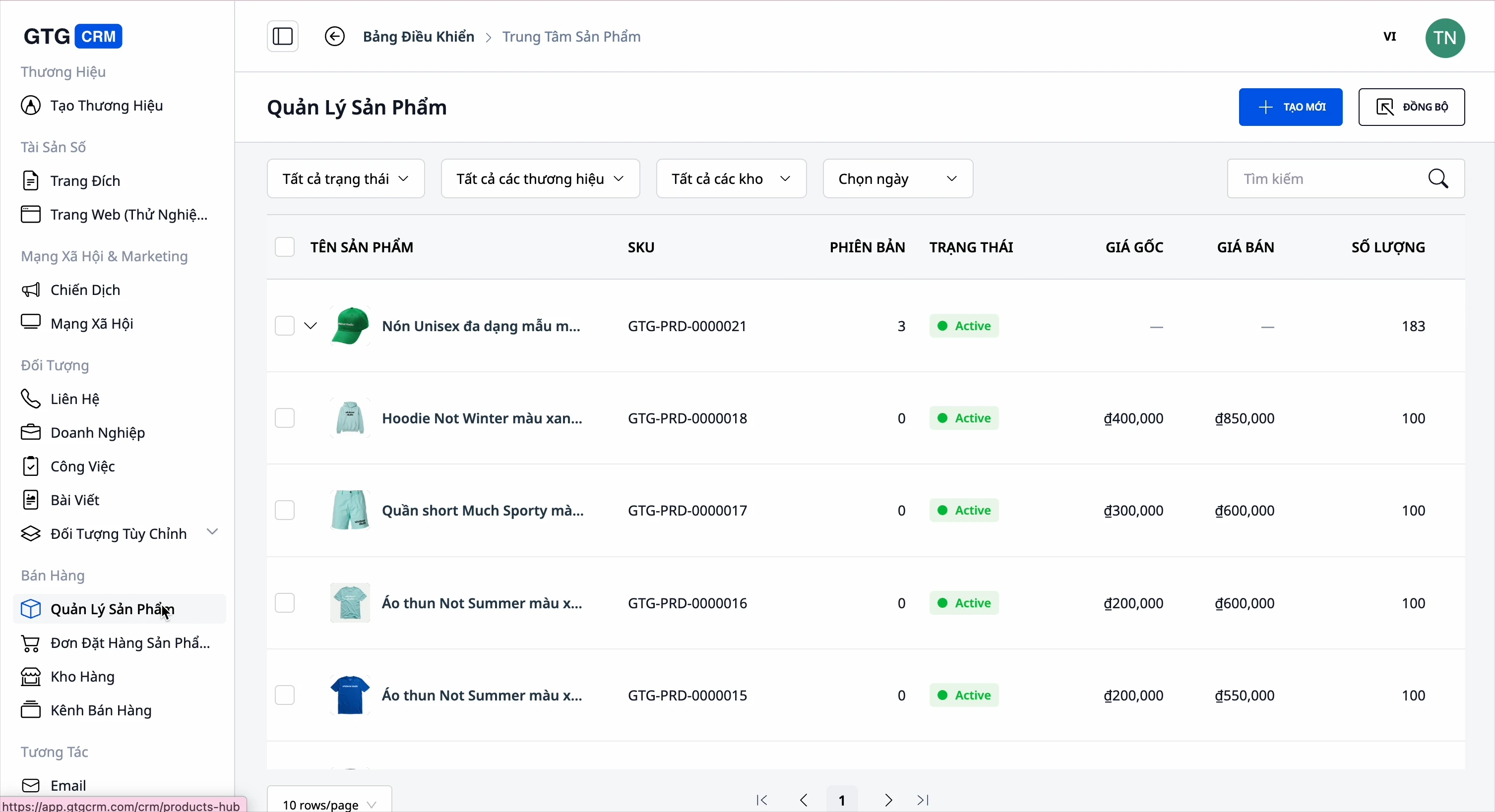
Problemos, su kuriomis susiduria verslas
Produkto valdymas atskirai kiekvienoje prekyvietėje (Shopee, Lazada, TikTok, svetainė) — Atskiri duomenys, kainos/kiekio atnaujinimas daug kartų, lengva padaryti klaidų
Atsargų sekimas rankiniu būdu kiekviename kanale — Parduota daugiau nei nurodyta, baigėsi prekės, bet vis tiek priimami užsakymai
Rankinis naujų produktų įvedimas į sistemą — Visą popietę kelių dešimčių produktų įvedimui, lengva pamiršti nuotraukas/parametrus
Kategorijos priverstinai pritaikytos griežtai žeminančiai prekyvietės rūšiavimo medžiu — Negalima tvarkyti taip, kaip jūsų parduotuvė iš tikrųjų veikia
Daugybė įvežtų produktų neturi nuotraukų — Tušti produktų puslapiai, klientai neperka
Produktų nuotraukos sumaišytos, reikia atidaryti kitą programinę įrangą, kad apkarpytumėte/redaguotumėte — Nuolatinis perkėlimas tarp įrankių, lėtai ir lengva pasirinkti netinkamą nuotrauką
GTG CRM viską sujungiama į vieną duomenų šaltinį: produktai → individualios kategorijos → nuotraukos → atsargos → pardavimo kanalai → užsakymai → sąskaitos faktūros → apskaita — tiesiai, be dvigubo įvedimo.
Pagrindinės ypatybės
1. Centralizuotas produktų ir variantų valdymas
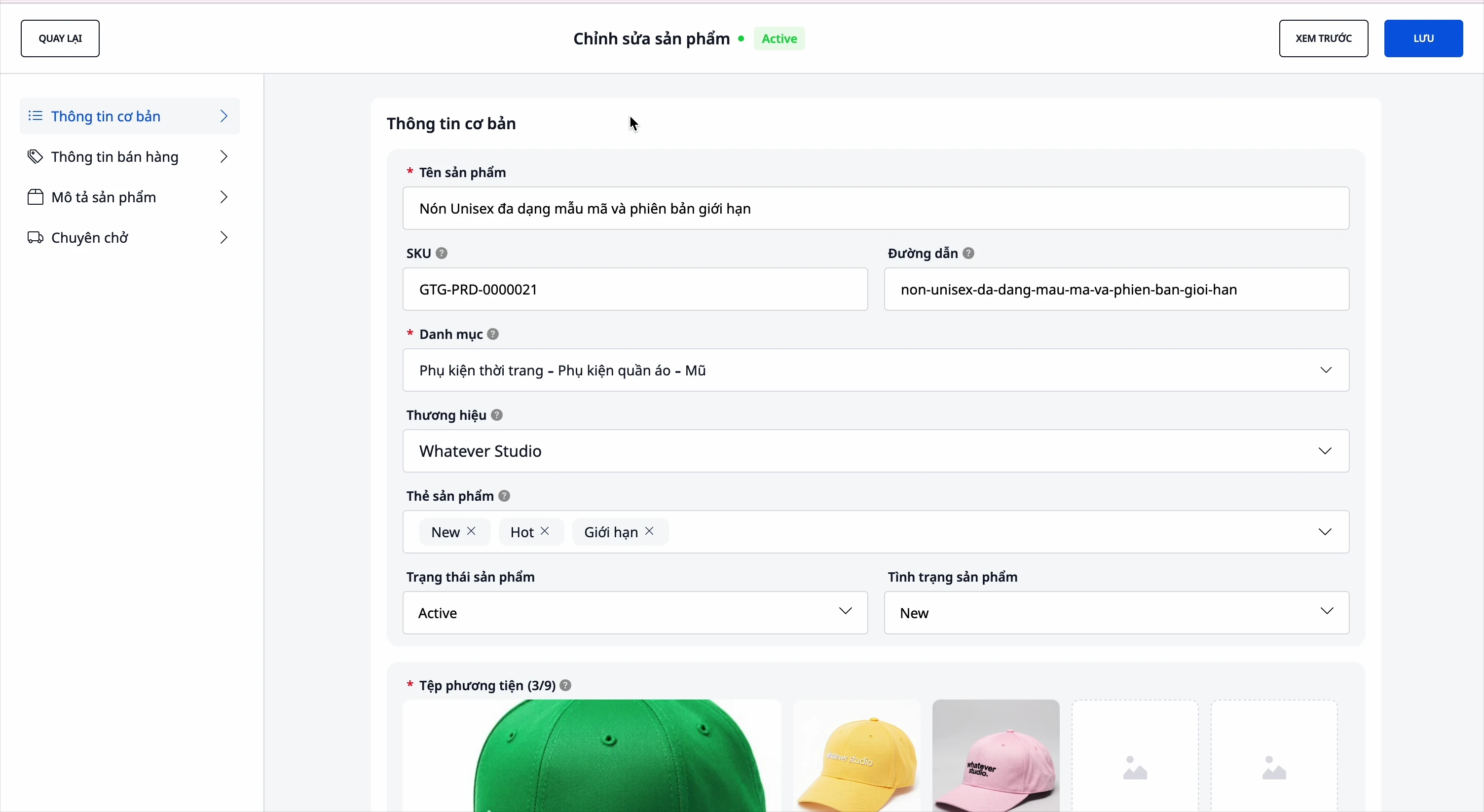
- Išsami informacija: pavadinimas, SKU, kategorija, prekės ženklas, aprašymas, techninės specifikacijos, nuotraukos ir vaizdo įrašai.
- Variantai: spalva, dydis… iki 3 atributų, kiekvienas variantas turi savo SKU ir kainą.
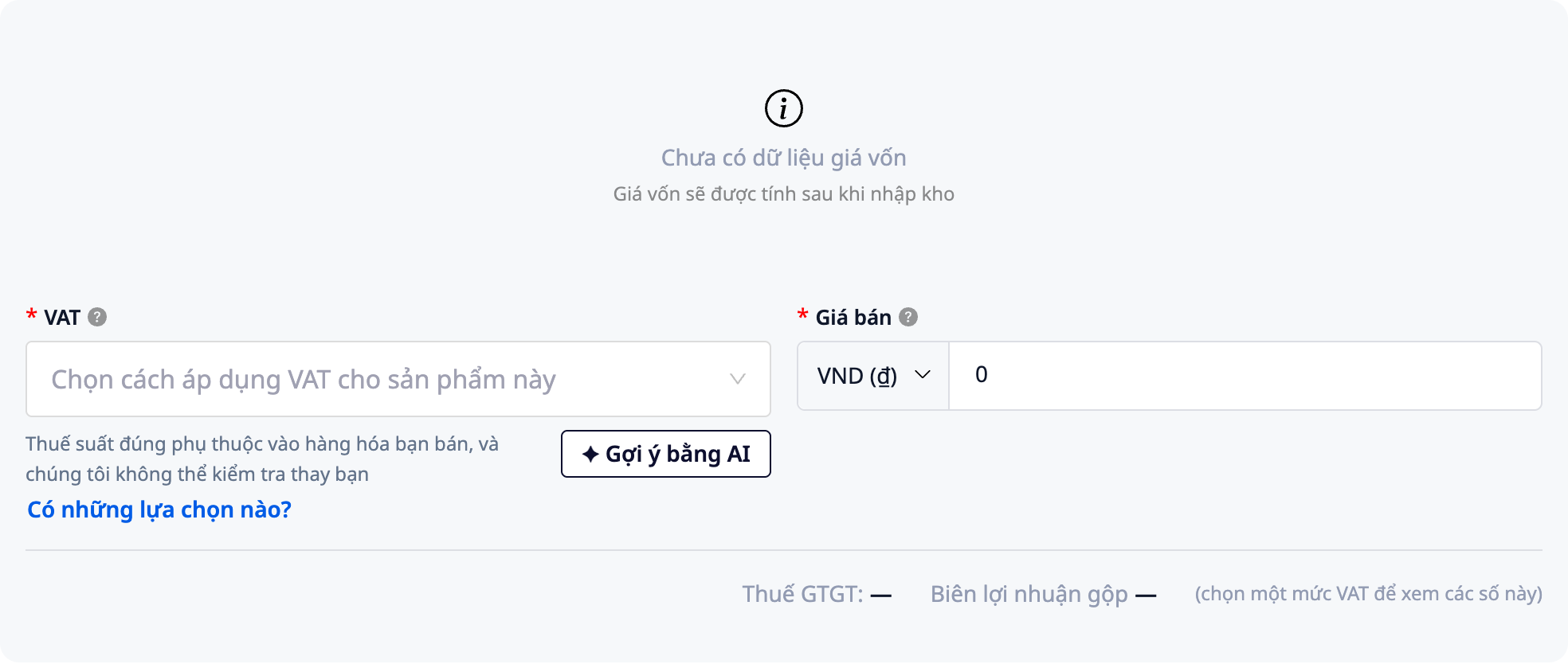
- Savarankiški kainos ir pelno skaičiavimai: įveskite pirminę ir pardavimo kainą, pasirinkite produkto PVM → sistema automatiškai apskaičiuos pelno maržą, nereikės skaičiuoti ranka.
- PVM, kurį sprendžiate jūs: PVM laukas lieka tuščias, sistema nepasirenka jokio nustatymo už jus. Galite spustelėti Siūlyti su AI, kad gautumėte rekomendaciją, o PVM patvirtinimo juosta padeda patvirtinti arba masinio PVM nustatyti jau turimiems produktams.
- Produkto būsena: Normalus / Juodraštis / Išparduota, kad būtų galima kontroliuoti, kas parduodama, o kas vis dar paslėpta.
2. Jūsų individualios produktų kategorijos — iki 3 lygių
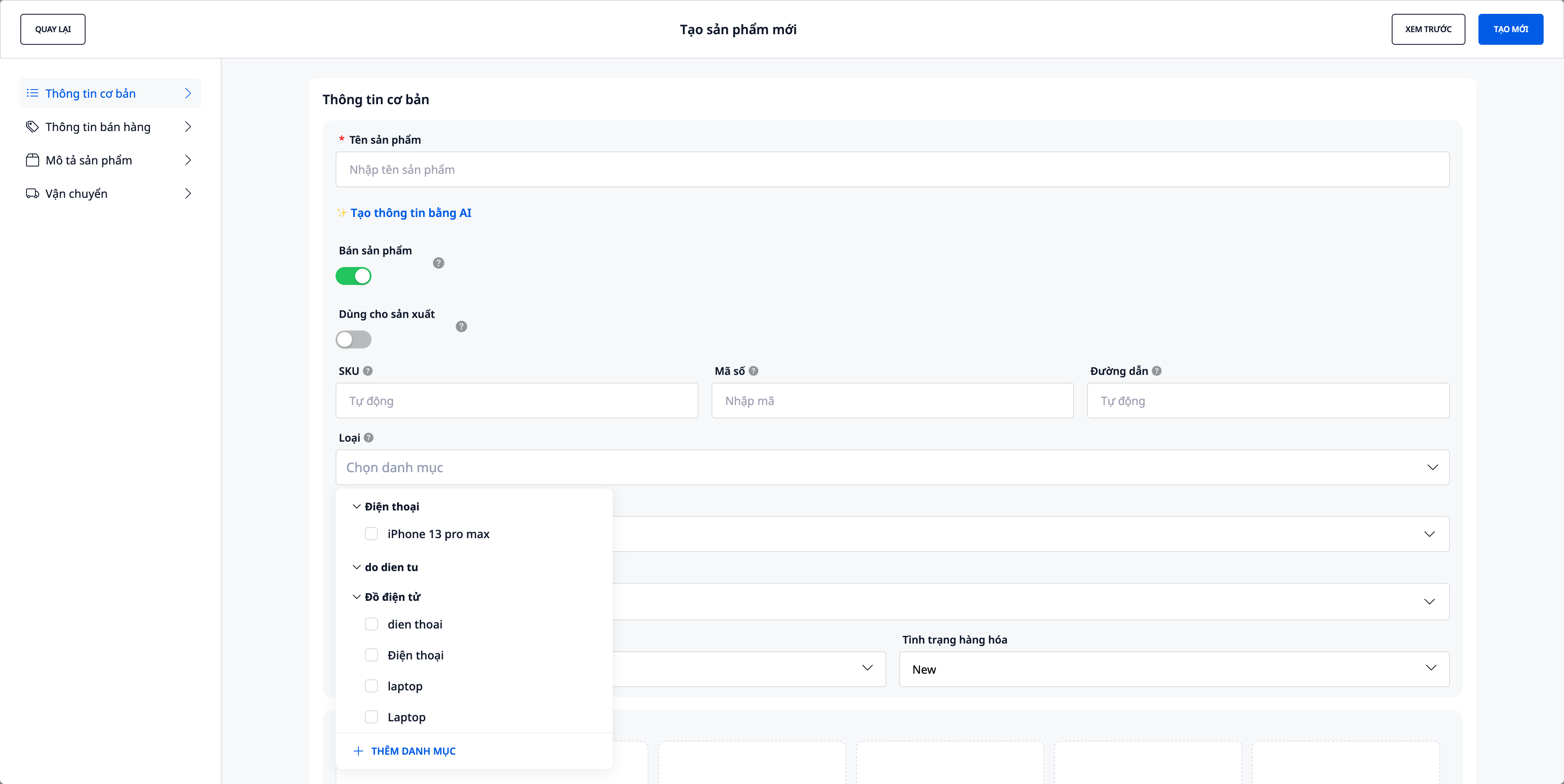
Anksčiau kategorijos buvo fiksuojamos pagal standartinę produkto medžio struktūrą. Dabar kategorijas kuriate patys, pritaikydami jas savo parduotuvės tvarkai – lygiai taip, kaip skirstote straipsnius.
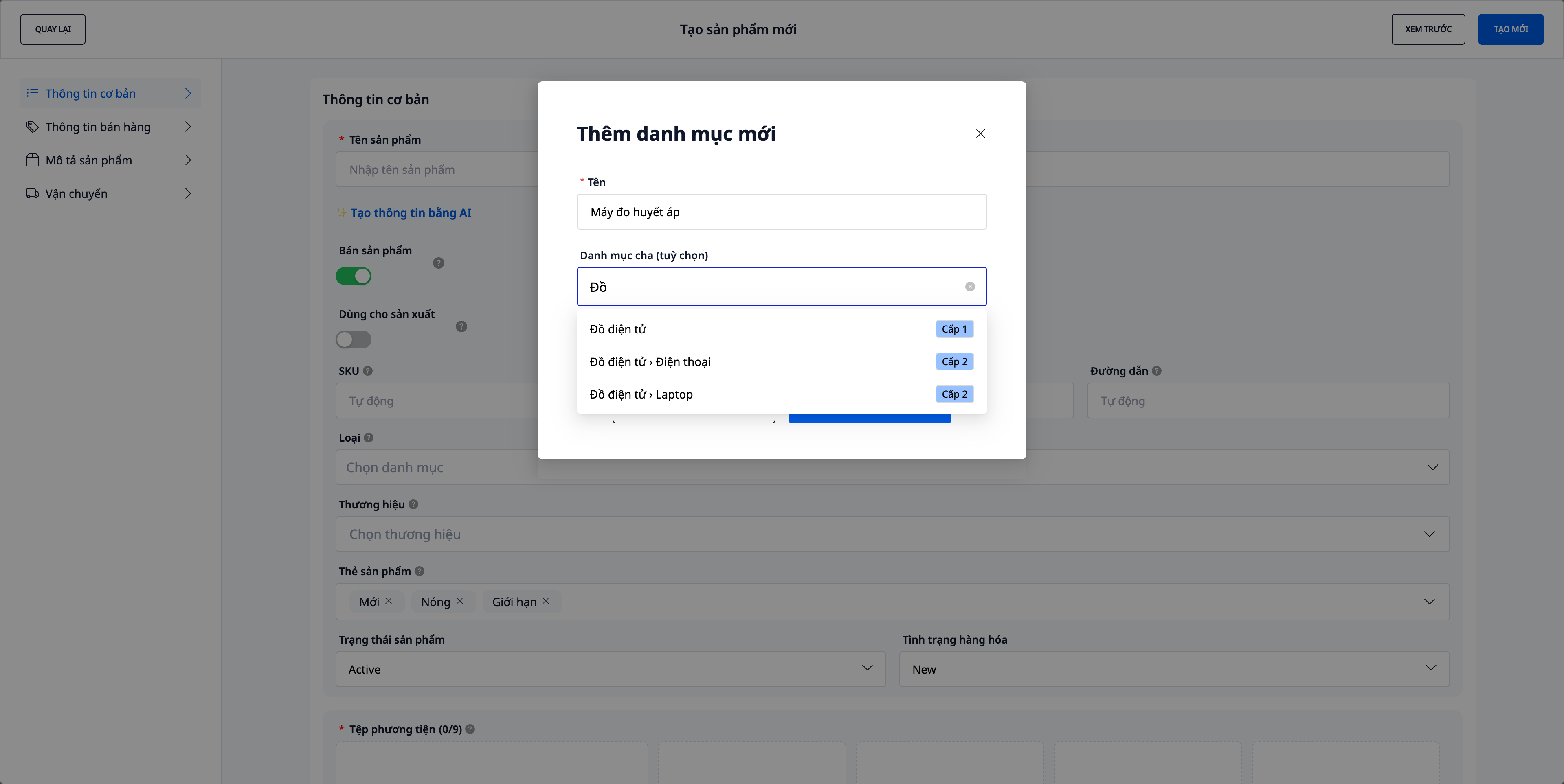
- Kurkite iš karto pildydami produktą: spustelėkite „Pridėti naują kategoriją“, įveskite pavadinimą, pasirinkite pagrindinę kategoriją (nebūtina) – sistema suformuos kelią, pvz.,
Elektronika › Nešiojamieji kompiuteriai › Žaidimams. - Iki 3 lygių, aišku iš karto: kiekvienas pagrindinės kategorijos pasirinkimas turi žymę 1 lygis / 2 lygis, o Peržiūros eilutė parodo, kiek lygių kuriate – pasirinkę 2 lygio elementą, gausite 3 lygius, nereikės spėlioti.
- Senos kategorijos išlieka: seni produktai išlaiko ankstesnes parduotuvės kategorijas (rodomos kaip „Senoji kategorija“, tik peržiūrai) tol, kol juos perskirstote – duomenys neprapuola.
3. Importuokite produktus pagal nuorodą – dirbtinis intelektas nuskaito puslapį, parengia produktus
Turite internetinę parduotuvę ar produktų puslapius? Įklijuokite nuorodą, sistema nuskaitys puslapį ir parengs produktus jūsų peržiūrai – nereikės rašyti ranka.
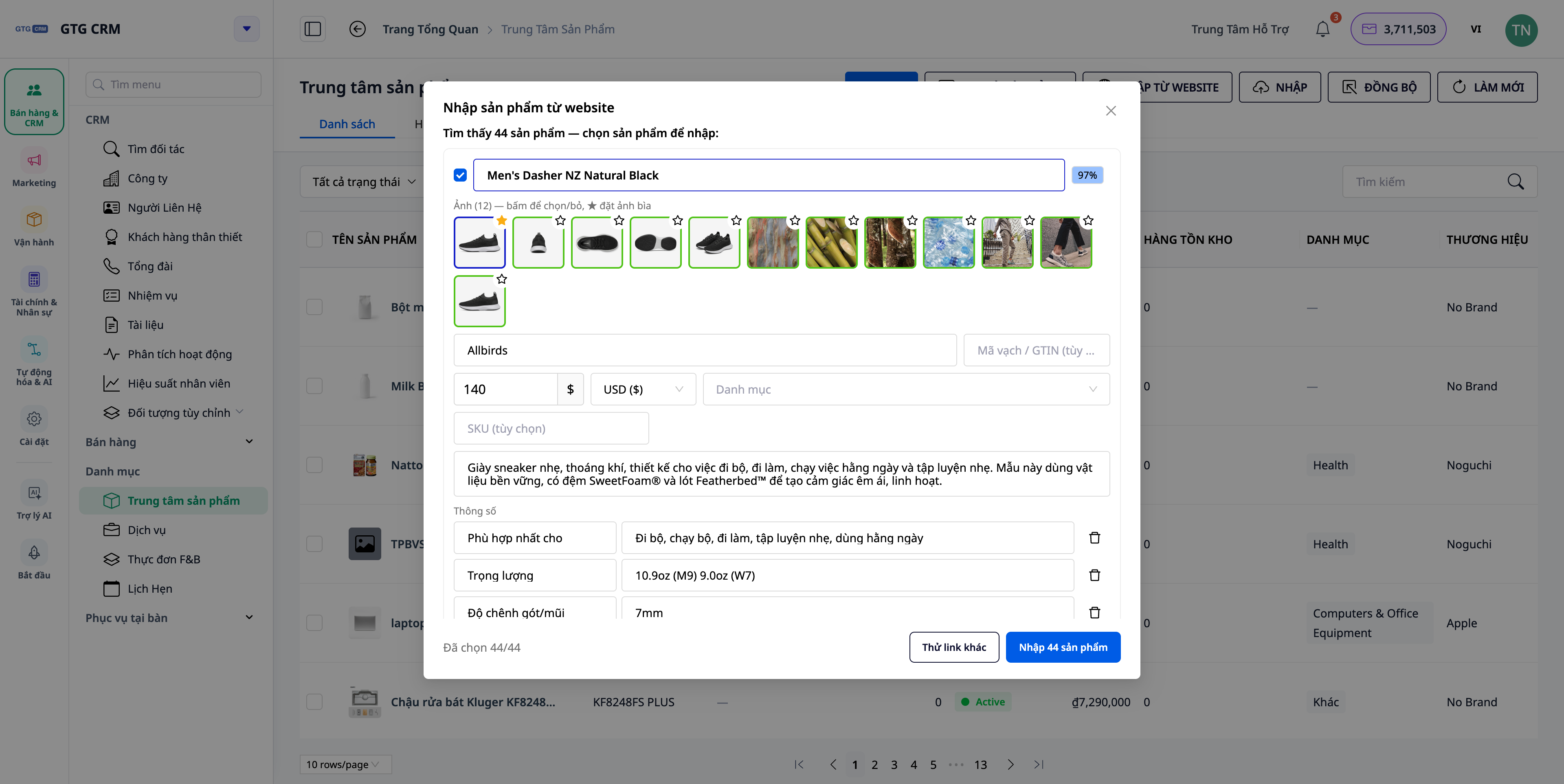
- Vienas puslapis ar visa parduotuvė: įklijuokite vieno produkto nuorodą (sukursite 1 juodraštį) arba kategorijos / „visi produktai“ puslapio nuorodą (sukursite kelis juodraštis vienu metu).
- Gaukite visą informaciją: AI išskiria pavadinimą, SKU, aprašymą, prekės ženklą, brūkšninį kodą (GTIN), technines specifikacijas, kainą/valiutą, variantus ir visą nuotraukų rinkinį – ne tik vieną nuotrauką.
- Pasirinktis „gauti visą informaciją“: įjunkite, kad sistema atidarytų kiekvieną produkto puslapį ir gautų visą nuotraukų, aprašymų, specifikacijų ir variantų rinkinį (tiksliau, šiek tiek lėčiau).
- Peržiūrėkite prieš kurdami: redaguokite visus laukus, atžymėkite nereikalingus produktus, pasirinkite, kurias nuotraukas išsaugoti ir kurią padaryti pagrindine (★) – niekas neišsaugoma, kol nepaspausite „Sukurti“.
- Priskirkite savo kategorijas: siūlomos kategorijos bus suderintos su jūsų parduotuvės nuosavomis kategorijomis, sinchronizuojant su likusiu Product Hub.
💡 Importuojant iš svetainės, kiekvienas puslapio nuskaitymas naudoja nedidelį kiekį kreditų – tai aiškiai matote prieš paleidžiant.
4. Medijų biblioteka – importuokite nuotraukas iš PDF katalogų ir apkarpykite/redaguokite vietoje
Kuriant/redaguojant produktą, spustelėkite nuotraukos laukelį, kad atidarytumėte Medijų biblioteką. Naujas atnaujinimas siūlo du naujus būdus įkelti nuotraukas, neatsiveriant kitų langų:
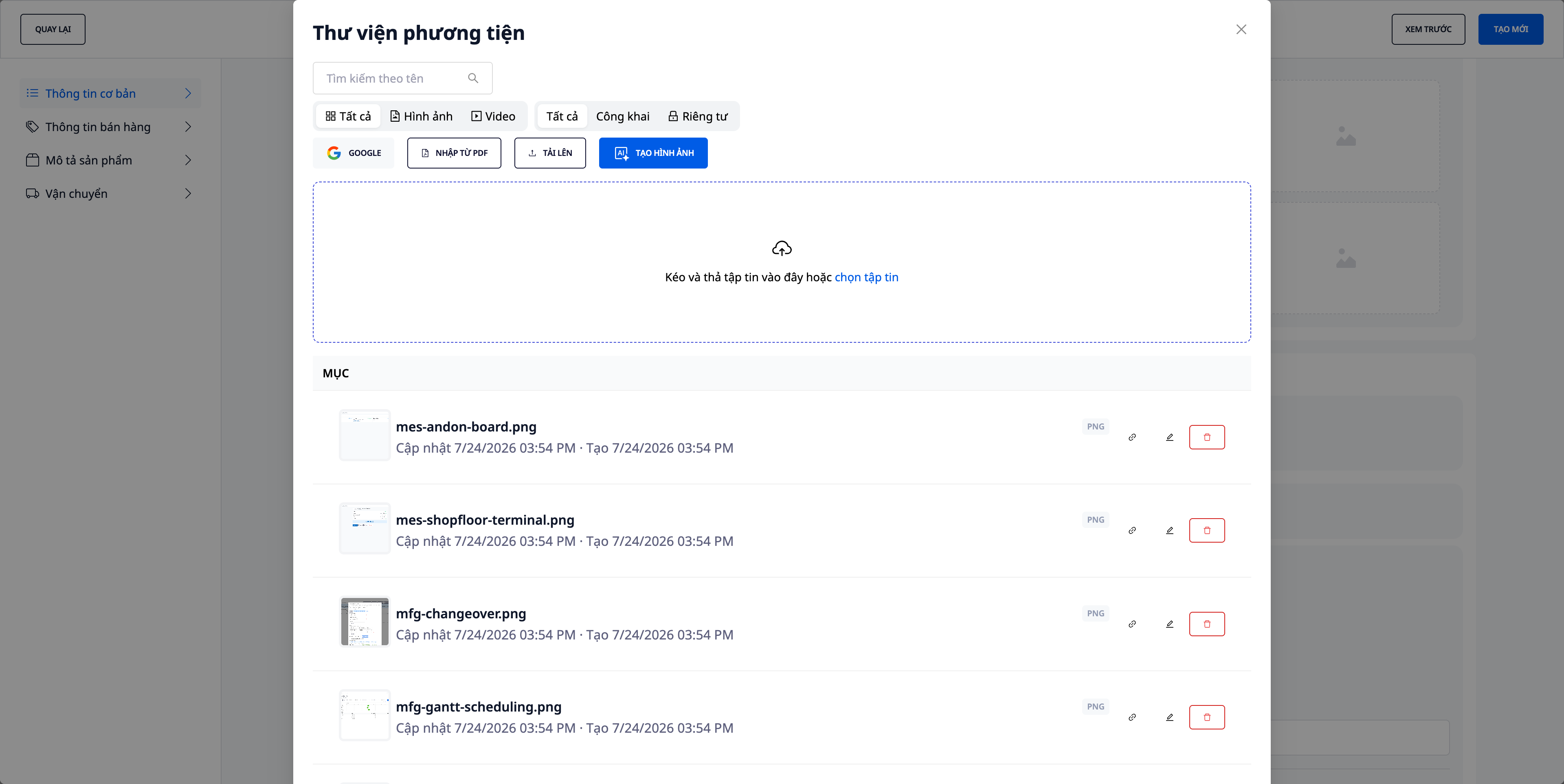
- Importuokite nuotraukas iš PDF katalogo: tiekėjas siunčia PDF katalogą? Vilkite failą, kad išgautumėte visas nuotraukas iš jo akimirksniu, nereikia daryti ekrano nuotraukų ir jas kirpti (pridedamas su klaidomis esančių nuotraukų sąrašas, kad galėtumėte juos patikrinti).
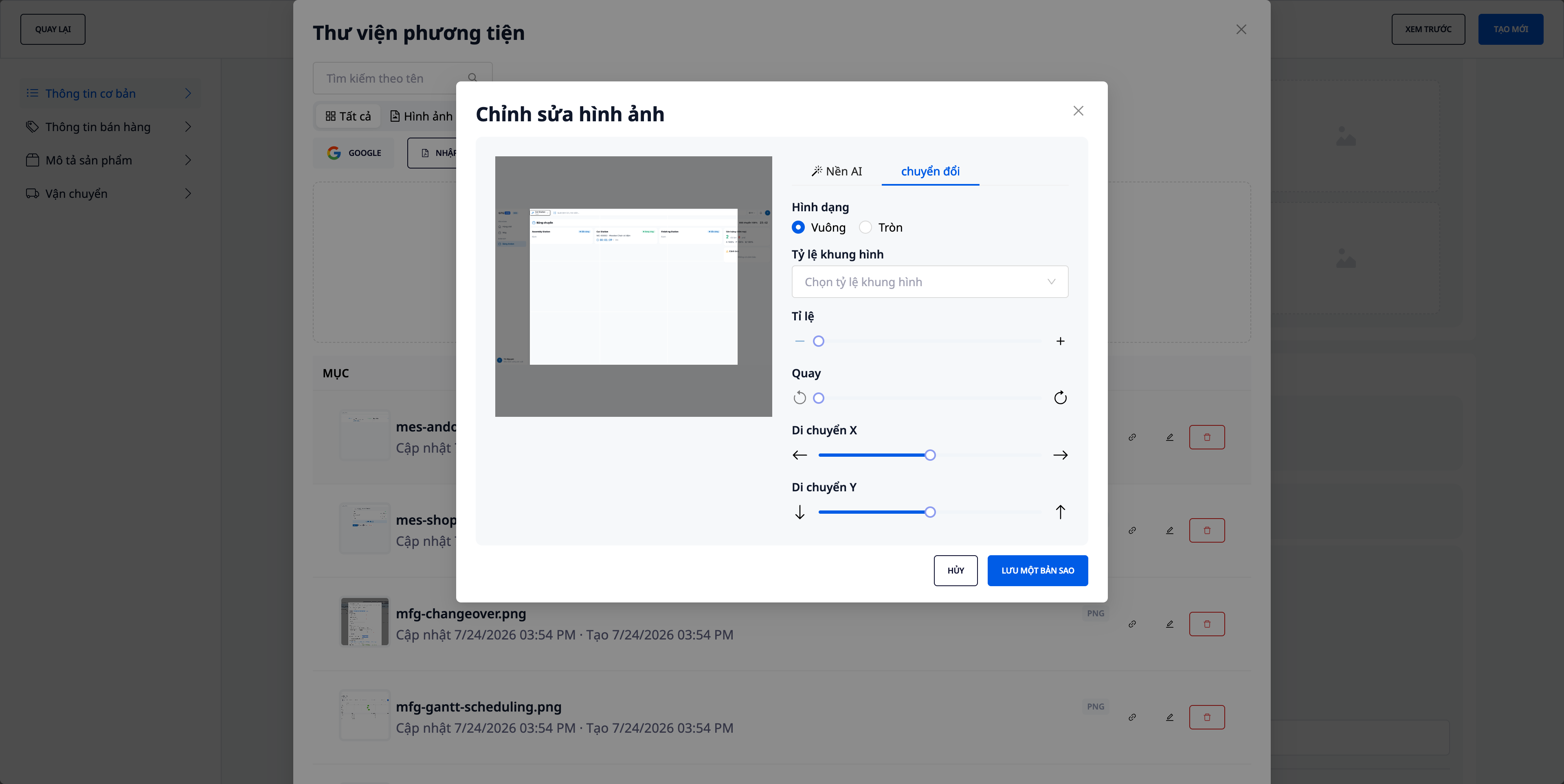
- Kirpkite/redaguokite nuotraukas tiesiai bibliotekoje: kirpkite, sukite, koreguokite vaizdo rėmelį vietoje – nereikia atidaryti kitos programos ir grįžti atgal.
- Saugokite originalius failų pavadinimus: įkeltos/importuotos nuotraukos išlaiko pirminius failų pavadinimus, todėl jas lengva atpažinti ir sumažėja tikimybė pasirinkti netinkamą.
- Palaikomos įprastos funkcijos: vis tiek galite įkelti iš kompiuterio, gauti iš Google (Drive/Photos) ir kurti produktų nuotraukas su AI (žr. 5 punktą).
5. Kurkite ir papildykite produktų nuotraukas su AI
Dar daug produktų neturi nuotraukų – importavote jas iš failo, iš prekyvietės ar įvedėte rankiniu būdu? Atidarykite AI nuotraukos funkciją Produktų centre, pasirinkite diapazoną "Visi produktai be nuotraukų", ir sistema sukurs produktų nuotraukas iš paties pavadinimo + aprašymo (+ kategorijos/prekinio ženklo). Jūs peržiūrite, prieš nuspręsdami išsaugoti – niekada neperrašykite esamų nuotraukų be leidimo.
- Peržiūrėkite, prieš išsaugodami: rezultatų tinklelis aiškiai parodo "N paruošta, M klaidų"; peržiūrėkite kiekvieną nuotrauką, prieš paspausdami Taikyti.
- Skaidrios išlaidos: nuotraukų kūrimas su AI naudoja kreditus – sistema parodo išlaidas ir patvirtina prieš paleidžiant, ir nuskaito tik pagal faktiškai sukurtų nuotraukų skaičių.
- Atlikite iš karto įvežant prekes: produkto importavimo proceso pabaigoje, jei vis dar trūksta produktų nuotraukų, pasirodo mygtukas su pasiūlymu "Sukurti AI nuotraukas trūkstamiems produktams", kad galėtumėte juos nedelsiant sutvarkyti.
- Kurti tik trūkstamiems: jei jūsų importo faile yra stulpelis su nuotraukos nuoroda, sistema automatiškai naudos tą nuotrauką ir pašalins šiuos produktus iš "be nuotraukų" diapazono – AI kurs tik tiems produktams, kurių iš tikrųjų trūksta.
6. Sandėliai ir atsargos keliuose sandėliuose
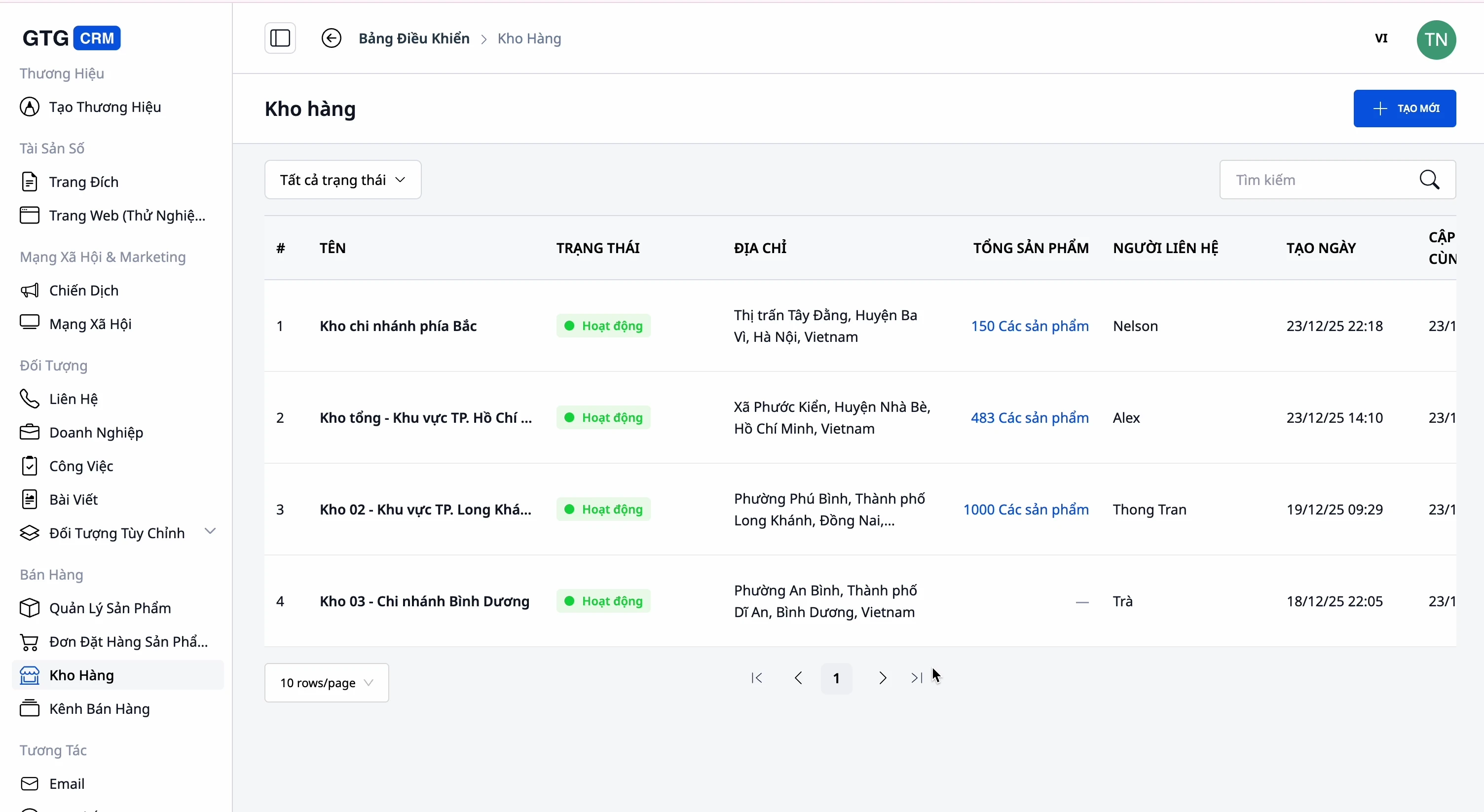
- Keli sandėliai: pagrindinis sandėlis, papildomas sandėlis, filialo sandėlis – su pavadinimu, kodu, adresu, kontaktiniu asmeniu.
- Sekite atsargas kiekviename sandėlyje: žinokite, kiek prekių yra ir kur.
- Susiekite produktus ↔ sandėlį: kuriam sandėliui priklauso kuris produktas, aišku.
7. Daugialypė prekyba ir 2 krypčių sinchronizavimas su elektroninėmis prekyvietėmis
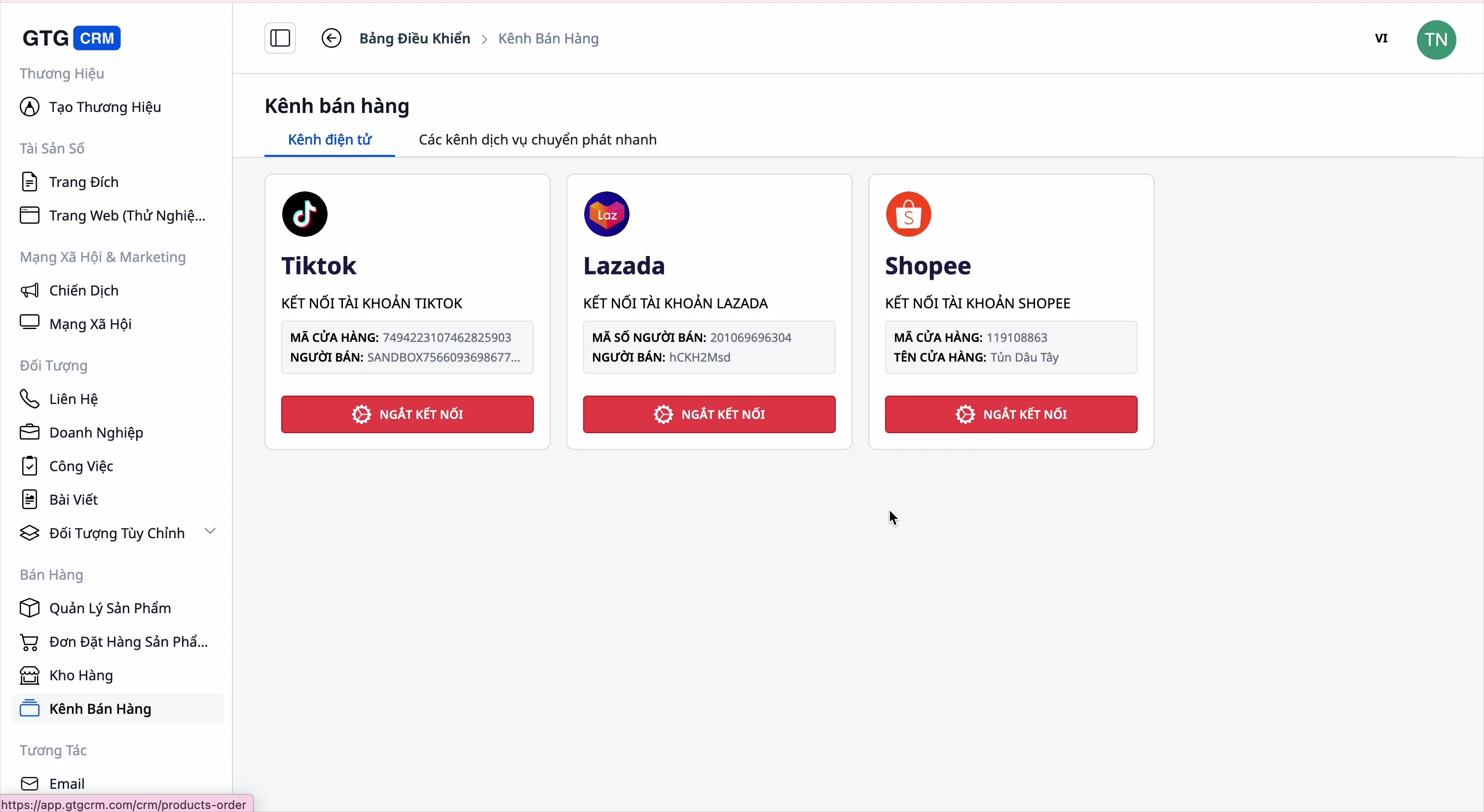
- Prijunkite prekyvietes: Shopee, Lazada, TikTok Shop.
- Atgal: gaukite produktus iš prekyvietės į GTG CRM (visus arba po vieną).
- Pirmyn: įkelkite produktus iš GTG CRM į prekyvietes, konfigūruokite informaciją kiekvienai prekyvietei.
- Derinkite kategorijas įkeliant į prekyvietę: kadangi naudojate savo kategorijas, įkeliant produktus į Shopee/Lazada/TikTok, sistema pasiūlys atitinkamas prekyvietės kategorijas, kad galėtumėte patvirtinti – ir įsimins tą susiejimą kitiems įkėlimams, kad nereikėtų rinktis iš naujo.
8. Visapusiškas sistemos sujungimas
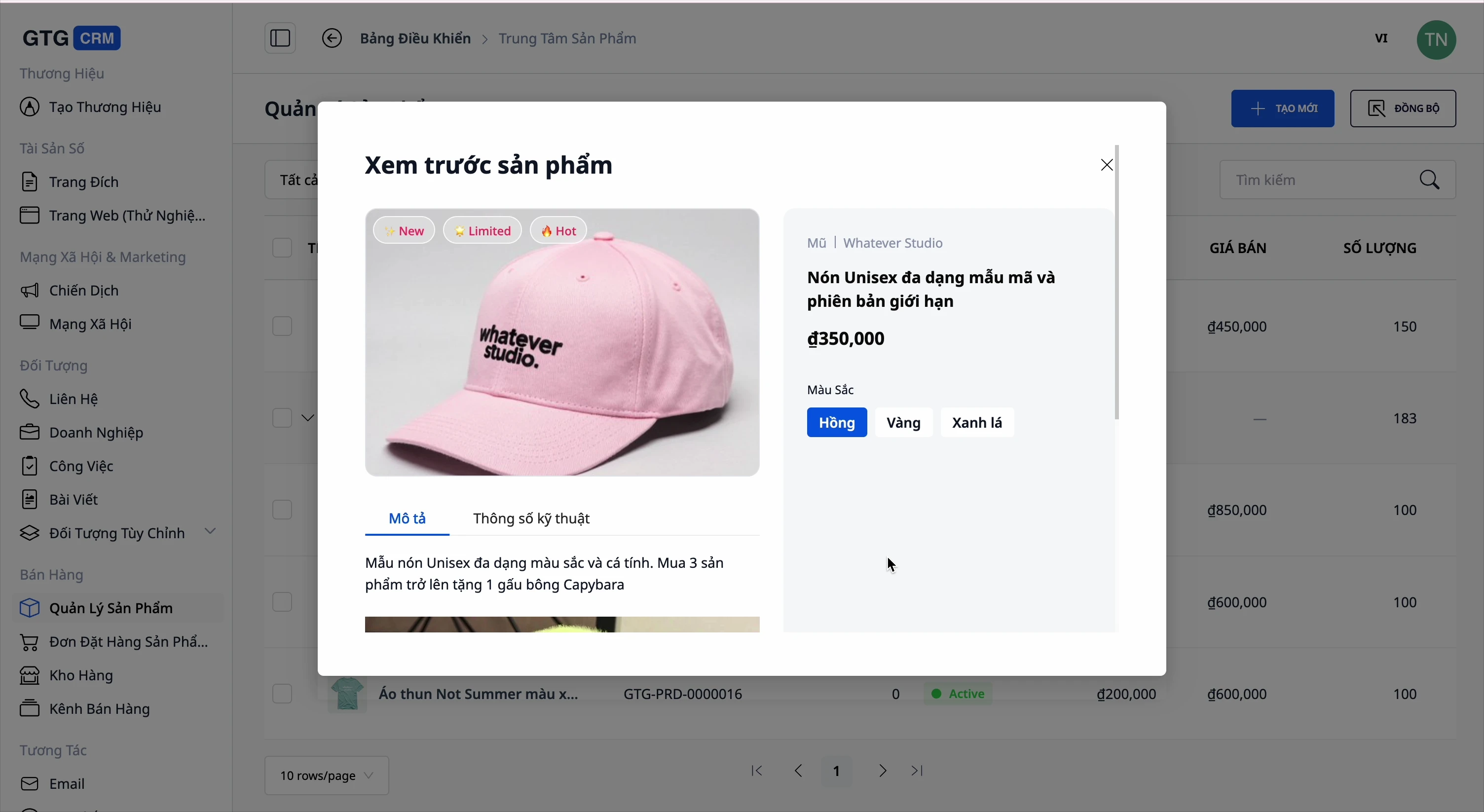
- Užsakymas: sukurkite užsakymą tiesiai iš produkto.
- Svetainė & Tūpimo puslapis: rodyti produktus svetainėje, pridėti prie tūpimo puslapio, peržiūrėti prieš skelbiant.
- Elektroninė sąskaita: išrašyti sąskaitą už parduotus produktus.
- DI asistentas: greitai paklausti, kurie produktai gerai parduodami, koks atsargų likutis.
Nauda verslui
Centralizuotas produktų + variantų + kainų valdymas — Viena vieta viskam valdyti, savarankiškai apskaičiuoti pelną, pamiršti kainų klaidas.
Nuosavos kategorijos iki 3 lygių — Tinkamai sutvarkykite savo parduotuvės veiklą, nebūkite priversti laikytis platformos struktūros.
Importuoti produktus iš svetainės nuorodos (DI) — Sukurkite visą katalogą per kelias minutes, su visomis nuotraukomis/prekės ženklais/specifikacijomis/variantais.
Importuoti nuotraukas iš PDF katalogo + apkarpyti/redaguoti vietoje — Greitai gaukite tiekėjo nuotraukas, neišeidami iš formos, išlaikydami teisingus failų pavadinimus.
Kurti produktų nuotraukas su DI — Padengti nuotraukomis visą katalogą per kelias minutes, nereikia samdyti fotografų; peržiūrėti prieš išsaugant, iš anksto pranešti apie išlaidas.
Atsargos daugelyje sandėlių — Žinokite, kas kur yra, neparduokite per daug, netikėtai nesibaigkite.
Daugiakanalė sinchronizacija + kategorijų susiejimas perkeliant — Parduokite „Shopee“/„Lazada“/„TikTok“/svetainėje iš vienos vietos, perkeliant į platformas nereikia rinkti iš naujo.
Sujungtos užsakymų, svetainės, sąskaitų, apskaitos sistemos — Reikia pirkti vienu programinės įrangos vienetu mažiau, viena vieta palyginimui.
Kam tinka?
- Internetinės parduotuvės, parduodančios daugelyje platformų, kurioms reikia vienos vietos bendram produktų ir atsargų valdymui.
- MVĮ įmonės su daug sandėlių, norinčios stebėti atsargas kiekviename sandėlyje.
- Didmenininkai / importuotojai pagal katalogus, norintys greitai įkelti šimtus produktų iš tiekėjo svetainės ar PDF katalogo.
- Parduotuvių savininkai, norintys patys tvarkyti kategorijas pagal savo veiklos modelį, o ne pagal griežtą platformos klasifikavimą.
- Elektroninės komercijos startuoliai, norintys turėti pilną parduotuvę su nuotraukomis, bet neturintys biudžeto fotografavimui.
Kaip pradėti?
Eikite į Produktai GTG CRM sistemoje. Sukurkite kelias savo kategorijas (spustelėkite „Pridėti naują kategoriją“), tada pridėkite pirmąjį produktą — arba įklijuokite parduotuvės nuorodą masiškai importuoti, arba vilkite PDF katalogą į Medžiagų biblioteką. Produktams, kuriems trūksta nuotraukų, atidarykite DI vaizdai ir sukurkite nuotraukas per kelias minutes. Prijunkite sandėlius ir platformas, kai būsite pasiruošę. Žiūrėkite žingsnis po žingsnio „Product Hub“ vadovą arba skaitykite kaip per vieną popietę įkelti visą produktų katalogą į sistemą.
Nemokamas bandymas — nereikia kredito kortelės.


