

Introductie van functies
U verkoopt op uw website, op Shopee, Lazada, TikTok Shop — en elk kanaal heeft zijn eigen manier om producten te beheren. Productlijsten zijn verspreid, de voorraad komt niet overeen tussen kanalen, elke keer dat u een nieuw product toevoegt, moet u het opnieuw invoeren op elke plek. Categorieën worden gedwongen door de rigide classificatieboom van de marktplaats, niet zoals u uw winkel echt organiseert. En vaak over het hoofd gezien: veel producten hebben geen foto omdat inhuren voor fotografie duur is, en het zelf doen kost een week.
Dat eindigt vandaag.
Product Hub in GTG CRM biedt u één centrale plek om al uw producten, varianten, voorraad en verkoopkanalen te beheren — direct naast de bestellingen, facturen, website en boekhouding die u gebruikt. De nieuwe update helpt u ook uw hele catalogus in enkele minuten in het systeem te laden in plaats van handmatig in te typen: plak een winkel link zodat AI de pagina kan lezen en de producten voor u kan opbouwen, sleep een catalogus PDF van de leverancier erin om foto's te krijgen, creëer uw eigen categorieën (maximaal 3 niveaus) precies zoals u uw goederen organiseert, en genereer productfoto's met AI voor artikelen waarvoor nog geen foto's zijn — allemaal binnen het productenscherm.
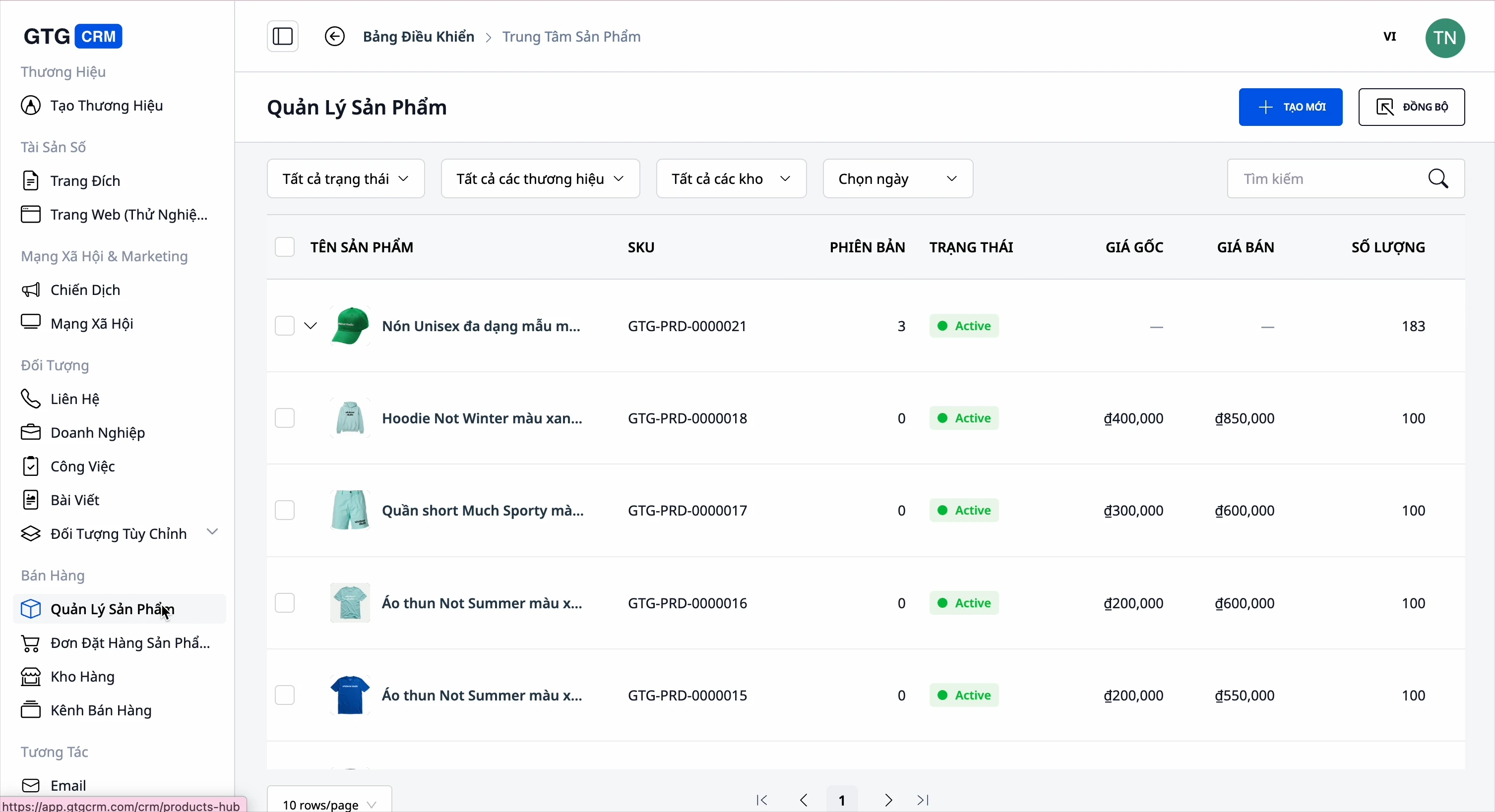
Problemen waar bedrijven mee kampen
Productbeheer afzonderlijk op elke marktplaats (Shopee, Lazada, TikTok, Website) — Losse gegevens, meerdere keren prijzen/hoeveelheden bijwerken, gemakkelijk fouten maken
Voorraad handmatig bijhouden op elk kanaal — Meer verkopen dan de voorraad toelaat, bestellingen ontvangen terwijl het uitverkocht is
Nieuwe producten handmatig in het systeem invoeren — Kost een halve dag om tientallen producten te lanceren, gemakkelijk ontbrekende foto's/specificaties
Categorieën gedwongen door de rigide classificatieboom van de marktplaats — Kan niet organiseren zoals uw winkel echt functioneert
Veel ontvangen producten zonder foto — Lege productpagina's, klanten klikken weg zonder te kopen
Productfoto's door elkaar, moet andere software openen om te knippen/bewerken — Wisselen tussen tools, traag en gemakkelijk de verkeerde foto kiezen
GTG CRM bundelt alles naar één enkele gegevensbron: producten → eigen categorieën → foto's → voorraad → verkoopkanalen → bestellingen → facturen → boekhouding — één doorlopende stroom, geen dubbele invoer.
Hoogtepunten
1. Geconcentreerd product- en variantenbeheer
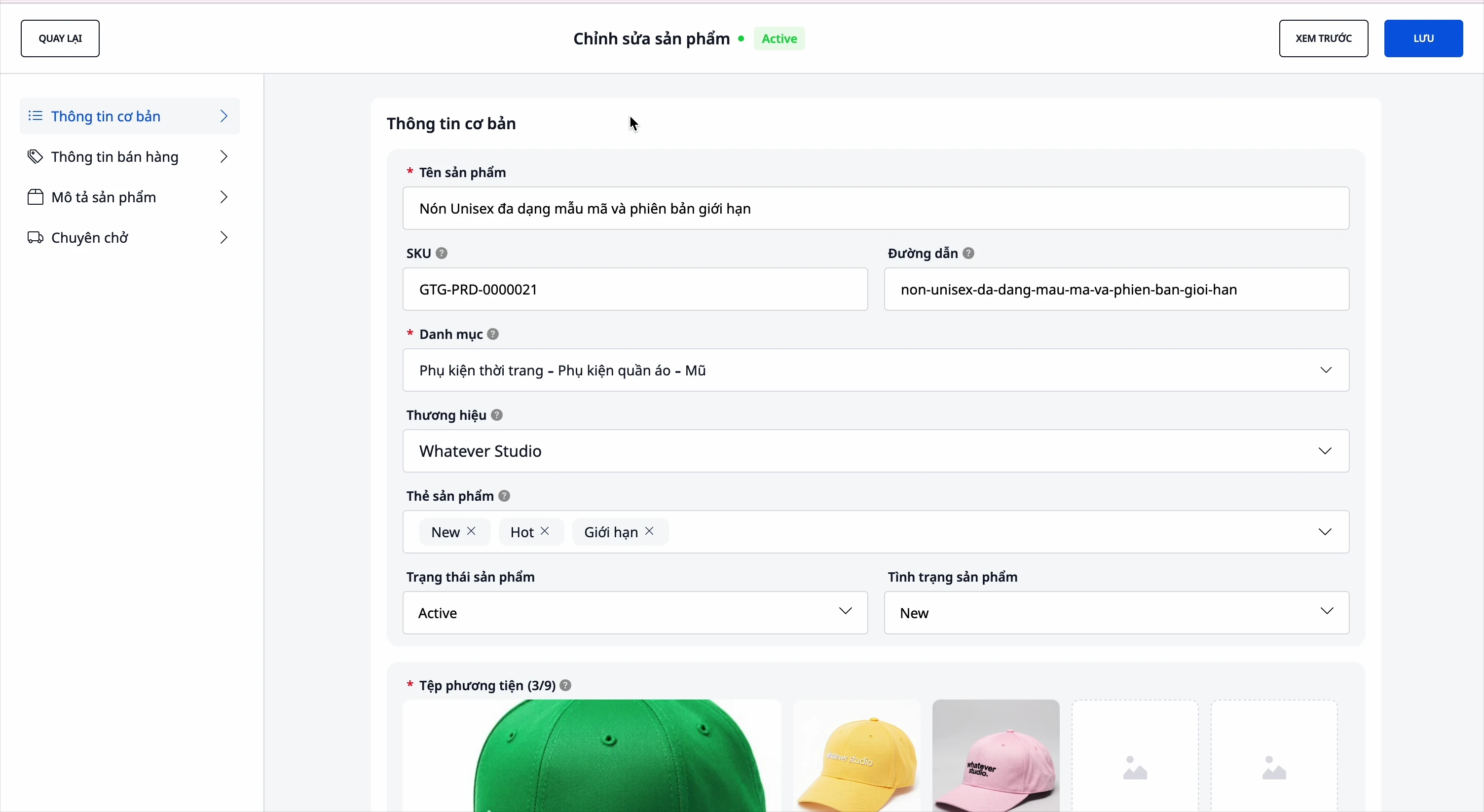
- Volledige informatie: naam, SKU, categorie, merk, beschrijving, technische specificaties, afbeeldingen en video's.
- Variant: kleur, maat… maximaal 3 attributen, elke variant heeft zijn eigen SKU en prijs.
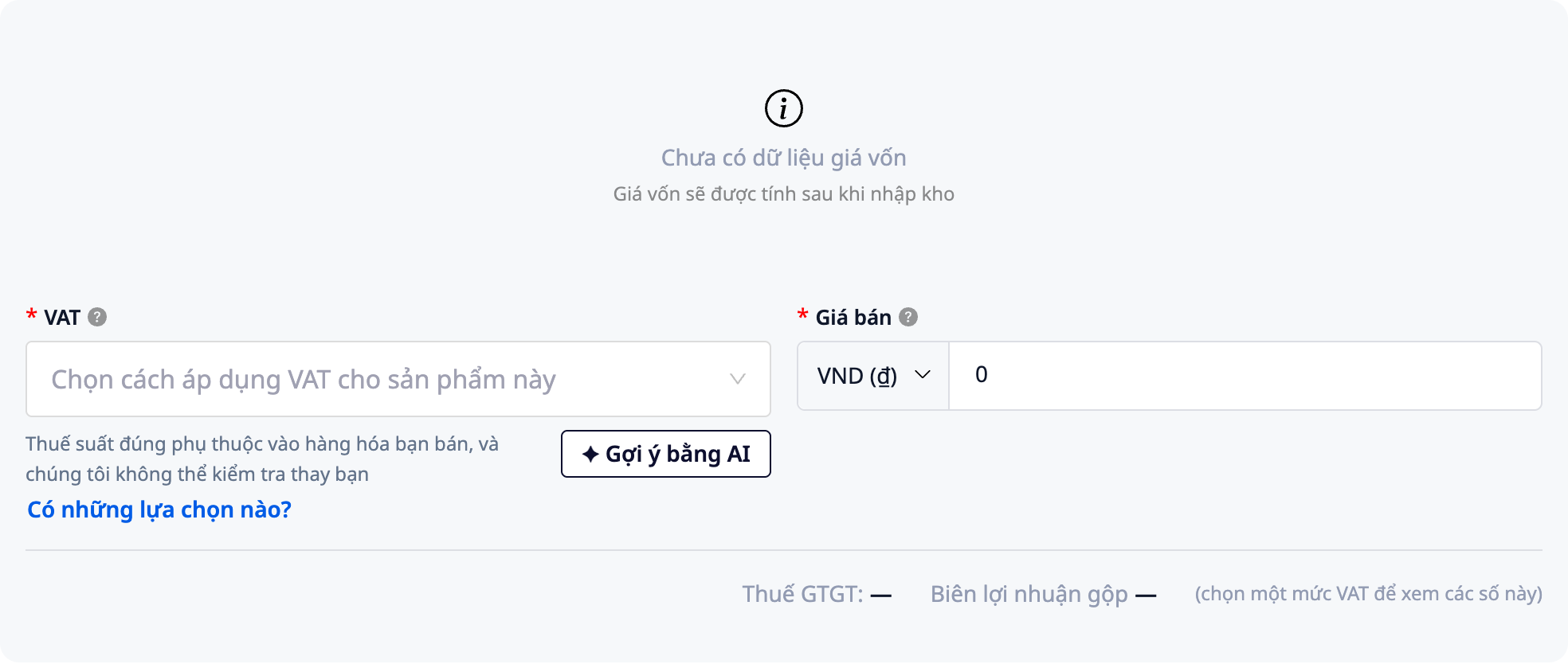
- Automatisch berekenen van prijs en winst: vul de inkoopprijs en verkoopprijs in, kies de btw voor het product → het systeem berekent automatisch de winst, geen handmatige berekeningen nodig.
- BTW die u bepaalt: het BTW-veld is leeg, het systeem kiest er geen standaardwaarde voor u. U kunt op AI-suggestie klikken voor referentie, en de BTW-controle helpt bij het bevestigen of massaal instellen van BTW voor reeds bestaande producten.
- Productstatus: Normaal / Concept / Uitverkocht, om te controleren wat er te koop staat en wat verborgen is.
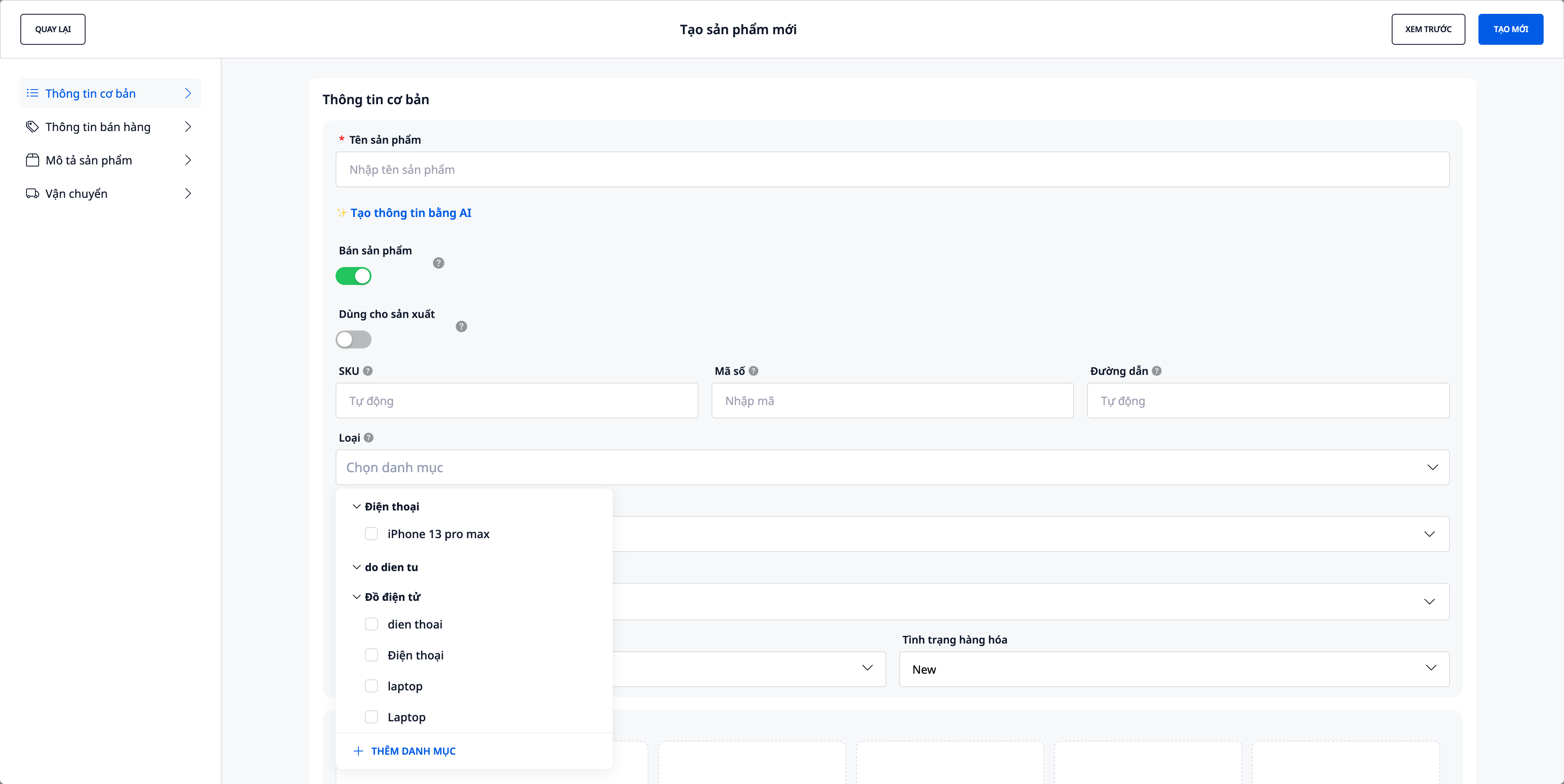
2. Uw eigen productcategorieën — maximaal 3 niveaus
Voorheen was de categorie vergrendeld in de vaste classificatieboom van de beurs. Nu maakt u uw eigen categorieën aan, op de manier die uw winkel organiseert — precies zoals u uw berichten indeelt.
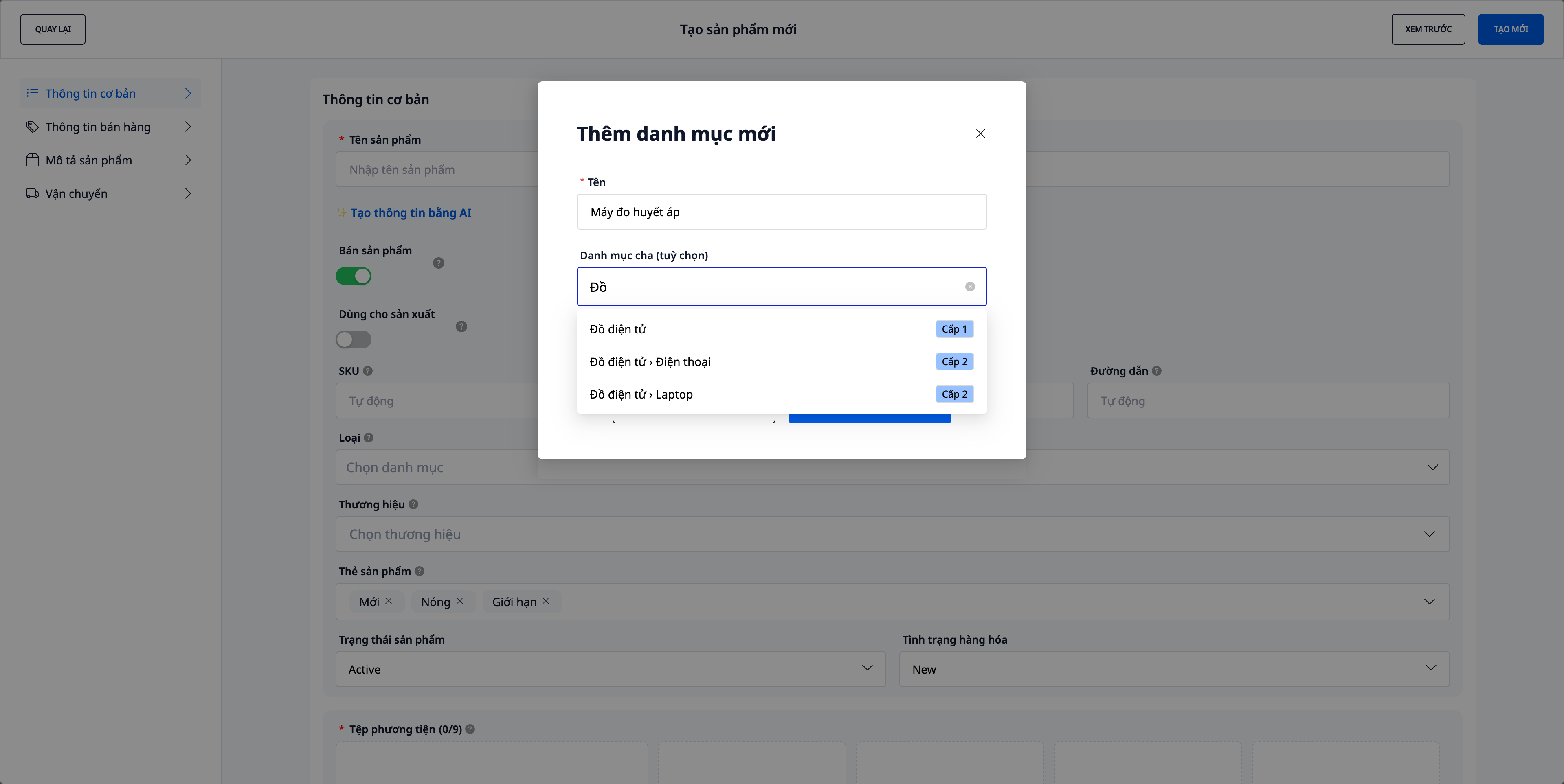
- Direct aanmaken tijdens het invoeren van producten: klik op "Nieuwe categorie toevoegen", typ de naam, selecteer een bovenliggende categorie (optioneel) — het systeem voegt het samen tot een pad zoals
Elektronica › Laptops › Gaming. - Maximaal 3 niveaus, direct duidelijk bij aanmaak: elke selectie van een bovenliggende categorie heeft een label Niveau 1 / Niveau 2, en een Voorbeeldregel laat zien hoeveel niveaus u aanmaakt — door een item in "Niveau 2" te selecteren, maakt u precies 3 niveaus aan, zonder te hoeven gokken.
- Oude categorieën blijven bestaan: oude producten behouden hun vorige beurs-categorie (weergegeven als "Oude categorie", alleen ter inzage) totdat u ze opnieuw classificeert — geen gegevensverlies.
3. Producten importeren vanuit website-links — AI leest de pagina, stelt producten samen
Heeft u een online winkel of productpagina's? Plak de link, het systeem leest de pagina en stelt producten samen ter beoordeling — geen handmatig typwerk.
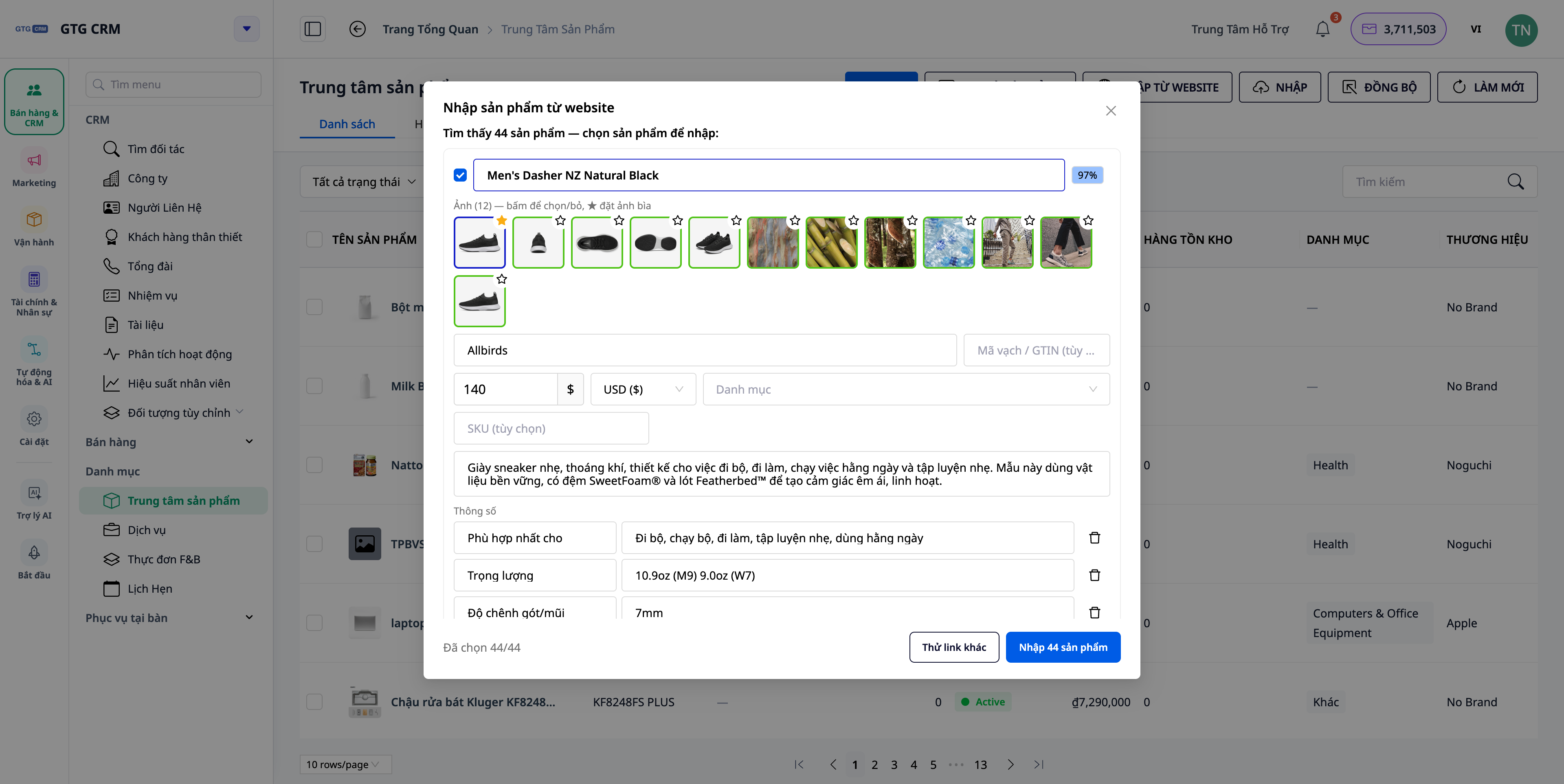
- Eén pagina of een hele winkel: plak de link van één product (maakt 1 concept aan) of de link van een categoriewebpagina / "alle producten" (maakt meerdere concepten tegelijkertijd aan).
- Alle informatie ophalen: AI extraheert naam, SKU, beschrijving, merk, streepjescode (GTIN), technische specificaties, prijs/valuta, varianten en de volledige set afbeeldingen — niet slechts één foto.
- Optie "volledige details ophalen": schakel dit in om het systeem elke productpagina te laten openen en alle afbeeldingen, beschrijvingen, specificaties en varianten op te halen (nauwkeuriger, iets langzamer).
- Beoordelen vóór aanmaak: bewerk elk veld, deselecteer onnodige producten, kies welke afbeeldingen te behouden en welke als omslagfoto (★) te gebruiken — wordt pas opgeslagen als u op Maken klikt.
- Direct uw eigen categorie toewijzen: de voorgestelde categorie wordt gematcht met de eigen categorieën van de winkel, gesynchroniseerd met de rest van de Product Hub.
💡 Importeren vanuit websites verbruikt een kleine hoeveelheid credits per gescande pagina — u ziet dit duidelijk voordat u begint.
4. Mediabibliotheek — importeer afbeeldingen vanuit PDF-catalogi & snijd/bewerk ter plekke
Wanneer u producten aanmaakt/bewerkt, klikt u op het afbeeldingsveld om de Mediabibliotheek te openen. De nieuwe update voegt twee manieren toe om afbeeldingen toe te voegen zonder het formulier te verlaten:
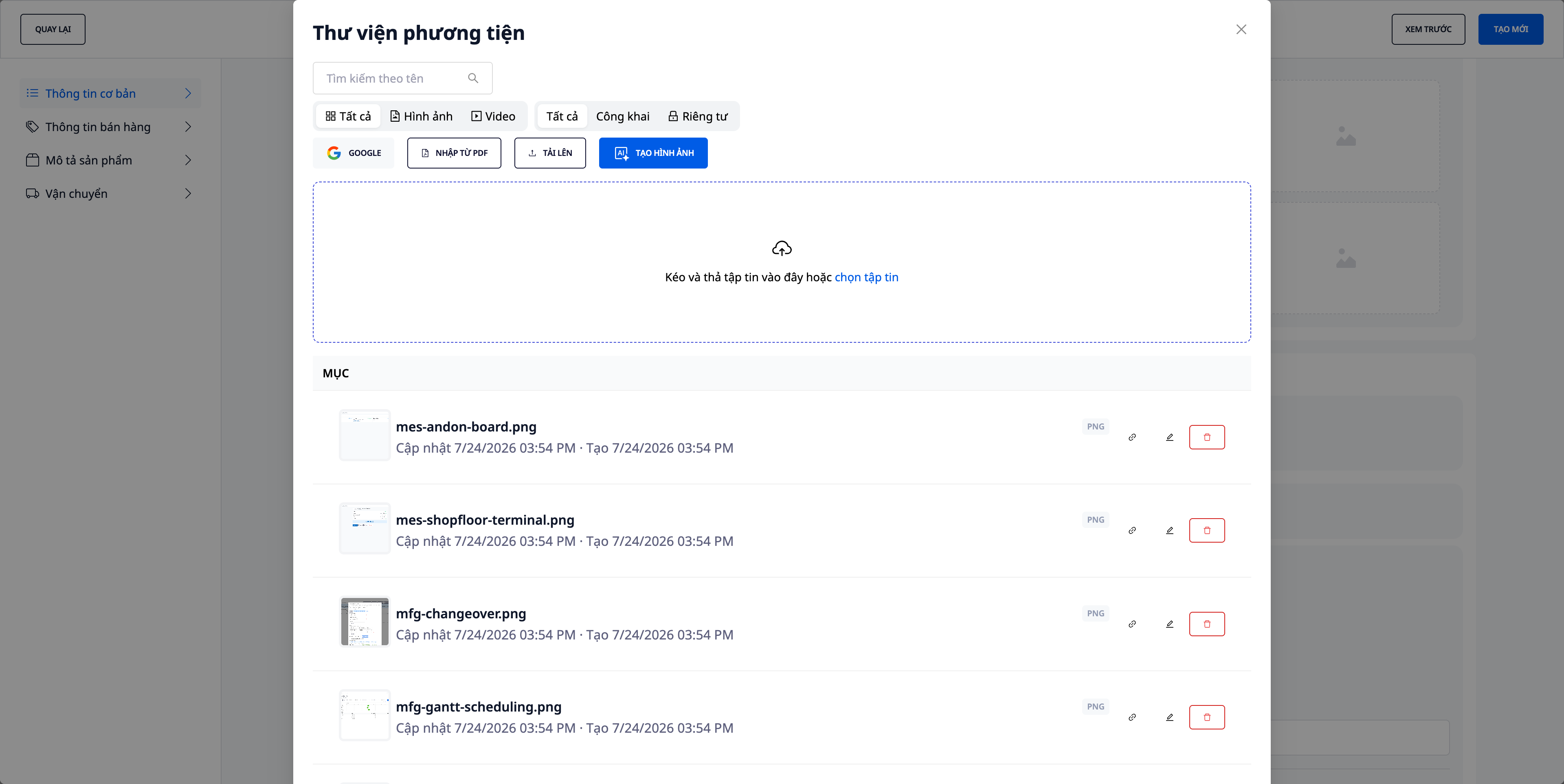
- Afbeeldingen importeren uit PDF-catalogi: Ontvangt u een PDF-catalogus van een leverancier? Sleep het bestand erin om de afbeeldingen eruit te halen, zonder handmatig screenshots te maken en bij te snijden (inclusief een lijst met mislukte afbeeldingen, zodat u controle heeft).
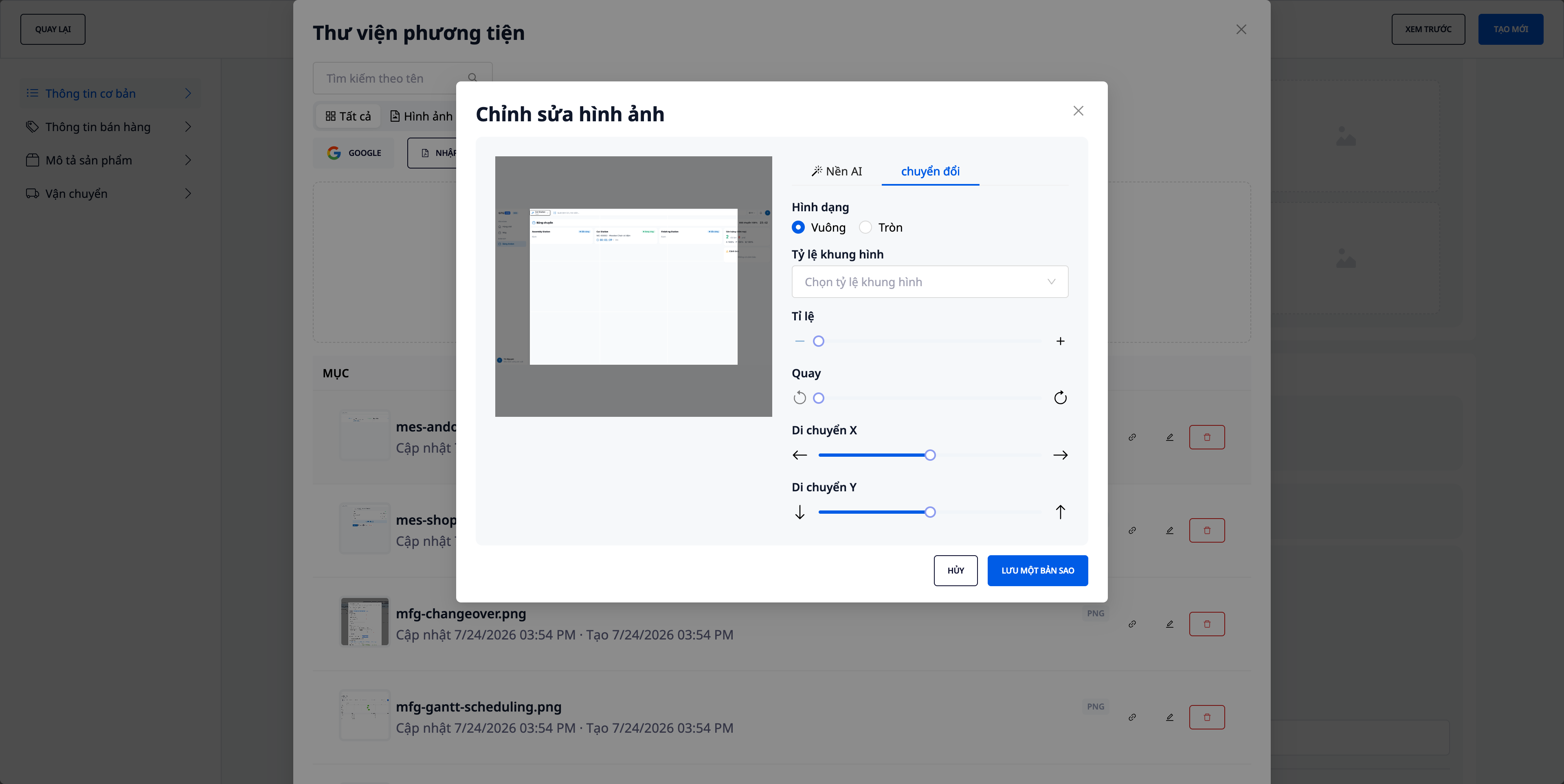
- Afbeeldingen direct in de bibliotheek bijsnijden/bewerken: Snijd, roteer en pas de kader direct ter plekke aan — u hoeft geen ander programma te openen en weer terug te keren.
- Behoud de originele bestandsnamen: Geüploade/geïmporteerde afbeeldingen behouden hun oorspronkelijke bestandsnamen, waardoor ze gemakkelijk te herkennen zijn en u minder snel de verkeerde selecteert.
- Bekende methoden zijn ook aanwezig: U kunt nog steeds vanaf uw computer uploaden, afbeeldingen ophalen van Google (Drive/Foto's) en productafbeeldingen genereren met AI (zie sectie 5).
5. Productafbeeldingen genereren & aanvullen met AI
Heb je nog steeds producten zonder afbeeldingen — geïmporteerd uit bestanden, marktplaatsen of handmatig ingevoerd? Open AI Images in Product Hub, selecteer het bereik "Alle producten zonder afbeeldingen", en het systeem genereert productafbeeldingen op basis van de naam + beschrijving (+ categorie/merk). U bekijkt een voorbeeld voordat u opslaat — bestaande afbeeldingen worden nooit zonder uw toestemming overschreven.
- Voorbeeld bekijken voor opslaan: Het resultatenraster toont duidelijk "N afbeeldingen klaar, M fouten"; u bekijkt elke afbeelding voordat u op Toepassen klikt.
- Transparante kosten: Het genereren van afbeeldingen met AI verbruikt credits — het systeem toont de kosten en vraagt om bevestiging voordat het wordt uitgevoerd, en het trekt alleen af op basis van het daadwerkelijke aantal gegenereerde afbeeldingen.
- Direct uitvoeren bij ontvangst van goederen: Aan het einde van het productimportproces, als er nog steeds artikelen zonder afbeeldingen zijn, verschijnt er een knop met de suggestie "AI-afbeeldingen genereren voor producten zonder afbeeldingen" om dit direct af te handelen.
- Alleen genereren voor ontbrekende items: Als uw importbestand een kolom met afbeeldingslinks bevat, haalt het systeem die afbeeldingen op en sluit deze producten uit van het bereik "zonder afbeeldingen" — AI genereert alleen voor producten die echt leeg zijn.
6. Magazijn & voorraadbeheer met meerdere magazijnen
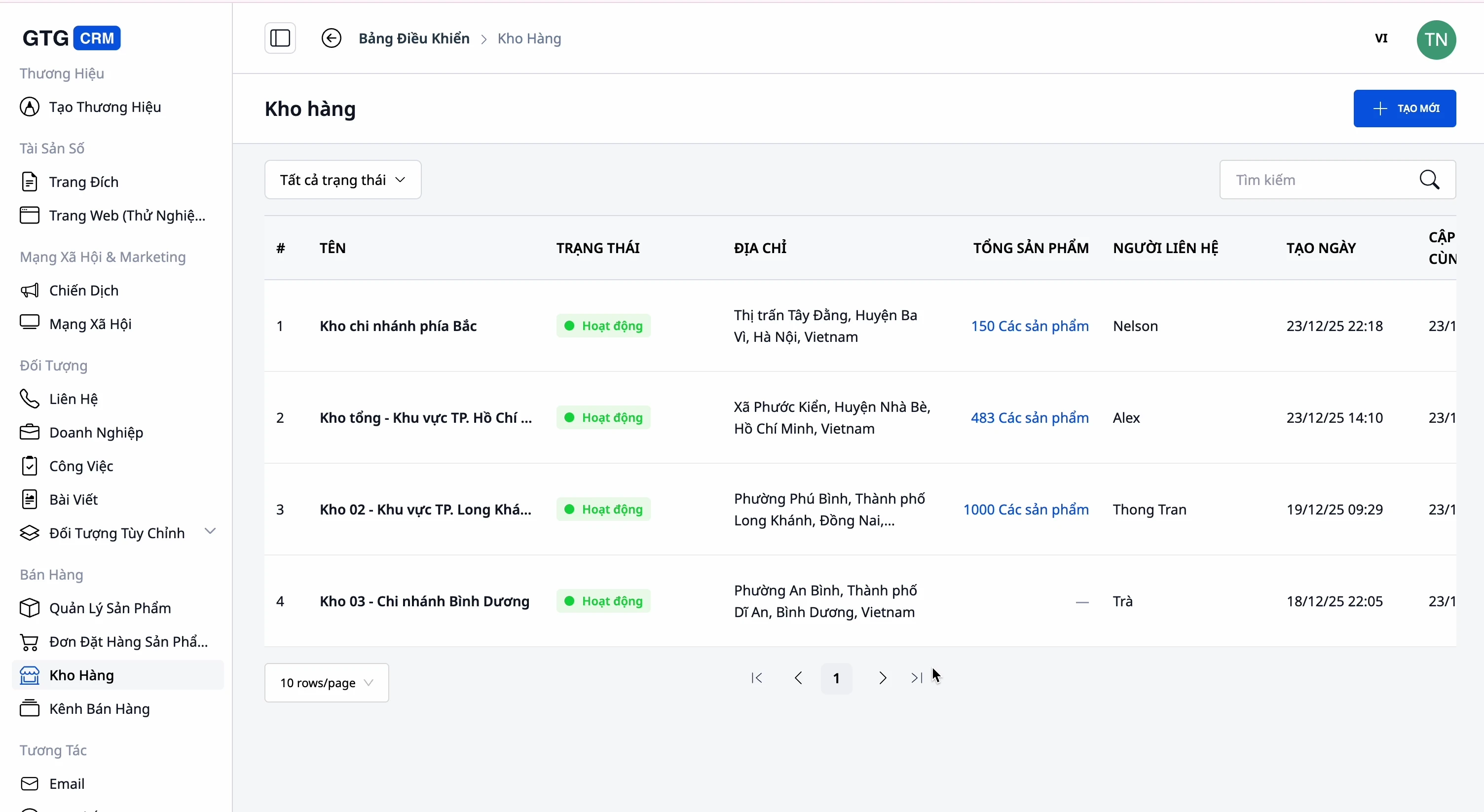
- Meerdere magazijnen: Hoofmagazijn, secundair magazijn, filiaalmagazijn — met naam, code, adres, contactpersoon.
- Voorraad volgen per magazijn: Weet hoeveel producten er waar zijn.
- Producten ↔ magazijnen koppelen: Duidelijk welke producten tot welk magazijn behoren.
7. Cross-channel verkoop & tweerichtingssynchronisatie met e-commerce platforms
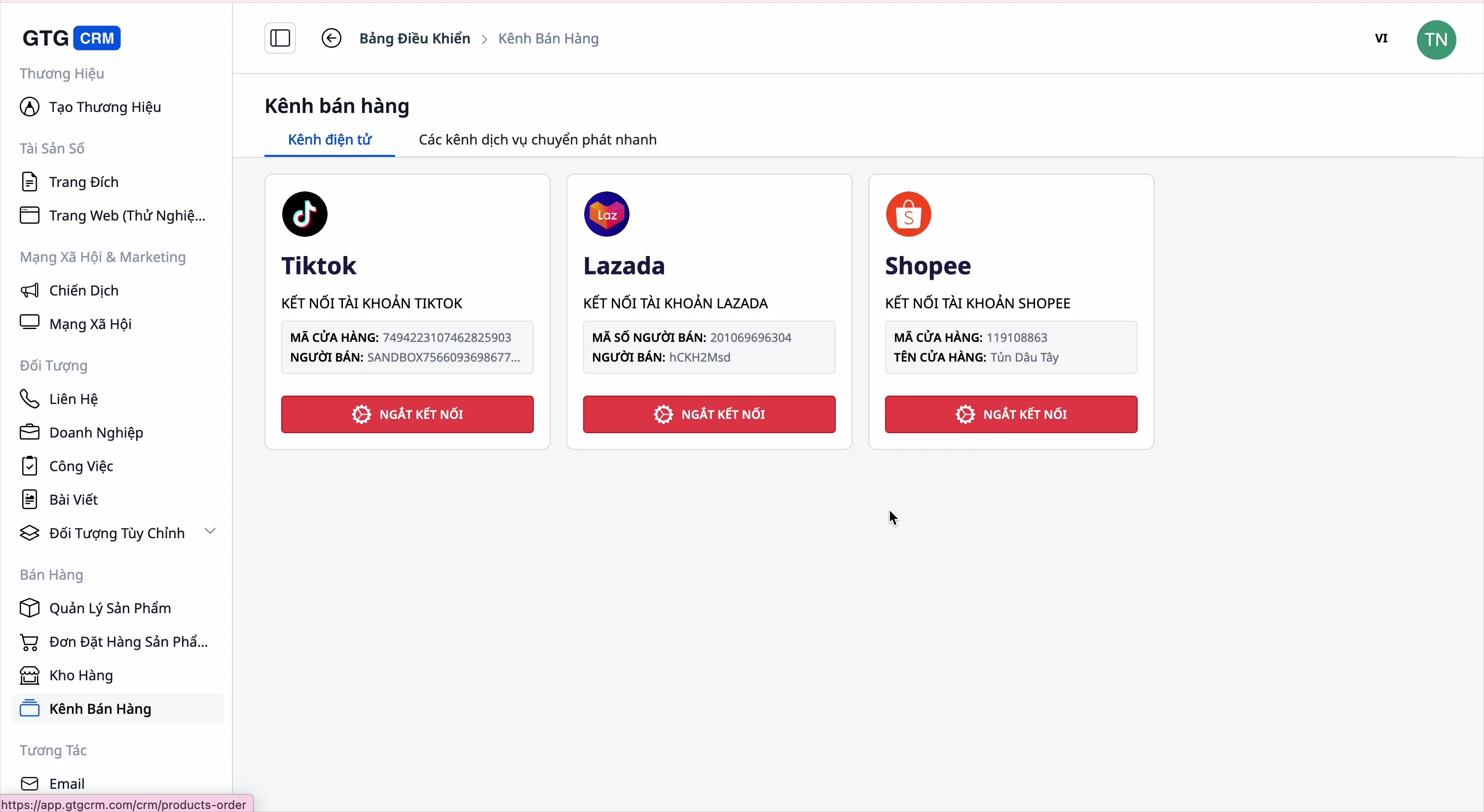
- Platforms verbinden: Shopee, Lazada, TikTok Shop.
- Ophalen: Producten van platforms naar GTG CRM halen (alles of individueel selecteren).
- Uploaden: Producten van GTG CRM naar platforms uploaden, met configuratie van informatie per platform.
- Categorieën mappen bij het uploaden naar platforms: Omdat u uw eigen categorieën gebruikt, stelt het systeem bij het uploaden van producten naar Shopee/Lazada/TikTok de bijbehorende categorie van het platform voor, zodat u deze kunt bevestigen — en onthoudt die mapping voor volgende keren, zodat u niet opnieuw vanaf nul hoeft te selecteren.
8. Volledige systeemintegratie
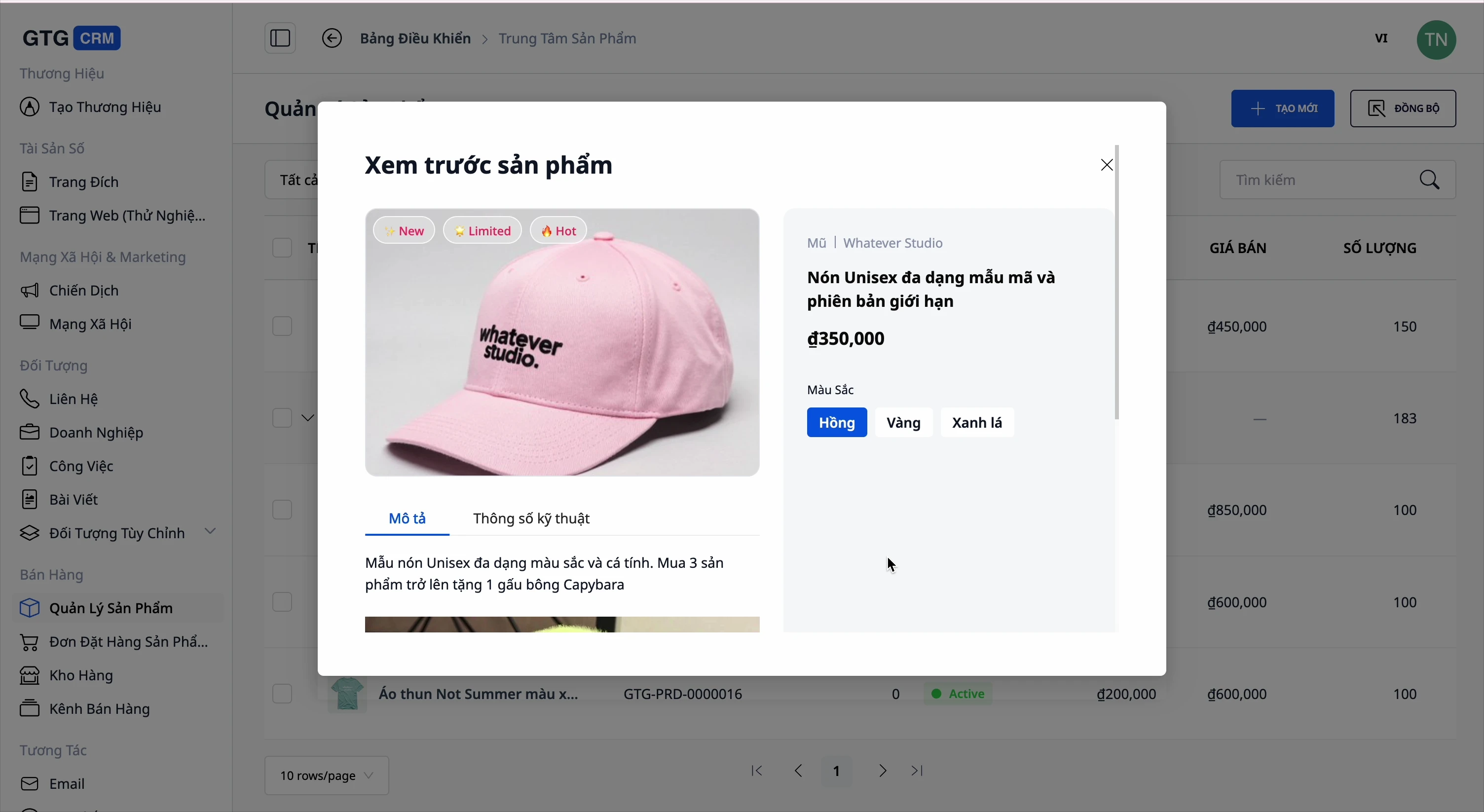
- Bestellingen: maak direct vanuit een product een bestelling aan.
- Website & Landing Page: toon producten op de website, koppel ze aan een landingspagina, bekijk een voorbeeld voordat je publiceert.
- Elektronische facturen: genereer facturen voor verkochte producten.
- AI Assistent: stel snel vragen over welke producten goed verkopen en hoe de voorraad ervoor staat.
Voordelen voor Bedrijven
Centraal beheer van producten + varianten + prijzen — Eén plek om alles te beheren, winst zelf te berekenen, geen prijsfouten meer
Eigen categorieën tot maximaal 3 niveaus — Organiseer je winkel op de juiste manier, niet gedwongen door het platform
Importeer producten van een website link (AI) — Maak in een paar minuten een hele catalogus, inclusief afbeeldingen/merken/specificaties/varianten
Importeer afbeeldingen uit PDF catalogi + snijd/bewerk ter plekke — Haal snel afbeeldingen van leveranciers op, zonder het formulier te verlaten, behoud de juiste bestandsnaam
Creëer productafbeeldingen met AI — Dek je hele catalogus in enkele minuten af met afbeeldingen, geen noodzaak om een fotoshoot te huren; bekijk een voorbeeld voordat je opslaat, kosten worden vooraf getoond
Voorraad in meerdere magazijnen — Weet wat waar is, voorkom oververkoop, geen onverwachte voorraadtekorten
Synchronisatie met meerdere kanalen + categorie mapping bij het pushen — Verkoop op Shopee/Lazada/TikTok/Website vanuit één plek, geen noodzaak om opnieuw te kiezen bij het plaatsen op platforms
Koppel bestellingen, website, facturen, boekhouding — Minder software om te kopen, één plek voor controle
Voor Wie Is Dit Geschikt?
- Online winkels die op meerdere platforms verkopen hebben een centrale plek nodig om producten en voorraad te beheren.
- MKB-bedrijven met meerdere magazijnen willen de voorraad per magazijn volgen.
- Distributeurs / importeurs die catalogi gebruiken willen snel honderden producten van websites of PDF-catalogi van leveranciers importeren.
- Winkel eigenaren die hun eigen categorieën willen indelen op een manier die bij hun bedrijf past, niet volgens de vaste structuur van het platform.
- E-commerce startups die een uitgebreide webwinkel met afbeeldingen willen hebben zonder budget voor fotografie.
Hoe Te Beginnen?
Ga naar Products (Producten) in GTG CRM. Maak je eigen categorieën aan (klik op "Nieuwe categorie toevoegen"), voeg vervolgens je eerste product toe — of plak een winkellink om in bulk te importeren, of sleep een PDF-catalogus naar de Mediatheek. Voor producten met ontbrekende afbeeldingen, open AI Images om in enkele minuten afbeeldingen te genereren. Koppel magazijnen en platforms wanneer je er klaar voor bent. Bekijk de stap-voor-stap Product Hub handleiding, of lees hoe je een hele productcatalogus in een middag naar het systeem krijgt.
Gratis proberen — geen creditcard nodig.


