

CRM (客户关系管理) 在 GTG CRM 中,帮助企业从多个渠道存储、管理和跟踪所有客户信息,并将其集中到一个平台。现在,您还可以在 CRM 中分析客户和公司通讯录,查看时间线上所有交互历史,并发现下一步需要采取的正确行动 — 无需导出 Excel。
为什么需要 CRM?
当前企业的现状
在经营过程中,客户数据通常分散各处:
- Facebook:客户通过 Messenger 留言
- Zalo:客户通过 Zalo OA 聊天
- Email:客户发送邮件咨询信息
- Landing Page:客户填写注册表单
使用 Excel 的问题
手动将客户数据录入 Excel — 耗时,易出错
每位员工一个独立文件 — 数据不一致,难以分配工作
通过表格公式统计数据 — 没有整体视角,数据过时
没有互动历史 — 遗漏客户,重复跟进
GTG CRM 将所有数据整合到一个统一的数据源:客户自动从所有渠道流入,所有互动都被记录,分析数据始终基于所有实际数据进行计算。
客户数据来源
CRM 自动收集来自以下渠道的客户:
- 社交媒体 — Facebook Messenger (客户通过 Fanpage 留言)
- Email — Gmail (客户发送邮件到企业邮箱)
- Landing Page & Live Chat — 通过 Live Chat 注册表单,留下信息
- 手动录入 — 直接创建联系人或批量导入 CSV
亮点
1. 集中的联系人列表管理
在一个表格中查看和管理所有客户:姓名、邮箱、电话号码、国家、状态 (New, In Progress, Converted…)、客户来源、负责人。
- 自定义显示列:添加/删除列 (已购产品、备注…),重新排列顺序。
- 高级筛选器:按日期、按状态、按地址/产品/来源筛选,并组合多个条件。
- 分配负责人:将客户分配给每位员工,需要时进行转交,跟踪工作量。
- 自动企业分类:拥有公司域名的邮箱联系人将被单独归入“企业”列表。
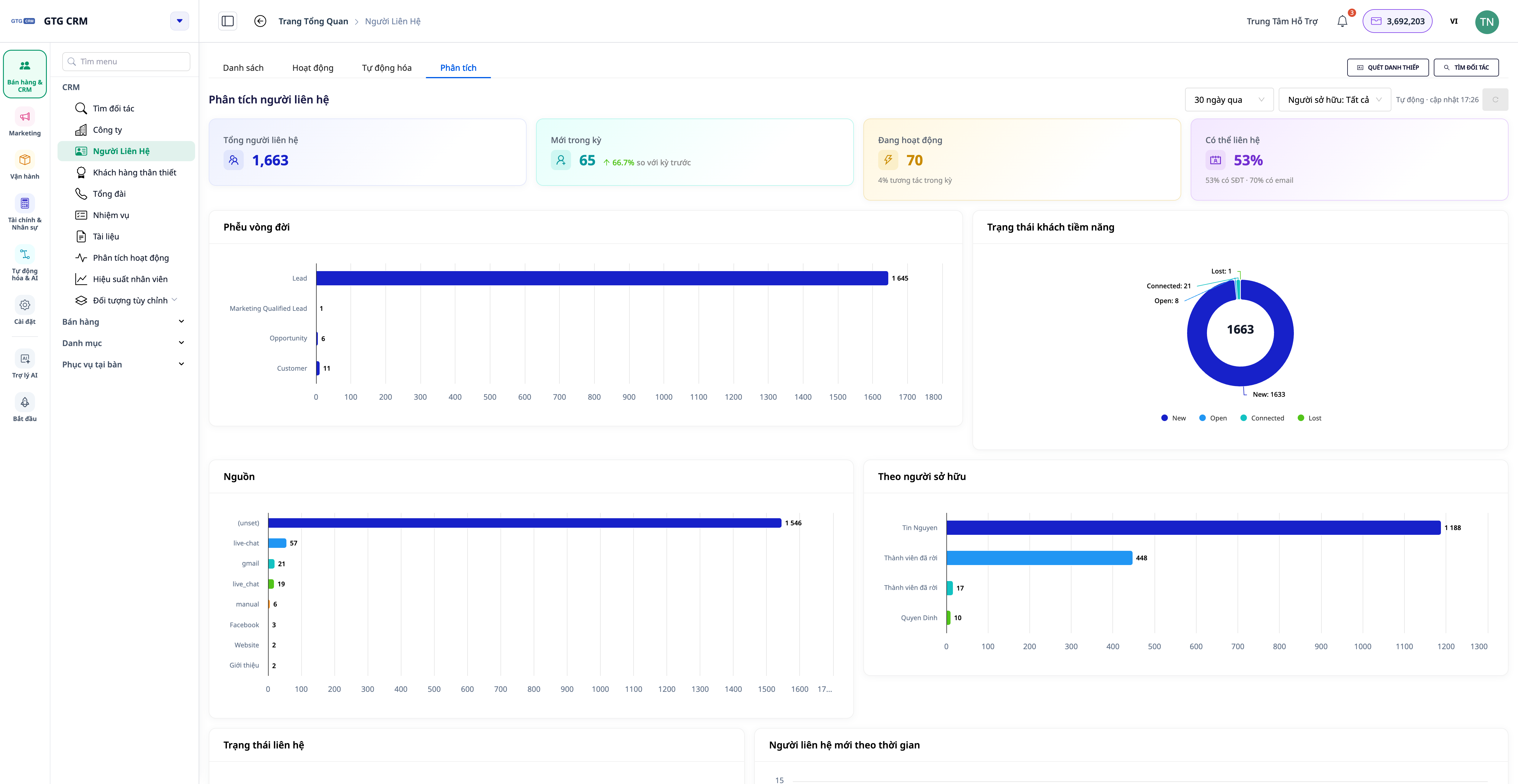
2. Contact & Company 分析选项卡 — 在所有数据上进行精确统计
在联系人和企业菜单中,现在有了分析选项卡 — 一个预先构建的仪表板,在所有通讯录(无样本限制)上进行计算,并实时更新。
- KPI Card: Total contacts · New in period (with trend ▲/▼ vs. previous period) · Active · Contactable rate (with email/phone number).
- Lifecycle Funnel: see where customers accumulate/drop off — from leads to actual customers.
- Distribution by Source, Status, Owner: know which channels bring customers, who holds many customers.
- Data Health: contactable rate with email / phone number / owner / company.
- For Companies: distribution by industry, size, companies without contacts, and pipeline summary by company.
💡 Dashboard **auto-refreshes** — the top-right corner displays "Auto · updated HH:MM", you don't need to reload the page to see new metrics.
3. Actionable Suggestions — Turn Metrics into To-Dos
The Analytics tab not only displays charts but also points out the next steps. Each suggestion comes with a quantity and a button that directly leads to a pre-filtered list of that specific customer group.
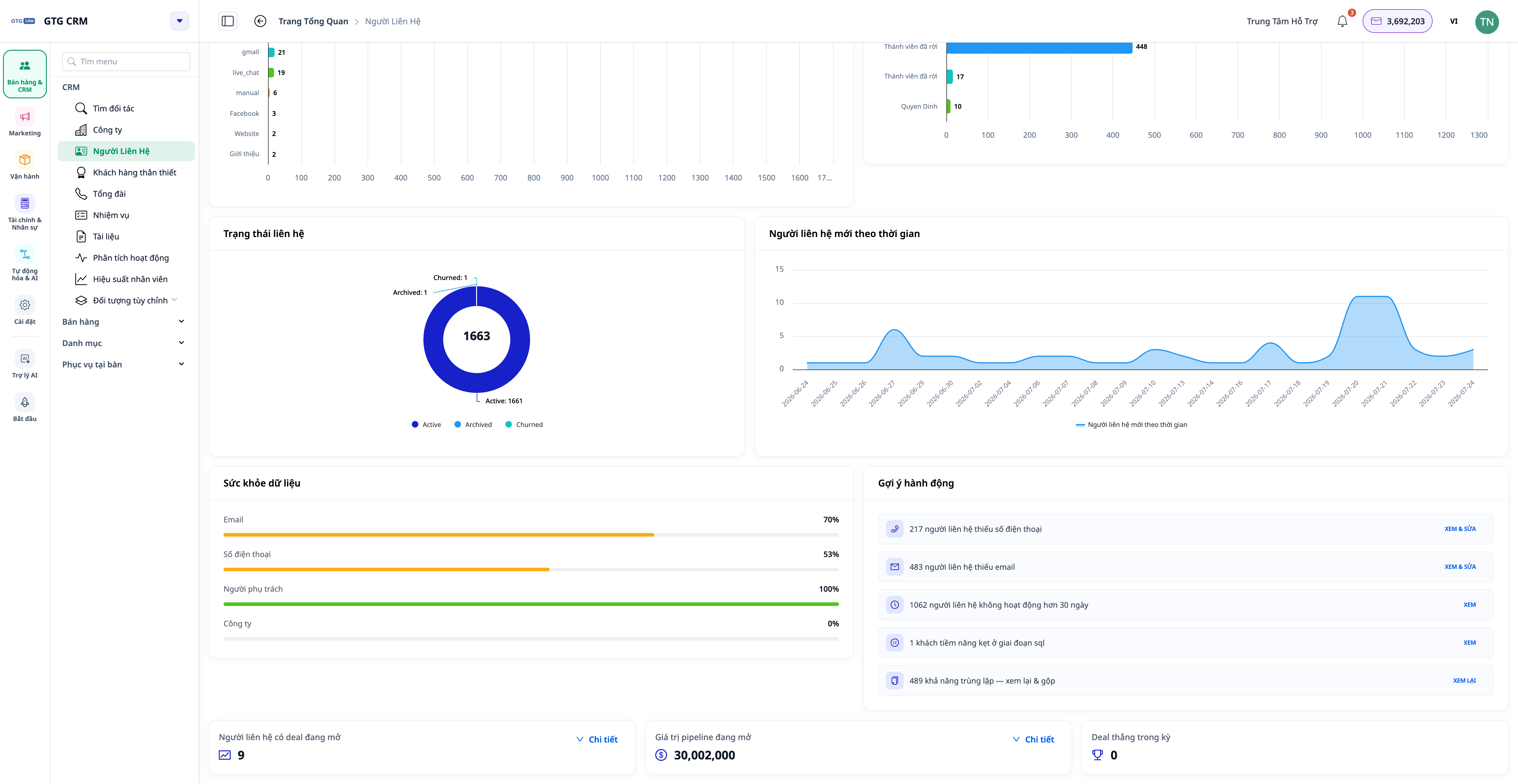
- "Contacts missing phone number / email" → open the correct group to add or import.
- "Inactive > 30 days" → group needs re-engagement.
- "No owner assigned" → assign immediately.
- "Stuck in a lifecycle stage" → group needs a push.
4. 360° Activity Timeline
Each contact and company has an Activity tab displaying all related events on an easy-to-read timeline: calls, emails, deals, orders… along with the name of the person performing the action (instead of cryptic identifiers) and a clear description of the action in your language.
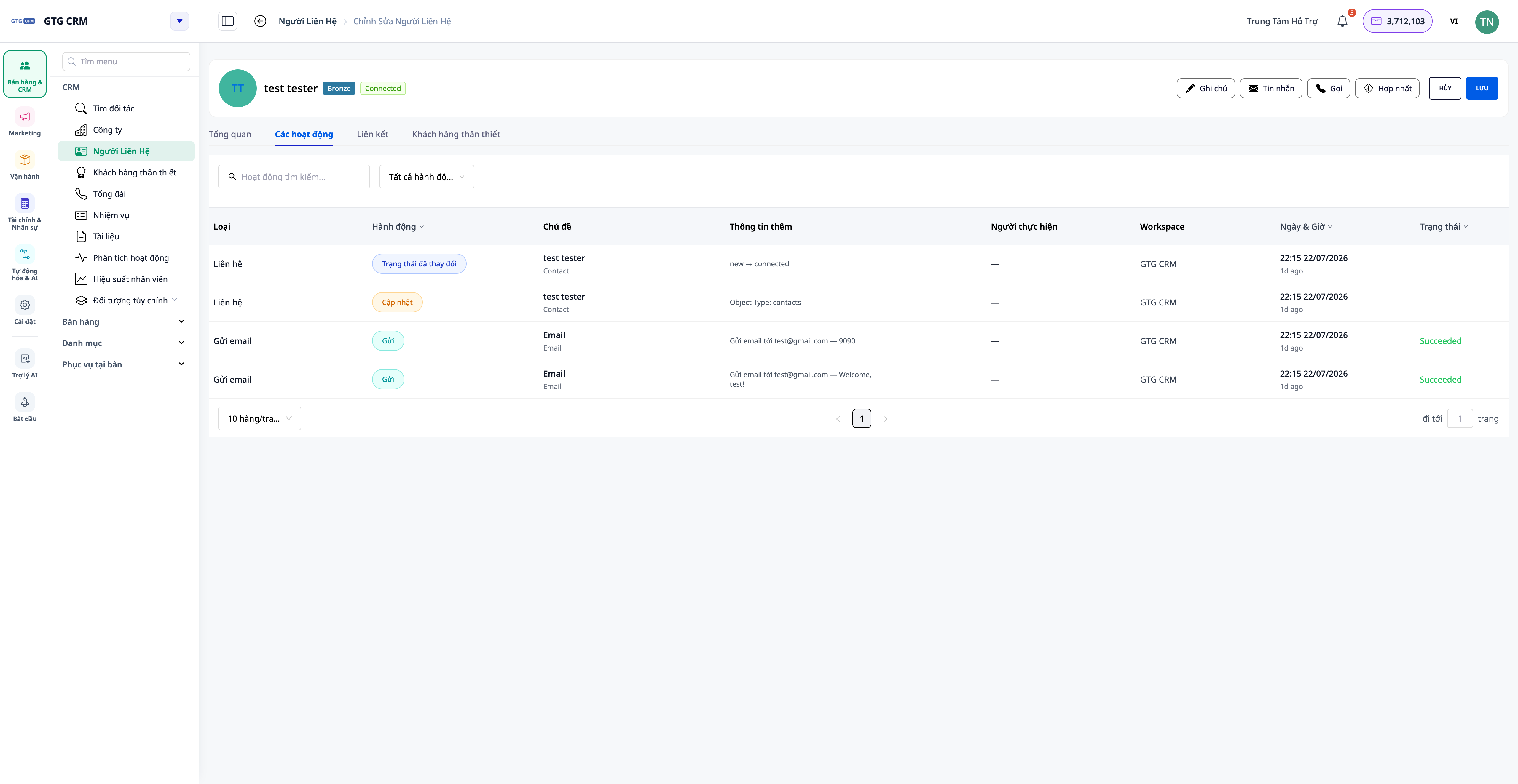
- For Companies: the timeline also collapses and merges activities of contacts, deals, and orders belonging to that company.
- At the List Level: open the Activity tab to see a common feed of all contacts/companies, filter by person / action type / date.
5. Attach Files & Links to Tasks
Each Task in CRM can attach files from the Asset Manager (PDF, DOCX, XLSX, images, videos…) and external links (Google Sheets, Drive, Figma…). Opening a task shows all the necessary documents — no need to search elsewhere.
Benefits for Businesses
Automated Multi-Channel Lead Collection — No missed contacts, no manual entry
Analytics Tab Based on All Data — Make decisions on correct data, not truncated samples
Actionable Suggestions with Pre-filtered Lists — Know the next steps immediately, save time
360° Activity Timeline — Grasp entire customer history in seconds
Advanced Filters + Column Customization — Find the right customer group extremely fast
Assign Owners — Clearly know who manages which customer, avoid duplication
Who Is It For?
- Sales Teams — manage leads, track lifecycle funnels, immediately handle "hot" customer groups.
- Marketing Teams — segment customers by source, measure channel effectiveness.
- Customer Support — view entire interaction history on a single timeline.
- Managers & Business Owners — monitor data health and team workload, metrics are always up-to-date.
How to Get Started?
进入GTG CRM中的联系人(或公司)菜单,当您在“设置”中连接渠道(Facebook、Zalo、电子邮件)时,客户数据将自动填充。选择分析标签页以查看仪表板,然后打开联系人/公司并选择活动标签页以查看360°时间线。
在“GTG CRM上的CRM使用指南”文章中查看每个步骤的详细信息。
免费试用 — 无需信用卡。


