

CRM (Customer Relationship Management) in GTG CRM enables businesses to store, manage, and track all customer information from various channels, consolidating it onto a single platform. You can now also analyze both customer contacts and companies directly within the CRM, view the entire interaction history on a timeline, and identify the right next action to take — no need to export to Excel.
Why is CRM Necessary?
The Current Business Landscape
In business, customer data is often scattered:
- Facebook: customers messaging via Messenger
- Zalo: customers chatting via Zalo OA
- Email: customers sending emails for information
- Landing Page: customers filling out registration forms
Problems with Using Excel
Manual customer data entry into Excel — Time-consuming, prone to errors
Each employee has their own file — Data is not synchronized, difficult to assign tasks
Calculating metrics using spreadsheet formulas — Lacks an overall view, outdated data
No interaction history — Missing leads, duplicate customer care
GTG CRM consolidates everything into a single data source: customers automatically flow in from all channels, all interactions are recorded, and analysis metrics are always calculated on the entire actual data.
Customer Data Sources
CRM automatically collects customers from:
- Social Media — Facebook Messenger (customers messaging via Fanpage)
- Email — Gmail (customers sending emails to the business inbox)
- Landing Page & Live Chat — registration forms, leaving information via Live Chat
- Manual Entry — direct contact creation or bulk CSV import
Key Features
1. Centralized Contact List Management
View and manage all customers in one table: Name, Email, Phone number, Country, Status (New, In Progress, Converted…), Customer Source, Assigned Person.
- Customize displayed columns: add/remove columns (Purchased Product, Notes…), reorder them.
- Advanced filters: filter by date, status, address/product/source, and combine multiple conditions.
- Assign responsible persons: assign customers to each employee, transfer when needed, track workload.
- Automatic company classification: contacts with company domain emails are separated into the "Companies" list.
2. Contact & Company Analytics Tab — accurate metrics on all data
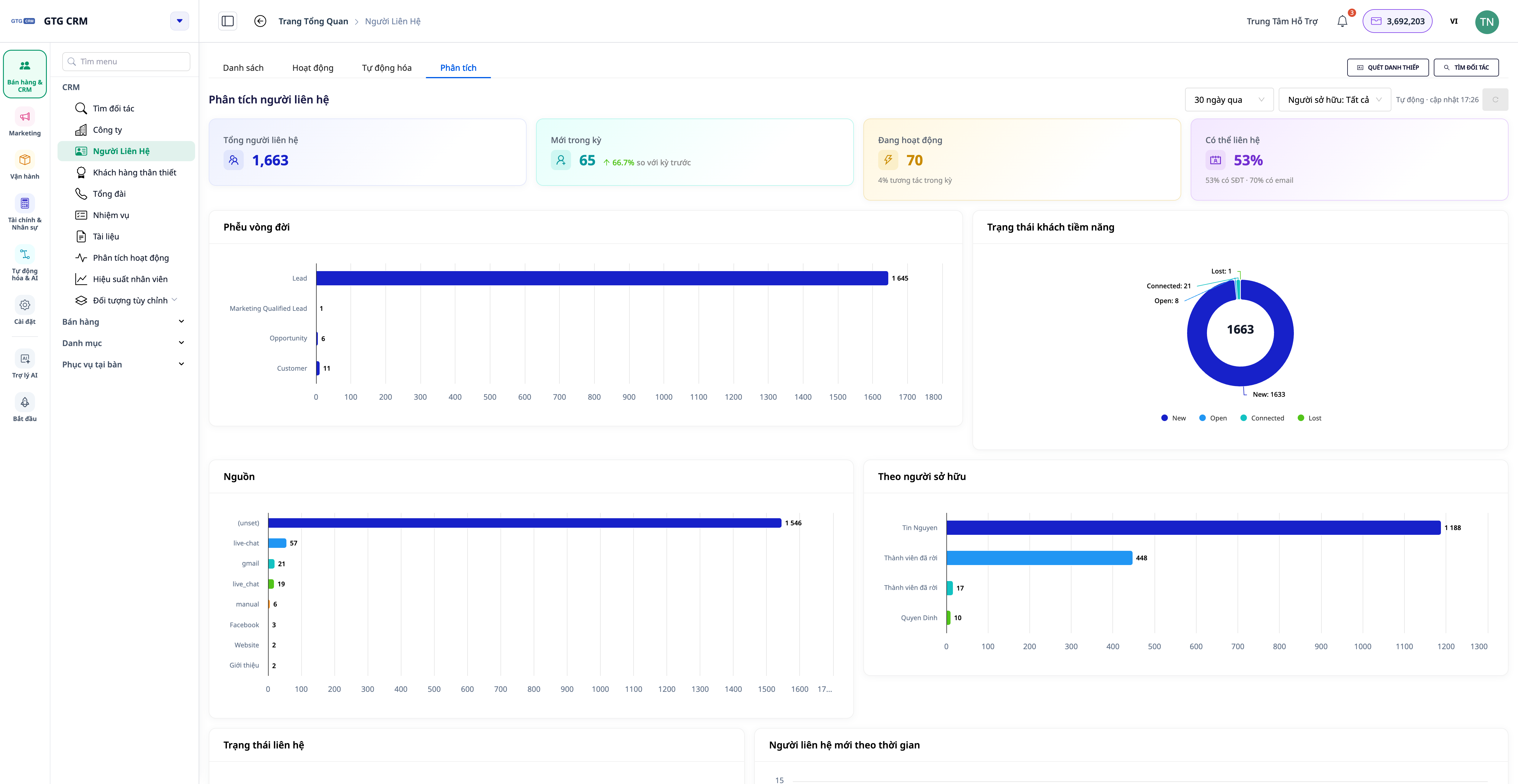
Now on the Contacts and Companies menus, there's an Analytics tab — a pre-built dashboard, calculated on the entire contact list (unlimited samples), updated in real-time.
- KPIタグ: 総連絡先数・期間中の新規連絡先(前期間比のトレンド▲/▼付き)・アクティブ連絡先・連絡可能率(メール/電話番号あり)。
- ライフサイクルファネル: 顧客がどの段階で積み上がり/離脱しているかを見る — 見込み顧客から実顧客へ。
- ソース、ステータス、担当者別配分: どのチャネルが顧客をもたらしているか、誰が多くの顧客を保持しているかを知る。
- データ健全性: メール/電話番号/担当者/会社がある連絡先の割合。
- 会社別: 業種、規模、連絡先が紐づいていない会社別の配分、および会社別のパイプライン概要。
💡 ダッシュボードは自動更新 — 右上に「Auto · 更新 HH:MM」と表示され、新しい数値を見るためにページをリロードする必要はありません。
3. アクション提案 — 数値を実行すべきタスクに変える
分析タブはグラフを表示するだけでなく、次に取るべきアクションを示します。各提案には数量と、その顧客グループに直接つながるボタンが付いています。
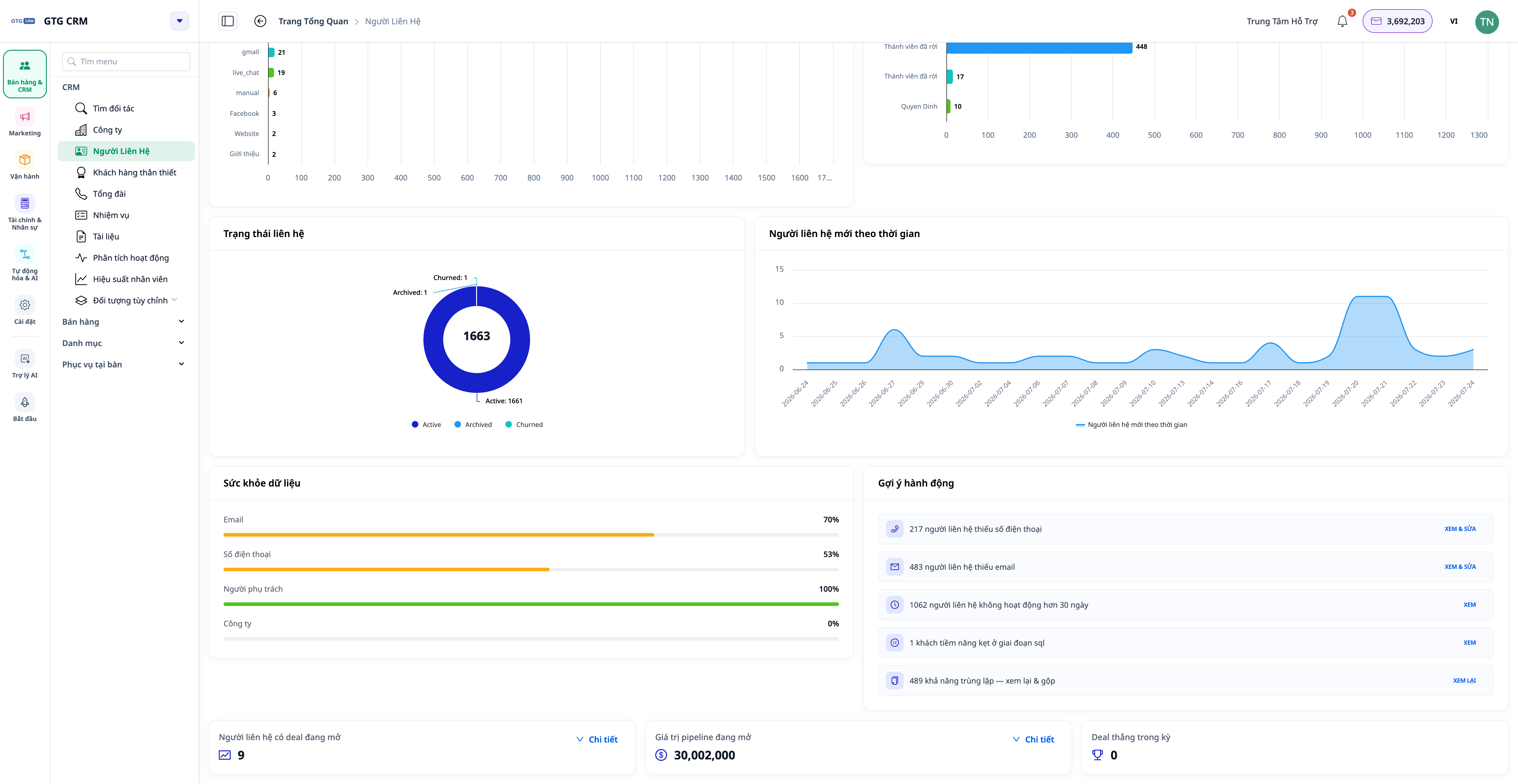
- 「電話番号/メールアドレスが不足している連絡先」→ 追加またはインポートするために正しいグループを開く。
- 「30日以上未活動」→ 再度ケアが必要なグループ。
- 「担当者がいない」→ すぐに割り当てる。
- 「ライフサイクルのある段階で停滞している」→ 促進が必要なグループ。
4. 360°アクティビティタイムライン
各連絡先と各会社にはアクティビティタブがあり、関連するすべてのイベントを読みやすいタイムラインで表示します:通話、メール、商談、注文…実行者の名前(分かりにくいIDではなく)と、あなたの言語による明確なアクション説明付き。
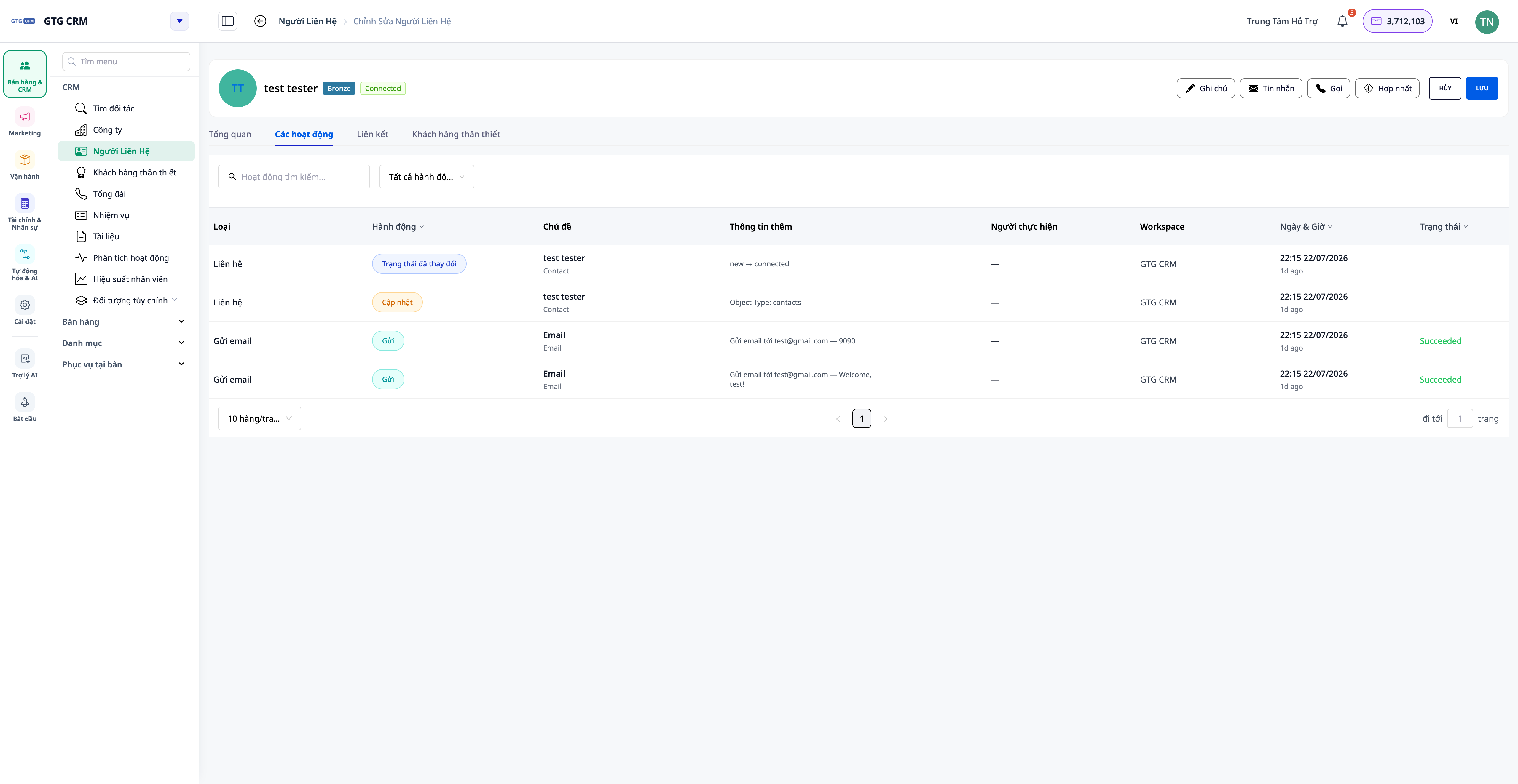
- 会社別: タイムラインには、その会社の連絡先、商談、注文のアクティビティがまとめて表示されます。
- リストレベル: アクティビティタブを開いて、すべての連絡先/会社の共通フィードを表示し、担当者/アクションタイプ/日付でフィルタリングできます。
5. タスクへのファイル&リンク添付
CRMの各タスクには、Asset Managerのファイル(PDF、DOCX、XLSX、画像、ビデオ…)や外部リンク(Google Sheets、Drive、Figma…)を添付できます。タスクを開けば、必要なドキュメントがすべて揃っています — 他の場所を探す必要はありません。
企業にとってのメリット
マルチチャネルでの自動顧客収集 — 連絡先の見落としなし、手入力なし
全データに基づいた分析タブ — 正しい数値に基づいて意思決定、不完全なサンプルではない
フィルタリング済みリスト付きアクション提案 — 次に取るべきアクションがすぐに分かり、時間を節約
360°アクティビティタイムライン — 数秒で顧客の履歴全体を把握
高度なフィルタリング + 列カスタマイズ — 顧客グループを非常に速く見つける
担当者割り当て — 誰がどの顧客を担当しているかが明確になり、重複を回避
誰に適していますか?
- 営業チーム — 見込み顧客管理、ライフサイクルファネル追跡、「ホット」な顧客グループの即時処理。
- マーケティングチーム — ソース別に顧客を分類し、どのチャネルが効果的かを測定。
- カスタマーケア — 1つのタイムラインでインタラクションの全履歴を表示。
- マネージャー&経営者 — チーム全体のデータ健全性と作業量を監視、数値は常に最新。
始め方
GTG CRM の 連絡先 (または 企業) メニューに入ると、設定でチャネル (Facebook, Zalo, Email) を接続すると顧客データが自動的に入力されます。ダッシュボードを表示するには 分析 タブを選択し、連絡先/企業を開いて アクティビティ タブを選択すると 360° のタイムラインを表示できます。
各ステップの詳細については、「GTG CRM での CRM の使用方法」 を参照してください。
無料トライアル — クレジットカードは不要です。


