Are you facing this problem?
Ms. Hương is an accountant for a trading company in Hanoi. At the end of every period, she is overwhelmed: she collects figures from the sales software, pastes them into Excel, builds the financial statements by hand, then opens a separate tax declaration software to re-enter each number and export the returns to submit to the tax authority. Three or four software programs, entering the same data over and over, and one mistake throws off the entire set of reports. This year brings a bigger worry: Circular 99/2025 replaces Circular 200 for fiscal years beginning on or after 01/01/2026, but her old software still builds reports using the old templates.
This is the burden of accountants at small and medium-sized enterprises: data is scattered, reports are built manually, and there is always the fear of getting the standards or templates wrong and being penalized.
What you really want to achieve
Ms. Hương does not want to re-enter data into the tax declaration software every period. She needs one single place where sales invoices issued from GTG CRM and customer payments are automatically posted to the ledger, so that at period end she can generate the trial balance, income statement, and balance sheet from the posted data and export them to PDF/Excel for storage and signing.
She also needs to export XML files of VAT returns by quarter or by month (with figures taken from the ledger) and of personal income tax (PIT) withholding returns (with figures taken from payroll), so she no longer has to retype numbers that already exist in the system. And she needs to keep books under the TT99/2025 chart of accounts from the start, not under the old standard.
How GTG CRM helps you
GTG CRM brings sales, invoicing, and accounting together in one system. Reports are built from the general ledger. VAT returns take their figures from the books; PIT withholding returns take their figures from confirmed payrolls, along with the payment dates and scope you confirm. Specifically:
- Chart of accounts template under TT99/2025: for businesses in Vietnam, you select the new standard template with a single click, without having to build it from scratch; you can also import your own chart of accounts.
- Automatic posting of transactions: sales invoices issued from GTG CRM and customer payments automatically generate journal entries in the general ledger as soon as you select the chart of accounts template. Cost of goods sold and purchase inventory receipts can be enabled under Accounting → Chart of Accounts, in the Accounting Automation section; depreciation of fixed assets is under Accounting → Fixed Assets, using the Automate button. Figures are kept in one place and do not need to be re-entered multiple times.
- Financial statements taken directly from the general ledger: Trial Balance, Income Statement, Balance Sheet, and Cash Flow Statement; along with receivables aging, payables aging, and cash position. The full set of financial statements in the TT99 format for submission is not yet generated by GTG CRM.
- Export to PDF & Excel — all accounting reports can be exported to PDF for signing/storage and to Excel for further work, with one click.
- Export XML files for you to review and then upload to eTax yourself: the table right below the list clearly shows which returns have a file and which do not. For PIT returns, the screen lists all outstanding items in one place (payrolls for which months lack a payment date, how many people are outside the scope), the figures in the file match the data table on screen, and neither the screen nor the file contains any employee names or individual salary amounts.
- Incoming invoices connected to the tax authority — synchronizes incoming invoices and suggests how to record them, so your books are complete in both directions.
Group | Which returns it includes |
|---|---|
Has XML file | VAT returns by quarter or by month (01/GTGT) and quarterly personal income tax withholding returns (05/KK-TNCN), following the HTKK file structure |
No file yet: figures for you to enter into HTKK | Corporate income tax finalization (03/TNDN), personal income tax finalization (05/QTT-TNCN), and financial statements. For these three returns, the screen displays a "Figures from the books for you to enter into HTKK" table, along with the reason |
The first thing to do before exporting: for the VAT return, line [22] (deductible VAT carried forward from the previous period) needs to be filled in. GTG CRM cannot know this figure, so for each period (each quarter, or each month if you file monthly), it will ask you once before export. For periods within the 8% VAT rate application window where your books only record purchases taxed at 8% (with no sales taxed at 8%), there is one additional question about Appendix III of Decree 174/2025/NĐ-CP. See the FAQ section below. Lines [37], [38], [39a], [40b] and [42] do not yet have input fields; for any period with figures on these lines, add them in HTKK. For the personal income tax return, enter the payment date for each payroll, then confirm the scope.
Review each file using HTKK or iTaxViewer, then submit it yourself. For the monthly VAT file specifically, open it in HTKK; that file is also a draft, so see the question "Can I file monthly VAT returns and submit the XML file directly to eTax?" in this article. Whether the tax authority will still accept this file structure for periods from 01/07/2026 onward, please check with the tax authority.


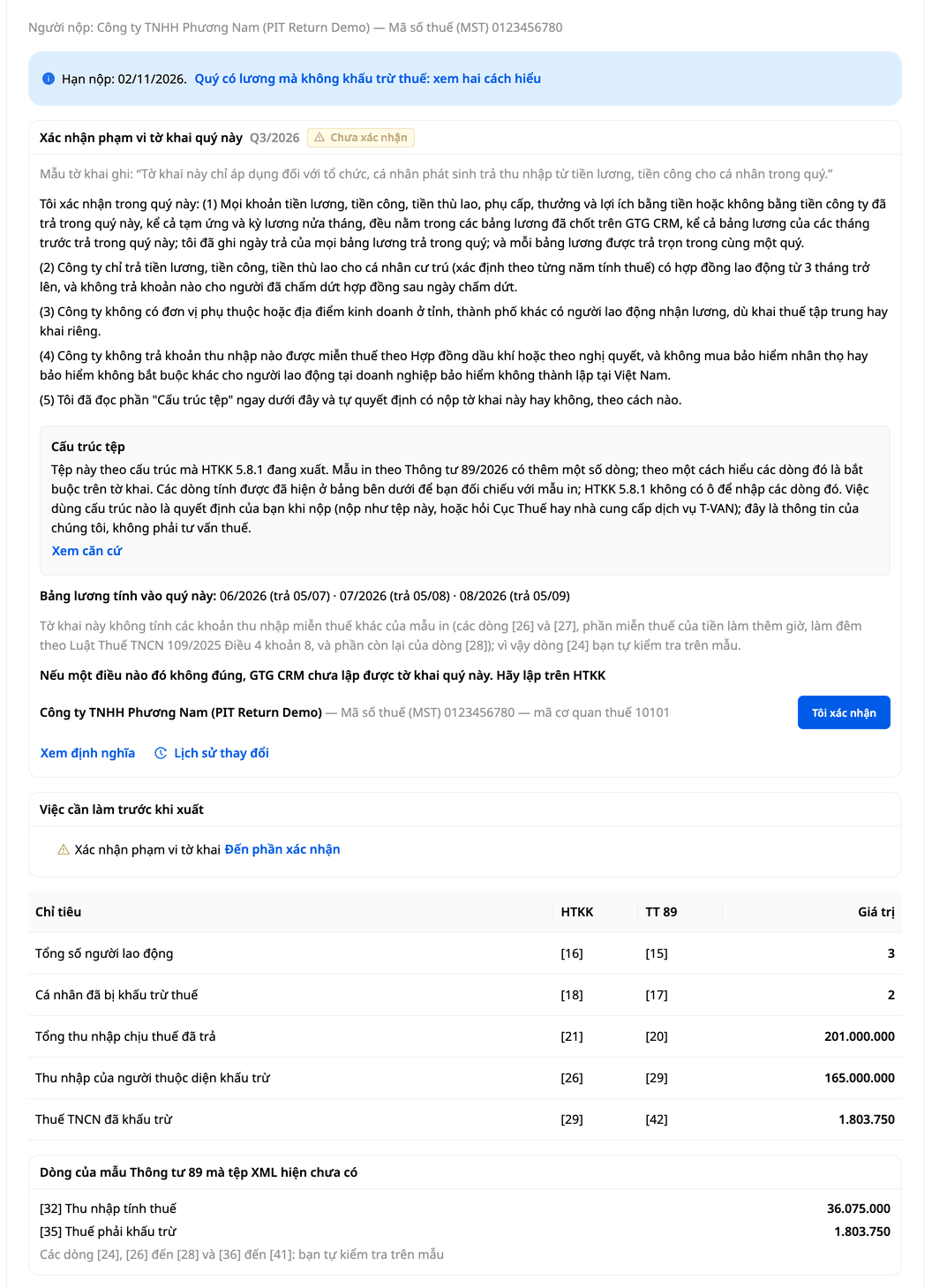
Q3/2026 Personal Income Tax Withholding Return (05/KK-TNCN) of a sample company, before clicking "I confirm": the figures are ready, but the "Tasks before export" panel still has one task left, which is confirming the scope.
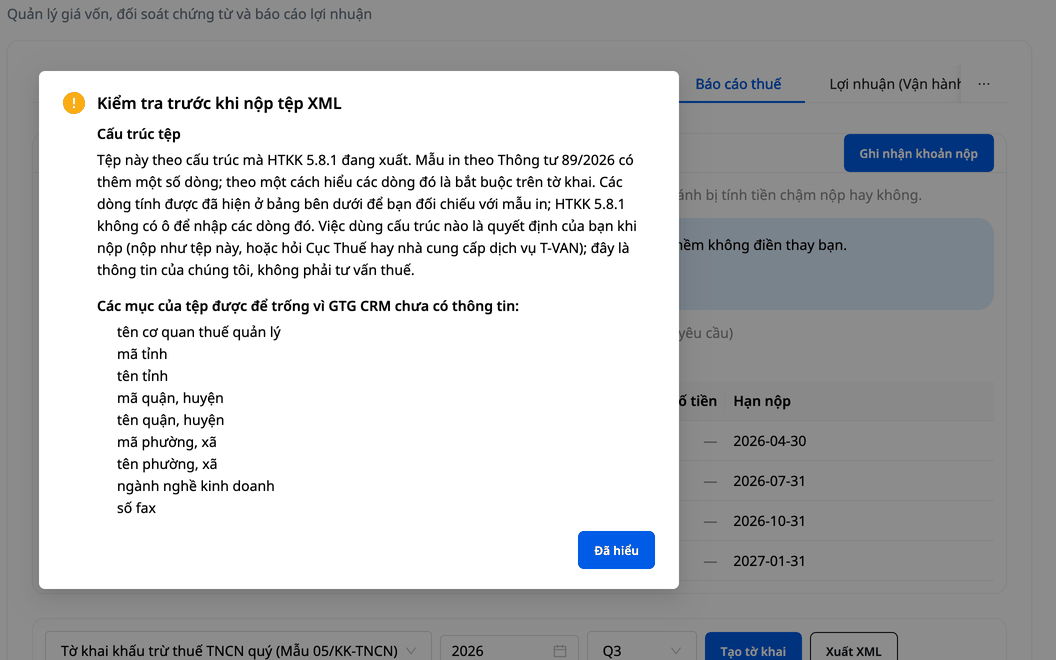
After exporting the file, GTG CRM lists the fields that must be left blank in the file because the information is not yet available.
Want to see all these tools in full? See the Accounting & E-Invoice Suite feature and the step-by-step guide to accounting & e-invoicing to set up your chart of accounts and post your ledgers before exporting reports.
What you get after using it
- Ghi sổ theo hệ thống tài khoản TT99/2025 ngay từ đầu: bạn chọn mẫu một lần, không phải dùng hệ thống tài khoản TT200 cũ. Trước khi ký, bạn vẫn soát số liệu lần cuối.
- Bớt nhập đi nhập lại: hóa đơn bán ra xuất từ GTG CRM và tiền khách thanh toán tự lên sổ. Cuối kỳ, bạn bấm để ra báo cáo, và hai tờ khai (GTGT theo quý hoặc theo tháng, khấu trừ thuế TNCN) xuất được file XML từ số liệu đã có trong hệ thống, để bạn xem lại rồi nộp.
- Số liệu khớp nhau: bán hàng, hóa đơn và kế toán dùng chung một nguồn số liệu, đỡ phải đối chiếu qua lại.
- Bớt một phần mềm kế toán riêng: sổ sách nằm cùng hệ thống bạn đang bán hàng. Bạn vẫn dùng HTKK để lập các tờ khai chưa có file.
Câu hỏi thường gặp
Công ty tôi đang theo TT200, giờ phải làm sao? TT99/2025 thay thế TT200 cho năm tài chính bắt đầu từ ngày 01/01/2026 trở đi; năm tài chính bắt đầu trước đó vẫn theo TT200. Nếu năm tài chính của bạn bắt đầu từ 01/01/2026 trở đi, bạn chọn mẫu TT99. Nếu chưa chắc, hãy hỏi kế toán trưởng trước, vì đã ghi bút toán vào sổ thì không đổi mẫu được.
Tôi có xuất được file để nộp cho cơ quan thuế không? Có, với Tờ khai GTGT theo quý (01/GTGT) và Tờ khai khấu trừ thuế TNCN hằng quý (05/KK-TNCN): bạn xuất file rồi tự nộp, GTG CRM không nộp thay. Tờ khai GTGT theo tháng cũng xuất được tệp, nhưng đó là bản nháp, và GTG CRM chưa xác nhận được cổng thuế có nhận tệp theo tháng hay không. Xem câu hỏi ngay dưới đây.
Tôi khai GTGT theo tháng, file XML có nộp thẳng lên eTax được không? GTG CRM chưa xác nhận được cổng thuế có nhận tệp theo tháng hay không, nên chúng tôi không hứa điều đó. Tệp theo tháng là bản nháp: bạn mở trong HTKK, soát từng dòng rồi mới quyết định nộp. Phần đầu tệp theo đúng kiểu HTKK tự ghi cho một tháng. Nếu cổng thuế không nhận, bạn vẫn lập tờ khai trên HTKK như bình thường, dùng số liệu từ sổ sách trong tệp để đối chiếu.
Ba tờ khai chưa có file (03/TNDN, 05/QTT-TNCN, Báo cáo tài chính) thì màn hình hiện số liệu từ sổ sách để bạn đối chiếu và nhập vào HTKK. Riêng Báo cáo tài chính, đó là các số tổng, chưa chia theo từng chỉ tiêu của mẫu TT99.
Để xuất file, hồ sơ thuế phải điền đủ. Để xuất tệp GTGT theo tháng, Hồ sơ thuế còn phải ghi rõ bạn khai theo tháng; kỳ khai do bạn tự chọn trong Hồ sơ thuế, GTG CRM không chọn thay bạn. Tệp theo quý xuất như trước. Với kỳ theo tháng, hãy tự kiểm tra xem số hóa đơn bán ra đã đồng bộ chưa và quyết định trước khi xuất. Tờ khai GTGT còn cần bạn trả lời dòng [22] và, nếu có hóa đơn bán ra lấy về từ cổng hóa đơn, quyết định từng hóa đơn đó ghi vào sổ hay để ngoài sổ. Tờ khai TNCN còn cần quý đã kết thúc, bảng lương đã chốt và có ngày trả, và bạn xác nhận phạm vi. Còn thiếu gì, màn hình sẽ ghi rõ.
PDF/Excel có sẵn cho các báo cáo kế toán ở tab Báo cáo tài chính và cho tờ khai thuế GTGT.
Kỳ này tôi chỉ có hóa đơn đầu vào 8%, không bán ra hàng nào chịu 8%: tờ khai 01/GTGT có phải kê Mục I của Phụ lục III không? Nghị định 174/2025/NĐ-CP (Điều 1 khoản 6) quy định cơ sở kinh doanh thuộc diện áp dụng phải kê khai các hàng hóa, dịch vụ được giảm thuế GTGT theo Mẫu số 01 tại Phụ lục III cùng với tờ khai. Trong các văn bản GTG CRM đã đọc (đến 05/11/2026), chưa có chỗ nào nói rõ người chỉ mua vào có phải kê Mục I hay không. Có hai cách hiểu, đều có lý lẽ: phải kê, nếu hiểu "cơ sở kinh doanh" ở đây bao gồm cả người chỉ mua vào; hoặc không cần kê, vì thuế đầu vào của bạn đã nằm ở chỉ tiêu [23] đến [25] của tờ khai. Cách hiểu này dựa trên Điều 1 khoản 2 điểm a, khoản 3 điểm a và cột 6 của Mục II trong Mẫu 01, và là suy luận của chúng tôi. GTG CRM không chọn thay bạn và không nói cách nào đúng.
What you get: a tax authority question already drafted with your period's figures. The Vietnamese cover letter is pre-filled with your company name, tax code, period, and purchases subject to 8% (excluding tax) and the VAT amount. If you want to ask the tax authority, click Copy question, don't retype any figures, and send it yourself to the tax office that manages your account. The Export XML button only opens after you choose List Section I (purchases subject to 8% rate) or Do not include Appendix III in the file. Your choice records who made it and on what date, and you can change or withdraw it. The card appears when the period falls within the 8% rate application window, your books contain recorded purchases subject to 8%, and there are no sales subject to 8%. The period is a quarter, or a month if your Tax profile is set to monthly filing. If the period has not yet ended, the card still appears but cannot yet give an answer.
Example with sample data (a sample company, not a real customer): Q3 2026 has purchases subject to 8% worth ₫1,300,000 excluding tax, with VAT of ₫104,000, and no sales subject to 8%. After you click Create return, the Appendix III: period with only purchases subject to 8% rate card shows those two figures along with two options, neither of them pre-selected.
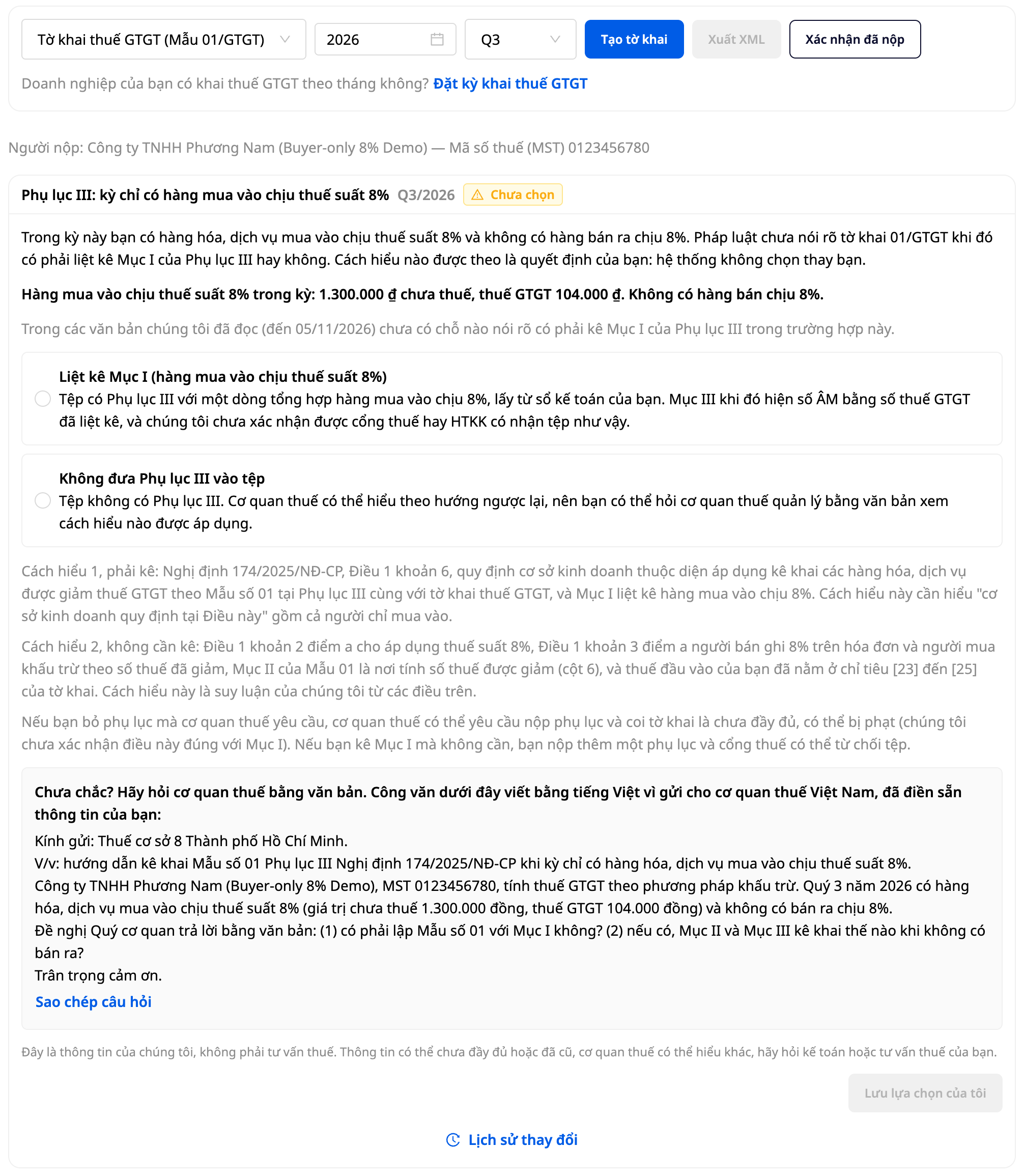
The Appendix III card for a sample company, Q3 2026, before you have responded.
GTG CRM has not confirmed whether the tax portal or HTKK accepts a file containing only Section I, so please don't try uploading the file to the tax portal to test it. You submit the return yourself; GTG CRM does not submit it on your behalf. The section on exporting the Form 01/GTGT XML file, including how to read this card, is in Step 10 of the step-by-step accounting & e-invoice guide. This is our information, not tax advice. It may be incomplete or outdated, and the tax authority may interpret it differently. Please consult your accountant or tax advisor.
My company pays salaries. Can GTG CRM prepare the quarterly personal income tax (PIT) return? Yes, starting from Q3 2026, provided that all salaries the company pays in the quarter are in payroll sheets that have been finalized on GTG CRM. Haven't turned on Payroll? You enable it yourself under HR → HR settings. We recommend messaging the GTG team first so you can review the rates under the law together. See the HR & Payroll guide.
Form 05/KK-TNCN counts each salary payment in the quarter it is paid, not the month it is for (for example, December salary paid in January falls under Q1 of the following year). For each payroll sheet, you enter the date the salary was paid; GTG CRM does not fill this date in for you. Each quarter, you confirm the scope of the return once, including confirming that everyone receiving salary is a tax resident with a contract of 3 months or more.
Are there cases where GTG CRM cannot prepare the Form 05/KK-TNCN return? Yes. If a quarter includes anyone on probation, anyone with a contract under 3 months, or anyone paid after their contract has ended, the file cannot be exported. The screen will show how many people are affected (without naming them) so you can prepare that quarter's return in HTKK.
The form template under Circular 89/2026/TT-BTC includes a few lines that the XML file does not yet contain. GTG CRM calculates and displays two of these lines automatically (taxable income and tax withheld), and you cross-check the remaining lines against the printed form. There are two interpretations: one holds that these lines must be present on the return, while the other holds that the old file structure remains usable until the tax authority announces uniform application.
Do I have to set up the chart of accounts myself? No, it's not required. For businesses in Vietnam, you can select the new-standard chart of accounts template with a single click. You can also import your own chart of accounts if you prefer.
Do incoming invoices post to the ledger automatically? You connect your account to sync incoming invoices, and the system suggests how to record them so you can review and post them to the ledger.
Do I need a credit card to get started? No. You can try it free first.