

Why Automated Email Marketing is Key to Growth?
Beyond a good product, customers also expect personalization and timely interaction. For small businesses with limited resources, meeting these expectations can be challenging. This is where automated Email Marketing plays its crucial role:
- Saves Time and Effort: Automation allows you to send emails at the right time to the right audience without manual intervention, freeing up time for other important tasks.
- Personalization at Scale: You can segment your customers and send personalized email content tailored to each stage of their buying journey, increasing open and conversion rates.
- Effective Lead Nurturing: A well-designed automated email sequence can "warm up" cold leads and turn them into loyal customers.
- Sustainable Sales Growth: By maintaining continuous connection and providing ongoing value, you encourage repeat purchases and easily upsell or cross-sell products/services.
- Increases ROI (Return on Investment): Email Marketing often delivers the highest ROI compared to other marketing channels when implemented correctly.
Email Marketing is not just a marketing tool; it's a powerful communication channel for building and nurturing strong customer relationships. In today's competitive landscape, an effective Email Marketing system helps small businesses optimize every interaction, thereby converting potential customers into sustainable revenue streams.
Steps to Build an Automated Email System with GTG CRM
To build a truly effective automated Email Marketing system that helps you connect with and convert customers seamlessly, you need a powerful yet user-friendly tool. GTG CRM is the ideal platform that meets these criteria, offering a comprehensive solution. Here are the detailed steps to get you started:
Step 1: Choose Pre-built Email Templates from GTG CRM
First, use GTG CRM's Email Templates to create automated welcome email sequences. The first email should be sent immediately to confirm registration and introduce the value you offer. You can easily set up automatic email sending when a new contact is added within our Automation Workflows module.
GTG CRM provides various pre-designed email templates for specific purposes, such as:
- Registration Confirmation (Welcome Email, Registration Confirmation)
- Appointment Reminders (Appointment Reminder)
- Customer Birthday Greetings (Happy Birthday)
- Holiday Emails for Tet, Christmas, New Year, etc. (Holiday Campaigns)
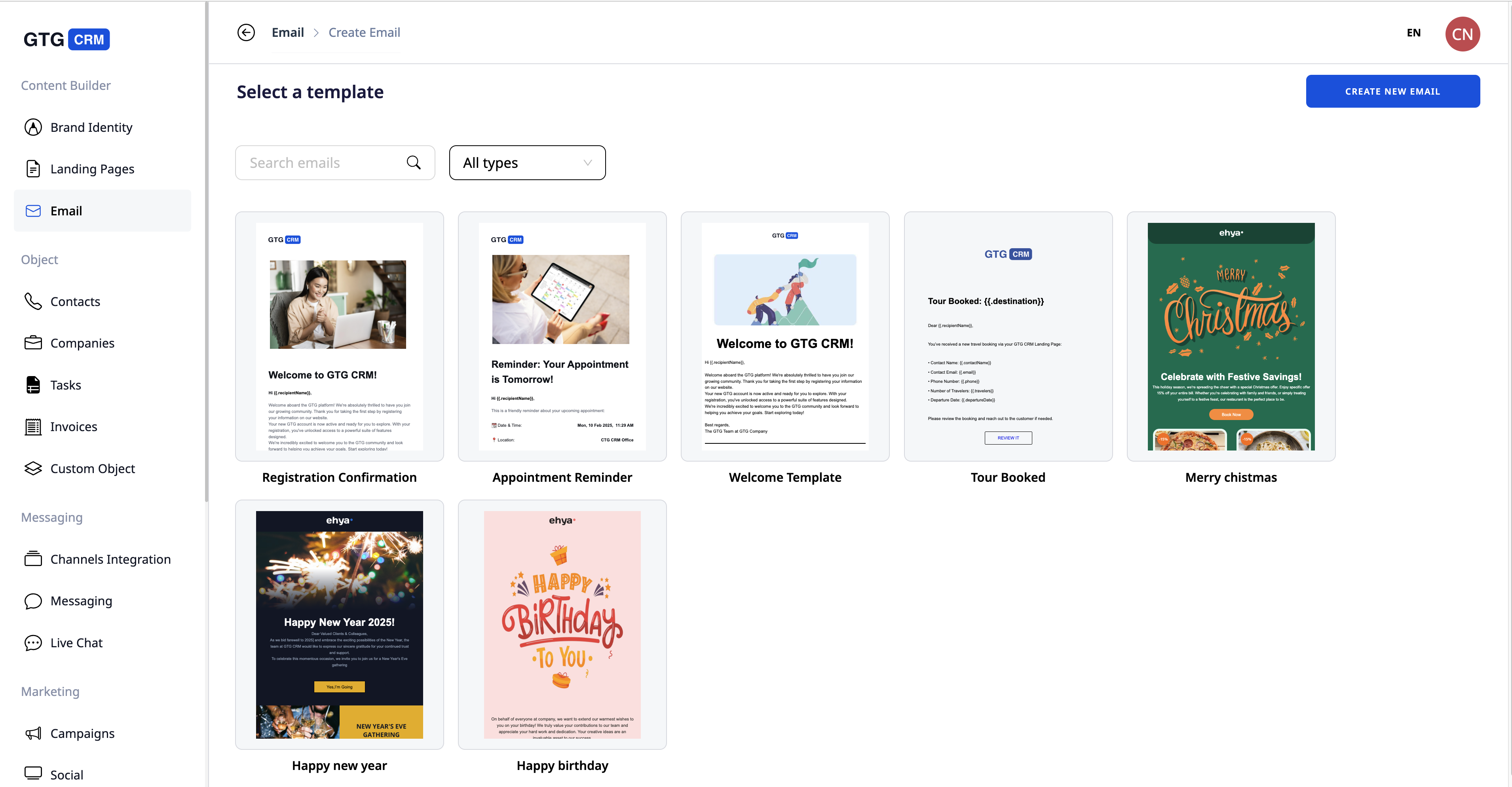
GTG CRM helps you create automated welcome emails with attractive Email Templates
Step 2: Send Bulk Emails or Set Up Automatic Sending
After finalizing your email content, you can choose to send it in two ways:
- Send in Bulk: You send emails to a specific customer group, for example, a group that just submitted their information, or a group whose birthdays are this month. Sending in bulk requires just a few clicks to select contact lists and press send or schedule.
- Send Automatically: You set up emails to be sent automatically based on specific events, such as: When a customer registers → send a welcome email; 1 day before an appointment → send a reminder email; On their birthday → automatically send birthday wishes. All of this can be set up in the Automation Workflows module.
Each email is sent at the right time to the right person, helping you maintain continuous connection without manual checking and operation.
Furthermore, all customer interactions via email are stored and updated in their customer profiles on GTG CRM, giving you a comprehensive view and allowing you to personalize future strategies. You can also view important metrics like Email Open Rate.
Step 3: Track Results and Optimize Content
To ensure your automated Email Marketing system delivers maximum effectiveness and continuous improvement, measuring and analyzing data is crucial for understanding what's working well and what needs adjustment:
GTG CRM provides detailed reports for each email campaign: Send Rate, Open Rate. From these reports, you can see which emails are performing well and what content is engaging readers, allowing you to continuously adjust and improve.
Thanks to this measurement, each subsequent campaign will become more effective. You'll no longer operate in the dark, but always have data to make informed decisions.

GTG CRM dashboard allows you to view detailed campaign results
Conclusion
Automated Email Marketing helps small businesses optimize time, personalize interactions, and effectively nurture customers, turning new leads into sustainable revenue. GTG CRM is a powerful tool that supports you from creating automated Email Marketing campaigns to detailed reporting.
Turn what you just read into real results — apply now with GTG CRM, free.
Apply Now

