

機能紹介
カスタマーサービスチームは、別のコールセンターソフトウェアを開き、電話番号を紙に書き留め、その後、各通話を手動でCRMに入力しなければならない状況に陥っていませんか?常連客からの電話でも、従業員は「お名前とご注文内容を教えてください」と尋ねなければなりません。なぜなら、情報は別の場所に保存されているからです。月末になると、上司は発信件数、不在着信件数、そして誰が最も多くの電話に対応したかを知りたがりますが、誰も答えられません。
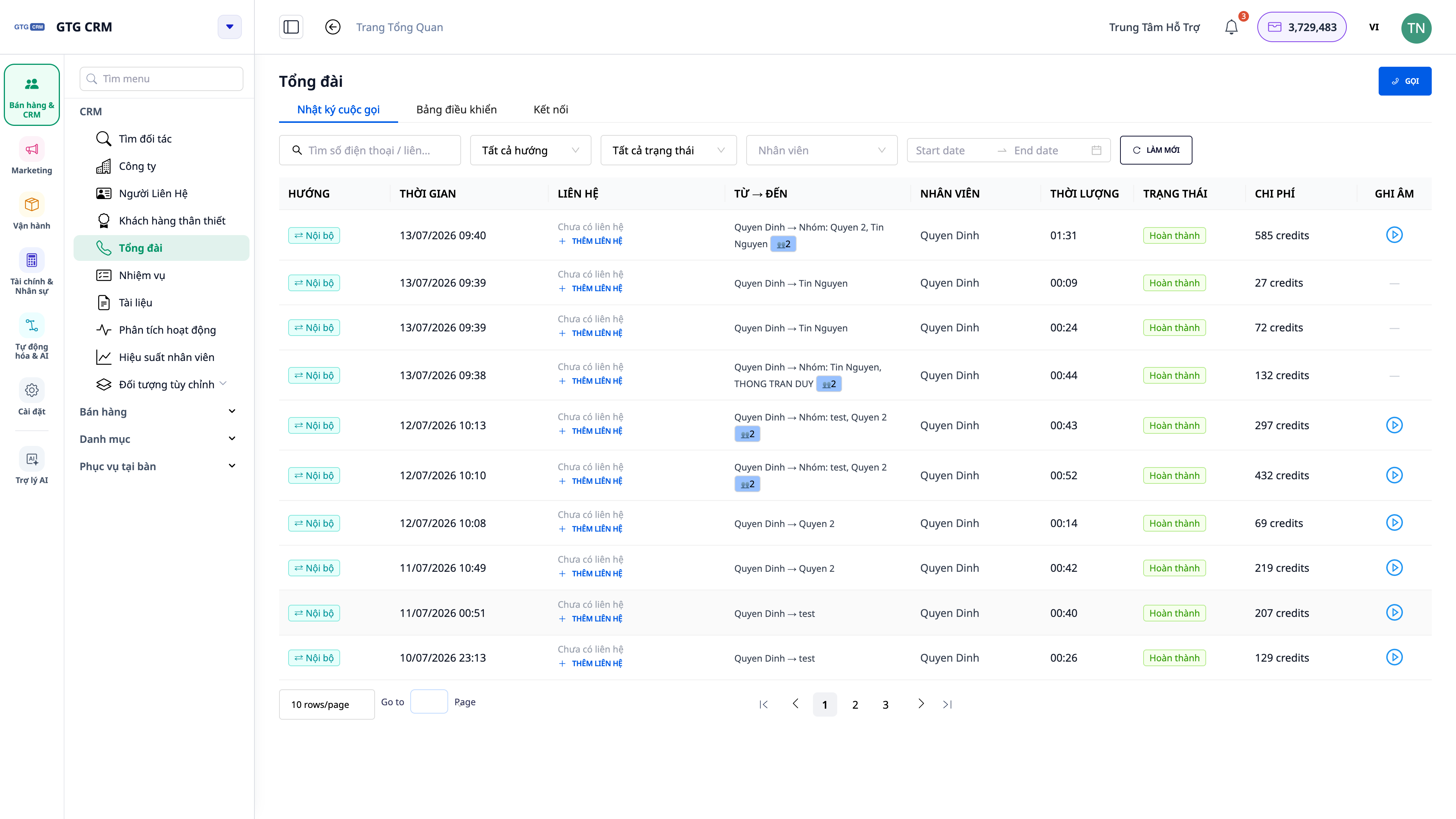
その状況は今日で終わりです。GTG CRMは、コールセンターシステム全体を一つに統合します。ソフトウェア内で直接コールセンター番号を取得し、ブラウザ上で直接通話の発信と受信が可能です(インストール不要、固定電話回線不要)。メンバー間の内線通話、複数人による会議の開始、通話の録音、そして話者別に分類された音声録音の自動作成も行えます。各通話は自動的に360°顧客プロファイルに保存されます。
企業が直面している問題
CRMシステムとは別にコールセンター/通話ソフトウェアを使用すると、従業員は2~3種類のアプリケーションを切り替える必要があり、情報を見落としやすくなります。
コールセンターの番号を取得するには、ネットワークプロバイダーに自分で登録し、技術的な設定を行う必要があります。これは中小企業にとって大きな障壁であり、実際に電話をかけられるようになるまで数日かかる場合もあります。
通話履歴をCRMに手動でインポートする――時間がかかる上に、データが不完全かつ不正確になる。
音声録音がない、あるいは断片的な録音しかない、書面による内容がない――そのため、内容の確認が不可能で、スタッフの研修も不可能であり、紛争が発生しやすい。
通話レポートがない― 上司は通話量、不在率、個々のパフォーマンスを把握できない。
GTG CRMは、電話番号、通話履歴、録音、音声録音、レポートなど、すべてのデータを単一の情報源に統合し、顧客プロファイルと並べて表示します。
ハイライト
1. GTG CRMでホットライン番号を直接取得します。
音声プロバイダーのアカウントや技術的な知識は一切不要です。国を選択し、番号を選んで確認するだけで、GTG CRMがすべての技術的な側面をバックグラウンドで処理し、料金は透明性をもってアカウントに反映されます。
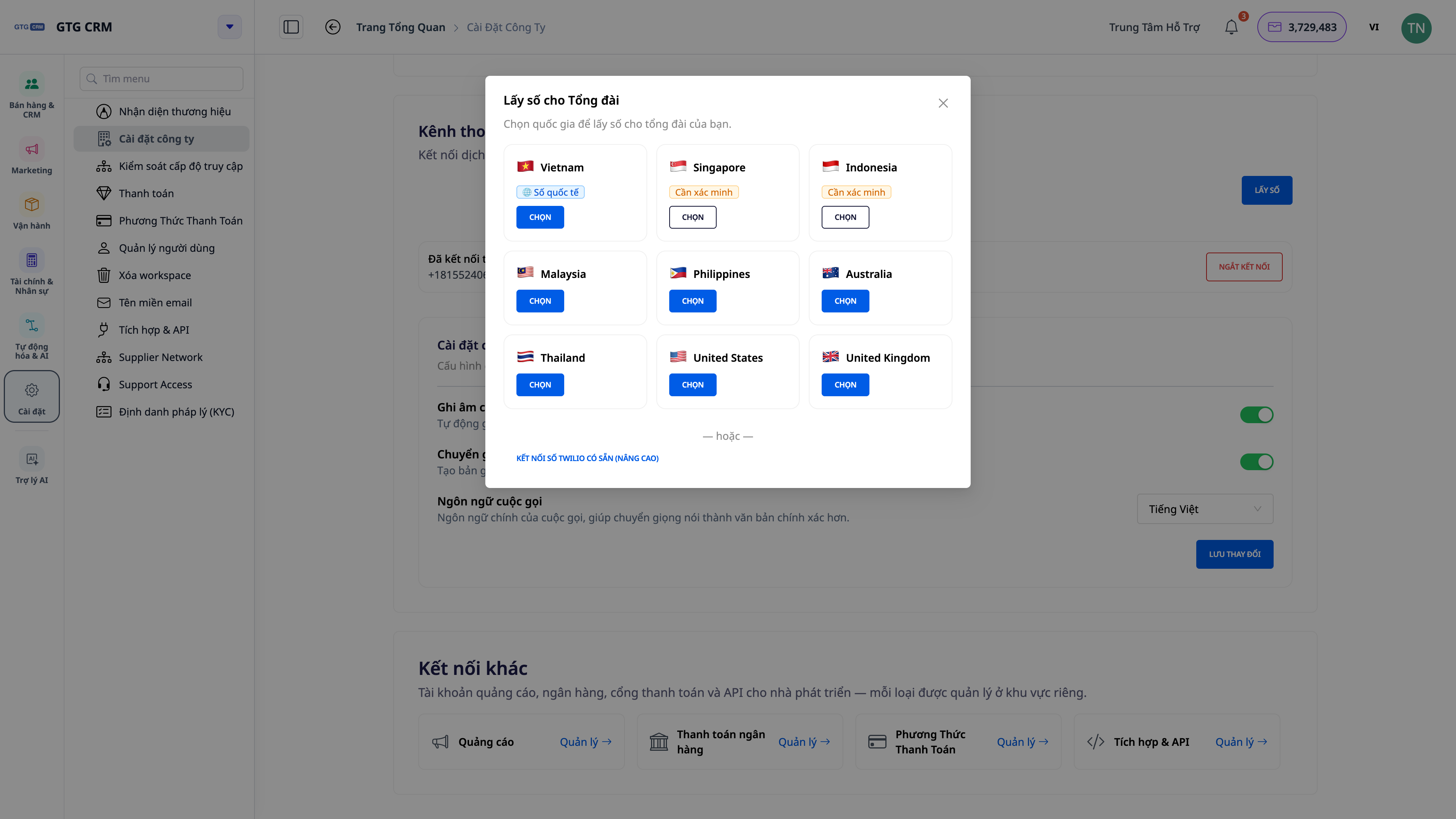
- 多くの国へ即座にダイヤルできる番号があり、外部の登録手続きを待つ必要はありません。
- 番号のライフサイクルを管理しましょう。更新、一時的な無効化(番号は保持したまま)、同じ番号への再接続、または使用していない場合は完全に破棄するなど、常にコストをコントロールできます。
- 既に個人用の電話番号をお持ちですか?既存の電話番号を接続するための高度なオプションもご用意しています。
ℹ️ 一部の国では、番号を発行する前に一度限りの本人確認(KYC)チェックが必要です(セクション6を参照)。ベトナムの電話番号(+84)は現在、国際番号として発行されています。
2. ブラウザから直接電話の発信と受信が可能です。数字キーパッドも搭載されています。
コールセンターのすべてがブラウザ上で簡単に操作できます。数字キーパッドで素早くダイヤルするか、顧客プロフィールの通話ボタンを直接クリックしてください。着信があると、発信者情報を含む通知が表示されるので、応答するか拒否するかを選択できます。
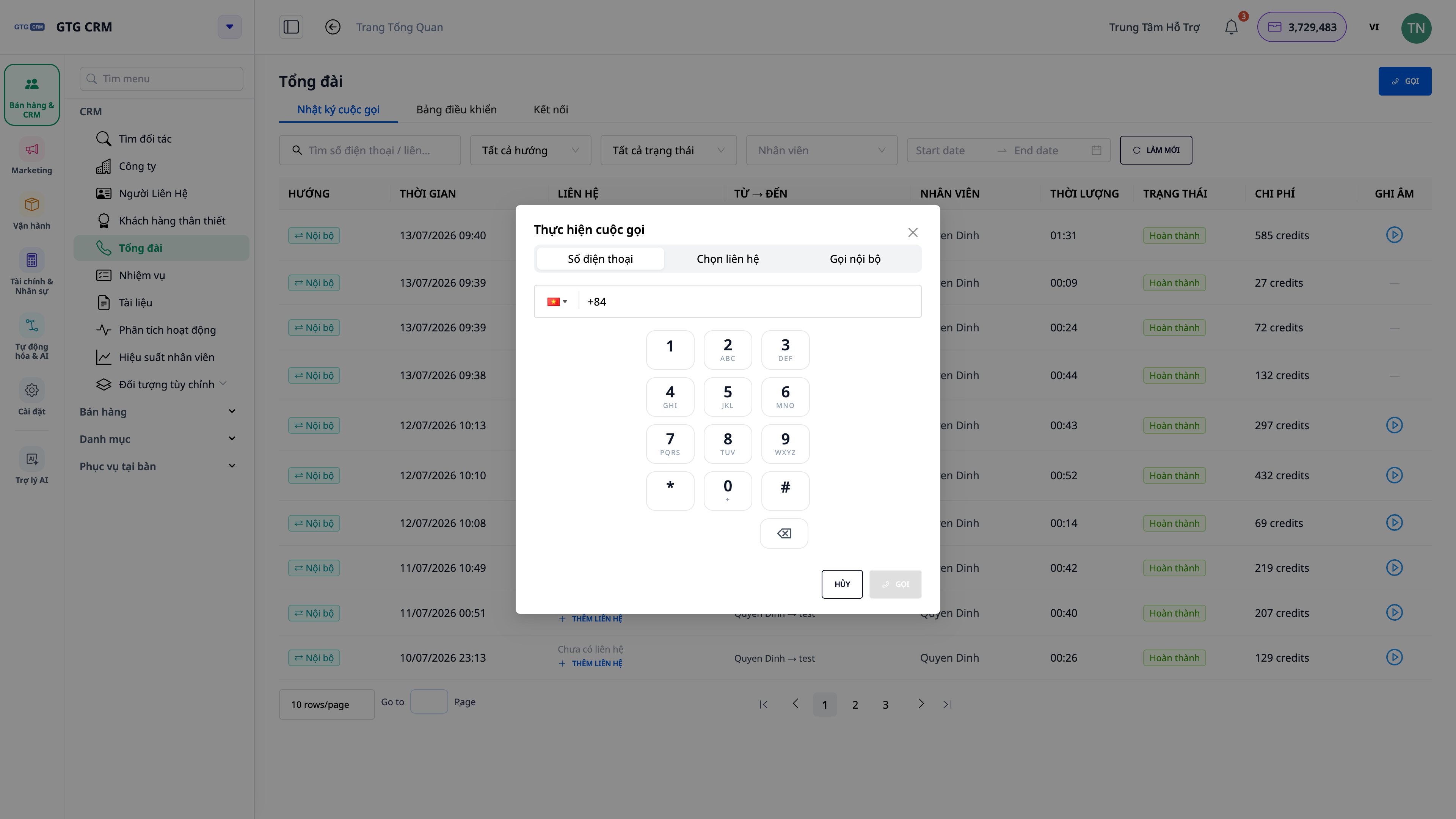
- 設定不要、固定電話も不要。必要なのはブラウザとマイク付きヘッドセットだけ。
- 電話を受けたらすぐに顧客情報を表示します。電話番号がすでにCRMに登録されている場合は、名前と通話履歴が表示されます。新規顧客の場合は、通話中に連絡先が作成されます。
- 画面から目を離さずに、話しながらメモを取り、タスクを作成する。
3. メンバー間の内部通話
同僚にちょっと電話をかけたいですか? 「内線通話」タブを開き、メンバー(役職別にグループ化されています)を選択して、ブラウザから直接電話をかけましょう。外部通話料金はかかりません。オンライン/通話中/オフラインのステータスがリアルタイムで表示されるので、誰が対応可能かすぐにわかります。
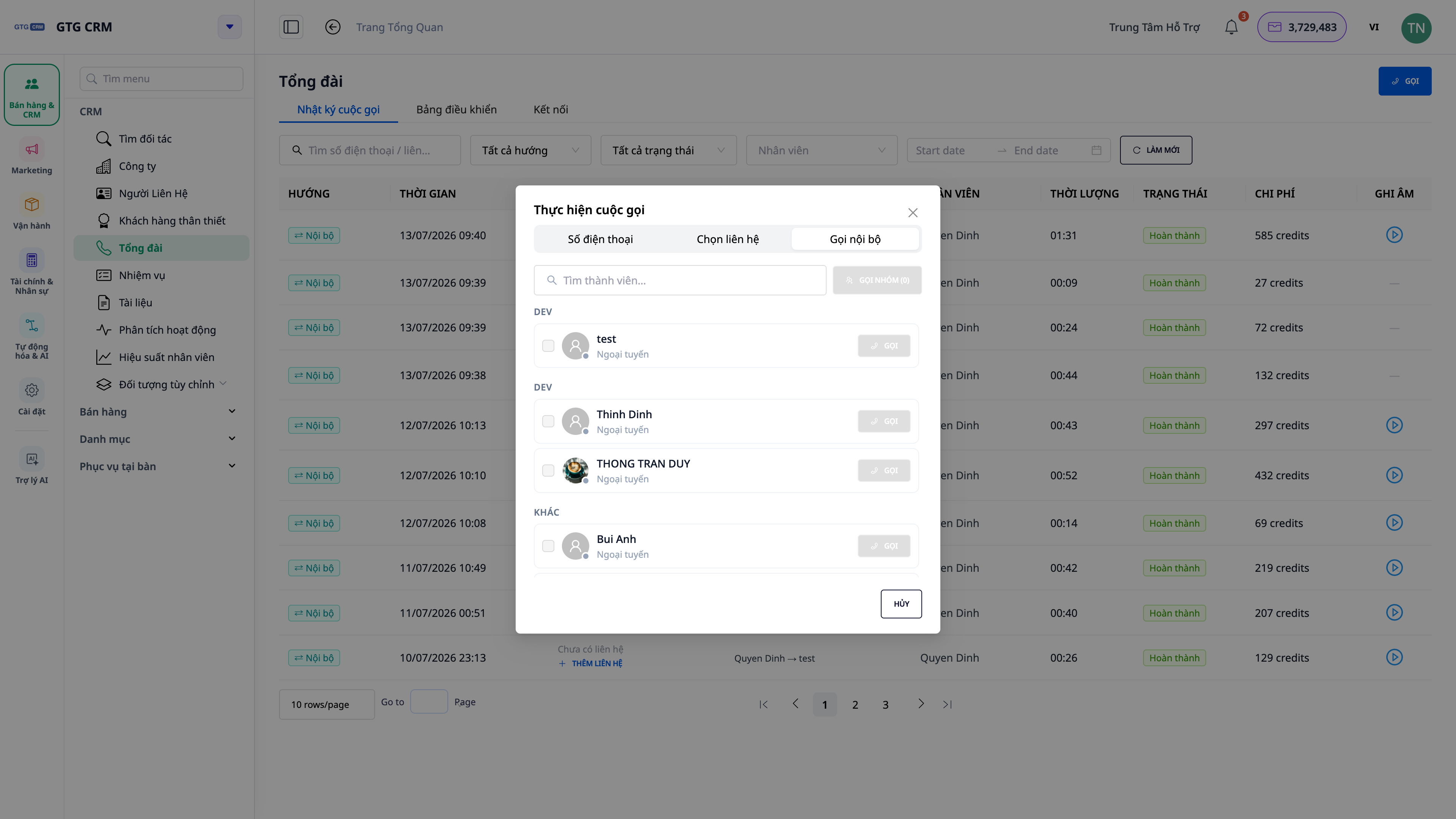
- 迅速な社内コミュニケーションが可能で、お互いの電話番号を知る必要もない。
- 内線通話料金は外線通話料金よりも安い。
4. 複数人による会議 — 通話の途中で参加者を追加する
マネージャーや技術チームのメンバーを会議に追加する必要がありますか? 「メンバーを追加」をクリックして、会議にメンバーを追加招待してください。進行中の会議は中断されず、参加者が切断されることもありません。
- 複数の部門(営業、技術、顧客)の関与が必要となる状況への対応。
- 会議全体は録音され、通常通り議事録が作成された。
5. スピーカーフォンによる通話録音および音声録音
通話録音をオンにすると通話全体が保存され、音声認識をオンにすると自動的に文字起こしが作成されます。文字起こしされた内容は、誰が何を言ったのかが時系列順に明確に表示された会話として表示されます。
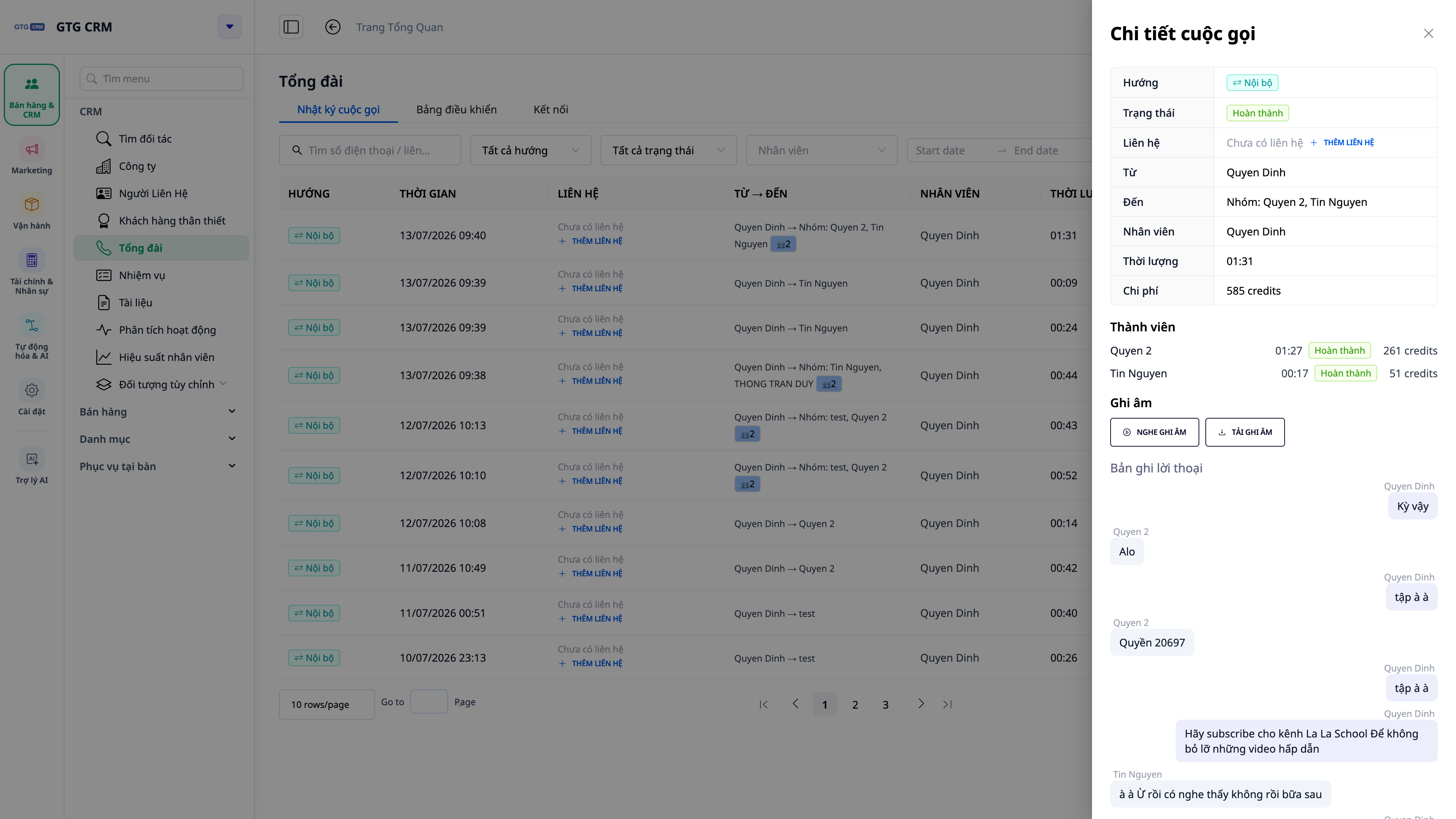
- いつでも聞き返すことができます。録音データはGTGのインフラストラクチャ上に安全に保存されます。
- 聞く代わりに読む:テキストベースの文字起こしにより、ベトナム語にも対応した迅速な検索と参照が可能になります。
- 通話記録が完備されていれば、研修や紛争解決が容易になります。
ℹ️ 録音と音声認識は、各ワークスペース(通話設定内)で切り替え可能なオプションです。録音を有効にするかどうかは、完全にユーザーが制御できます。
6. 規制要件のある国の電話番号については、KYC(顧客確認)を確認する。
本人確認が必要な国の場合、GTG CRMはソフトウェア内で直接、KYC認証申請の提出手順を案内します。新しい番号は申請が承認された後にのみ発行され、承認前に料金が発生することはありません。透明性が高く、安全です。
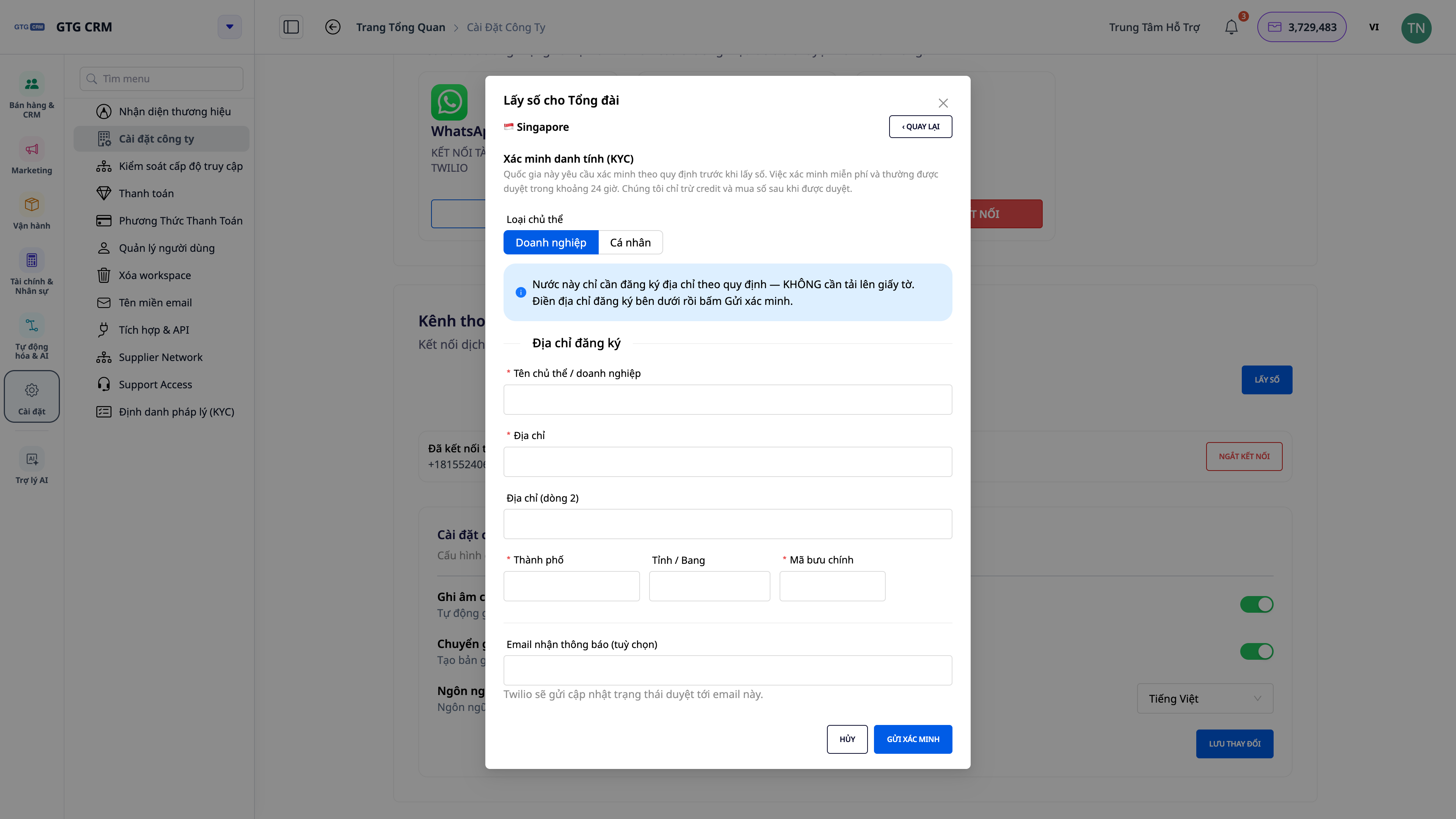
- 代理店やネットワークプロバイダーと直接やり取りする必要はありません。プロセスはCRM内で効率化され、デジタル化されています。
- 申請状況(「審査中」「承認済み」「却下済み」)が明確に表示されます。
7. 顧客ログ、ダッシュボード、タイムライン360°
すべての通話は自動的に通話ログ(検索、通話方向、従業員、不在着信によるフィルタリング、料金、再生ボタン付き)とダッシュボード(通話量、不在着信率、合計通話時間、合計料金、従業員別統計)に記録されます。通話は、該当する顧客の360°タイムラインにも直接表示されます。
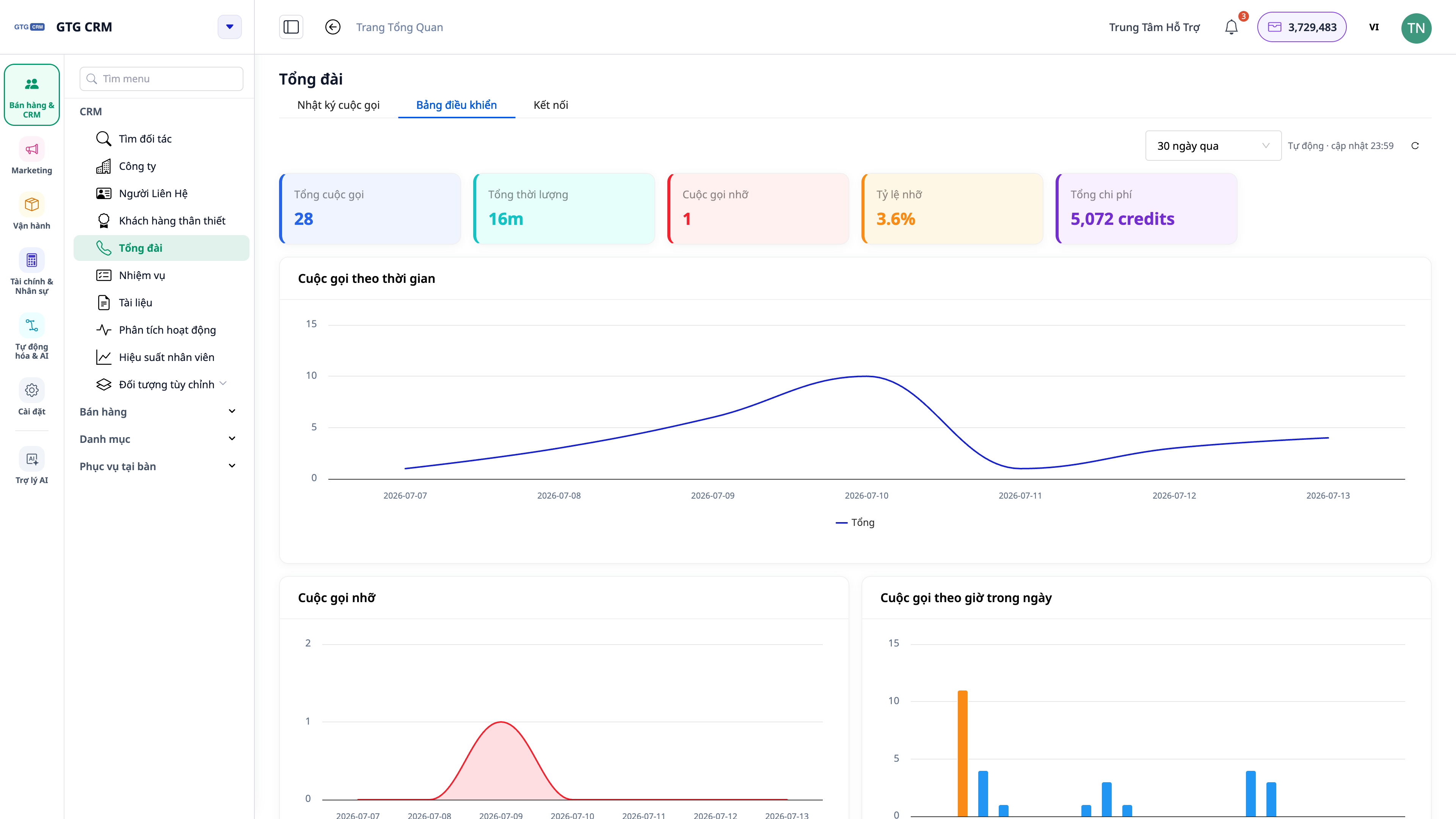
- 上司は全体像を把握し、チームリーダーは個々のメンバーのパフォーマンスを監視する。
- スタッフは、顧客のプロフィールを開くとすぐに、その顧客とのやり取りの履歴全体を確認できます。
透明性の高い料金体系 ― 実際の秒数に基づいて計算されます
通話料金は、従来のコールセンターのように分単位で切り上げるのではなく、実際の秒数に基づいて課金されます。つまり、未使用の時間に対して料金を支払う必要はありません。
顧客との着信/発信通話— 5クレジット/秒
メンバー間の内線通話— 3クレジット/秒(割安)
期間— 接続から切断まで
システムは通話開始時にクレジットを保持し、通話終了時に実際の秒数に基づいて正確な金額を差し引き、残高を返金します。そのため、実際の通話時間以上の料金が請求されることは決してありません。GTG CRMは通話開始前に自動的にクレジット残高を確認し、残高が不足している場合は通知してチャージを提案します。
ℹ️ コールセンターの電話番号のレンタル料金(月額パッケージ、クレジットカード払い)は通話料金とは別に請求され、確認前に必ず明確に表示されます。
企業にとってのメリット
CRMで電話番号を取得して即座に電話をかける— 技術的な障壁なしに、数分で電話で顧客対応を開始できます。
ブラウザとテンキーを使った通話— チーム全員がどこからでも作業できます。必要なのはブラウザとヘッドセットだけです。
社内通話― 迅速かつ費用対効果の高い社内連携。
電話会議および通話中の追加機能― 複数の部署の関与を必要とする複雑な状況への対応。
音声録音+話者文字起こし— 参考資料、研修、そして必要に応じて明確な証拠として使用できます。
ログ+ダッシュボード+360° — データに基づいた意思決定で、顧客を一人も逃しません。
秒単位の課金+信用調査— 透明性の高い料金体系、無駄なし。
どのような人に適していますか?
- 中小企業の経営者は、物理的なPBXシステムに投資することなく、プロフェッショナルなコールセンターを求めている。
- 電話営業チームは迅速に電話をかけ、すべての情報をCRMに記録する必要がある。
- 顧客サービスおよびサポート部門は、電話を受けた直後に顧客の通話履歴を確認できる必要がある。
- チームリーダー/マネージャーは、通話量、不在着信率、従業員の業績を報告する必要があります。
どうすれば始められますか?
GTG CRMで、コールセンターモジュールに移動し、 「接続」タブを開いてコールセンター番号を取得するか(または既存の番号に接続します)、通話を録音する場合は「通話設定」を有効にしてから、通話を開始します。詳細な手順については、「GTG CRMでコールセンターを使用する方法」の記事を参照してください。
無料でお試しください。クレジットカードは不要です。


