
In online sales businesses, a professional order processing workflow is a key factor in business success. GTG CRM provides a comprehensive order processing workflow, from order receipt, inventory management, shipping, to invoicing and customer service – all integrated into a single system.
With GTG CRM , you can not only manage orders but also connect with major e-commerce platforms like Shopee, Lazada, and TikTok Shop , automatically synchronize products and inventory, create shipping orders quickly, and issue valid electronic invoices. This is a comprehensive solution that helps businesses operate efficiently, enhance customer experience, and achieve sustainable growth.
Main features
- Automated consultation and sales closing : AI chatbots assist in answering customer inquiries and closing sales 24/7, reducing the workload for staff.
- Centralized order management : All orders from the website, e-commerce platforms, and other channels are managed within a single system.
- Multi-channel sales integration : Integrates Shopee, Lazada, TikTok Shop and synchronizes products and orders in both directions.
- Smart warehouse management : Real-time inventory tracking, automatic updates upon order placement, support for multiple warehouses.
- Shipping carrier integration : Create direct delivery orders with shipping carriers such as Giao Hang Nhanh, Viettel Post, and support COD (Cash on Delivery).
- Electronic invoice issuance : Link with S-Invoice (Viettel) and MISA to issue valid VAT invoices.
- Track order status : Clearly update the status from New → Processing → Completed
Standard Order Processing Procedure
Step 1: Prepare Products and Warehouse
Create and manage inventory.
First, you need to set up the warehouses in the Warehouse Management system → Warehouses .
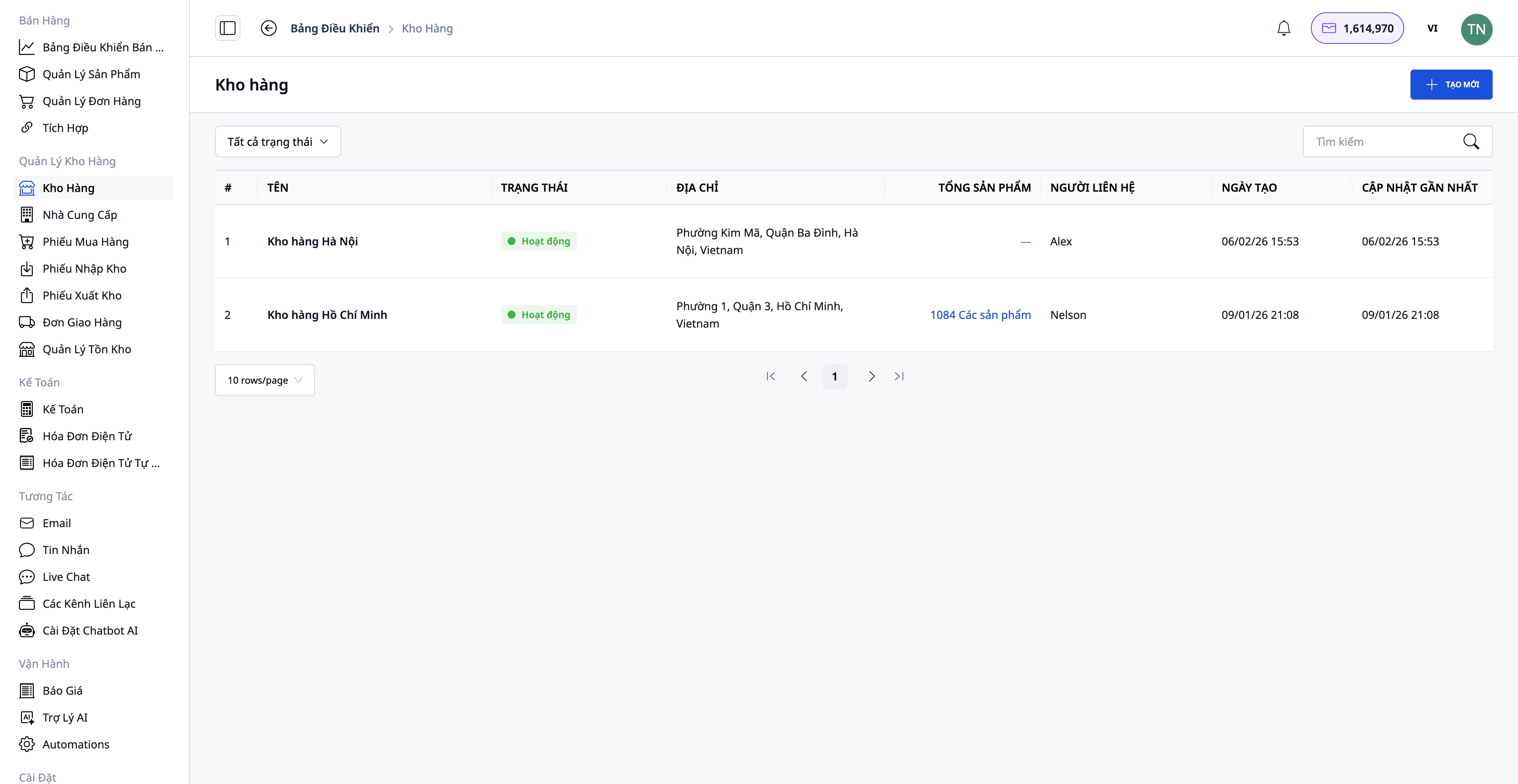
- Create a warehouse with the following information: Warehouse name, warehouse code, address, and person in charge.
- Supports multiple warehouses: Main warehouse, subsidiary warehouses, branch warehouses.
- Track inventory by individual warehouse.
Create Products in the System
Go to Sales → Product Management to create a new product.
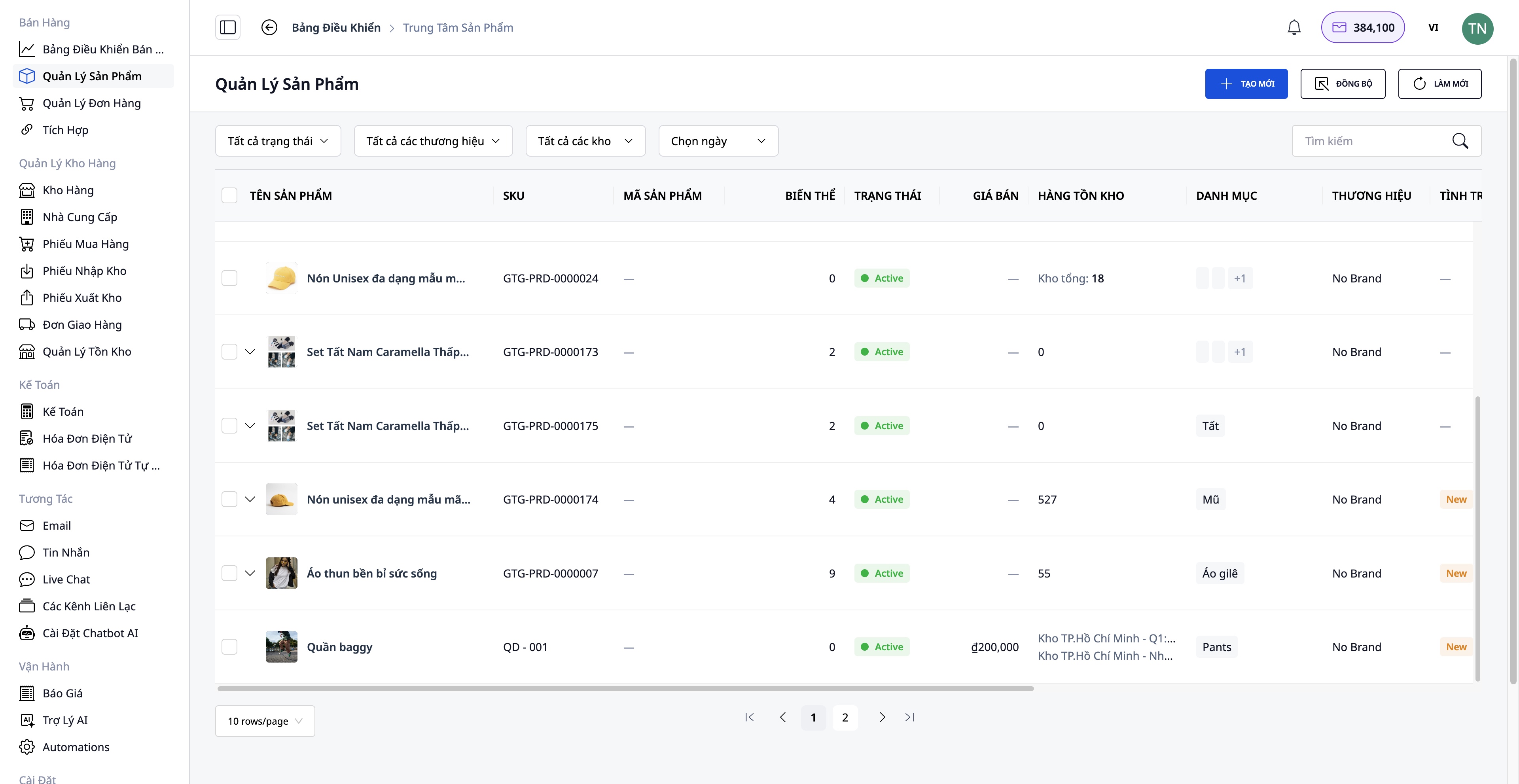
Information to be entered:
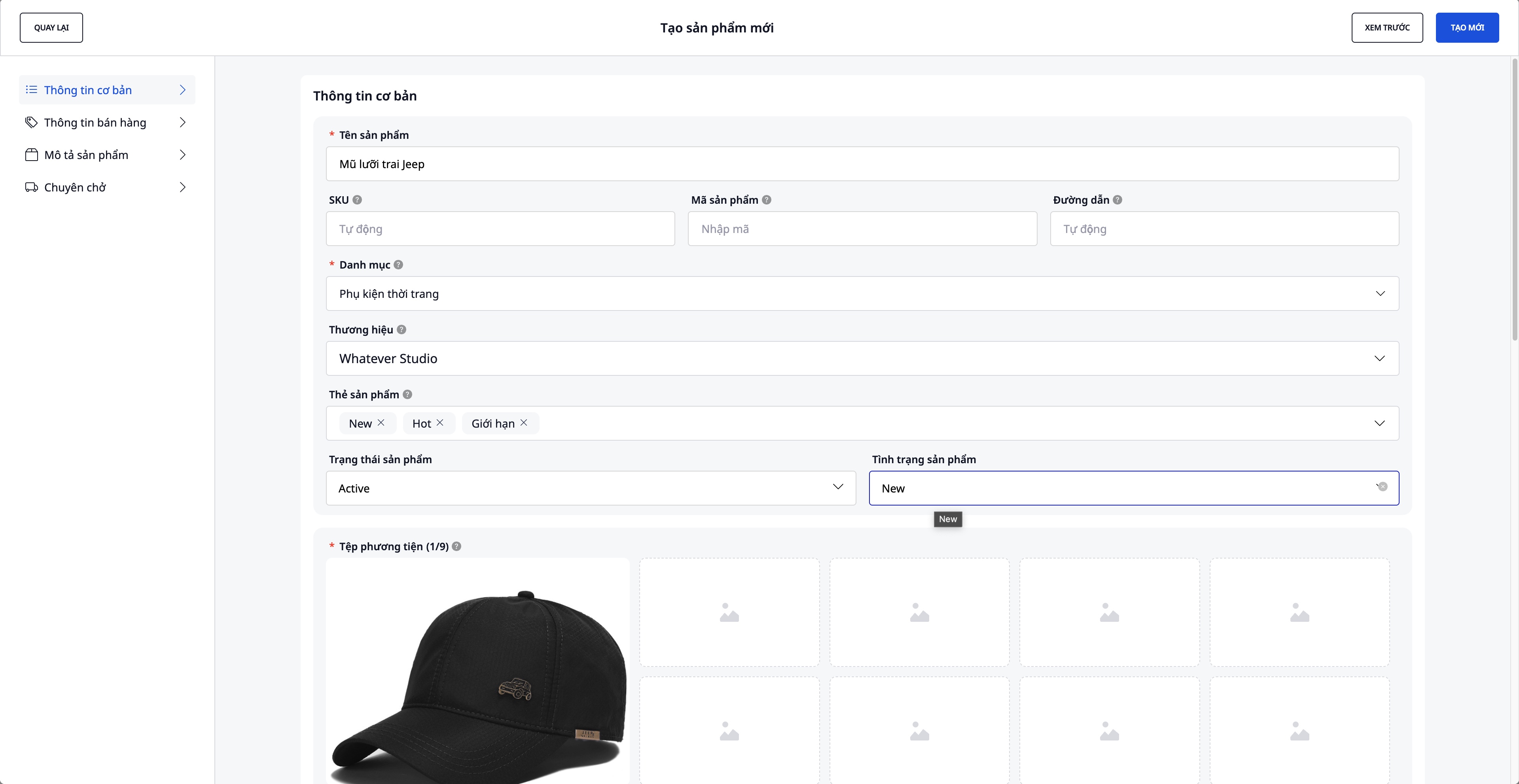
- Product name, SKU, category, brand
- Product images and videos
- Variations: Color, size (maximum 3 attributes)
- Original price, VAT, selling price (profit is automatically calculated by the system)
- Detailed description and specifications
- Initial inventory quantity
Connect and Synchronize with the E-commerce Platform
Go to Sales → Integration to connect with e-commerce platforms.
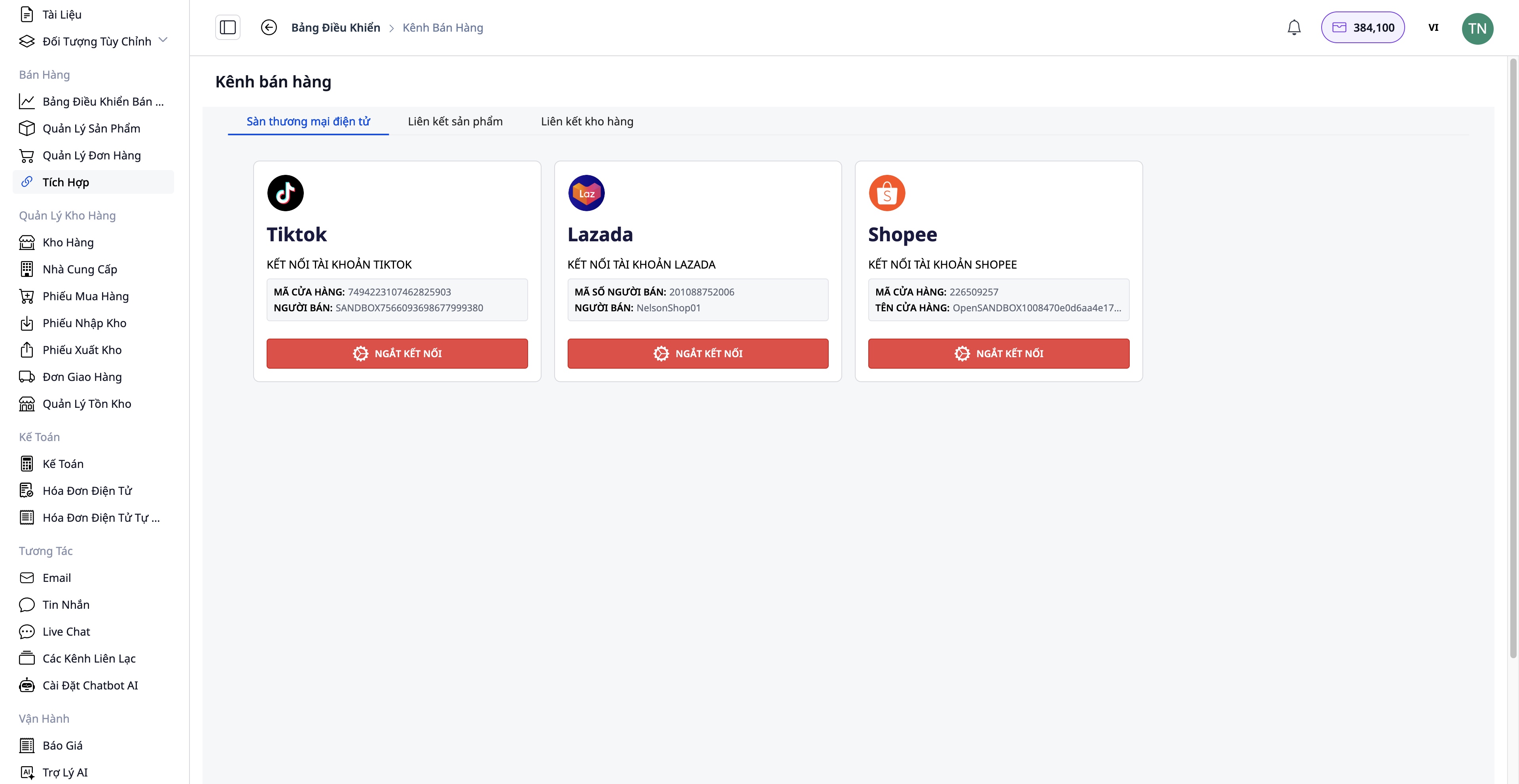
Connection steps:
- Choose the platform you want to connect to: Shopee / Lazada / TikTok Shop
- Verify your shop account
- Two-way product synchronization:
- Pull back : Retrieve products from the marketplace to GTG CRM
- Go up : List GTG CRM products on the exchange.
Benefit:
- Centralized management of all products
- Inventory is automatically synchronized across channels.
- Save time on manual updates.
Step 2: Receiving the order
Receive orders from multiple channels.
Orders may originate from:
- Your website (integrated with GTG CRM)
- Shopee, Lazada, TikTok Shop (automatically synchronized)
- Manual orders (orders placed by customers via phone, Facebook, etc.)
Step 3: Processing and Preparing Goods
Review and edit the order (if necessary).
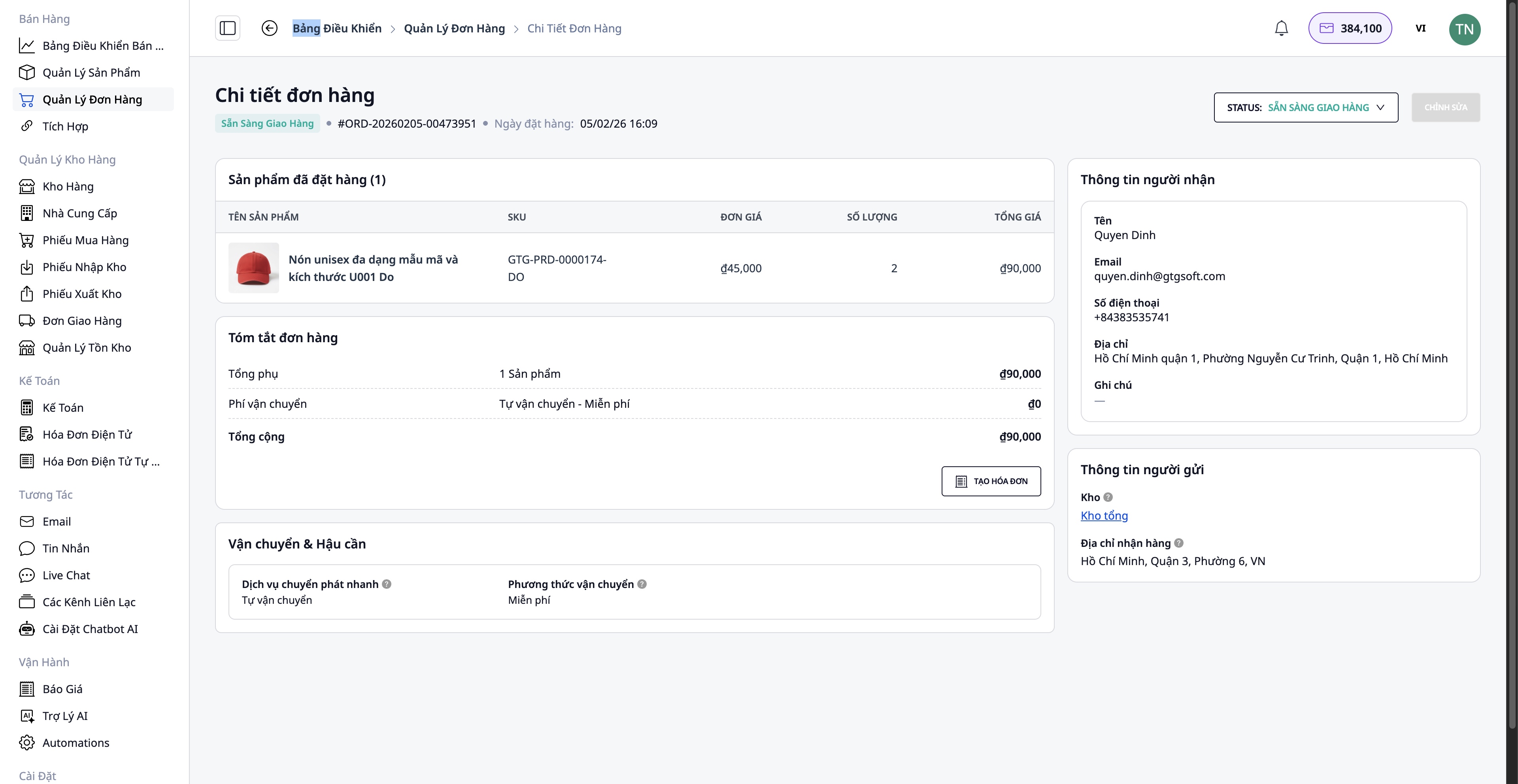
- Buyer information
- Delivery address
- Add/remove products
- Quantity of products
Check inventory
Automated inventory checking system:
- ✅ In stock → Proceed with packaging
- ❌ Out of stock → Need to order from supplier
Order receiving procedure (if there is a shortage):
Go to Suppliers → Select a supplier → Create a purchase order
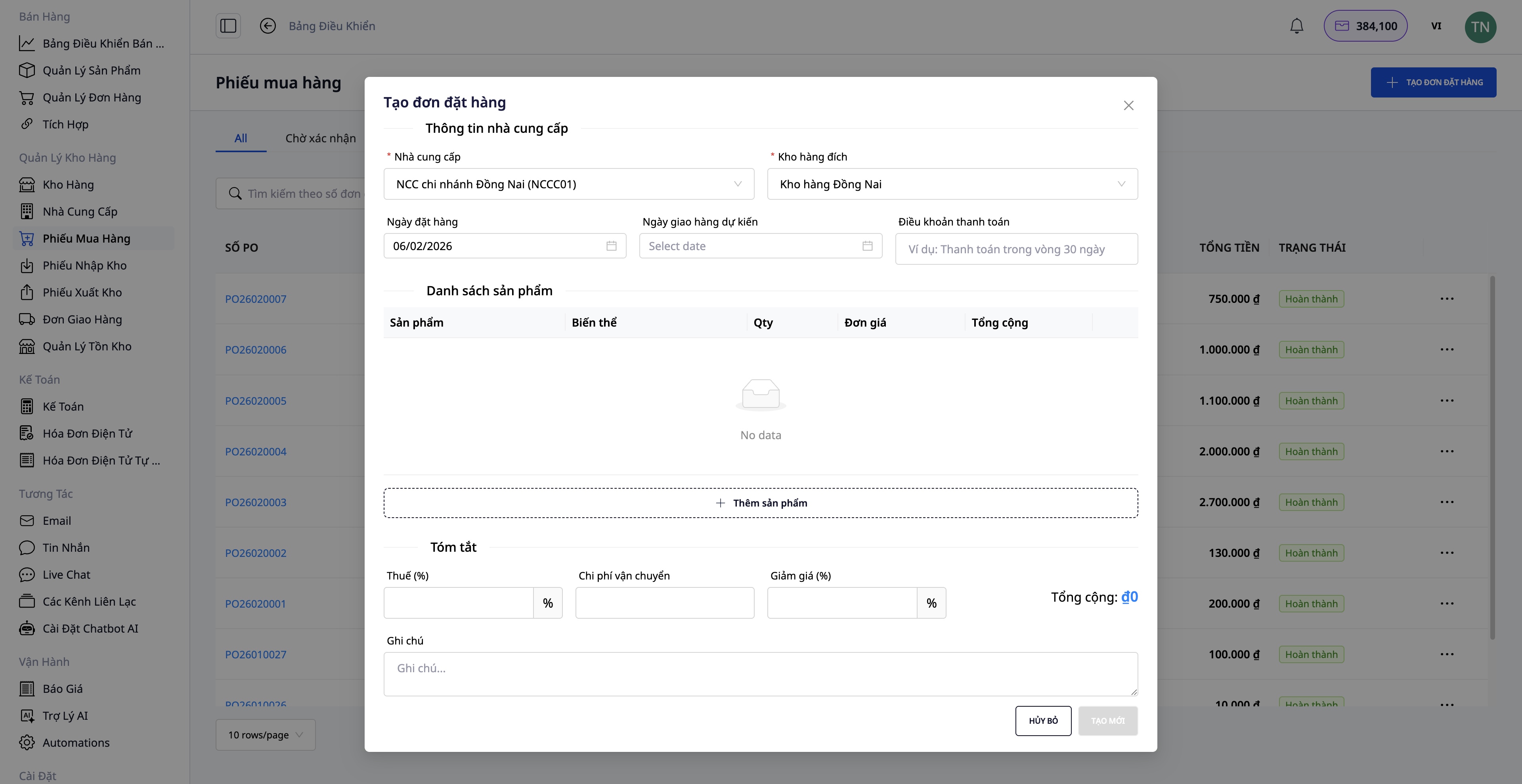
- Select the products to import.
- Fill in the quantity and unit price.
- Confirm the purchase order.
- When the goods arrive, create a Warehouse Receipt.
- Inventory updates automatically.
Step 4: Create a Shipping Order
After packing the goods, create a shipping order directly from the order.
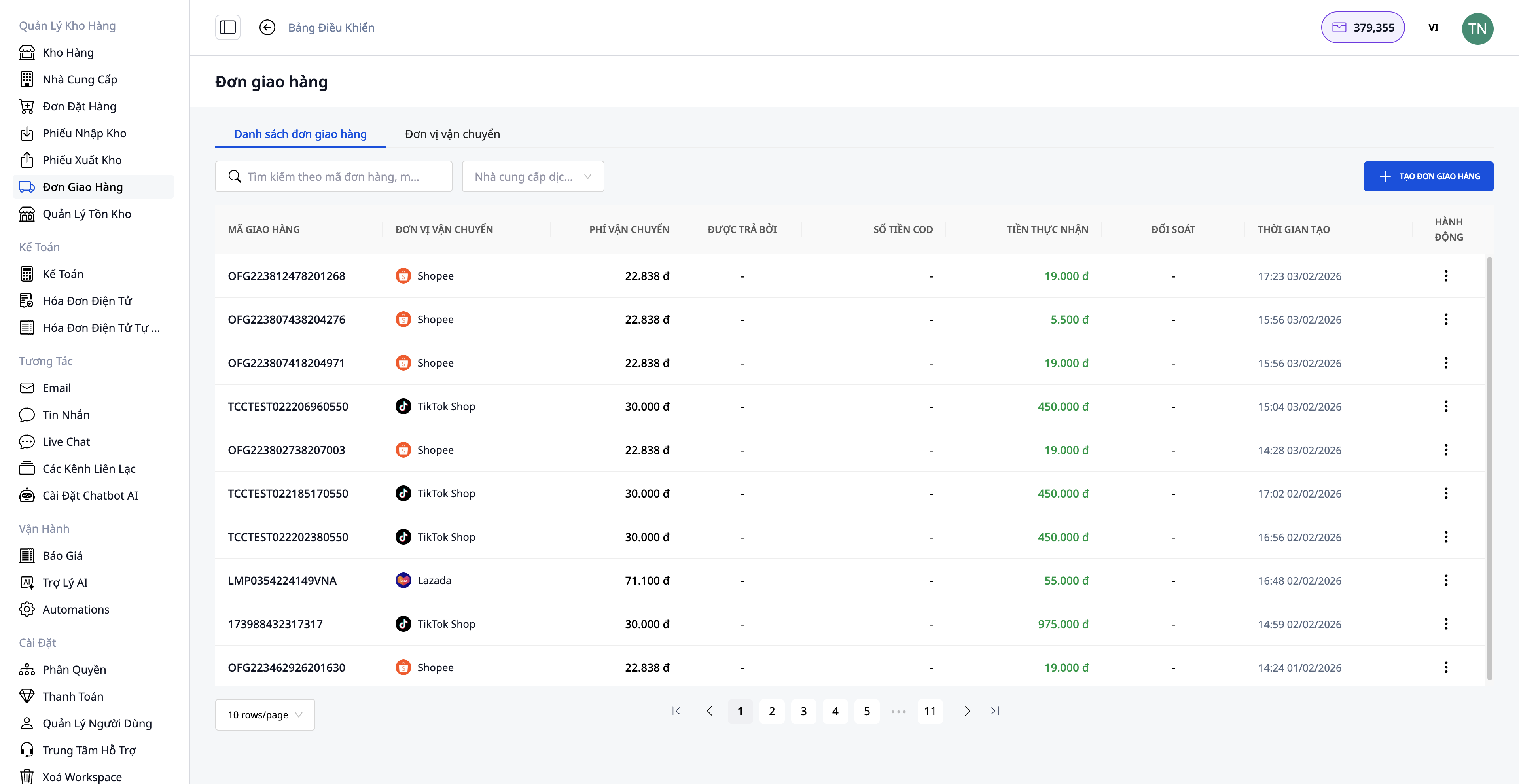
Required information:
1. Choose a shipping service:
- Fast delivery
- Economical delivery
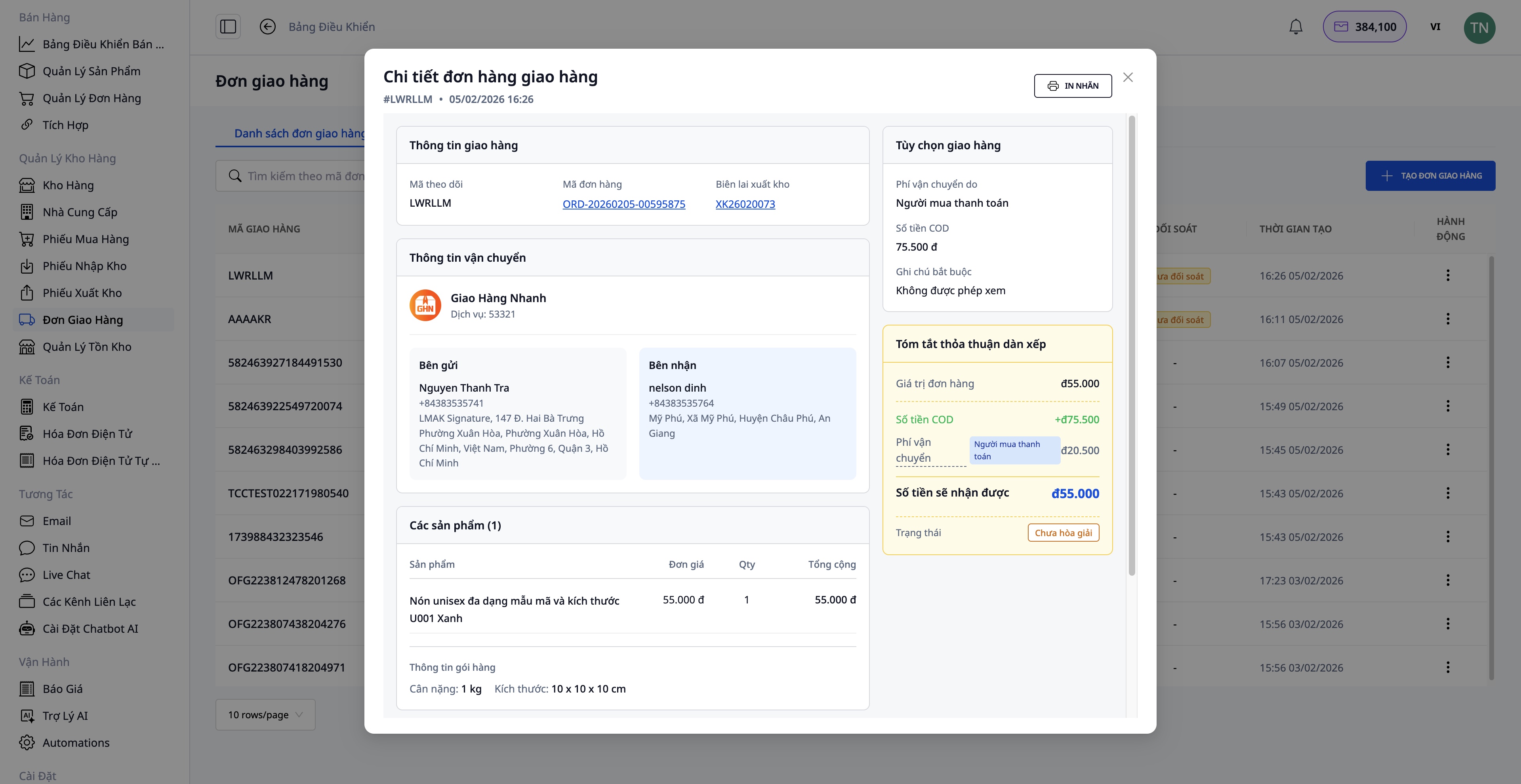
2. Cash on Delivery (COD) amount:
- Enter the amount to be collected from the customer.
- This includes both the cost of goods and shipping fees (if paid by the customer).
3. Package information:
- Weight (kg)
- Dimensions (length x width x height)
- Who pays the shipping fee (seller/buyer)
4. Confirm order creation:
- The system automatically retrieves information from the order.
- Send a request to the shipping company.
- Receive tracking number
After successfully creating the shipping order:
- Print the delivery label and attach it to the package.
- Hand over to the shipping company.
Step 5: Issue Electronic Invoice
For business customers or those requiring VAT invoices, you can generate electronic invoices directly from the order or allow the system to automatically generate the invoice.
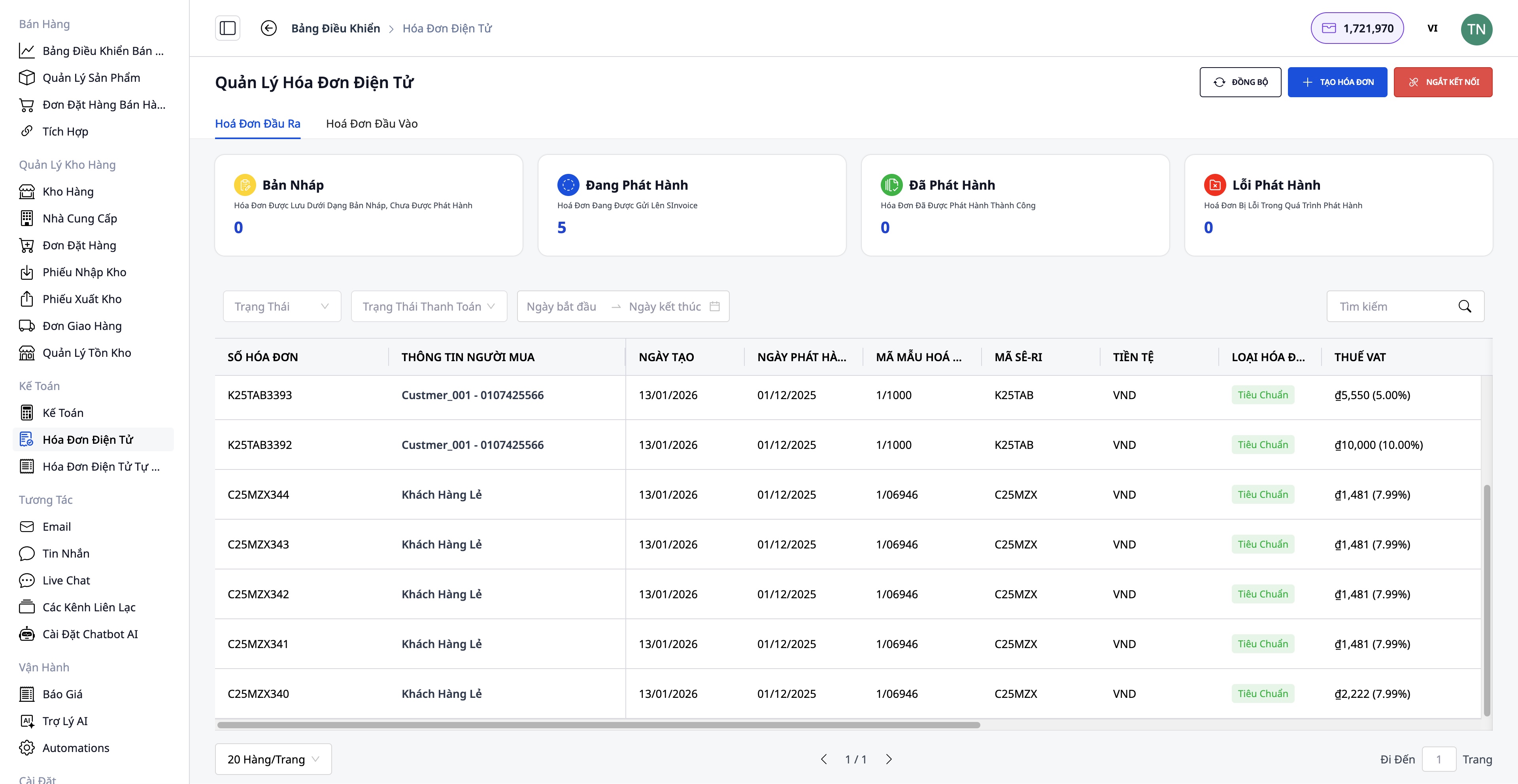
Steps to issue an invoice:
- Choose your invoicing provider: S-Invoice (Viettel) or MISA
- Choose an invoice template: VAT invoice or Sales invoice
- Fill in the information: Buyer information (company name, tax code, address), Product and quantity (automatically retrieved from the order), VAT rate, Payment method
- Preview the PDF:
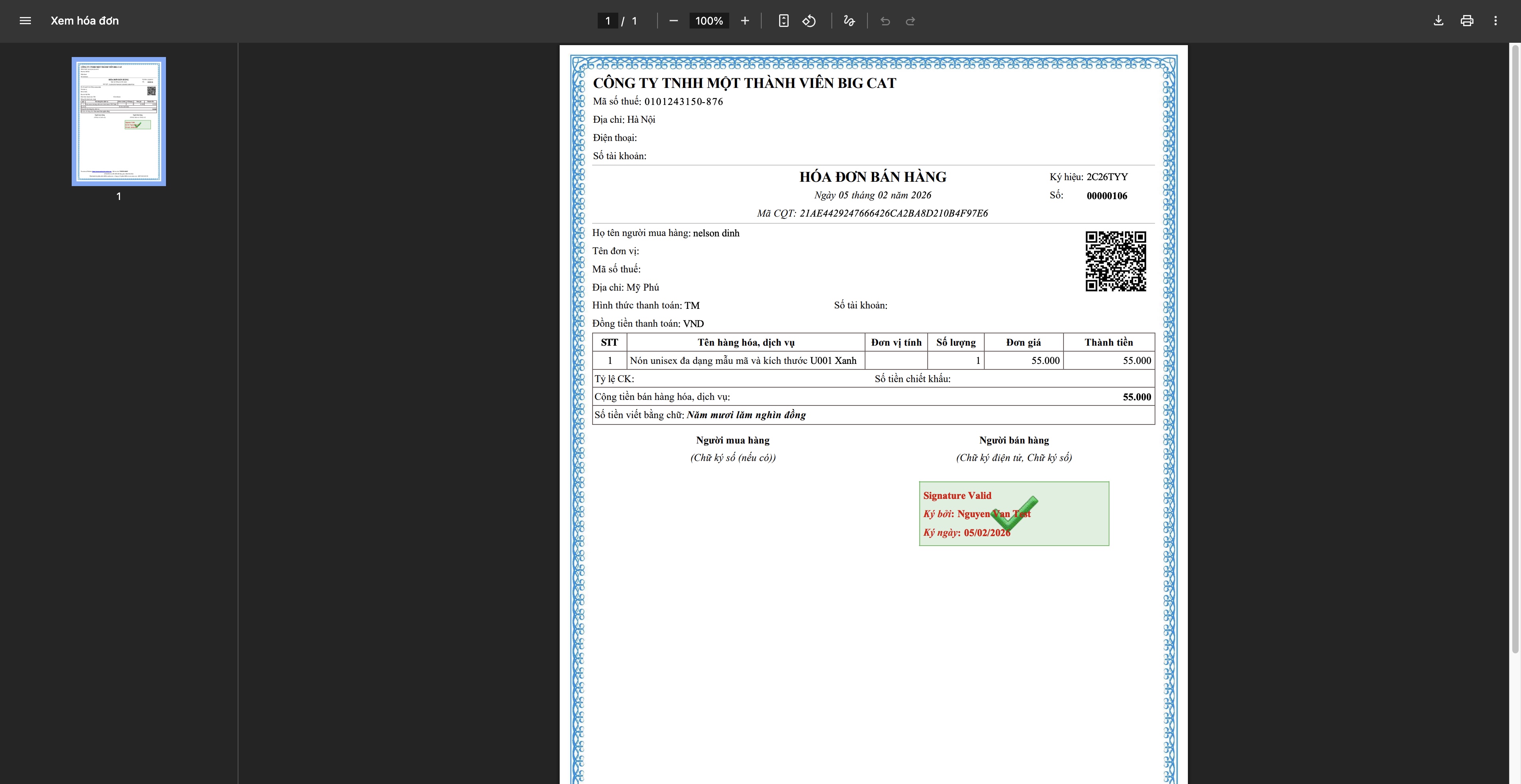
- Invoice generation: The system sends a request to the supplier, the invoice is assigned a code by the Tax Authority, downloaded and sent to the customer.
Step 6: Track and Complete the Order
Track your shipment
- Update the shipping status from the carrier.
- Inform customers about the delivery progress.
- Handling special cases (delivery failure, delay, etc.)
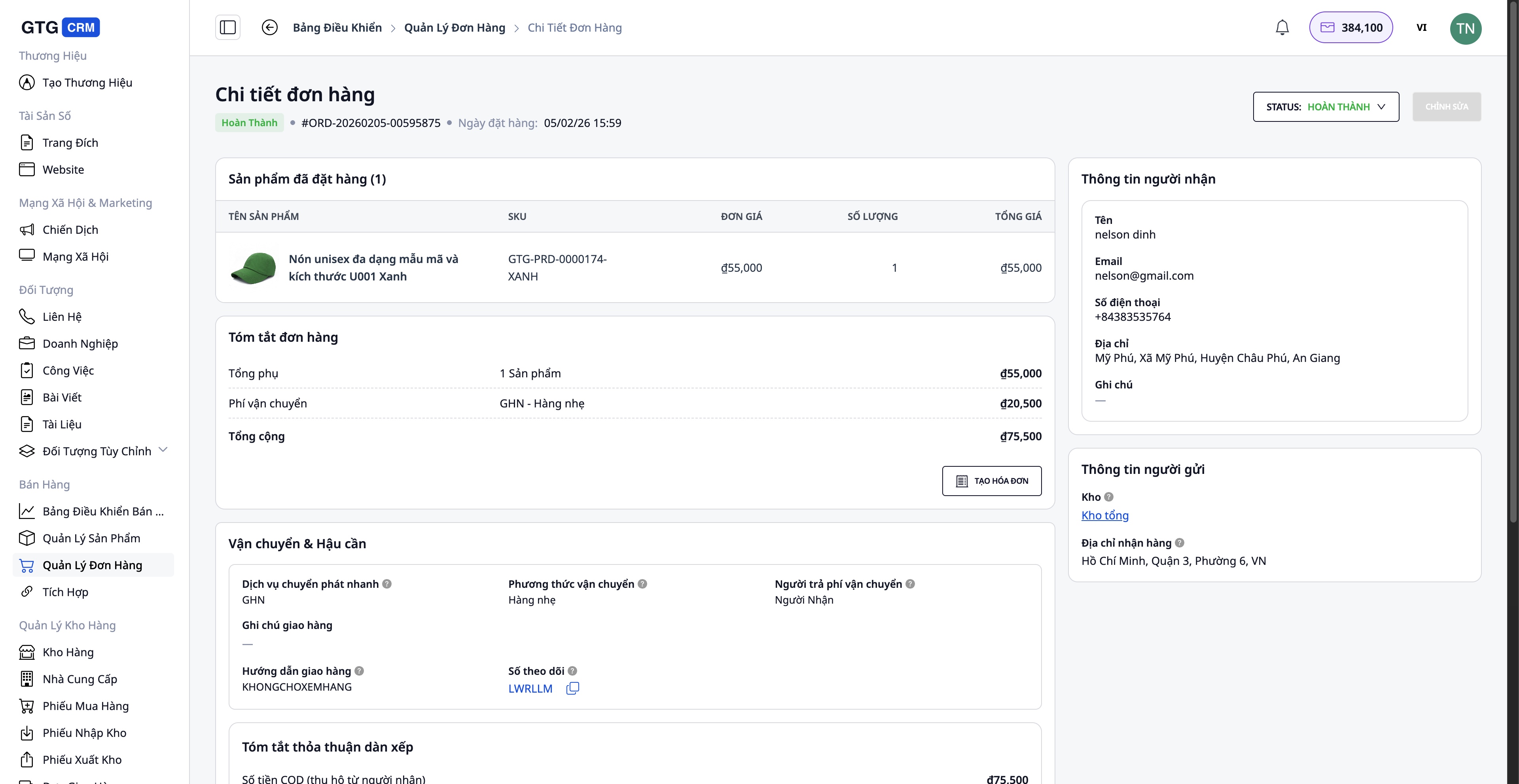
Complete the order.
Once the customer has successfully received the goods:
- Update the order status to Completed
- Confirmation that payment has been received (for COD orders)
- Save the information to your transaction history.
Handling problematic orders
In the case of customer returns/exchanges:
- Create a replacement invoice (if an invoice has already been issued) - Adjust the quantity and value - The system will automatically generate a replacement invoice after activation.
- Inventory update - Return returned goods to warehouse (if still in good condition) - Record damaged goods (if any)
- Refunds will be given to customers (if necessary).
Benefits of Standard Procedures
For Businesses
- Centralized management : All orders, products, and inventory within one system.
- Save time : Automate many processes (product synchronization, shipping label creation, invoice issuance).
- Reduce errors : Information is automatically synchronized, minimizing manual data entry.
- Inventory control : Real-time updates, avoid overselling.
- Legal compliance : Valid and complete electronic invoices.
For Employees
- User-friendly interface : Easy to use, no complex training required.
- Clear process : Each step is guided in detail.
- Full integration : No need to switch between multiple applications.
- Work efficiently : Process multiple orders simultaneously.
For Customers
- Fast response : AI chatbot provides 24/7 support.
- On-time delivery : Fast processing
- Accurate information : Order and shipping information is updated continuously.
- Professional invoices : Valid and complete electronic invoices.
Important note
Regarding connecting to e-commerce platforms:
- A verified shop account on Shopee/Lazada/TikTok Shop is required.
- Product synchronization should be performed during off-peak hours to avoid data conflicts.
Regarding warehouse management:
- Inventory should be updated regularly to ensure accuracy.
- Conduct periodic inventory checks (monthly/quarterly) to compare with the system.
Regarding invoicing:
- Invoices are only issued upon customer request or for large order values.
- Carefully check the tax identification number and address before issuing the invoice.
- Replacement invoices are only used when necessary (returns, errors).
Regarding shipping:
- Pack carefully to prevent damage during shipping.
- Choose a shipping service that suits the order value and customer requirements.
Conclude
GTG CRM's standardized order processing workflow helps online businesses operate professionally, efficiently, and systematically. From product management, multi-channel connectivity, order processing, shipping, to invoicing and customer service – everything is seamlessly integrated into a single platform.
By applying this process, you will:
- Increase order processing speed.
- Better control over business operations
- Optimizing operating costs
- Enhance the customer experience.
- Sustainable business development
Start using GTG CRM today and experience a professional sales workflow!
Turn what you've just read into tangible results — apply it now with GTG CRM, free.
Apply now

