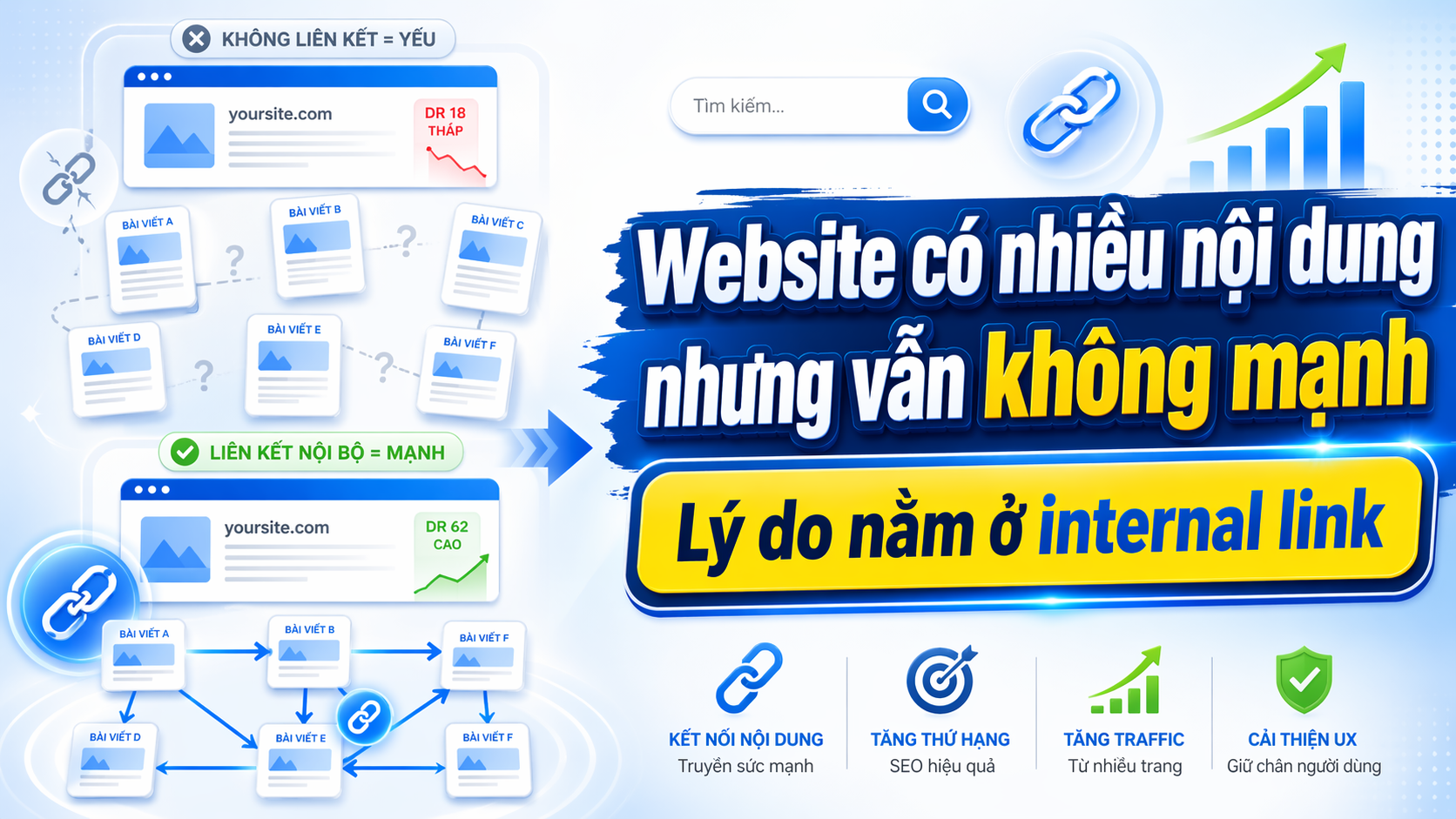
When building a business or e-commerce website, many people focus on writing blog posts, creating service pages, and landing pages, but forget one crucial element: internal linking. What are internal links? They are the way you connect content within the same website to create a logical structure, helping users delve deeper and helping search engines better understand the topic you want to convey. Without internal links, even a website with a lot of quality content will easily be perceived as disjointed, lacking depth, and less prioritized in search results.

This article will help you understand why a website might have dozens or hundreds of articles but still not improve over time, and how internal linking for a business blog can change that.
What is an internal link?
Internal links are links within your website that connect one page to another within the same domain. Unlike external links (which lead outside the website), internal links help you create an information network within your own website.
For example:
- You have a blog post about "how to optimize landing pages".
- In that article, you mentioned the concept of "call-to-action".
- You can create an internal link from that phrase to another article that explains the call-to-action in detail.
- Alternatively, you could direct readers directly to your services page for landing page consultation.
Internal linking is more than just adding a link. It's how you organize information, guide the reader's journey, and help your website become a content ecosystem rather than a collection of isolated articles.
Why does a website have many articles but still perform poorly?
Many websites today have their own blogs, service pages, landing pages, and even regular updates. But when you look at the structure, you'll see:
- The blog posts stand alone and are not linked together.
- The service page does not lead to support blog posts.
- The blog post did not lead to a page with conversion value.
- Readers click on an article, finish reading it, and then leave; there are no suggestions for the next article.
This results in:
From an SEO perspective : Search engines don't know which pages are more important, they don't understand the connections between topics, making it difficult for websites to rank well for major keywords or specialized topics.
From a user perspective : Readers are not guided further, nor are they given suggestions for related content, leading to a high bounce rate and low time spent on the page.
In other words, the website has content but lacks structure. There are articles but no flow. There is information but no journey.
The role of internal links in SEO
Internal links help search engines understand your website in three ways:
1. Helps Google know which pages are more important.
Every time you place an internal link from page A to page B, you are sending a signal: page B deserves attention. If multiple pages on your website lead to a specific page, Google will understand that page to be of higher value.
For example, if you have a main service page about "CRM solutions for businesses," and you link to this page from 10 different blog posts, Google will understand that this service page is the focus of your website.
2. Help Google understand the relationships between different pieces of content.
When you build a topic cluster website, internal links are the means of connecting that content together. Google will see that you're not just writing one article about a particular topic, but that you have an entire system of content revolving around that topic.
For example:
- You have a main article on "What does an e-commerce website need?"
- Surrounding that main topic, you have smaller articles such as: "How to design a high-converting landing page", "How to manage customer data", "How to optimize product pages".
- All sub-lessons lead back to the main lesson, and the main lesson also leads back to the sub-lessons when further explanation is needed.
At that point, Google recognizes that you're building a topic with depth, not just writing ramblingly.
3. Helps Google crawl faster.
When Google's bot arrives at your website, it follows the links. If your pages have internal links connecting them, the bot will easily find and index all the pages. Conversely, if a page has no links pointing to it, the bot may not find that page, even if it has good content.
This is why many websites have new articles but take a very long time to get indexed by Google, or may never appear in search results.
The role of internal links in user behavior.
Internal links don't just serve SEO; they also directly impact user experience and website conversion rates.
It helps readers delve deeper into the topic.
When someone reads your blog post, they're likely in the information stage. If you don't provide internal links to guide them further, they'll likely finish reading and leave. But if you suggest a related article, they might continue reading and delve deeper into the topic.
For example:
- Users read the article "What features should an e-commerce website have?"
- In the article, you mention landing pages.
- You should place an internal link leading to the article "How to build a high-converting landing page".
- Users click, read on, and may proceed to the article "Which landing page creation tool is suitable for small businesses?"
- Finally, they can go to your solution page.
Thus, instead of just reading an article and leaving, users go through a journey and gain a better understanding of your solution.
Guide readers to pages with high conversion potential.
Many websites have excellent blogs, but fail to direct readers to service pages or landing pages. This leaves the blog as a separate channel that doesn't support business goals.
Internal linking helps you naturally connect your blog to high-converting pages. Instead of just writing articles to get traffic, you write articles to guide readers to the right place they need to go.
For example:
- You write a blog post about "Why businesses need SEO-optimized websites."
- In the article, you should include an internal link leading to the page introducing your website and blog building solution.
- Readers who find it useful will click and learn more.
This is how internal links for a business blog become part of the sales funnel, not just content for entertainment.
Reduce bounce rate and increase time spent on page.
When you have well-placed internal links, users will stay on your website longer and read more pages. This indirectly improves metrics such as bounce rate, pages per session, and average time on page. All of these are positive signals to search engines.
How to connect your blog to your services page, features page, and landing page.
One of the most common mistakes is separating blogs from conversion-focused pages. Many people think that blogs are for writing SEO content, while service pages are for selling. But in reality, these two things must support each other.
From the blog, you'll be directed to the service page.
When you write a blog post addressing a specific problem, you can end by suggesting your solution. That's when you place an internal link leading to your service page.
For example:
- Blog post: "How should small businesses choose a CRM?"
- In conclusion: "If you're looking for a flexible, user-friendly CRM solution suitable for small and medium-sized businesses, learn more about GTG CRM here."
From the service page, you'll be directed to the support blog.
Conversely, your service page should also link to blog posts that provide more in-depth explanations of each feature or benefit. This helps users understand better before making a decision.
For example:
- Service page: "GTG CRM helps you manage customers effectively"
- In the feature explanation, you could link to the blog post: "Learn more about professional customer data management in this article."
Between blog posts in the same cluster
Blog posts on the same topic should be linked together. This makes it easier for readers to discover more information without having to search again.
For example:
- Lesson A: "How are websites and blogs different?"
- Lesson B: "How to build a business blog from scratch"
- Article C: "How to optimize your blog to increase traffic"
These three posts should be linked together, forming a cluster of content on the blog's topic.
Describe the internal link structure in an easy-to-understand way.
Imagine your website's internal linking as a road network in a city:
- A pillar piece is the central square, the place everyone knows about. It's the largest, most comprehensive piece of writing on a topic.
- The subsections are small paths leading from the square to specific areas. Each subsection explains an aspect of the larger theme.
- A service page or landing page is the final destination where users can take action. It's a store, office, or transaction location.
Branch articles can link to each other when they are related. They also lead back to the main article when an overview is needed. And most importantly, they lead to the service page when the user has a sufficient understanding and wants to find a solution.
Here's a specific example:
Pillar article : "What does an e-commerce website need for good conversions?"
Sub-sections :
- "Landing page for e-commerce website"
- "How to manage customer data effectively"
- "How to optimize product pages"
- "Which information collection form is suitable for an e-commerce website?"
Landing page : This page introduces GTG CRM's website building and customer management solution.
Each sub-article will lead back to the main article for an overview, and to the solution page once the reader has a clear understanding of the issue.
A practical example of internal linking in a business blog.
Let's say you're writing a blog post about "How to increase conversion rates for your business website." In the post, you mention factors such as:
- good landing page
- Information collection form
- Clear call-to-action
- Page load speed
- Manage customer data after they leave their information.
Instead of just briefly explaining each element, you could:
- Include an internal link to the article "How to Design a High-Conversion Landing Page" when mentioning landing pages.
- Include an internal link to the article "Which data collection forms are suitable for your business?" whenever you mention the form.
- Include internal links leading to your solutions page when mentioning customer data management.
Thus, readers not only understand the concept but can also delve deeper into each section if they wish. And if they find your solution suitable, they can click on the service page immediately.
Common mistakes when placing internal links
Only include links back to the homepage.
Many websites simply link back to the homepage in every article. This doesn't help with SEO and doesn't support the user journey. Instead, link to specific, truly relevant pages.
Too many links in a short paragraph.
If you include 5-6 links in a short paragraph, readers won't know which one to click. Be selective and only include links when absolutely necessary.
Anchor text is too general.
Anchor text is the text that contains a link. If you only use phrases like "read more," "here," or "click here" everywhere, you're missing an opportunity to help Google understand what your landing page is about.
Instead, use anchor text that clearly describes the content of the landing page. For example, instead of "learn more here," write "learn how to build a high-converting landing page."
The blog post does not lead to the service page.
This is the most common mistake. Many people write excellent blogs but forget to direct readers to pages that offer conversion value. As a result, the blog generates traffic but no leads.
The service page does not link back to the support blog.
Conversely, the service page should also link to blog posts that provide more in-depth explanations. This helps users understand better before making a decision, and also gives the service page more context in Google's eyes.
Content on the same topic is not linked to each other.
If you have five blog posts all about your online store but they're not linked, you're missing an opportunity to create a topic cluster. Connect them to form a group of in-depth content.
Mini case: Business website lacks internal links.
A marketing consulting firm has a website with over 50 blog posts. Each post has good content and answers clients' questions correctly. But upon closer analysis, they realized:
- No posts lead to another.
- None of the posts lead to the service page.
- The reader enters an article, reads it, and then exits.
- There is traffic, but the number of leads from the blog is very low.
Then they began rebuilding the internal link structure:
- Identify the topic groups: SEO, content marketing, social media, email marketing
- For each group, select a pillar piece and branch pieces.
- Create internal links between articles within the same group.
- Place internal links from blog posts leading to the corresponding service page.
- Place internal links from the service page leading to the support blog posts.
As a result, the reading journey becomes clearer. Users can easily find relevant content. The percentage of people reading more than one article increases. And most importantly, the number of people switching from the blog to the service site also increases significantly.
This isn't a miracle; it's simply about reorganizing information and guiding users in the right way.
Build more professional websites and blogs with GTG CRM.
If you're building a website and blog system for your business, having a platform to help you organize content systematically is crucial. GTG CRM is not only a customer management tool, but it also helps you build multi-page websites, blogs, landing pages, and organize your content structure more logically.
With GTG CRM, you can:
- Build a website with multiple service pages, introduction pages, and solution pages.
- Create a blog post or publish an article on the website.
- Create separate landing pages for each campaign or customer segment.
- Organize the pages and articles in a clearer way.
This makes it easier to build a logical internal linking structure from the start, instead of having to revise it later when you have too much content.
If you're looking to build an SEO-optimized website, a well-structured business blog, and content that seamlessly integrates different elements, GTG CRM is a solution worth considering.
Conclude
Internal linking isn't a complex or difficult SEO technique. It's simply a way to organize information and guide users in the right direction. However, without it, no matter how much high-quality content your website has, it will remain just a collection of disconnected pieces, failing to form a complete picture.
Take a look at your website and ask yourself:
- Do the blog posts lead to each other?
- Do the blog posts lead to the service page?
- Does the service page link to the support blog?
- Can readers easily delve deeper into the topic?
If the answer is no, that's why your website isn't truly strong yet.
Frequently Asked Questions
What is an internal link?
Internal links are URLs within your website that lead from one page to another within the same domain, helping to create an information network and guide the user's journey.
Why do business blogs need internal links?
Internal links help connect related content, guiding readers deeper into the topic, reducing bounce rates, and making it easier for users to move from relevant content to pages with higher conversion potential.
How many internal links should be included in a single article?
There's no fixed number, but quality should be prioritized over quantity. Only include links that are truly relevant and useful to the reader, avoiding excessive link stuffing that can be visually distracting.
How should anchor text be written?
Anchor text should be clear, natural, and accurately reflect the content of the landing page. Instead of using "learn more" or "here," use specific descriptive phrases such as "how to build a high-converting landing page."
Does the blog necessarily have to link to the service page?
It's not mandatory for every post to link to a service page, but if the content is relevant and aligns with the user's journey, including a link to the service page will help increase conversion rates.
How do I know if my internal links are effective?
You can track metrics such as average pages per session, time spent on page, bounce rate, and internal traffic flowing from your blog to your service page to assess effectiveness.
Should the service page link to the blog?
Yes, the service page should lead to blog posts that explain the features or benefits in more detail. This helps users understand better before making a decision and provides better context for search engines.
Should we use nofollow for internal links?
Generally, it's not recommended, because internal links help transfer link juice within your own website. Only use nofollow for unimportant pages or pages with duplicate content if absolutely necessary.
Turn what you've just read into tangible results — apply it now with GTG CRM, free.
Apply now