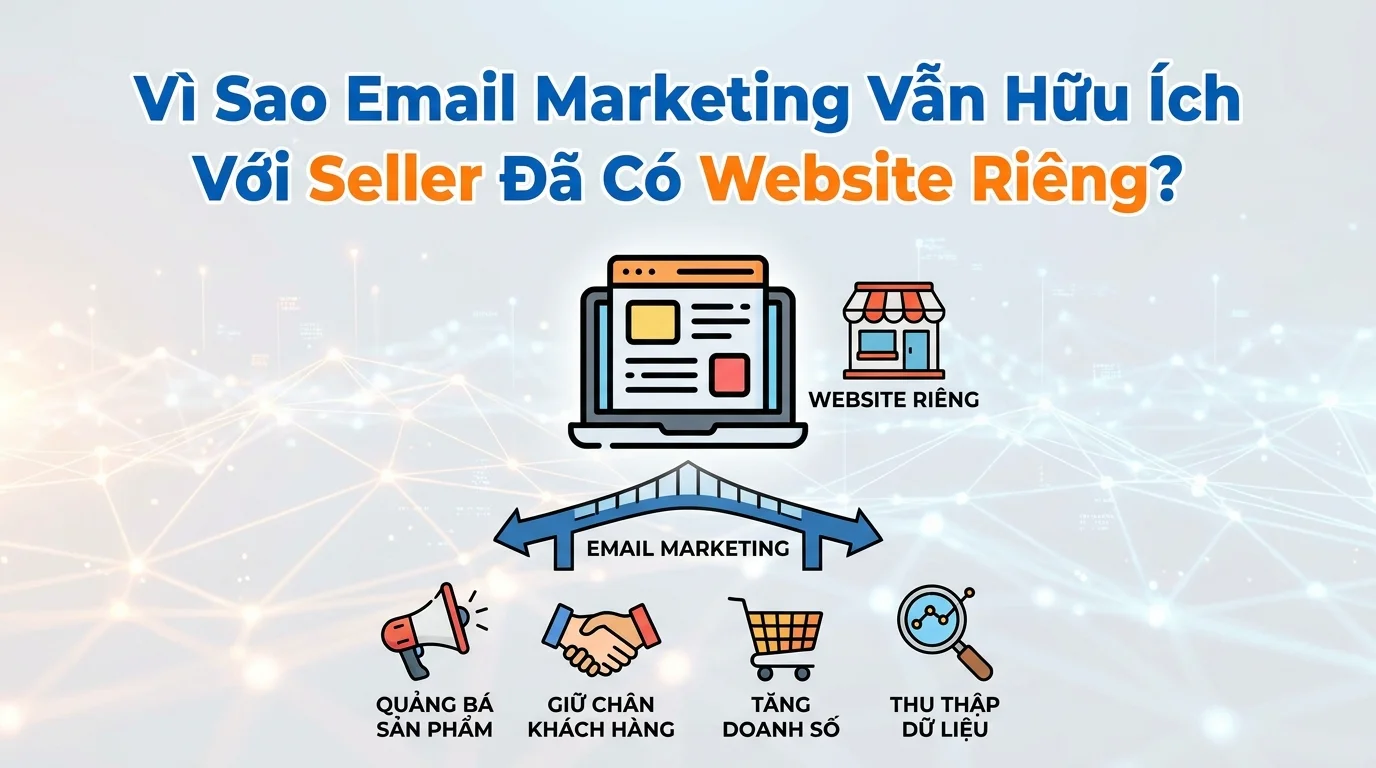
Many online sellers think that once they have their own sales website, the channel development work is done. In reality, a website only provides a place for customers to buy products, but it doesn't automatically help retain existing customers or encourage repeat purchases. Email marketing remains useful for sellers with websites because it's a way to maintain connection with customers who are already familiar with the brand, remind them to make repeat purchases, and better utilize existing customer data from the website, forms, or orders.

When customers visit your website, leave their information, or make a purchase, that's a crucial business asset. But if you can't contact them afterward, they're likely to forget your brand within a few days. Email helps you maintain a presence in your customers' minds without running expensive, continuous advertising campaigns.
This article will help you better understand the role of email marketing when you already have your own website, the email groups you should have, how to connect your website with CRM and email, and some specific customer follow-up flows that you can apply right away.
Websites help you sell, emails help you retain customers.
A website is the platform where customers learn about products, place orders, and make payments. But once customers leave the site, you have no way to proactively reach them unless they return on their own or you run retargeting ads.
Email marketing allows you to proactively re-engage with people who have previously interacted with your brand. When customers leave their email address on your website through registration forms, landing pages, or orders, you have the legal right to send them emails. This is an opportunity to remind them to return, introduce new products, send relevant offers, or simply maintain brand presence.
Many online sellers haven't realized that the cost of reselling to a returning customer is often much lower than constantly searching for new customers. Returning customers are already familiar with the brand, have made purchases before, or at least have shown interest. Email marketing is a tool that helps you effectively leverage this customer group.
When Should Sellers Start Using Email Marketing?
You should start using email marketing when you have a substantial amount of customer contact data. Specifically, when you have at least one of the following situations:
Once you have customers making purchases on your website.
After each order, you receive the customer's email address. This is a good time to send thank-you emails, order confirmations, product usage instructions, or reminders for repeat purchases after a suitable period. Post-purchase emails help you maintain relationships with customers instead of letting them forget about you after their first transaction.
Once you have customers who have left their information on the landing page or registration form.
If you're running ads that direct customers to a landing page to receive offers, download documents, or sign up for newsletters, then this email list is a valuable asset. You can send welcome emails, product introductions, or follow-up emails to interested but unsold customers.
When you want to reactivate old customers who haven't made a purchase in a long time.
Many sellers have lists of returning customers from previous orders but don't know how to re-engage them. Email is an effective tool to remind them to return for more purchases, especially when you have new products or suitable promotions.
When you want to introduce a new product or promotion.
Instead of just posting on social media and hoping customers will see it, you can send emails directly to people who have previously shown interest or made purchases. Email helps you control who receives your messages and track who opens the emails and who clicks on products.
If you're in one of the situations above, then it's time to start taking email marketing seriously instead of just focusing on having a website.
Essential Email Groups That Sellers Should Have
When starting with email marketing, you don't need a lot of complicated email types. Here are some basic email groups that most online sellers should have:
Welcome or confirmation email when guests leave their information.
When customers leave their email address on your website via a registration form or landing page, you should immediately send a welcome email. This email confirms that the information has been received and briefly introduces your brand, products, or the benefits they will receive by following you. This is also an opportunity to make a good first impression.
Post-purchase email
After a customer makes a purchase, you should send a thank-you email, confirming the order and providing product usage instructions if needed. This email not only reassures the customer about their order but also provides an opportunity to introduce related products or loyalty programs, if any. Post-purchase emails have one of the highest open rates because customers are waiting for information about their order.
Email reminders for returning customers.
After a certain period, for example 30 or 60 days since their last purchase, you can send a follow-up email to remind customers to return. This email can introduce new products, special offers, or simply remind them that your brand is still active and ready to serve. Follow-up emails help re-engage existing customers instead of letting them forget about your brand.
Email introducing new products or relevant offers.
When you have a new product or promotion, you can send emails to your relevant customer list. If you have a CRM to segment customers by interests or purchase history, this email will be much more effective than sending emails to everyone indiscriminately. New product introduction emails help you leverage existing customer data instead of relying solely on advertising to re-engage them.
Follow up with customers who showed interest but didn't make a purchase via email.
Many customers visit your website, view products, and may add items to their cart, but ultimately don't complete the order. If you collect their email addresses through forms or pop-ups, you can send them reminder emails about the products they viewed or offer small incentives to encourage them to return and complete their order. This email helps you leverage customers who have considered buying but haven't yet decided.
Additionally, if appropriate, you can add emails sharing useful content such as product usage guides, industry-related tips, or brand stories. However, for online sellers, the above email groups are sufficient to start and maintain effective connections with customers.
The Relationship Between Websites, CRM, and Email Marketing
When you only have a website and no CRM, customer data will be scattered in many places. You might have customer lists from orders, registration forms, and landing pages, but you don't know how to manage and use them systematically.
CRM helps you centralize all your contact data in one place. When a customer leaves their information on your website or makes a purchase, this data is saved to the CRM along with related information such as the product purchased, purchase date, order value, customer source, and current status. This allows you to identify returning customers, new customers, repeat customers, and those who have only left their information but haven't made a purchase.
Email marketing becomes much more effective when you connect it to your CRM. Instead of sending generic emails to everyone, you can send emails based on the actual data of each contact. For example, you can only send repurchase reminder emails to customers who have purchased at least once, or only send emails introducing new products to customers who have previously purchased similar products.
When you combine your website, CRM, and email correctly, your workflow will look like this:
Customers visit your website or landing page, leave their information, or make a purchase. This data is stored in your CRM with detailed information. Based on the customer's status, they are categorized into appropriate groups. You can then send post-purchase emails to new customers or reminder emails to customers who haven't purchased in a while. When customers open the email and click on a product, they will return to the website and may make another purchase. This entire process helps you better utilize existing customer data instead of losing them after their first interaction.
This is why many online sellers today not only focus on having a website but also care about building a system that includes CRM and email to systematically nurture existing customers.
Basic Email Flow for Customer Follow-up
Here's a basic email flow you can implement right away to re-engage with existing customers:
Flow 1: After-sales service
Day 0: Customer makes a purchase on the website.
Immediately: Send a thank-you email and order confirmation.
Day 3: Send an email to inquire about the user experience with the product.
Day 7: Send emails introducing related products or loyalty programs.
Day 30: Send a repurchase reminder email or introduce a new product.
This flow helps you maintain a connection with customers after they make a purchase, instead of letting them forget your brand. Each email in this flow has a clear purpose and is sent at the right time.
Flow 2: Follow up with customers who left their information but haven't made a purchase yet.
Day 0: Guests leave their email address on the landing page or registration form.
Immediately: Send a welcome email and brand introduction.
Day 2: Send emails showcasing featured products or special offers.
Day 5: Send emails sharing case studies or reviews from real customers.
Day 10: Send email reminders about expiring offers or trending products.
This flow helps you leverage customers who have shown interest but haven't yet decided to buy. Instead of letting them forget about you after a few days, you proactively send them information to keep them within your brand's interest.
Flow 3: Reactivate old customers who haven't purchased in a long time.
After 60 days of inactivity: Send a reminder email with a special offer to encourage guests to return.
After 90 days: Send an email introducing a new product or collection.
After 120 days: Send an email asking why the customer hasn't returned and offer a discount code.
This flow helps you avoid missing out on returning customers who have made purchases in the past but haven't returned in a while. Often, customers don't return not because they dislike the product, but simply because they've forgotten or don't need it right now. Repurchase reminder emails help you reach them at the right time, when they do need it.
All of the above workflows can be automated using email automation if you have the right tools. Once set up, you don't need to manually send each email; the system will automatically send them based on customer actions or status.
A Real-World Example from an Online Shop
There's an online fashion shop that has its own website and runs Facebook ads quite effectively. Each month, the shop gets around 100 new orders from first-time customers. However, after customers make a purchase, the shop has no way to contact them again other than by running retargeting ads on Facebook.
The problem is that advertising costs are increasing, and customers don't always see the shop's ads. Many customers forget the brand after a single purchase because there's nothing to remind them to come back.
The shop decided to start using email marketing to re-engage existing customers. First, they set up an automated thank-you email that was sent immediately after each order. This email not only confirmed the order but also inquired about the customer's well-being and introduced the loyalty program.
After 7 days, the shop sends an email to inquire about the customer's experience using the product and to introduce some related products. After 30 days, the shop sends an email reminding the customer to return with a small discount code for their next purchase.
Thanks to email, the shop is no longer entirely dependent on advertising to re-engage old customers. Some customers, after receiving emails, have returned to make additional purchases without the shop having to run ads for them. This helps the shop reduce the cost of acquiring new customers and increase the lifetime value of each customer.
This is a practical example showing that once you have a website and customer data, email marketing is a tool that helps you better utilize those assets instead of letting them sit idle.
Comparison Between Sellers Who Only Have a Website and Sellers Who Also Have Email Marketing
When you only have a website and no email marketing, your process typically goes like this:
Visitors arrive at your website through ads or search. Some make a purchase, some leave. After that, you have no way to contact them again unless they return or you run ads again. If you want to sell to them again, you have to pay for ads to reach them again. Advertising costs increase over time, and you are always dependent on the advertising platform.
When you have a website along with email marketing and a CRM, the process is different:
Customers arrive at your website through ads or search. They leave their information or make a purchase, and the data is stored in your CRM. You send post-purchase emails or welcome emails. After a period of time, you send emails reminding them to return, introducing new products, or offering suitable deals. Some customers will return to make additional purchases through email without you needing to run ads targeting them. You reduce the cost of acquiring new customers and increase the lifetime value of each customer.
The biggest difference is that you can proactively re-engage with existing customers without relying entirely on advertising. Email helps you build your own channel to maintain connections with customers.
How does GTG CRM help sellers connect their website, CRM, and email?
GTG CRM is a solution that helps online sellers connect their websites, manage contact data, and send emails systematically.
When you use GTG CRM, you can store contact data from your website, registration forms, or orders in a single location. Each contact will have complete information such as name, email, phone number, purchase history, and related notes. This allows you to identify returning customers, new customers, repeat customers, and those who have only left their information but haven't made a purchase.
GTG CRM features a drag-and-drop email builder that allows you to easily create emails with text, images, buttons, and basic blocks. No coding or complex design skills are required. The system also supports personalization options such as name, email, and company name for each contact, making your emails look professional and tailored to each recipient.
You can send email campaigns to all contacts, or only to a specific group based on filters or segments. For example, you can create a segment of customers who have made purchases in the last 30 days, or a segment of customers who haven't purchased but have left their information. GTG CRM also features Smart Segmentation, which helps you intelligently segment customers based on behavior and status.
You can send emails immediately or schedule them for a convenient time. Before sending, you can preview and test the email to see what it looks like. After sending, GTG CRM provides key metrics such as the number of emails sent, the number of emails opened, the number of clicks, the number of bounces, and the number of unsubscribes. This lets you know whether your email campaign is effective or not.
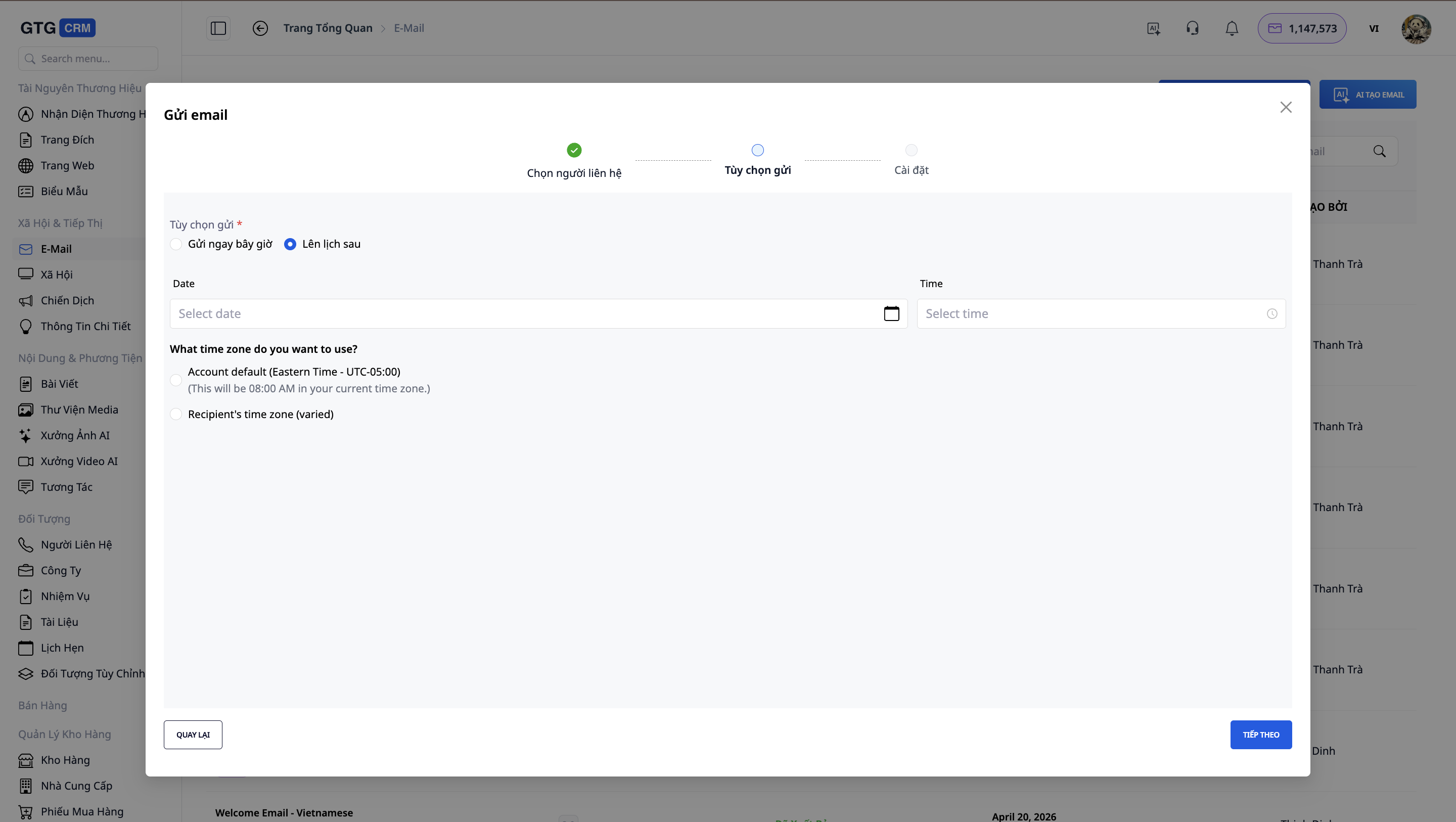
GTG CRM also supports basic email automation, allowing you to automatically send emails based on customer actions or status. For example, you can set it up to automatically send welcome emails when a new contact is made, or to automatically send repurchase reminder emails 30 days after the last purchase.
In addition, GTG CRM also features AI support for creating email campaigns from natural language descriptions. You simply describe the content of the email you want to send, and the AI will help you generate a suitable email draft. This saves you time and makes creating email content easier.
All these features allow online sellers to easily connect their website with email marketing without needing in-depth technical knowledge.
Things to Consider When Getting Started with Email Marketing
When starting with email marketing, you should keep the following points in mind to ensure effectiveness and compliance with regulations:
Only send emails to people who have agreed to receive them.
You shouldn't send emails to people who haven't provided their information or haven't opted to receive emails from you. This not only helps you comply with data protection regulations but also improves your email open and engagement rates.
Send emails at the right time.
You shouldn't send emails too frequently or too infrequently. You should have a reasonable email schedule based on purchase frequency and customer behavior. For example, for new customers, you could send emails after 3 days, 7 days, and 30 days. For customers who haven't purchased in a long time, you could send emails after 60 days or 90 days.
The email content must be valuable.
Every email you send should provide value to the recipient, whether it's useful information, a special offer, or a reminder about a product they're interested in. Don't send emails just for the sake of sending them, without a clear purpose.
Continuous monitoring and improvement
After each email campaign, you should review metrics such as open rates, click-through rates, and unsubscribe rates. From this, you can adjust the content, sending time, or target audience to improve effectiveness.
Combine email with other channels.
Email marketing doesn't replace other channels like social media or advertising; rather, it complements them. You can combine email with Facebook, Zalo, or SMS to create a more comprehensive customer care system.
Conclude
Having your own sales website is the first step for online sellers to build an independent sales channel. But if you stop there without maintaining connections with customers who have previously interacted with you, you're missing out on many sales opportunities from existing customers.
Email marketing remains useful for sellers who already have their own websites because it helps you re-engage with existing customers, remind them to make repeat purchases, and better utilize existing customer data. When combining a website, CRM, and email marketing correctly, you not only make one-time sales but also have the opportunity to generate repeat purchases without relying solely on advertising.
If you're looking for an easy way to connect your website with email, you might consider GTG CRM. This system helps you manage contact data, create and send emails systematically, and automate basic customer care workflows. You can start with simple emails and gradually expand as you become more familiar with the process.
Start building your email system today so you don't miss out on customers who are already aware of your brand.
Frequently Asked Questions
Is email marketing suitable for beginner sellers?
Email marketing is suitable for sellers who already have at least a certain amount of customer contact data. If you already have 50 to 100 emails from customers who have made purchases or left their information, then it's time to start using email to follow up with them instead of letting the data sit idle.
How often should I send emails to former customers?
The frequency of emails depends on the type of product and the customer's buying cycle. For fast-moving consumer goods, you can send emails weekly or bi-weekly. For durable goods, you can send emails monthly or whenever new products are available. The important thing is not to send emails so frequently that customers feel annoyed.
When should I send a post-purchase email?
Post-purchase emails should be sent immediately after the customer places an order to confirm the order. Then, you can send another email on the 3rd day to inquire about their experience, and another email on the 7th or 30th day to introduce related products or remind them to repurchase.
How do I know if my emails are effective?
You can track key metrics such as email open rates, click-through rates (CTRs), and the number of orders generated from emails. If the open rate is below 10% or there are no clicks, you should review the content or timing of your emails.
Do I need to hire a professional email writer?
When you're just starting out, you don't need to hire a professional email writer. You can write simple emails yourself with clear, sincere, and valuable content for your customers. Once you're familiar with email sending and see the results, you can consider hiring someone to improve the content further.
Is GTG CRM suitable for small and medium-sized sellers?
GTG CRM is designed to suit small to medium-sized online sellers. The system has an easy-to-use interface, requires no in-depth technical knowledge, and has enough basic features to get you started with email marketing effectively. You can start with simple email campaigns and gradually expand as needed.
Turn what you've just read into tangible results — apply it now with GTG CRM, free.
Apply now