Many small and medium-sized businesses today are no longer short on leads. They have websites, fan pages, run ads, have landing pages, registration forms, and customers messaging through various channels. On the surface, this is a positive sign as demand has begun to emerge from multiple touchpoints.
But the more channels there are, the more apparent another problem becomes: leads are coming in, but sales can't keep up.
This is a common situation in businesses with small sales teams. Leads can pour in daily from websites, forms, Facebook, Zalo, email, live chat, or various advertising campaigns. However, without a clear processing flow, leads quickly become scattered, responded to slowly, or missed entirely. The consequence is that businesses think they lack leads, but in reality, they lack a sufficiently focused lead management system.
The issue is: leads not only need to be generated but also collected in the right place, assigned to the right person, and processed at the right time.
Why Do Businesses Have Leads But Sales Still Can't Keep Up?
When businesses are small, lead processing is often manual. Whoever sees a message replies. Whoever receives a form shares it in the chat group. Whoever has a personal connection with a customer keeps them in their personal inbox. This approach might be acceptable when the lead volume is low. But as the number of channels increases and lead frequency rises, this processing model quickly reveals its weaknesses.
Sales falling behind isn't always due to a lack of personnel. Often, the real reason is that leads are entering a fragmented system.
Some very common signs include:
- Leads have left their information, but no one calls back soon enough.
- Customers have messaged, but the sales team doesn't know who is in charge.
- The same customer appears in multiple places, making it difficult to track their history.
- Marketing sees leads, but sales claims not enough leads are coming in.
- The business has traffic, messages, and forms, but the number of actual opportunities is lower than expected.
This is when businesses need to re-evaluate the problem not from the perspective of "running more ads," but from the perspective of sales ops, which is how leads are received, distributed, and tracked internally.
Where Do Leads Typically Get Lost When Businesses Have Many Channels?
Leads don't always get lost at the final stage. In most cases, leads start getting lost as soon as they appear.
1. Lost During Reception
Leads fill out forms on the website, but the data only ends up in emails.
Customers message the fan page, but no one checks it in time.
Someone leaves their information via a landing page, but sales doesn't see it immediately.
When data goes into multiple places without a central collection point, response times slow down significantly.
2. Lost During Handoff
Small businesses often lack a truly clear handoff process. Leads are sent to chat groups, communicated verbally, or marked manually. This makes tracking very easily interrupted.
A good lead, if handed off slowly or without a clear owner, quickly loses momentum.
3. Lost During Follow-up
Not every lead closes immediately. However, if the business doesn't have a central place to track them, it's hard to know if a customer has already provided information, what stage they are in, who has communicated with them, and what was discussed.
Without a complete history, it's difficult for sales to follow up systematically.
4. Lost Because Leads Are Scattered Across Multiple Tools
This is a very common problem for small businesses:
- Forms are on the website.
- Messages are on the fan page or Zalo.
- Customer information is in an Excel file.
- Interaction notes are on personal phones or internal chat groups.
Each place holds a piece of the data. But when it comes to piecing together a clear customer journey, the business lacks a single place to view the whole picture.
Where Are Leads Scattered in Small Businesses?
For small sales teams, the question isn't just "how many leads," but "where are the leads spread out."
Typically, leads are scattered at the following points:
- Websites and landing pages: Customers fill out forms, but the data doesn't automatically consolidate into a central management system.
- Fan pages and messaging channels: Customers inquire, express needs, but they are not fully recorded.
- Email: Customers send requests but are not connected to the overall tracking flow.
- Manual files: Businesses store information scattered in spreadsheets or personal notes.
- Individual sales reps: Each person keeps their own data, making collaboration more difficult.
When leads are divided like this, the problem is no longer poor lead generation by marketing. The problem is that the business lacks a clear structure to turn leads into sales opportunities.
What Is the Standard Flow for Collecting Leads for a Small Sales Team?
For small and medium-sized businesses, a good flow doesn't need to be overly complicated. What's important is clarity, ease of operation, and sufficient focus to avoid losing leads along the way.
A basic flow should include the following steps:
1. Collect Leads from All Sources into One Place
Leads from websites, landing pages, forms, live chat, fan pages, Zalo, or email should be brought into a single platform so businesses don't have to search each place when they need to process them.
2. Clearly Record Customer Information
As soon as a lead appears, the business needs a place to store basic information such as name, contact method, lead source, and initial needs. This is the minimum data layer so sales don't have to start from scratch.
3. Have a Designated Person Responsible for Follow-up
Each lead should have a clear owner or at least a sufficiently transparent status so the team knows who is handling the lead. Without this clarity, the situation of "everyone assumes someone else is doing it" can easily occur.
4. Track Interaction History in the Same Thread
Sales reps need to see if a customer has filled out a form, where they have messaged, and what responses they have received. The more centralized the history, the better the follow-up.
5. Have a Place to Measure Lead Source Effectiveness
If businesses don't know which lead sources (website, landing page, or messaging channel) are good, optimizing marketing and sales will always be unclear.
In short, a standard flow not only helps sales keep up better but also helps businesses see more clearly where they are losing leads to fix the right bottlenecks.
The Problem for Many Businesses Isn't a Lack of Leads, But a Lack of a Lead Collection Platform
This is where many SMBs easily make a mistake.
They see sales overloaded and think they need to hire more people.
They see a low closing rate and think they need to run more ads.
They see many customer messages but no results and think the leads aren't quality enough.
But before doing any of that, businesses need to answer a more important question: Are the current leads being collected and managed well enough?
If the answer is no, then injecting more leads into a fragmented system will only make things harder to control.
How Does GTG CRM Help Small Businesses Solve This Problem?
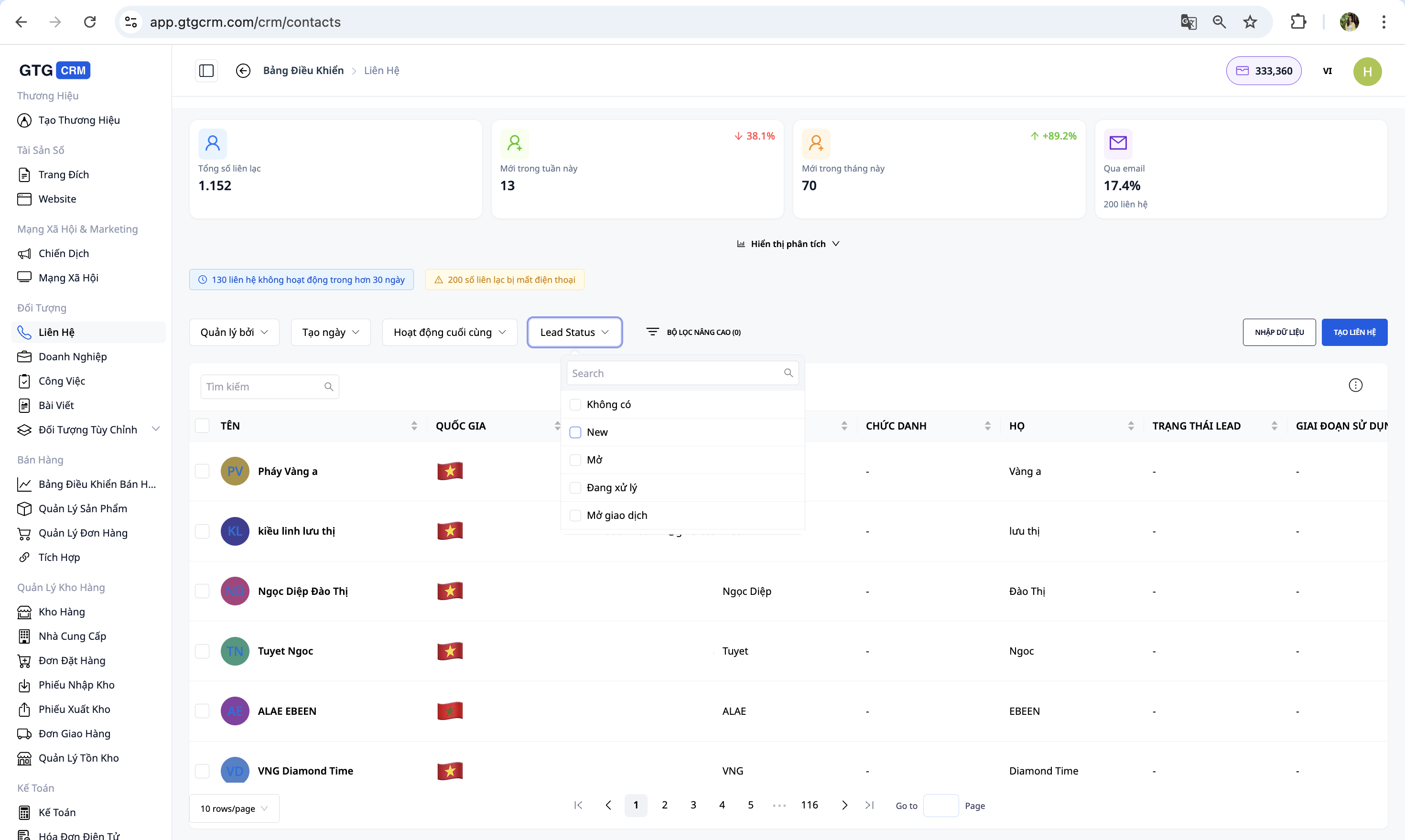
GTG CRM is suitable for businesses with many lead sources that need more centralized management so small sales teams can still keep up.
With GTG CRM, businesses can:
- Connect websites and landing pages to the CRM, helping customer data from forms be brought to a more centralized management system.
- Manage leads within the CRM, allowing the team to track customer information more clearly instead of having data scattered everywhere.
- Manage multi-channel messages on one platform, consolidating customer communication channels into the same system instead of them being separate in multiple places.
- Track interaction history and customer information within a clearer workflow, making it easier for sales to follow up with interested customers.
The key here isn't just having a CRM or a multi-channel inbox. The real value lies in businesses starting to build a more seamless flow from website, forms, and messaging to the CRM.
When leads are no longer scattered across many places, small sales teams will find it easier to keep up, marketing will have an easier time reviewing lead quality, and managers will have a clearer basis for optimizing processes.
Conclusion
Leads coming in from multiple channels but sales not keeping up is not uncommon. But in many cases, the problem isn't a lack of people or leads. The problem lies in an insufficiently robust processing structure.
Leads can be lost at the reception stage.
Leads can be lost at the handoff stage.
Leads can be lost because data is scattered across websites, forms, inboxes, and manual files.
For small and medium-sized businesses, the more channels there are, the more crucial it becomes to consolidate leads onto a common platform.
GTG CRM offers a more practical solution to this problem by connecting websites to the CRM, consolidating customer data in one place, and supporting multi-channel interaction management on the same platform.
If your business has leads but sales still can't keep up, it's time to look not just at the number of leads, but at how leads are being received and managed daily.
Turn what you've just read into real results — apply now with GTG CRM, for free.
Apply Now