
Feature Introduction
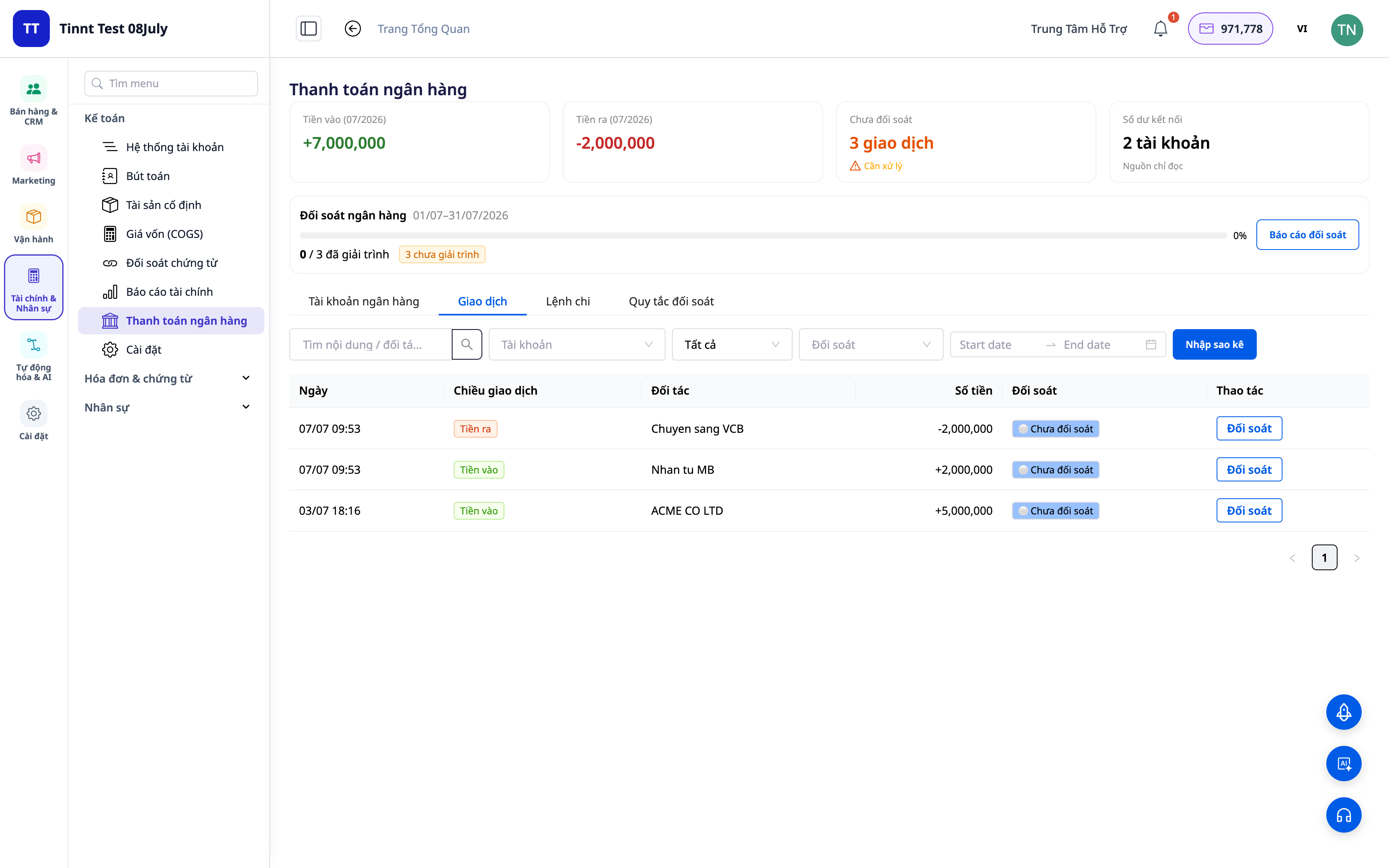
At the end of the month, you open your bank statement and start going through each line: which customer paid for which invoice? Is this fee, an internal transfer, or COD money returned by the platform? Then you open Excel and manually type to reconcile your books with the bank. It takes half a day, is prone to errors, and every time you're asked "where did this money come from," you break into a sweat.
That ends today. GTG CRM turns your bank statement into a reconciliation workspace right within the accounting system you're using: categorize each transaction to the correct account, set up reusable matching rules to automatically suggest for similar lines, view reconciliation tables and reports, and enable the option to automatically post balancing journal entries. Money ⇄ Invoices ⇄ Ledgers are closed into a loop.
Problems Businesses Are Facing
| Old Method | Consequences |
|---|---|
| Manually reviewing bank statements and re-entering data into Excel | Hours lost each month, prone to input errors, no audit trail |
| Uncertainty about which payment corresponds to which invoice | Obscure accounts receivable/payable, missed underpayments/overpayments |
| Accounting entries made separate from bank records | Discrepant data, difficult to explain during tax audits |
| Difficulty in separating returned COD payments from platforms/carriers | Unclear if full amounts were received, complex COD reconciliation |
GTG CRM consolidates everything into a single source of truth: each bank transaction is directly linked to the accounting account and (where applicable) to the invoice, automatically generating balancing entries.
Key Features
1. Categorize Transactions to the Correct Account
For each line on your statement, classify it: revenue, fee, internal transfer, cash-to-bank, COD, etc. The system links the transaction to the correct accounting account (GL account).
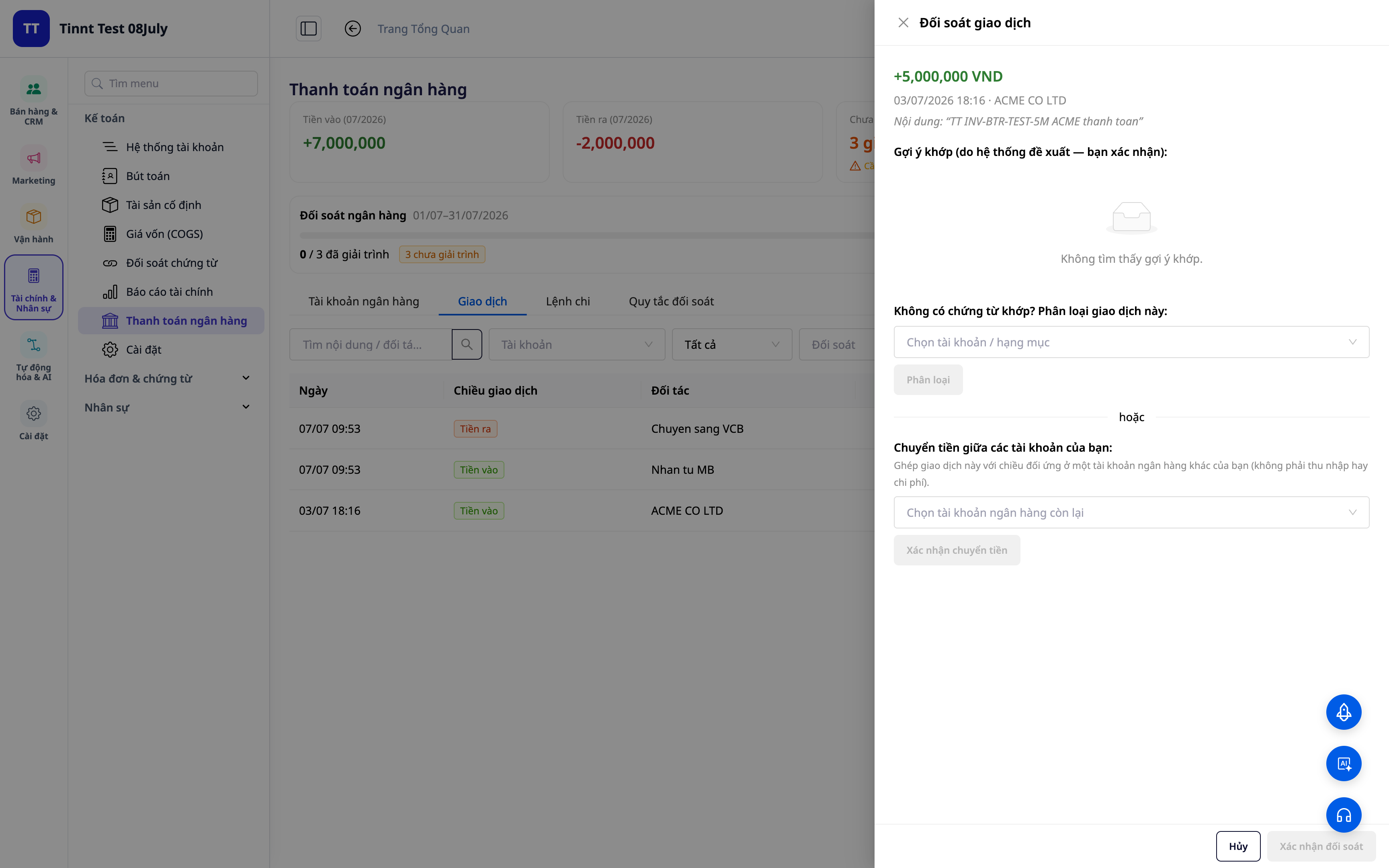
- Feature: Categorize transactions → corresponding accounting accounts.
- Benefit: Every unit of money in/out has a clear "address" in your books.
2. Reusable Matching Rules — Set Once, Match Automatically
Create rules based on description/partner/amount: similar future transactions will automatically be assigned the correct type. New rules are activated immediately for instant application.
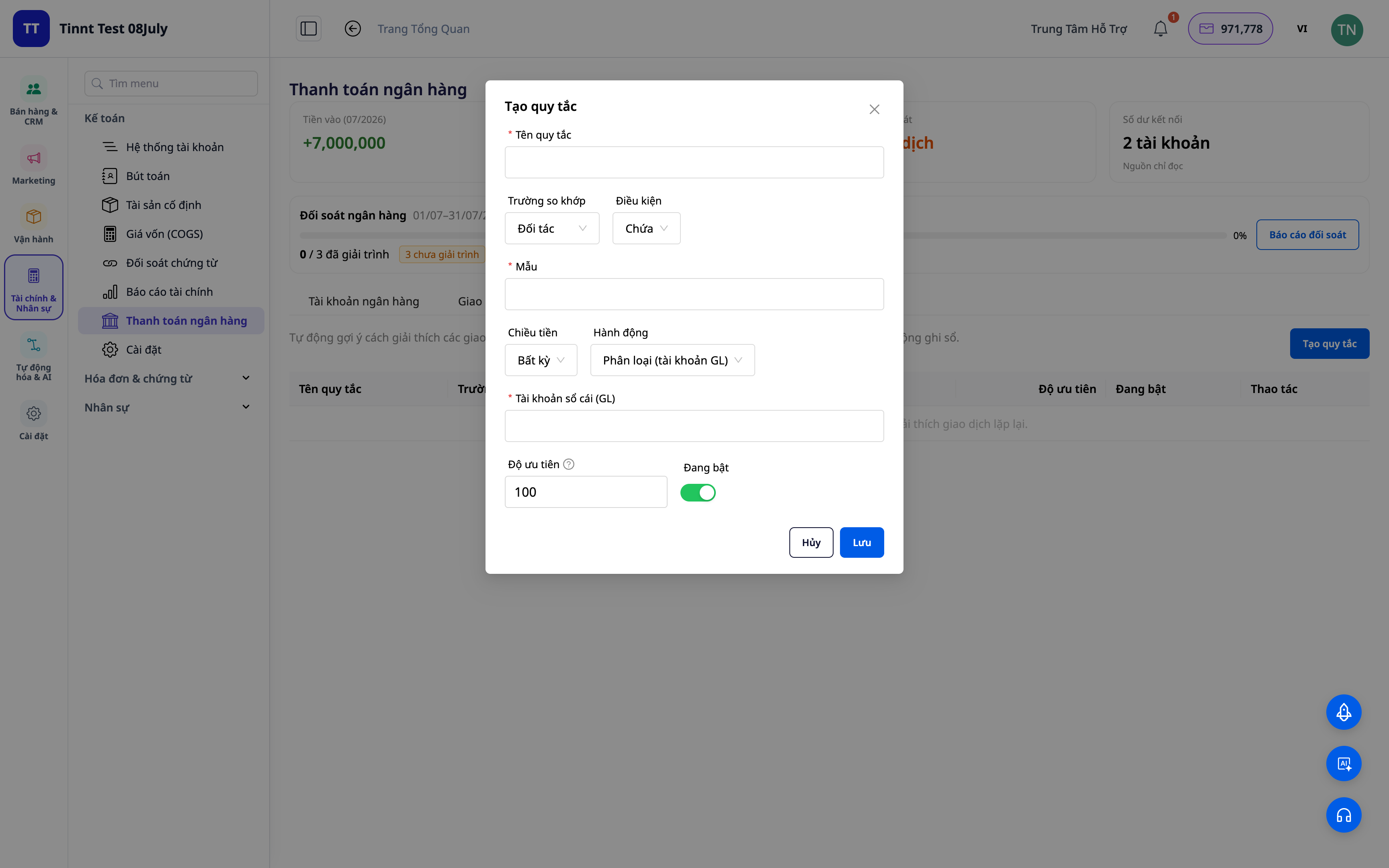
- Feature: Reusable matching rule set.
- Benefit: Each month becomes easier than the last — repetitive tasks are automated.
3. Rule-Based Matching Suggestions — You Just Need to Approve
Your established rules will automatically suggest classifications for similar transactions — you just need to review and approve. The more you use it, the more situations your rules cover, making reconciliation faster. You always have the final decision.
- Feature: Suggest transaction matches based on rules (you approve).
- Benefit: Quickly process repetitive entries while maintaining full control.
ℹ️ Matching and suggestions via rules are free. Coming soon: an AI assistant to suggest explanations for entirely new transactions.
4. Reconciliation Dashboard + Reports
Get an overview: how much has been matched, how much is pending, where are the discrepancies. Export reconciliation reports for your records and explanations.
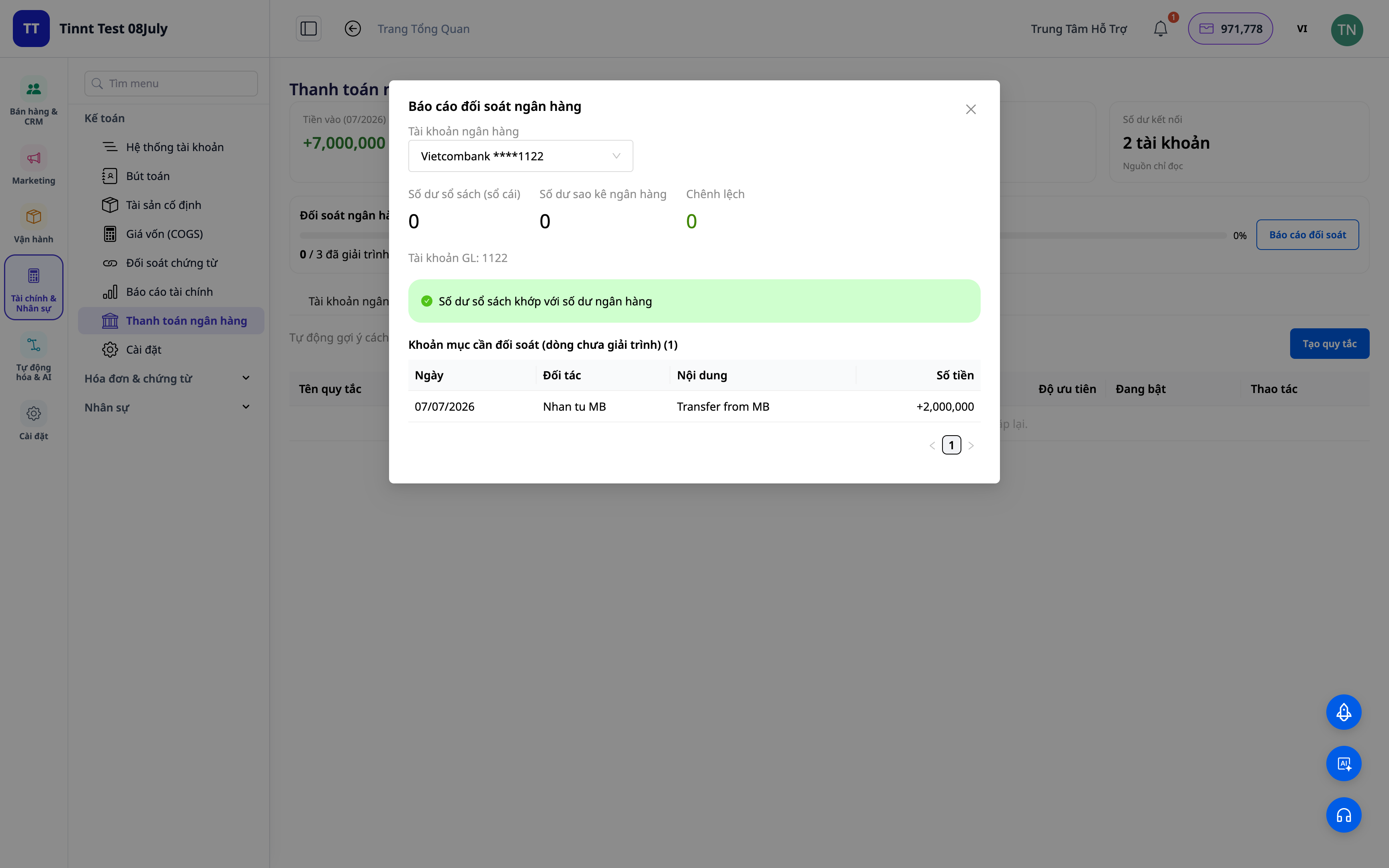
- Feature: Reconciliation dashboard + reports.
- Benefit: See at a glance whether your books match your bank.
5. Automatic Balancing Journal Entries (Optional)
Enable the "post to ledger" option: classified transactions / transfers / cash-to-bank / COD automatically generate standard accounting balancing journal entries. Unlinking a transaction reverses the journal entry.
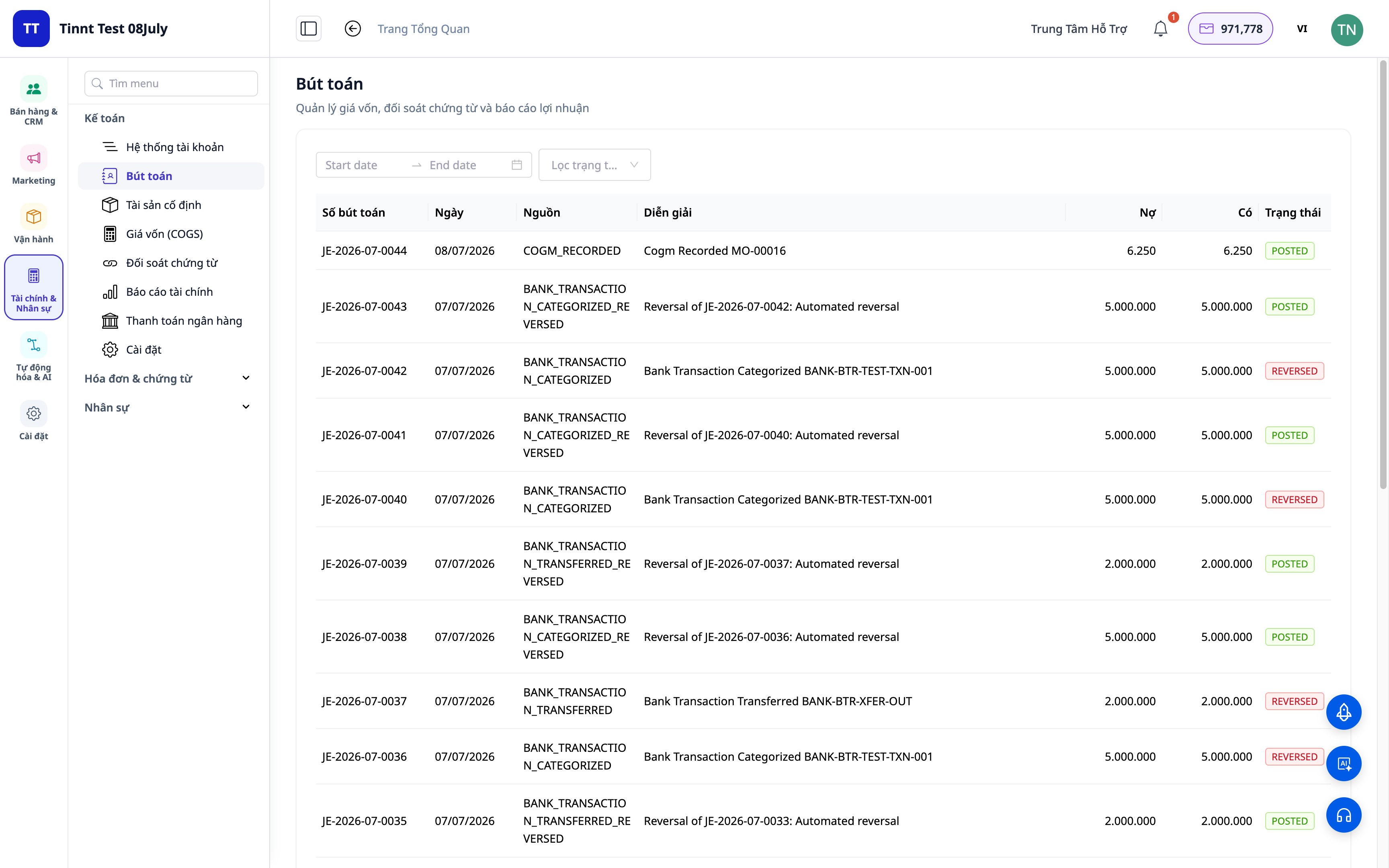
- Feature: Automatically post journal entries from reconciled transactions.
- Benefit: Reconciliation and ledger posting are one process, not two — data is always consistent.
Benefits for Your Business
| Feature | Real-World Benefits for You |
|---|---|
| Categorization + Matching Rules | Cut hours of manual statement review each month |
| Rule-Based Matching Suggestions | Quickly process repetitive entries, reduce errors |
| Reconciliation Dashboard + Reports | Close books faster, have records ready for tax audits |
| Automatic Journal Entries | Ledger always matches bank, no discrepancies |
| COD Reconciliation | Know exactly if you've received all your sales revenue |
Who Is It For?
- Accountants / Head Accountants who need to close books quickly and ensure bank reconciliation.
- Business Owners / Sole Proprietors using GTG CRM's accounting suite, wanting to control cash flow.
- COD Sellers needing to reconcile returned funds from platforms/carriers.
- Small to Medium Businesses looking to reduce reliance on separate accounting software.
How to Get Started?
Go to the Accounting ▸ Bank Reconciliation section, upload your statement or connect your bank account, and start categorizing. Need detailed steps? See the article User Guide: Bank Reconciliation on GTG CRM, and refer to Double-Entry Accounting within the CRM to understand the overall accounting picture.
Try it free — no credit card required.


