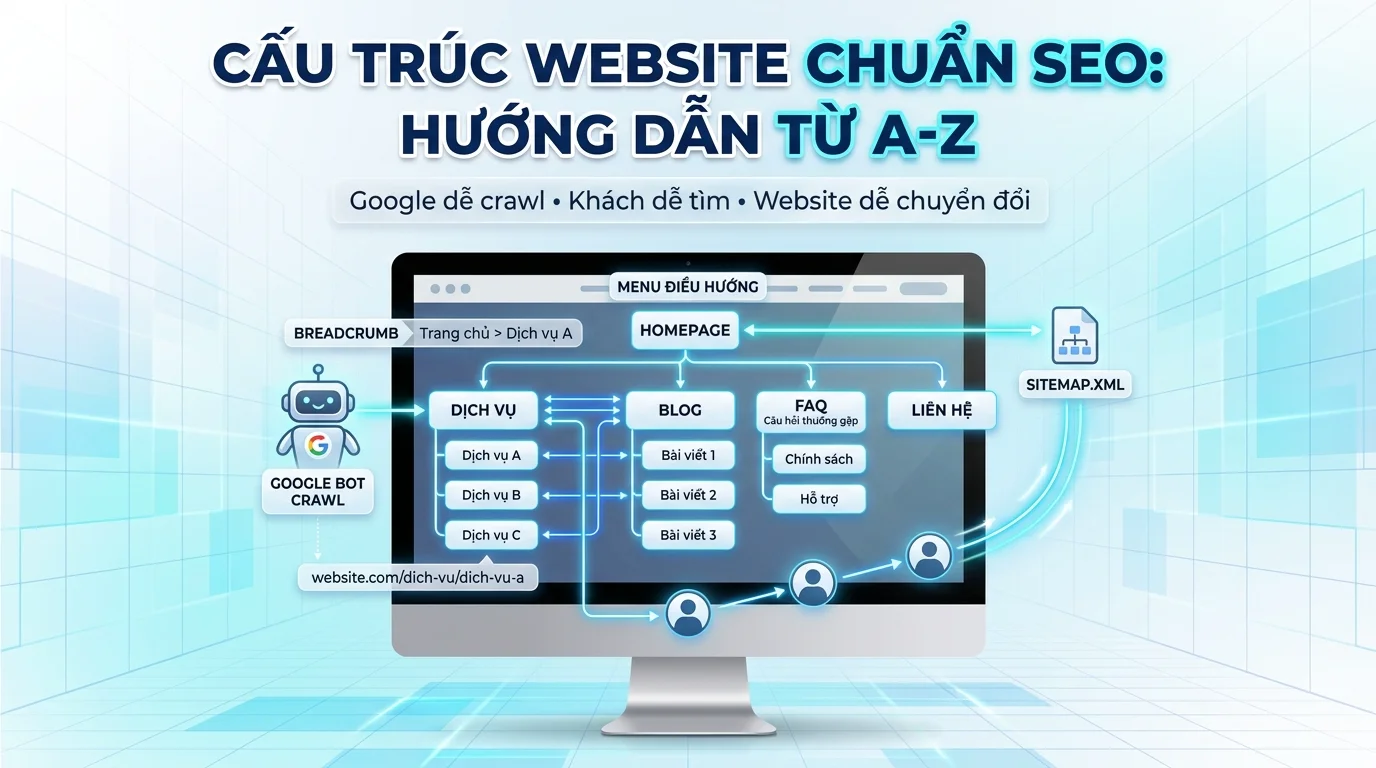
You've invested in dozens of pages of content for your website, but when you check Google Search Console, only half of them are indexed. Customers visit the site, browse a few pages, and leave immediately. The bounce rate is high, the time spent on the site is low, and most importantly, the conversion rate isn't meeting expectations.
The root cause isn't poor content or a lack of backlinks. The problem lies in the website structure – how you organize and link pages together. When the structure is illogical, Google bots crawl inefficiently, and users get lost in a maze of information.
This article will provide a detailed guide on how to build a SEO-friendly website structure from A to Z, helping you optimize both user experience and Google ranking.
What is website structure and why is it important?
Define
Website architecture is how you organize, structure, and link web pages together. It includes four main components:
- Hierarchy : The way pages are arranged, from general to detailed.
- Navigation : Menus and toolbars that help users move between pages.
- Internal Linking : Links between pages within the same website.
- URL Structure : The way pages are named and organized.
Why does Google care about website structure?
Google evaluates your website from three perspectives:
- Crawl Budget : The Google bot only crawls a certain number of pages at a time. A good structure helps the bot find and index all important pages without wasting its crawl budget.
- Topical Authority : When you organize your content into clear topics (silo), Google understands that your website is an expert in that field, thereby improving your ranking for related keywords.
- Link Equity Flow : A good structure helps to evenly distribute authority from the homepage and strong pages to subpages, improving the overall ranking of the website.
Why do users need good structure?
- 3-Click Rule : Users should find any information within a maximum of 3 clicks. A clear structure helps them navigate quickly.
- Reduce Bounce Rate : When users can easily find what they need, they stay on the website longer and interact more.
- Increase Conversions : A logical customer journey from awareness → consideration → decision will lead customers to purchase/register more effectively.
3 common website structure models
1. Flat Structure
Trang chủ ├── Về chúng tôi ├── Dịch vụ ├── Dự án ├── Liên hệ └── BlogFeatures : All pages are at level 1 or 2, no more than 1-2 clicks away from the homepage.
Suitable for :
- Small website (<20 pages)
- Marketing campaign landing page
- Personal Portfolio
Advantages : Link equity is evenly distributed and easy to crawl.
Disadvantages : Difficult to scale when the website is large, does not clearly demonstrate topical authority.
2. Silo Structure
Trang chủ ├── Dịch vụ │ ├── Thiết kế website │ ├── SEO tổng thể │ └── Content marketing ├── Blog │ ├── SEO │ │ ├── Bài viết 1 │ │ └── Bài viết 2 │ └── Marketing │ ├── Bài viết 3 │ └── Bài viết 4 └── Dự án ├── Dự án A └── Dự án BCharacteristics : Content is divided into independent "silos" based on topic. Pages within the same silo are closely linked to each other, with minimal links to other silos.
Suitable for :
- The company website offers a wide range of services/products.
- Large blog with many categories
- E-commerce with a wide range of product categories.
Advantages : Builds strong topical authority, Google easily understands the expertise required in each area.
Disadvantage : Requires high discipline in internal linking, avoiding haphazard connections between silos.
3. Hub & Spoke (Central and Satellite Pages)
Trang chủ └── SEO là gì? (Hub page) ├── Keyword research (Spoke 1) ├── On-page SEO (Spoke 2) ├── Off-page SEO (Spoke 3) ├── Technical SEO (Spoke 4) └── Local SEO (Spoke 5)Characteristics : A central "hub" page covers the entire major topic, linking to "spoke" pages that delve into smaller aspects. The spokes also link back to the hub.
Suitable for :
- Content marketing strategy
- SaaS wants to rank for main keywords + long-tail keywords
- Knowledge base/Help center
Advantages : Optimized for both main (hub) and long-tail (spoke) keywords, making it easy for users to discover related content.
Disadvantage : Requires significant investment in high-quality content for both the hub and speakers.
💡 Pro tip: A suitable model for Vietnamese SMBs
Combine Silo + Flat Structure , keeping the maximum depth ≤3 levels. For example:
Trang chủ (Level 0) └── Dịch vụ (Level 1) └── Thiết kế website (Level 2) └── Thiết kế web bán hàng (Level 3) ← Dừng ở đâyAvoid going too deep into 4-5 levels because Vietnamese users usually browse the web on mobile devices and don't have the patience to click multiple times.
Sample structural diagram for a business website.
Below is a standard diagram for a typical SMB business website:
Trang chủ │ ├── Giới thiệu │ ├── Về chúng tôi │ ├── Đội ngũ │ └── Lịch sử hình thành │ ├── Dịch vụ │ ├── Dịch vụ A │ ├── Dịch vụ B │ └── Dịch vụ C │ ├── Dự án │ ├── Dự án 1 │ ├── Dự án 2 │ └── Dự án 3 │ ├── Blog │ ├── Danh mục SEO │ │ ├── Bài viết 1 │ │ └── Bài viết 2 │ └── Danh mục Marketing │ ├── Bài viết 3 │ └── Bài viết 4 │ ├── Liên hệ │ ├── FAQ │ └── Chính sách ├── Bảo mật └── Điều khoản sử dụngExample of an actual URL :
- Homepage:
https://example.com/ - Service A:
https://example.com/dich-vu/thiet-ke-website/ - SEO article:
https://example.com/blog/seo/cau-truc-website-chuan-seo/ - FAQ:
https://example.com/faq/
Detailed structural components
a) Navigation menu
The menu is the backbone of a website's structure. A good menu should meet the following criteria:
Menu design principles :
- Maximum of 7 level 1 items : According to Miller's Law, humans can only remember 7±2 items at a time.
- Supports dropdown menus for levels 2-3 : Helps save space while still displaying all the necessary information.
- Priority order : Place high-converting services/products in the middle of the menu, at eye level.
Here are some good menu examples :
[Logo] | Giới thiệu | Dịch vụ ▼ | Dự án | Blog | FAQ | Liên hệ | [CTA Button] │ ├── Thiết kế website ├── SEO tổng thể └── Content marketingGTG CRM supports :
- Dynamic Menu element : Create menus with dropdown sub-items, customize colors, and fonts.
- Header section : Integrates logo, menu, and CTA button into one section.
- 8 Footer Variations : From simple footers to multi-column footers with widgets and social links.
b) Breadcrumb (Breadcrumb path)
Breadcrumbs are "bread paths" that help users know where they are on a website.
For example :
Trang chủ > Dịch vụ > Thiết kế websiteSEO benefits :
- Google displays breadcrumbs in SERPs instead of URLs, which increases the click-through rate (CTR).
- This helps Google better understand the hierarchical structure of your website.
Breadcrumb rules :
- Always start with "Homepage"
- Each item is a clickable link (except for the current page).
- Use schema markup so that Google can read it.
GTG CRM supports :
- The built-in breadcrumb element automatically creates links based on the page structure.
- Supports default schema markup.
c) URL Structure
A URL is the "home address" of a website. A good URL should:
URL naming rules :
- In short : Maximum 3-5 words, under 60 characters.
- Keywords are included : URLs containing target keywords help Google understand the page content.
- The hyphen : Use
-instead of_or a space. - Lowercase : Avoid capital letters that could cause confusion.
- No parameters : Avoid
?id=123,&category=abc.
Comparing good vs. bad URLs :
| ❌ Bad URL | ✅ Good URL |
|---|---|
/page?id=123&cat=service | /dich-vu/thiet-ke-website/ |
/tin-tuc/bai-viet-so-1-ve-cach-lam-seo-tot-nhat/ | /blog/seo/cau-truc-website/ |
/DichVu/ThietKe_Website.html | /dich-vu/thiet-ke-website/ |
GTG CRM supports :
- Custom URL slug for each page, automatically generating a slug from the title (editable).
- Automatically add hyphens and convert text to lowercase.
d) Internal Linking
Internal linking acts as a bridge between pages, helping to:
- Link equity distribution (SEO power)
- This helps Google crawl deeper into your website.
- Increase the time users spend on the site.
Internal linking rules :
- Links within the same silo : Prioritize links between pages on the same topic.
- Natural anchor text : Use keywords that accurately describe the landing page. Avoid phrases like "click here" or "read more".
- Contextual link : A link placed within the content itself (not footer spam).
- 2-5 internal links per page : Enough for linking but doesn't dilute link equity.
Examples of good internal links :
Để tối ưu hóa website, bạn cần chú ý đến cấu trúc URL chuẩn SEO và tối ưu tốc độ tải trang.GTG CRM supports :
- Button element with internal linking functionality.
- Text hyperlink : Highlight text and add a link to another page on the website.
e) Sitemap
A sitemap is a file that lists all the URLs on a website, helping Google crawl it more effectively.
Two types of sitemaps :
- XML Sitemap : For search engines (Google, Bing).
- URL:
https://example.com/sitemap.xml - Contains URL information, lastmod (update date), and priority.
- HTML Sitemap : For users.
- URL:
https://example.com/sitemap/ - Listing pages by category helps users find what they're looking for quickly.
GTG CRM supports :
- Sitemap.xml is automatically generated : Every time a page is added or deleted, the sitemap is automatically updated.
- Customize priority : Set the priority for each page (0.0 - 1.0).
- Add custom URLs : Add external URLs (if there are other subdomains).
- Raw XML editing : Directly edit the XML file if needed.
Practical example - Structure for 3 types of businesses
a) Website of a service business (SMB)
Template GTG CRM : outsourcing-agency , sme-1
Structure :
Trang chủ ├── Giới thiệu │ ├── Về chúng tôi │ └── Đội ngũ ├── Dịch vụ │ ├── Thiết kế website │ ├── SEO tổng thể │ ├── Quảng cáo Google Ads │ └── Content marketing ├── Dự án đã làm ├── Blog │ ├── Digital marketing │ ├── SEO │ └── Thiết kế web ├── FAQ ├── Liên hệ └── Footer ├── Chính sách bảo mật └── Điều khoản dịch vụActual URL :
- Services:
https://example.com/dich-vu/thiet-ke-website/ - Blog:
https://example.com/blog/seo/cau-truc-website/ - Contact:
https://example.com/lien-he/
💡 Pro tip : For service companies, the "Services" page is the main hub page. Invest in long-form content (2000-3000 words) for each sub-service page, add case studies and testimonials to increase conversions.
b) E-commerce website
Template GTG CRM : ecommerce , cosmetic-store
Structure :
Trang chủ ├── Sản phẩm │ ├── Danh mục 1 (VD: Skincare) │ │ ├── Sản phẩm A │ │ ├── Sản phẩm B │ │ └── Sản phẩm C │ ├── Danh mục 2 (VD: Makeup) │ │ └── ... │ └── Danh mục 3 (VD: Haircare) │ └── ... ├── Bộ sưu tập (Collection) │ ├── Bộ sưu tập mùa hè │ └── Sản phẩm bán chạy ├── Blog │ ├── Hướng dẫn sử dụng │ └── Tin tức làm đẹp ├── Giỏ hàng ├── Thanh toán ├── Tài khoản │ ├── Đăng nhập │ └── Đăng ký └── Footer ├── Chính sách đổi trả ├── Hướng dẫn thanh toán └── Liên hệActual URL :
- Category:
https://example.com/san-pham/skincare/ - Product:
https://example.com/san-pham/skincare/serum-duong-am/ - Blog:
https://example.com/blog/huong-dan/cach-dung-serum/
💡 Pro tip : E-commerce requires a well-structured silo system. Each product category should have its own "landing page" with SEO content (category introduction, benefits, buying guide) before listing the products.
c) Real estate website
Template GTG CRM : real-estate-3
Structure :
Trang chủ ├── Dự án │ ├── Căn hộ │ │ ├── Dự án A │ │ └── Dự án B │ ├── Biệt thự │ │ └── Dự án C │ └── Đất nền │ └── Dự án D ├── Tin tức │ ├── Thị trường BĐS │ ├── Phong thủy │ └── Chính sách ├── Tư vấn │ ├── Mua bán │ ├── Cho thuê │ └── Định giá ├── Giới thiệu ├── Liên hệ └── Footer ├── Dự án nổi bật └── Khu vựcActual URL :
- List:
https://example.com/du-an/can-ho/ - Details:
https://example.com/du-an/can-ho/vinhomes-grand-park/ - News:
https://example.com/tin-tuc/thi-truong-bds/nha-dat-2024/
💡 Pro tip : Real estate websites need powerful filters (by area, price, and size). Create landing pages for each geographical area (e.g. /can-ho-quan-2/ ) to rank local SEO.
Checklist for SEO-friendly website structure (10 criteria)
Use the checklist below to perform a self-audit of your website:
| # | Criteria | How to check | ✅ Achieved | ❌ Not achieved |
|---|---|---|---|---|
| 1 | All pages ≤3 clicks from the homepage | Randomly select 10 pages and count the number of clicks from the home screen. | ||
| 2 | Menu with ≤7 level 1 items | Count the number of items in the navigation bar. | ||
| 3 | There is breadcrumb on all subpages. | Check the visuals on the service/blog page. | ||
| 4 | Standard URL slug (short, contains keywords, hyphens) | Check 5 random URLs | ||
| 5 | Each page has ≥2 internal links to/from it. | Use Screaming Frog or check the manual. | ||
| 6 | Sitemap.xml has been submitted to Google Search Console. | Access GSC > Sitemaps | ||
| 7 | Robots.txt does not block important pages. | Visit yourdomain.com/robots.txt | ||
| 8 | There is a custom 404 page. | Accessing a URL that does not exist (e.g., /abc123xyz ) | ||
| 9 | The footer contains links to the main pages. | Check the visual footer. | ||
| 10 | The blog has clearly categorized sections. | Access /blog/ and check if there is a filter/category. |
Score :
- 10/10: Excellent, the structure is SEO-friendly.
- 7-9/10: Good, needs further refinement.
- <7/10: Needs immediate improvement
Guide to creating a standard structure with GTG CRM (7 steps)
Step 1: Choose a template by industry.
GTG CRM offers dozens of pre-structured templates tailored to specific industries:
- SMB services :
sme-1,outsourcing-agency,consulting-firm - E-commerce :
ecommerce,cosmetic-store,fashion-shop - Real estate :
real-estate-3,property-listing - Education :
online-course,university
Each template already includes:
- Page structure: logical hierarchy
- Optimized menu and footer
- SEO-friendly URL slug
- Integrated breadcrumbs
How to choose : Go to "Create new website" > Select industry > View template preview > Select.
Step 2: Customize the Dynamic Menu dropdown
After selecting a template, adjust the menu:
- Go to Header > Dynamic Menu element
- Add/remove/arrange menu items
- Create a dropdown menu for items with subpages:
- Click on the item (e.g., "Services")
- Select "Add sub-item"
- Enter the name and link of the subpage.
- Save and preview
💡 Pro tip : Place the dropdown menu item in the middle (yellow position), not at the beginning or end.
Step 3: Add/remove pages as needed.
The template includes basic pages, but you can:
- To add a page : Go to "Page Management" > "Create New Page" > Enter a name and select the parent page (if it's a child page).
- Deleting a page : "Manage pages" > Hover over the page > Click the delete icon.
- Sorting : Drag and drop pages to change the order in the directory tree.
Rule : Maintain depth ≤3 levels. If exceeded, consider merging or restructuring.
Step 4: Install breadcrumbs for the subpage
Breadcrumbs help users and Google understand the current page position:
- Go to a subpage (e.g., "Website Design")
- Drag the Breadcrumb element from the toolbar to the top of the page.
- Breadcrumbs are automatically displayed based on the hierarchical structure:
Trang chủ > Dịch vụ > Thiết kế website - Customize the style (text color, font size, separator
/or>)
💡 Pro tip : Place breadcrumbs right after the header, before the H1 heading. Do not place them in the footer or sidebar.
Step 5: Configure SEO-friendly URL slugs
GTG CRM automatically generates URL slugs from the page title, but you should check and optimize them yourself.
- Go to "Page Management" > Click on the page you want to edit.
- The "URL slug" section: Check the current slug.
- Edit if necessary:
- Remove unnecessary stop words (is, of, and, ...).
- Shorten if too long (>60 characters)
- Add the main keyword if you haven't already.
- Save
For example :
- Title: "Professional Website Design Services for Businesses"
- Original slug:
/dich-vu-thiet-ke-website-chuyen-nghiep-cho-doanh-nghiep/ - Optimized slug:
/dich-vu/thiet-ke-website/
Step 6: Automatically check sitemap.xml
GTG CRM automatically generates a sitemap.xml file every time you add or remove a page:
- Visit
yourdomain.com/sitemap.xmlto view your sitemap. - Check:
- Are all the important pages included in the sitemap?
- Priority: Homepage = 1.0, main page = 0.8, subpage = 0.6
- Lastmod (date updated): True to the last edit
- If you need to make adjustments: Go to "SEO Settings" > "Sitemap" > Adjust priority or add a custom URL.
- Submit to Google Search Console: GSC > Sitemaps > Enter sitemap URL > Submit
💡 Pro tip : After submitting your sitemap, Google takes 1-7 days to crawl it. Check GSC > Coverage to see the indexing rate.
Step 7: Use SEO Checklist for a real-time audit.
GTG CRM has a real-time SEO checklist audit tool that works directly on your website:
- Enable "SEO Audit" mode in the editor.
- Checklist for automatic scanning:
- Heading structure (H1, H2, H3)
- Standard URL slug
- Is internal linking sufficient?
- Do you have breadcrumbs yet?
- Has the sitemap been updated?
- Fix each error according to the instructions.
- Re-scan to re-check.
Result : On-page SEO score of 80-100/100.
Conclude
Website structure is the foundation for all SEO efforts. A good structure helps to:
- Google crawls and indexes all important pages.
- Users find information quickly, increasing conversions.
- Build topical authority, making it easier to rank for difficult keywords.
Good news : You don't need to be a developer or have complex coding skills. GTG CRM provides:
- The template has a standard industry-specific structure.
- Drag-and-drop tools for customizing menus, breadcrumbs, and internal links.
- Automatically generated sitemap and real-time SEO checklist audit.
Start today : Create a free, SEO-optimized website with GTG CRM and see the difference within the first 30 days.
Turn what you've just read into tangible results — apply it now with GTG CRM, free.
Apply now